Floor Plan Creator Home Design
- 43.00
- 3.9
- Installs
- 1.00M
- Price
- Free

Screenshots
Analysis by Reviewed
When I’m rearranging a room or trying to see whether a new home layout will actually work, a sketch on paper only gets me so far. Floor Plan Creator gives me a way to think through a space on my phone, switching between a flat plan and a 3D view as I work. It’s a practical idea for a House & Home app, especially if you want to explore a layout before moving furniture or discussing a renovation.
Where it fits in a home project
I find this app most useful in the uncertain middle of a project: I know the room needs to change, but I’m not yet sure which arrangement makes sense. It gives me somewhere to test an idea before shifting heavy furniture, buying a large item, or asking someone else to imagine the same space from a verbal description. That practical role is different from collecting inspiration pictures; the focus is on how a room is arranged and whether its parts can plausibly fit together.
A good first project is a single room with a clear purpose, such as checking whether a desk can sit near a window without blocking a route through the room. Keeping the first plan small also makes it easier to learn the drawing workflow and spot measurement mistakes. Once I’m comfortable with the basic process, I can decide whether the app suits a larger home plan rather than committing time to a detailed project straight away.
How the app feels to use
The app is free to install and developed by Firehawk. It has a 3.9 average from around 4.7 thousand ratings, with over one million installs, so it has clearly found an audience among people planning spaces. The Everyone age rating makes it broadly suitable, though the design tools are more useful to someone willing to spend time learning how to lay out a room carefully.
A useful starting point, with a learning curve
From the moment you open Floor Plan Creator, you’re greeted with a clean and intuitive interface. Even if you’re not a pro at architectural design, navigating through the app is a breeze. The layout is straightforward, ensuring that all the essential tools are easily accessible. I found myself quickly getting the hang of things, thanks to the helpful tooltips that guide you along the way.
That first impression is helpful, but drawing accurately still takes patience. A floor plan is only as useful as the dimensions behind it, so I’d measure the room before starting rather than rely on a quick visual guess. For a first draft, rough proportions are fine; before using the plan to make buying or renovation decisions, I’d check the measurements again.
One small habit that saves frustration is to decide on a naming and measuring routine before a project gets complicated. I’d label rooms clearly and take measurements in a consistent direction, rather than entering numbers from memory later. When a wall or opening seems out of place, checking the original measurement notes is faster than repeatedly nudging objects until the drawing looks right. This is especially useful if the plan is meant to support a real purchase rather than just explore an idea.
More From Our News Desk

Weather by Xiaomi Review: Clear at a Glance, Less Clear Up Close

X Under Pressure: Can It Recover When Posting Goes Wrong?

Clash of Clans Is Won Between the Battles

Android Auto Makes the Case for Quieter Car Software

MobiOffice: Transforming Mobile Productivity with Seamless Integration

EA SPORTS FC™ Mobile Soccer: Redefining Mobile Sports Gaming
Building a layout and checking it in 3D
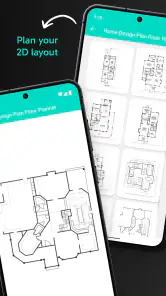
The app boasts a plethora of features that cater to both amateurs and seasoned designers. You can create intricate floor plans using a variety of tools such as walls, doors, and windows. The drag-and-drop functionality is a game-changer, making it super easy to place elements exactly where you want them.
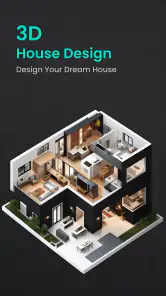
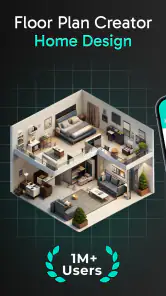
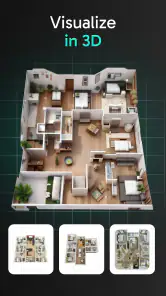
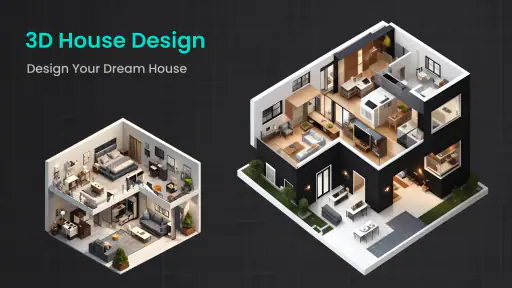
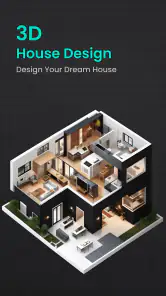
One of the standout features for me was the 3D tour mode. It’s one thing to see your design on a flat screen, but being able to take a virtual stroll through your creation? That’s something else entirely! This feature really helps in visualizing the final outcome and spotting any changes you might want to make.
A sensible workflow is to draw the room outline first, add openings next, and only then place furniture. That order makes it easier to notice whether a doorway or window is in the wrong spot before the room fills up with objects. I also treat the 3D view as a way to catch awkward proportions and sightlines, not as proof that a real renovation will look exactly the same.
There’s a useful distinction between what the two views answer. The flat plan is better when I’m checking placement and comparing clearances; the 3D view helps me understand how a layout may feel when viewed as a room rather than as lines on a screen. I wouldn’t rely on either view alone. A furniture arrangement can appear tidy from above yet feel awkward in perspective, so switching views during the same planning session can expose different problems.
Precision, plans, and practical decisions
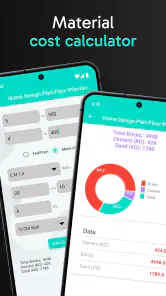
What I love about this app is the level of precision it offers. You can input exact dimensions for rooms and furniture, ensuring that your design is as accurate as possible. The customization options are vast, allowing you to tweak everything from the wall thickness to the color schemes of your rooms.
Plus, the app supports multiple units of measurement, catering to a global audience. Whether you’re more comfortable with metric or imperial units, Floor Plan Creator has got you covered.
That precision makes the app especially useful when I’m comparing two arrangements for the same room. I can test whether a larger table leaves enough room to move around, or whether a bed placement makes a narrow route feel even tighter. The useful question is not just “does it fit?” but “can I still use the room comfortably?” Allowing space for doors to open and for everyday movement is an easy detail to overlook in a rough sketch.
For a realistic weekend task, imagine measuring a living room before buying a sofa. I’d map the walls and openings, enter the sofa’s dimensions, and compare a couple of placements before visiting a shop. The plan can help rule out an obviously unsuitable size, but I would still check the product’s measurements and the room’s real clearances rather than treat a phone model as a substitute for measuring tape.
For a shared room, I’d use the same approach to compare needs rather than settle for the first arrangement that technically fits. For example, a work table and a place to relax may compete for the same corner. I’d make one draft for each priority, then look at circulation and access to doors before deciding what compromise is reasonable. A plan is valuable here because it makes the trade-off visible; it doesn’t decide which use matters more to the people who live there.
When measuring an irregular room, I’d break it into simple sections and note the position of each opening from a fixed corner. That makes it easier to reconstruct the shape accurately and reduces the chance of shifting every element when one measurement changes. For older rooms, where corners may not be perfectly square, I’d treat the drawing as a planning aid and verify critical distances in the actual space. Small inaccuracies can matter when a large piece of furniture has little clearance.
Sharing your work and choosing the right tool
In today’s connected world, being able to share your work is crucial. The app makes it easy to export your designs in various formats like PDF, DXF, and SVG. This feature is particularly useful if you’re collaborating with others or need to present your ideas to clients or friends.
Moreover, you can save your projects to the cloud, ensuring that your hard work is safe and accessible from any device. It’s these little things that make the app not just a tool, but a trusty partner in your design journey.
Exporting is most valuable when you have a clear next step: a PDF can make a layout easier to discuss, while the other formats may suit people who already use compatible design software. I’d share a simple, clearly labeled plan with a contractor or housemate rather than assume an exported drawing replaces professional drawings or a site visit. If you’re moving between devices, cloud saving can also make a project easier to pick up later; I’d still keep a separate copy of important work.
Before sharing a plan, I’d add enough context that another person can interpret it correctly: which room they’re looking at, what arrangement I’m proposing, and which measurements need special attention. That is more useful than sending a busy drawing and expecting someone else to infer the goal. If the recipient needs to make a technical decision, I’d treat the plan as a discussion aid and ask them to verify anything that affects the work itself.
Compared with a paper sketch, this app offers a more adjustable plan and a 3D perspective; compared with full desktop design software, it is a more approachable place to work through a home layout on a phone. That makes it a good fit for homeowners, renters planning furniture, and hobby designers who want to test ideas. If you need construction-grade documentation, advanced technical controls, or a polished presentation workflow, a dedicated professional tool and expert advice are a better choice.
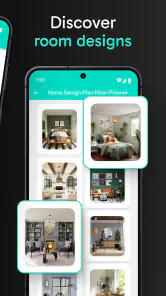
It also occupies a different niche from decor apps built around color palettes, furniture catalogs, or inspiration boards. Those can be more satisfying when the main question is what style to choose or what a finished room might look like with particular products. Here, I’d reach for the plan when the problem is spatial: whether a piece blocks a route, how a door affects placement, or which arrangement uses a room more sensibly. Someone who wants a quick visual makeover without measuring may prefer those more image-led alternatives.
Version, cost, and what to consider
The current version is 2.1.1, and the app was released on December 5, 2023. Those facts establish where the product stands, but they don’t by themselves tell me what has changed between versions, so I wouldn’t assume a particular new feature or improvement. Existing users can judge an update by checking whether their projects still open as expected and whether their usual workflow feels comfortable after installing it.
For an existing user, the practical question is less about chasing a version label and more about whether the app still supports the way they work. I’d open a familiar project after an update, check a few important dimensions, and make sure the plan remains easy to navigate before starting a time-sensitive task. That is a sensible routine for any project tool, especially when a drawing has become the reference point for a purchase or a conversation with someone else.
The app is free, with in-app purchases ranging from $0.99 to $199.99 per item. I’d try the basic workflow on a small room before spending anything, then decide whether any paid option is relevant to the way I actually use it. The wide range makes it worth checking the purchase details carefully rather than assuming every useful step requires payment—or that every paid item will suit your needs.
If you’re wondering whether you need to pay to get started, I’d begin by drawing one room, trying the 2D-to-3D workflow, and checking whether the tools you need are available for your task. That gives you a concrete basis for deciding instead of buying on the assumption that a paid option must be essential. If a purchase is relevant, I’d read its current description carefully and consider whether it solves a real limitation in my own workflow.
One trade-off is that a phone screen can make detailed placement fiddly, particularly when a plan contains many walls, openings, and furniture pieces. I’d work in short passes, zooming in for small adjustments and checking the whole room again before calling a layout finished. People who mainly want quick decorating inspiration may find a mood-board or room-visualization app more enjoyable; the strength here is planning dimensions and structure rather than browsing styles.
For a whole-home project, I’d avoid trying to perfect every room in one sitting. I’d establish the main outlines first, then return to each room for detail, checking that the overall plan stays legible as it grows. The trade-off is time: careful modelling takes longer than a rough sketch, but it can make later comparisons clearer. If the only decision is where to move one chair, this level of planning may be more work than the decision deserves.
As you decide whether to keep using it, watch for the things that matter to your own projects: dependable access to saved plans, exports that suit the people you share with, and a workflow that remains manageable as a design gets more detailed. I’d also check the current purchase options before relying on a particular tool for a larger project. Those practical checks tell you more than expecting a version number alone to promise a specific change.
For someone starting fresh, a useful test is to recreate a familiar room rather than invent a complicated layout. You already know where the doors and furniture are, so it’s easier to tell whether the drawing process feels natural and whether the result is helpful. If it feels cumbersome even on a simple room, a notebook or a different planning tool may be a better fit; if it makes comparisons easier, then a more ambitious plan is worth considering.
Who I’d recommend it to
In conclusion, Floor Plan Creator is a fantastic app for anyone looking to dive into home design. Its user-friendly interface, robust features, and precision make it a must-have for aspiring designers and homeowners alike. So, if you’re ready to bring your dream home to life, give this app a try! You might just find yourself spending hours crafting the perfect space. Happy designing!
My recommendation is strongest for people who enjoy planning before acting: renters mapping out furniture, homeowners comparing room arrangements, or anyone who wants a visual aid for a conversation about a space. I’d skip it if I only wanted instant decor ideas or if a drawing needed to serve as a technical construction plan. Used with careful measurements and realistic expectations, it’s a handy way to turn “I wonder if this could work” into a layout I can inspect and revise.
Floor Plan Creator Home Design Frequently Asked Questions
What devices and system requirements should I check before downloading Floor Plan Creator Home Design?
Before downloading, check that your device runs Android 8.0 or later, which is the minimum operating system requirement. Floor Plan Creator Home Design is a House & Home app from Firehawk, and it focuses on creating floor plans with 2D interior design and a 3D view. Confirm that your device meets the system requirement so you can install and use the app.
What is Floor Plan Creator Home Design, and how does it work?
Floor Plan Creator Home Design is an intuitive application designed for creating detailed and accurate floor plans. Users can easily draw, edit, and customize their home layouts with a variety of tools and functionalities. Whether you're a professional architect or a DIY enthusiast, the app offers a user-friendly interface that helps in visualizing spaces and planning renovations or new constructions effectively.
Is Floor Plan Creator Home Design free to use, or are there any costs involved?
While Floor Plan Creator Home Design offers a free version with basic features suitable for most users, there are premium options available for those who require advanced functionalities. These may include additional design elements, export options, and enhanced tools. The premium features usually come with a subscription model, allowing users to choose a plan that best suits their needs. In-app purchases range from $0.99 to $199.99 per item, so check the purchase details before confirming anything.
Can I use Floor Plan Creator Home Design offline, or do I need an internet connection?
Floor Plan Creator Home Design can be used offline, allowing users to create and edit floor plans without an internet connection. However, some features, such as cloud storage and sharing plans with other users, may require an internet connection. This flexibility makes it convenient for users who might not always have internet access while working on their projects.
What platforms is Floor Plan Creator Home Design available on?
Floor Plan Creator Home Design is available on both Android and iOS platforms, making it accessible to a wide range of users. The app is optimized for mobile devices, allowing users to work on their designs on-the-go. Additionally, there may be a web version or desktop application available, offering further flexibility for users who prefer working on larger screens.
Pros
- User-friendly interface.
- Extensive furniture catalog.
- Accurate measurement tools.
- Easy sharing/export options.
- Multi-platform support.
Cons
- Limited free version features.
- Occasional app crashes.
- Ads in free version.
- Learning curve for novices.
- Requires internet for full features.
- Category
- House & Home
- Version
- 2.1.1











