Realtor.com Real Estate & Rent
- 82.65K
- 4.7
- Installs
- 10.00M
- Price
- Free

Screenshots

Analysis by Reviewed
After trying the app’s main search tools, I see Realtor.com Real Estate & Rent as a practical way to turn a vague housing search into a manageable shortlist. It brings buying and renting into the same app, with map-based browsing and filters that help me compare places without losing track of what matters. It won’t replace a visit, a careful budget, or conversations with local professionals, but it can make the early search feel less scattered.
A practical starting point for a serious search
As a free house-and-home app from realtor.com®, it suits people who want to explore options before deciding whether to rent or buy. Its 4.7 average across around 538,000 ratings suggests that many users find it worthwhile, and it has more than 10 million installs. The app is rated for Everyone, so its basic appeal is broad: first-time renters, buyers comparing neighborhoods, and people who simply want to keep an eye on local housing.
The most helpful way to use it is to begin with needs rather than dream features. I’d set a realistic price range, choose the essentials such as bedrooms and property type, then widen or tighten the map area as I learn what different neighborhoods offer. That prevents an attractive listing outside my workable commute or budget from dominating the search. Saving a few strong candidates also makes it easier to compare them later instead of relying on memory.
Where the map and saved listings earn their keep
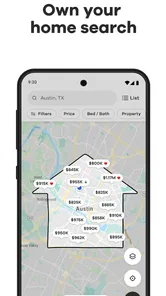
The map view is more than a different way to browse. Drawing a boundary can help when a search needs to stay within a particular part of town, especially if a city’s postal or neighborhood labels don’t match the area someone actually wants. I’d use it to compare nearby pockets, then open individual listings and check whether the location still makes sense for daily errands, travel, and the places I need to reach regularly.
For example, if I had a short lunch break to look at rentals, I could set my budget and bedroom needs beforehand, scan the map around work, and save a handful of possibilities to review that evening. That is a better use of the app than scrolling without a plan. Saved homes create a compact working list, while neighborhood information and school ratings can prompt questions to investigate before arranging a viewing.
The mortgage calculator is useful as a first-pass reality check, not a lending decision. I’d adjust the interest rate and down payment to see how sensitive a possible monthly payment is to those assumptions, then remember that a calculator estimate is only one part of affordability. If the number already feels uncomfortable, that is a good reason to revisit the budget before getting attached to a property.
What to keep in perspective
Housing listings can change quickly, and a fresh-looking result is not the same thing as a confirmed opportunity. I would contact the relevant agent or property contact to check availability and details rather than treating the app as the final word. Photos and neighborhood summaries are useful for screening, but neither can reveal every issue that becomes obvious in person, from noise to the feel of a street at different times of day.
More From Our News Desk

Weather by Xiaomi Review: Clear at a Glance, Less Clear Up Close

X Under Pressure: Can It Recover When Posting Goes Wrong?

Clash of Clans Is Won Between the Battles

Android Auto Makes the Case for Quieter Car Software

MobiOffice: Transforming Mobile Productivity with Seamless Integration

EA SPORTS FC™ Mobile Soccer: Redefining Mobile Sports Gaming
That distinction matters when comparing this app with general classified listings or a local agency’s own site. Realtor.com is more convenient for browsing sale and rental options together, and its map and filters support a broad first pass. A local source may be preferable when I need direct guidance on a specific building or want to verify a detail with the people managing it. I’d use the app to discover and organize candidates, then confirm important facts independently.
The app has been around since November 3, 2010, and its current version is 26.10.26, with iOS 8.0 as the minimum operating system. Those details make it accessible to a range of devices, though I’d still keep the app updated where possible so the experience remains current. With 82,000 reviews, it is clearly a widely used option, but popularity cannot tell me whether its available listings fit my exact town, budget, or timing.
I’d recommend it most to people at the browsing and comparison stage: renters weighing areas, buyers building a shortlist, or anyone who wants a quick way to see what is available around a chosen location. It is less suitable as a stand-alone source for making a final financial or property decision, and casual browsers who dislike repeated listing checks may prefer to wait until they have a concrete move in mind. My advice is to use saved listings as a research notebook, not a promise that a home will still be available.
Your New House-Hunting Buddy
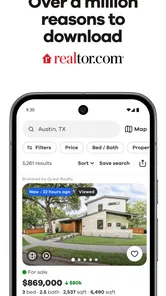
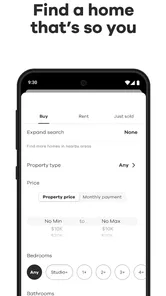
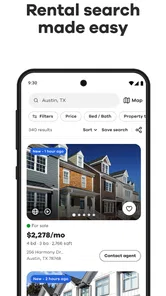
First off, let's talk about the user interface. It's sleek, intuitive, and honestly, it feels like a breath of fresh air compared to some other cluttered real estate apps. The main screen welcomes you with a search bar that screams "type any location here!" and off you go on your home-finding adventure. You can filter your search by price, number of bedrooms, type of property, and more. The app doesn’t just stop at homes for sale; it also provides listings for rentals, which I found incredibly handy.
Features That Shine
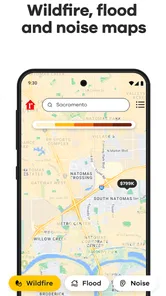
One feature that really stood out to me was the map search. It’s like playing a game of "spot the house" on a map, and it shows you exactly where each listing is located. You can even draw your own boundaries on the map to narrow down your search area. How cool is that?
Another strong feature is the mortgage calculator. It’s a nifty little tool that gives you an idea of what your monthly payments might look like, factoring in things like interest rates and down payments. It’s like having a pocket financial advisor.
A better way to compare possibilities
I find the saved-list approach especially useful when a search involves trade-offs rather than one obvious winner. A lower-priced home might be farther from work, while a more convenient location may mean compromising on space. Keeping a small group of candidates together lets me return to those choices with the same priorities in mind instead of being swayed by whichever listing I viewed most recently.
For a couple or family searching together, I’d use the app as a shared discussion aid even if each person has different non-negotiables. One person can flag location, another can focus on the number of bedrooms, and the shortlist gives everyone concrete options to talk about. It won’t settle disagreements about what matters most, but it can make the conversation more specific: is the extra travel worth the lower price, or does the neighborhood fit everyday routines better?
A useful habit is to note questions as soon as a property catches your eye. Does the listed location work for your regular commute? Is the displayed payment only a rough estimate, or have you accounted for other ownership costs? Do the photos leave an important room or exterior area unclear? The app helps me identify candidates; writing down these checks keeps attractive images from quietly becoming assumptions.
Where it differs from other ways to search
Compared with browsing general classified ads, the app feels more focused on housing discovery: buying and renting sit within the same search experience, and map boundaries help narrow the geography. That makes it a convenient first stop when I am still learning what is available across an area. A local property manager’s site or an agency contact has the advantage when I need a precise answer about a particular unit, building, or viewing arrangement.
There is also a meaningful difference between a broad search tool and a neighborhood expert. The map can show where a listing sits, and the surrounding information can suggest what to investigate, but neither replaces walking the route at the time of day you would actually travel or checking how a street feels in person. I would use the app to decide where to spend research time, not to make a final judgment about the character of a block.
Buyers should treat the mortgage calculator as a comparison aid rather than a complete affordability check. Changing the assumptions can show how a payment might shift, which is helpful when weighing a less expensive home against a higher-priced one. But a comfortable estimate on screen is not the same as a complete household budget, so I would use it to frame questions and then get qualified financial guidance before making a commitment.
Small habits that make the search more useful
When I am not ready to move immediately, I would keep the search deliberately narrow: one area, a realistic range, and a few essential property requirements. That makes it easier to notice meaningful changes in the options rather than constantly resetting the search around tempting but impractical homes. If the results feel thin, I would relax one constraint at a time, such as expanding the map boundary before changing the budget, so I can see which compromise actually makes a difference.
I would also separate “interesting” from “worth arranging a visit.” A listing can be saved because it helps establish what a certain price range buys in a neighborhood, even if it is not a serious candidate. For a viewing shortlist, I’d keep only places that meet the core needs and have enough information to justify follow-up. This simple distinction makes saved homes more useful as a research notebook and less like an ever-growing pile of possibilities.
For renters, the practical next step after finding a promising result is to verify that it is still available and ask the property contact about the details that affect a decision. For buyers, it is to check the property and location in person and use professional advice for financial or transaction questions. The app can help with discovery and organization, but the human follow-up is where uncertainty gets addressed.
Who should use it—and who may prefer another route
I’d point first-time renters and buyers toward this app if they need a simple way to explore several areas without committing to a single type of search. It is also a good fit for people comparing a move across neighborhoods, since the map and saved candidates make geography part of the decision rather than an afterthought. Someone casually curious about local housing can browse too, though the experience becomes more useful once there is a location, budget, or move timeframe to guide it.
I would not rely on it alone if the decision depends on a detail that must be confirmed, such as current availability or a property-specific question. In that situation, direct contact with the listing representative or property manager is the better next step. Likewise, if you already know the exact building you want and need authoritative details about it, a direct local source can be more efficient than searching a broad set of listings.
It may also be a poor fit for anyone who expects a listing app to make the decision for them. Housing involves trade-offs that filters cannot resolve: a longer journey against more space, a lower price against a less convenient location, or an appealing interior against questions that only an in-person visit can answer. I like the app most when I treat it as a way to organize those choices, not as a shortcut around them.
Features That Shine
One feature that really stood out to me was the map search. It’s like playing a game of "spot the house" on a map, and it shows you exactly where each listing is located. You can even draw your own boundaries on the map to narrow down your search area. How cool is that?
Another strong feature is the mortgage calculator. It’s a nifty little tool that gives you an idea of what your monthly payments might look like, factoring in things like interest rates and down payments. It’s like having a pocket financial advisor.
Why It’s Worth Downloading
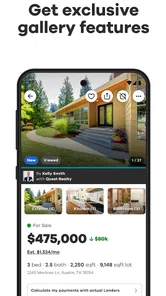
Now, let's get real. The Realtor.com Real Estate & Rent app isn’t just about pretty pictures and listings. It’s about making informed decisions. The app provides you with a wealth of information on each property, including school ratings and neighborhood insights. This is invaluable when you’re trying to get a feel for a place you might soon call home.
Plus, the app is constantly updated with new listings, so you're always in the loop. No more missing out on your dream home because you didn't see the listing in time.
And for those of us who love to plan, the app lets you save your favorite listings and revisit them anytime. It’s like having a personalized real estate portfolio right on your phone.
Wrapping It Up
In the end, Realtor.com Real Estate & Rent is more than just an app; it’s a gateway to possibilities. Whether you're buying, renting, or simply dreaming, it’s got you covered. So, if you're in the market for a new place or just love browsing beautiful homes, give this app a whirl. Who knows? Your dream home might just be a tap away.
Realtor.com Real Estate & Rent Frequently Asked Questions
Can I browse homes by neighborhood in Realtor.com Real Estate & Rent?
Yes. The app is intended to help people find homes for sale and apartments for rent in the best neighborhood, so you can use it to explore options around areas that interest you. Neighborhood-focused browsing can be helpful when you are still deciding where to live, as well as when you already have a particular location in mind.
Is Realtor.com Real Estate & Rent suitable for both buying and renting?
Yes. Realtor.com Real Estate & Rent covers homes for sale as well as apartments for rent, making it relevant to people weighing different ways to find a place. You can browse either kind of listing and compare options as your plans take shape. Its broad House & Home focus means it can be useful whether you are searching for a purchase or a rental.
What age group can use Realtor.com Real Estate & Rent?
The app has an Everyone content rating, so its content is intended for a broad audience. Its purpose is to help people look for homes for sale and apartments for rent, rather than to provide entertainment aimed at a particular age group. Parents and other users can still review the app’s features and decide whether it suits their needs before installing it.
Is Realtor.com Real Estate & Rent free to download?
Yes, Realtor.com Real Estate & Rent is free to download. It is a House & Home app from realtor.com® for people exploring homes for sale and apartments for rent. You can use it to browse listings and compare options, so it may be useful whether you are beginning a search or already have a particular neighborhood or type of home in mind.
Which devices can run Realtor.com Real Estate & Rent?
The app is available for Android and iOS users, and the Android version requires Android 8.0 or later. Before downloading, check that your device meets the relevant platform requirements. Realtor.com Real Estate & Rent is intended for a broad audience, with an Everyone content rating, and its focus is helping people find homes for sale and apartments for rent.
Pros
- User-friendly interface
- Comprehensive property listings
- Advanced search filters
- Accurate home value estimates
- Localized market insights
Cons
- Limited offline functionality
- Some listings lack photos
- Occasional app crashes
- In-app ads can be intrusive
- Limited customer support availability