AlfredCamera Home Security app
- 66.37K
- 4.7
- Installs
- 50.00M
- Price
- Free

Screenshots
Analysis by Reviewed
I see AlfredCamera Home Security as a practical way to try home monitoring without buying a dedicated camera first. It turns a spare phone into a camera and lets another device view it, which is appealing if you want to check on a room, pet, or entryway while away. The key trade-off is that a phone-based setup depends on the spare device staying powered, connected, and positioned well; it is a useful stopgap, not automatically a replacement for purpose-built security equipment.
What the phone-based setup is best at
The two-device arrangement makes the most sense for a specific, limited view rather than whole-home coverage. For example, I would point an old phone toward the living-room door or a pet’s usual resting spot, then keep the viewer device handy when stepping out. Before relying on it, I’d check the camera’s framing from the viewer: a small change in angle can make the difference between seeing a doorway clearly and recording mostly a wall.
A helpful habit is to test the full routine while still at home: open the live view, move through the area, and see whether the alerts and audio behave as expected. That helps reveal practical snags, such as a camera phone being too far from a reliable connection or a notification arriving when you do not want one. I would also choose a stable surface and keep the phone connected to power for long sessions, rather than treating a quick test as proof it will work unattended all day.
Speed, workload, and the limits of a spare phone
AlfredCamera’s usefulness depends on more than the app opening quickly. Live viewing and motion alerts rely on a working internet connection at both ends, so a weak or inconsistent connection can make the experience feel delayed or interrupted. I would not count on a phone-based camera as an instant, guaranteed response system; it is better suited to checking a situation than to replacing a monitored alarm or a dedicated security setup.
Heavy use also means leaving one device awake and available as the camera. That can tie up a phone you might otherwise use, and continuous monitoring makes power planning important. An older handset may be a sensible reuse project, but its battery condition, camera quality, and ability to remain connected affect the result. If the device overheats, loses charge quickly, or drops offline, the app cannot make that hardware limitation disappear.
Compared with buying a dedicated indoor camera, this approach can save an upfront hardware purchase when you already own an unused phone, but it asks you to manage that phone and its placement yourself. A dedicated unit may be the better fit for someone who wants a fixed installation or less hands-on device management. For a temporary view, a rented space, or a first experiment with remote monitoring, reusing a phone is often the more approachable choice.
The app comes from Alfred Systems Inc. and sits in the House & Home category. It is free to install, with in-app purchases ranging from $1.99 to $59.88 per item, and is rated for Everyone. Its 4.7 average comes from around 917,000 ratings, and it has more than 50 million installs. Those figures suggest broad uptake, though they do not guarantee that an older phone or a particular home network will perform equally well.
More From Our News Desk

Weather by Xiaomi Review: Clear at a Glance, Less Clear Up Close

X Under Pressure: Can It Recover When Posting Goes Wrong?

Clash of Clans Is Won Between the Battles

Android Auto Makes the Case for Quieter Car Software

MobiOffice: Transforming Mobile Productivity with Seamless Integration

EA SPORTS FC™ Mobile Soccer: Redefining Mobile Sports Gaming
The current version is 2025.25.2 and it requires Android 5.0 or later. I’d check that the spare phone can run it comfortably before building a routine around it, especially if the device is old or already sluggish. Someone who needs dependable coverage during internet outages, round-the-clock recording, or a polished multi-camera installation should compare dedicated systems instead. AlfredCamera is most persuasive when the goal is modest and the spare device is genuinely available.
A practical routine before you leave
I would treat setup as a small household routine rather than a one-time installation. First, decide what question you want the camera to answer: “Is the dog settling down?” is a realistic goal, while “Can I see every part of the house?” is not. Then place the phone so it has a clear view of that one area, check the live image from the viewer, and walk through the space at the times you expect to be away. This reveals blind spots and helps you judge whether the camera is aimed at useful activity rather than a bright window or an empty corner.
For example, before leaving for work, I might set the spare phone on a shelf facing the room where a new pet spends the day, connect it to power, and check the viewer once from outside the room. If the picture freezes or the connection is slow while I am still home, I can adjust the placement or network situation before depending on it. The useful takeaway is not that the system guarantees a perfect watch; it is that a quick rehearsal can expose problems when they are still easy to fix.
Making alerts useful instead of distracting
Motion alerts can help draw attention to activity, but they are not a substitute for deciding what activity matters. A camera aimed at a busy hallway may produce more interruptions than useful information, while a narrow view of a doorway or pet area may be easier to interpret. I would start with a location where movement has a clear meaning, then observe how often notifications arrive during ordinary household activity before relying on them when away.
There is also a practical distinction between seeing an alert and being able to act on it. If I am in a meeting or somewhere with poor reception, I may not be able to check immediately. That makes this setup better for reassurance and occasional remote checks than for situations where every alert demands an instant response. If a household needs someone to respond reliably to an alarm, a monitored service or purpose-built security system is the more appropriate choice.
One camera view, not a whole-home plan
Repurposing a phone works best when I accept that the camera sees only what its lens can cover. A single phone near the entry can help me check that area, but it cannot show what is happening in a separate room behind a wall. Adding more views means finding more spare devices and maintaining each one, so the apparent savings can become less attractive if the goal expands into a multi-room installation.
This is one reason I would choose the target area before choosing the phone. A pet’s bed, a shared living space, or a particular entrance can be a sensible focus; a broad claim of “home security” can create expectations the arrangement cannot meet. For a renter who only wants a temporary look at one room, that limitation may be perfectly acceptable. For someone planning comprehensive coverage, a dedicated multi-camera setup is likely to be tidier and easier to manage.
Getting Started with AlfredCamera
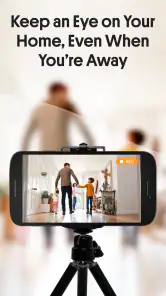
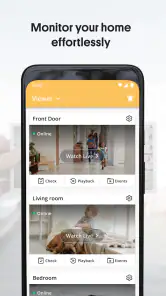
Setting up AlfredCamera Home Security is a breeze. All you need is two devices, and you can transform them into a home surveillance system. One device acts as the camera, while the other functions as the viewer. This flexibility means you can repurpose your old smartphones or tablets, making it a cost-effective solution.
Features That Stand Out
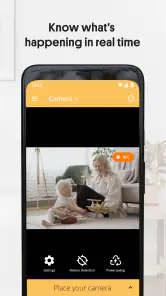
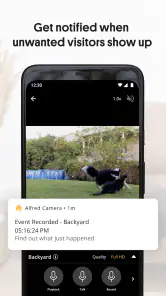
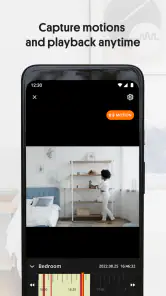
AlfredCamera is packed with features that cater to your security needs. It offers live streaming, which allows you to monitor your home in real-time from anywhere in the world. The motion detection feature is particularly impressive. It sends you instant alerts whenever movement is detected, so you are always in the loop about what’s happening at home.
One of the standout features is the two-way audio, which lets you communicate through the app. Whether you’re warning an intruder or simply talking to your pets, this feature adds an extra layer of interaction and security.
Usability and Interface
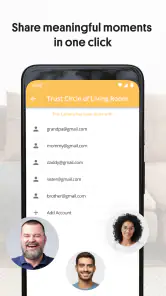
The app’s interface is intuitive, ensuring that even those who aren't tech-savvy can easily navigate the features. The setup process is straightforward and doesn’t require any technical expertise, which is a huge plus for anyone who might be intimidated by more complex systems.
User experience is prioritized, and this is evident in the app’s design. Everything is laid out clearly, and the app doesn’t bombard you with unnecessary information. This simplicity in design makes it easier to focus on what truly matters – the security of your home.
Performance and Reliability
In terms of performance, AlfredCamera delivers a reliable service. The live video feed is clear, and the motion detection is responsive. While the app does require a stable internet connection to function optimally, it performs well under standard conditions.
Battery consumption is always a concern with apps that require continuous operation, but AlfredCamera is optimized to ensure your devices last as long as possible while in use. It’s advisable to keep the camera device plugged in for extended monitoring sessions.
Choosing the right phone and recovering from interruptions
When deciding which handset to reuse, I would prioritize dependable operation over having the newest camera. A phone that can stay connected, hold a steady position, and remain powered is more valuable for this job than a device with impressive specifications that has a tired battery or unreliable network access. I would also avoid making the camera phone the only way to reach the household if it is being kept in one place for monitoring.
Recovery matters too. If the viewer stops receiving a picture, I would first check whether both devices still have internet access, then confirm that the camera phone remains powered and that the app is still available on it. A quick check from the viewer before leaving can prevent a silent failure from going unnoticed for hours. This is a simple but important trade-off: the setup is inexpensive when it reuses equipment, yet its reliability depends on a person noticing and correcting device or connection problems.
Who will appreciate it—and who should look elsewhere
I think AlfredCamera is a good fit for people who already have an unused phone, want to keep an eye on one area, and are comfortable doing a little setup and checking. It can suit someone watching a pet between errands, keeping an eye on a room during a short trip, or trying remote viewing before spending money on dedicated hardware. Its no-cost installation lowers the barrier to trying that routine, while optional in-app purchases mean the experience may involve spending for some users.
I would skip it if the old phone is the only spare device, if maintaining a charger and a stable connection is inconvenient, or if a missed alert would have serious consequences. It is also not my first choice for a home that needs continuous, professionally monitored protection or coverage through an internet outage. Those needs call for equipment and services designed around dependable security, not simply an app running on a repurposed handset.
One question people often have is whether it can monitor a home without internet. The setup depends on a connection between the camera and viewer, so I would not plan around remote viewing during a network outage. Another is whether an old phone can handle the job: it may, provided it runs the app, stays connected, and can operate safely for the intended session. Testing it for a full routine before relying on it is much wiser than assuming every older device will behave the same way.
Overall, AlfredCamera Home Security offers a cost-effective and reliable solution for those looking to enhance their home security without breaking the bank. Its ease of use, coupled with a range of powerful features, makes it a great choice for anyone seeking to keep their home safe and secure.
My performance verdict
For me, the strongest performance case is a modest one: a spare phone can provide a convenient live view of a chosen space without requiring a separate camera purchase. The weak point is not a single app feature but the chain of dependencies around it—phone condition, power, placement, and internet access. I would describe it as a handy extra set of eyes, not a system I would trust as the sole safeguard for a home.
The app has been around since December 17, 2012, and its current version is 2025.25.2. It is free, available for Android devices running version 5.0 or later, and carries an Everyone age rating. With an average rating of 4.7 across roughly 917,000 ratings and over 50 million installs, it is clearly widely used; still, those figures cannot tell me how well it will run on your particular spare phone or Wi-Fi connection.
My recommendation is to try it when the goal is specific and the hardware is already on hand. Take time to test the view, alerts, sound, charging arrangement, and connection before leaving the phone unattended. If that routine feels too fragile—or if you need dependable, broad coverage—choose a dedicated camera or a monitored security option instead. For a low-commitment check on a pet or a single room, though, AlfredCamera is an approachable place to start.
AlfredCamera Home Security app Frequently Asked Questions
Can AlfredCamera help me check on my home when I’m away?
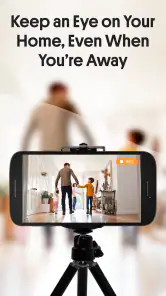
AlfredCamera is designed to let you turn an old phone into a security camera and use another device to view it. This can be useful for checking in on a room while you are away, as well as for everyday home monitoring. Place the camera phone where you want a view, then use your other device to access its feed.
Can I use AlfredCamera Home Security as a baby monitor or pet cam?
Yes. AlfredCamera is designed to turn old phones into security cameras, baby monitors, pet cams, and more. You can leave one phone in the room you want to keep an eye on and use another device to check in. This makes it a flexible option for everyday home monitoring, as well as watching over pets or a sleeping child.
What devices and operating systems does AlfredCamera support?
AlfredCamera is an app for using phones as cameras and for viewing their video feeds on another device. The Android version supports devices running Android 5.0 or later, so an older spare phone may still be useful if it meets that requirement. The app is available for iOS as well, making it possible to use compatible phones across platforms.
Is AlfredCamera suitable for a first-time home security app user?
AlfredCamera is aimed at a straightforward use: turning an old phone into a camera and checking its feed from another device. Its setup flow guides you through installing the app and pairing devices, so the basic process is approachable even if you have not used a phone-based monitoring app before. You can start with a simple camera-and-viewer arrangement and add devices as needed.
What features does AlfredCamera Home Security offer?
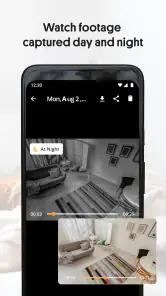
AlfredCamera Home Security provides a range of features including live video streaming, motion detection alerts, night vision, and two-way audio communication. This app also allows you to turn your old smartphones into security cameras, offering a cost-effective solution for home security. With cloud storage, you can keep your recordings safe and accessible anytime.
Pros
- Easy installation and setup.
- High-quality video streaming.
- Real-time motion alerts.
- Remote access from anywhere.
- Supports multiple cameras.
Cons
- Requires a stable internet connection.
- Limited free features.
- Occasional app crashes.
- Subscription needed for advanced features.
- Battery drain on mobile devices.
- Category
- House & Home
- Version
- 2025.25.2