Дом с Алисой
- 126.00
- 4.0
- Installs
- 10.00M
- Price
- Free

Screenshots


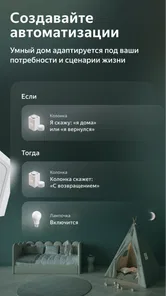
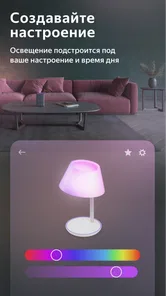


Analysis by Reviewed
I see Дом с Алисой as a smart-home controller with a clear purpose: bring compatible home devices together and let Alice handle everyday requests. It is most appealing if you already use, or are curious about, connected devices and want a voice-led way to manage them. I would not treat it as a magic fix for every household, though; the benefit depends on having devices it can work with and on being comfortable using a virtual assistant.
What makes it useful at home
A practical strength is the way voice control can reduce small interruptions. If I am cooking and my hands are busy, being able to ask Alice to adjust a light or handle another supported device is more convenient than stopping to find a switch or open several controls. The app’s value is less about one spectacular trick and more about making repeated household actions easier to reach.
It also gives a household a shared place to start when managing connected equipment. Rather than remembering which device needs which control, I can use the app as the central point for setup and everyday interaction. That is a useful distinction from controlling each product through its own separate app, although it still depends on whether the particular device is compatible.
Where I would be cautious
There is a real trade-off in making voice control part of home life: it is convenient when it understands the request, but it is not always the best choice for a quiet room, a private task, or a moment when speaking aloud is awkward. I would keep familiar manual controls available rather than assuming every household member will want to talk to an assistant.
Compatibility is another point to check before building a setup around it. “Smart” does not automatically mean supported, and a device that works with its own manufacturer’s app may not offer the same experience here. I would begin with one device I already own, confirm that it can be added, and only then decide whether expanding the system makes sense. That small test can prevent buying equipment based on assumptions.
A fit for some homes, not all
I would recommend it most to someone who wants to coordinate supported home devices from a phone and likes the idea of voice commands for routine tasks. It may also suit a household easing into smart-home controls, because starting with one light or another simple device is less daunting than trying to automate every room at once.
If you prefer direct physical controls, do not want a voice assistant involved, or have no compatible smart devices, the app is unlikely to change your daily routine much. A device maker’s own app can be the better option when you only need to manage one product and want its specific settings. For a mixed setup, a central controller is more attractive, but only when compatibility and household habits line up.
More From Our News Desk

Weather by Xiaomi Review: Clear at a Glance, Less Clear Up Close

X Under Pressure: Can It Recover When Posting Goes Wrong?

Clash of Clans Is Won Between the Battles

Android Auto Makes the Case for Quieter Car Software

MobiOffice: Transforming Mobile Productivity with Seamless Integration

EA SPORTS FC™ Mobile Soccer: Redefining Mobile Sports Gaming
Meet Alice: Your Smart Home Companion
Imagine coming home after a long day at work, and rather than fumbling with light switches or remotes, you simply say, "Alice, dim the lights." That's the magic of Дом с Алисой. This app is designed to seamlessly integrate with various smart home devices, allowing you to control lights, thermostats, and even your TV with simple voice commands. It’s like having a little genie in your phone, ready to make your life easier.
Setting Up: A Breeze or a Challenge?
Setting up this smart-home app is relatively straightforward. The app provides a step-by-step guide that walks you through connecting your smart devices. I found the process quite intuitive, although I’d recommend having some patience if you’re not tech-savvy. The app supports a wide array of devices, so chances are, if it's smart, Alice can handle it.
The user interface is clean and user-friendly. Everything is laid out logically, so you won't find yourself lost in a sea of options. Just a few taps, and you’re good to go. The app even includes a tutorial mode for first-time users, which I found incredibly helpful.
Everyday Use: How Well Does Alice Perform?
Once set up, using Alice is as simple as pie. Whether you're asking her to play your favorite playlist, adjust the room temperature, or even tell you a joke, Alice responds promptly and accurately. I was particularly impressed with her ability to recognize different voices, ensuring that my commands were personalized and efficient.
Alice also integrates well with other apps on your phone. Need to set a reminder or send a message? Alice has got you covered. It's like having a personal assistant who never takes a day off.
A realistic test is a rushed morning: while getting breakfast ready, I could use a spoken request for a task such as adjusting a supported light, then check the app if I need to see or change a device manually. That combination matters. Voice is quickest when the action is obvious, while a screen is better when I want to inspect a setting or avoid disturbing someone who is still asleep. I would not make the whole routine depend on speech alone.
For a first setup, I’d keep the experiment deliberately small. Add one device, give it a clear name that is easy to say, and try the command from the place where you expect to use it. If a request is awkward to phrase or the device is in another room, that is useful feedback before adding more equipment. A modest setup that behaves predictably is more valuable than a complicated one that the family rarely uses.
People deciding whether to install it may also wonder whether it costs anything, whether it is suitable for the household, and what phone it needs. The app is free, its content rating is Everyone, and it requires Android 8.0 or later. It is published by Direct Cursus Computer Systems Trading LLC; the current listing shows a 4.0 average from around 148,000 ratings and more than 10 million installs. Those figures suggest a widely used option, but they do not guarantee that a specific device or voice request will work as expected.
Choosing the right way to control a home
Compared with relying on individual manufacturer apps, a central controller is appealing when you have several compatible products and want one familiar place to reach them. The trade-off is that a dedicated app may expose controls or product-specific details that a general home interface does not. I would keep a manufacturer’s app available for setup or occasional adjustments, even if daily commands happen through Alice.
There is also a meaningful difference between voice-first control and a traditional smart-home dashboard. A spoken command is quick for a simple action, but a screen can be easier when you need to compare several settings, check which device you are changing, or make a quiet adjustment. In practice, I would treat voice and touch as complementary ways to control the home, rather than expecting one to replace the other completely.
One useful habit is to choose names based on how people naturally describe rooms and objects. A clear, distinct label is easier to remember and less likely to be confused with another device. Before adding a large number of items, I would ask another household member to try the same request without coaching. If they cannot guess the wording, the setup may be convenient for its owner but not genuinely shared.
For households with guests, children, or people who do not want to speak to an assistant, keeping ordinary switches and direct device controls in place is more than a backup; it prevents the smart setup from becoming a barrier. I would also avoid making a frequently needed action depend on remembering a precise phrase. The strongest arrangement is one where a voice request saves effort but a simple manual route remains obvious.
Who is likely to get the most from it?
This is best suited to someone who already has compatible connected equipment, or who wants to test a small smart-home setup without committing to a complicated system. It can be especially useful for repeated, low-stakes actions: changing a light while carrying groceries, adjusting a supported device from across a room, or giving a shared household an approachable way to try voice control.
I would be less enthusiastic about recommending it to someone who only wants to manage one appliance and is satisfied with that product’s own app. A dedicated control can be more direct and may make more sense when there is no need to bring several devices together. It is also a poor fit if voice assistants feel intrusive or if the home has no compatible devices; installing a controller alone will not create a useful smart-home routine.
For someone considering new equipment, my practical advice is to check compatibility before buying and to start with a single task that would genuinely make the day easier. A light that is often inconvenient to reach is a clearer test than adding devices simply because they can be connected. If the first item proves awkward to control, that is a reason to pause rather than build a larger setup around an assumption.
Is it worth trying?
If you're someone who loves the idea of a smart home but isn't sure where to start, this app is an excellent choice. It simplifies the process of managing various devices and brings them all under one roof—your smartphone. Plus, the app is continually updated, so you can expect new features and improvements regularly.
In conclusion, this app offers a delightful blend of functionality, ease of use, and a touch of fun. It's perfect for anyone looking to dip their toes into the world of smart homes without overwhelming themselves. So why not give Alice a try? You might just wonder how you ever managed without her!
My verdict is more measured: it is a sensible starting point if you want Alice and compatible devices to make a few everyday jobs easier, not a reason on its own to replace working switches or buy a collection of new products. I would try it with equipment I already have, judge it by whether the routine feels simpler, and expand only if the household actually uses it. If you want a single place to bring supported controls together, that is its strongest case; if your needs are limited to one device or you prefer hands-on controls, sticking with the simpler alternative may be the better choice.
Дом с Алисой Frequently Asked Questions
Can I use Дом с Алисой to control devices when I’m away from home?
Дом с Алисой is presented as a way to manage smart-home devices through a mobile interface and Alice, making it useful for people who want to keep home controls together in an app. Whether a particular control works while you are away depends on the device and its connection to the Yandex ecosystem. Check that your devices are supported and set up before relying on remote access.
Do I need a Yandex smart speaker to use Дом с Алисой?
The app is designed around Yandex’s Alice assistant, but its controls are not described as limited to a smart speaker: a mobile interface is also part of the experience. The most important consideration is whether the smart-home devices you intend to manage work with the Yandex ecosystem. If you already use compatible equipment, the app may be a convenient place to control it; a speaker is not the only interaction method mentioned.
Is Дом с Алисой suitable for someone new to smart-home apps?
The app is described as a simple and convenient way to manage a smart home, so it may appeal to someone who wants household controls in one mobile interface. Getting started still depends on having compatible devices and connecting them to the Yandex ecosystem. If you are new to smart-home technology, first identify the devices you want to control and check that they work with Alice before building your setup around the app.
What age group can use Дом с Алисой?
Дом с Алисой is rated for Everyone, so its listed content is suitable for a broad audience. Its purpose is managing smart-home devices rather than providing general entertainment, and what someone can control will depend on the devices available in the household. Adults setting up a home system should consider which devices are connected and who has access to them, especially when controls affect household equipment.
Is Дом с Алисой free to download?
Дом с Алисой is free to download, so there is no upfront app purchase required to try it. It is intended to help manage compatible smart-home devices through a phone and Alice. Keep in mind that using the app may depend on having suitable devices in your home, which are separate from the app itself. The app’s free price does not mean smart-home hardware is included.
Pros
- Intuitive voice control integration
- Wide range of compatible devices
- User-friendly interface
- Customizable automation scenarios
- Reliable performance and updates
Cons
- Limited third-party integrations
- Requires stable internet connection
- Occasional voice recognition issues
- Subscription needed for premium features
- Setup process can be complex