Trulia: Homes For Sale & Rent
- 60.73K
- 4.7
- Installs
- 10.00M
- Price
- Free

Screenshots


Analysis by Reviewed
For anyone searching for a place to live, the hard part is often more than finding available homes: it is working out which areas and trade-offs fit daily life. I find Trulia: Homes For Sale & Rent useful as a starting point because it brings property listings and neighborhood information into the same search. It is a free house-and-home app from Trulia, and its 4.7 average rating across around 310,000 ratings suggests many people find it worthwhile. That popularity does not make it a substitute for checking a property in person, but it can help turn a broad search into a more focused shortlist.
Start with the way you actually live
Before opening a housing search, I find it helpful to write down the details that shape an ordinary week: where I need to go, which routines are hard to change, and what I can compromise on. That makes Trulia’s map and filters more useful than simply entering a city and scrolling. A search can begin around a workplace, a family member’s home, or a transit route, then widen if the first results make the trade-offs clear.
This is especially useful for people comparing several possible areas rather than looking for one known street. I would make separate searches for genuinely different plans—for example, a smaller place close to work and a larger one farther away—instead of forcing both into one set of filters. That way, alerts and saved options remain connected to a real decision rather than a long, mixed list.
Finding your way through a home search
First off, the user interface is incredibly intuitive. From the moment you open the app, you’re greeted with a clean, well-organized homepage that makes navigating through listings a breeze. Whether you’re a first-time buyer or a seasoned real estate enthusiast, you’ll find the app’s design both welcoming and efficient.
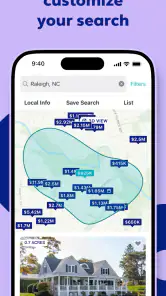
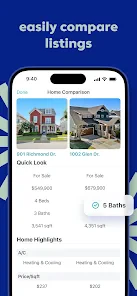
The search functionality is robust, allowing you to filter homes by location, price range, number of bedrooms, and more. One of the standout features is the ability to draw a custom search area on the map. This feature alone saves a ton of time and ensures you’re only looking at homes in your desired neighborhood.
Detailed listings and neighborhood context
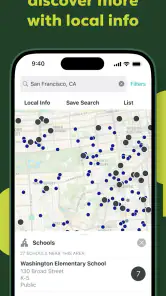
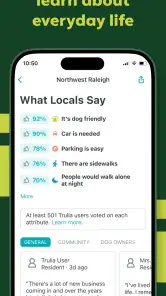
Each listing on Trulia is packed with details. From high-quality photos to comprehensive descriptions, you get a real sense of the property even before stepping foot inside. What I particularly love is the neighborhood insights feature. It provides crime rates, school ratings, and even reviews from local residents. It's like having a local expert in your pocket!
Moreover, the app offers a mortgage calculator, which is super handy for buyers to estimate monthly payments. This tool makes it easier to understand what you can afford and how different down payments might affect your finances.
More From Our News Desk

Weather by Xiaomi Review: Clear at a Glance, Less Clear Up Close

X Under Pressure: Can It Recover When Posting Goes Wrong?

Clash of Clans Is Won Between the Battles

Android Auto Makes the Case for Quieter Car Software

MobiOffice: Transforming Mobile Productivity with Seamless Integration

EA SPORTS FC™ Mobile Soccer: Redefining Mobile Sports Gaming
Keeping track of new options
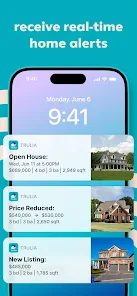
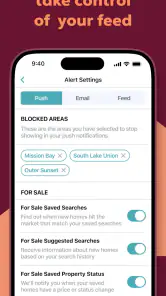
Another cool feature is the real-time alerts. You can set up notifications for new listings, price drops, or open houses in your chosen areas. This ensures that you never miss out on a potential dream home just because you didn’t check the app that day.
The app also seamlessly integrates with your phone’s calendar. This means you can easily add open house events or schedule visits without juggling between different apps. Talk about convenience!
For those who are environmentally conscious or interested in the community vibe, Trulia includes a section that details the local amenities and nearby public transportation options. It’s these little details that make the app stand out from the crowd.
Putting neighborhood information in context
The neighborhood material is most useful when I treat it as a set of questions to investigate, not a verdict on whether an area is right for me. A school rating or crime figure cannot capture every block, time of day, or household’s needs. I would use those details to decide what to inspect more closely, then compare them with a visit, local conversations, and the route I would actually travel. That keeps a convenient overview from becoming a false sense of certainty.
The custom map area also has a practical use beyond narrowing a search: I can shape it around a commute corridor, a family member’s home, or streets I already know, rather than relying only on a broad city or neighborhood label. If I am flexible, I would save separate searches for distinct priorities instead of combining everything into one restrictive filter. A smaller home near transit and a larger home farther out are different compromises; keeping both visible makes the decision clearer.
Readability, movement, and everyday access
The uncluttered layout and map-based browsing make the app approachable when I want to scan several homes quickly. That said, real-estate listings contain a lot of information, and long descriptions or dense details can still take concentration. I would use the map and photos for an initial pass, then return to promising listings when I have time to read carefully. This two-step approach is easier than trying to judge every detail while moving between errands.
For someone who finds precise touch gestures difficult, drawing a boundary on a map may be less comfortable than choosing a familiar location and using the available filters. Likewise, frequent alerts can become distracting if a search covers too many areas or has broad criteria. I would keep notifications focused on a small number of realistic searches and check the rest when convenient. The app helps organize discovery, but it cannot remove every physical or sensory barrier involved in using a phone or evaluating a property.
Planning around sensory and mobility needs
Photos and written details can help me screen out homes that clearly do not match my needs before spending time arranging a visit. For someone who relies on step-free access, room to maneuver, or a quieter setting, though, a listing’s general description may not answer the practical questions that matter. I would contact the listing representative to ask about entrances, thresholds, lifts, bathroom layout, and the path from the street or parking area, then verify those points during a visit. A photo can suggest what to ask; it cannot establish whether a space will work in daily use.
There is a similar trade-off for people who are sensitive to busy screens or notifications. The app’s range of listing and neighborhood information can support careful comparison, but it also means there is plenty to process. I would browse in short sessions, keep the search area manageable, and turn the alert workflow into a prompt to review options rather than something that demands an immediate response. For a companion or family member helping with the search, sharing a small shortlist and specific questions is more useful than forwarding every result.
A practical routine for comparing homes
Imagine I am looking for a rental near work but do not yet know which streets feel right. I can begin with a map search around the commute, review listings and nearby transit, and use neighborhood information to identify questions for a visit. I might then save the strongest options, watch for changes, and put open houses into my calendar. Before deciding, I would still check the route at the time I expect to travel, confirm important listing details, and inspect the home in person. The app makes the search more organized; it does not make those checks unnecessary.
A useful variation is to plan the search around the actual trip to a viewing. I would compare a listing’s location with the places I visit regularly, then check the route at the time I would normally commute or run errands. A neighborhood can look convenient on a map while a real trip involves awkward transfers, difficult crossings, or a long walk that matters to me. The app can help me notice location questions early, but an in-person route check is what turns that information into a practical judgment.
How it fits beside other ways to search
Compared with a basic property portal that focuses mainly on listing inventory, Trulia’s appeal is the extra neighborhood context alongside home search. That is valuable when choosing where to look, while a broker or property manager is better placed to answer transaction-specific questions, and a direct visit is essential for judging noise, access, condition, and how a space feels. Renters may appreciate the area overview without needing the mortgage tool; buyers can use the calculator for rough planning, but should not treat an estimate as a full affordability decision.
I would also think of it as a companion to, rather than a replacement for, local listings and direct contacts. A housing professional may know about details relevant to a particular transaction, while a rental provider can clarify lease terms and availability. Trulia is most helpful earlier in the process, when I need to compare locations and decide which properties deserve follow-up. If I already know the exact building or require authoritative information for a purchase or lease, direct confirmation matters more than browsing summaries.
Where it may not be the right fit
I would skip it as my only resource if I need a definitive answer about a property, a guaranteed view of every available home, or a professional assessment of a neighborhood. Listing details and neighborhood summaries are starting points, not promises about what I will experience. People who prefer a simple list with minimal surrounding information may also find the extra context unnecessary. With over 10 million installs, it is clearly a widely used option, but popularity does not change the need to verify the details that matter to an individual move.
It may also be a poor fit if map interaction is uncomfortable, if detailed listing pages are tiring to read, or if alerts create more pressure than value. In those situations, I would use a simpler search method or ask someone I trust to help shortlist possibilities, then rely on direct calls and visits for decisions. Buyers should treat the mortgage calculator as a rough way to compare scenarios, not a complete budget; renters can focus on location and property details instead. The right workflow is the one that helps someone make a careful choice without making the search harder to manage.
Trulia is rated for Everyone, is on version 14.33.1, and supports devices running Android 9 or later. Those details make it relevant to a broad range of home seekers, though the best experience still depends on being comfortable browsing maps, reading listing information, and managing phone notifications. Its strongest role is helping me compare possibilities and plan the next step, rather than making the decision for me.
A more inclusive way to narrow the search
In conclusion, Trulia: Homes For Sale & Rent is more than just an app; it’s a comprehensive tool for anyone serious about finding their next home. With its detailed listings, user-friendly interface, and insightful neighborhood data, it simplifies the often overwhelming process of house hunting. Whether you’re buying or renting, this app has something to offer. Give it a try and see how it transforms your home search experience.
I would recommend it to people who want property options and neighborhood clues in one place, especially when they are still deciding which areas deserve a closer look. Its map, alerts, and calendar workflow can make an otherwise scattered search easier to manage. I would pair it with in-person checks and direct conversations, and choose another approach if map gestures or dense listing pages are a poor fit. With more than 61,000 reviews and over 10 million installs, it has a substantial audience, but its real value is simpler: it can help make a complicated housing search feel more deliberate and manageable.
Who is likely to get the most from it?
I see the clearest use for people who are early in a move and still weighing neighborhoods, commute patterns, and the difference between buying and renting. The combination of listings, map browsing, local context, and alerts gives them a way to organize exploration before they know exactly which property they want. It can also suit someone relocating to an unfamiliar area, provided they treat summaries as prompts for further checks rather than substitutes for local knowledge.
Someone who already has a specific address in mind, needs a specialist to assess accessibility, or wants a definitive account of a home’s condition may be better served by direct contact and an in-person inspection. I would not rely on any app alone to settle those questions. Used with realistic expectations, however, Trulia can help me decide what to ask, what to compare, and which viewing is worth arranging next.
Making a decision without losing the thread
As a search grows, I would keep a short personal note for each serious option: the reason it made the shortlist, the question I still need answered, and the trade-off I would be accepting. That simple habit keeps a striking photo or a promising neighborhood score from overshadowing more practical concerns. It also makes it easier to compare homes after several viewings, when details can blur together.
My inclusive verdict is that Trulia can make the discovery stage more approachable by bringing several kinds of housing information together, but ease of browsing is not the same as equal access to every decision. People have different vision, dexterity, sensory, mobility, financial, and communication needs, and a listing app cannot resolve all of them. I would use it to build a thoughtful shortlist, then ask direct questions and visit with the specific needs of the people who will live there in mind.
Trulia: Homes For Sale & Rent Frequently Asked Questions
Is Trulia available in my area, and can I search by neighborhood?
Trulia is designed for exploring homes for sale or rent and finding a neighborhood that feels right for you. You can use it to browse real estate options and consider the surrounding area as part of your search. Before relying on any particular location, search for it in the app and review the listings and neighborhood details available there.
What should I consider before using a real estate app to compare homes?
A home search can involve more than comparing properties, so it helps to think about both the listing and its surroundings. Trulia’s focus is helping people find homes for sale or rent in the right neighborhood for them. Use the app to explore your options, then follow up directly with the relevant professionals before making decisions or commitments.
What devices and operating systems can I use Trulia on?
Trulia is a real estate app for people searching for homes to buy or rent. Before downloading, check that your device runs Android 9 or later if you are installing the Android version. The app is free, and its Everyone content rating makes it suitable for a general audience. Its usefulness will depend on having a device and connection that let you browse listings and maps comfortably.
Can I save searches or get alerts for listings that match what I want?
Trulia is designed to help people explore homes for sale or rent and find a neighborhood that suits them. You can search listings and review property and neighborhood details as you compare options. If you prefer to track new matches or save searches, check the app’s available settings after installation, since those tools can depend on the current app experience and your account choices.
What features does the Trulia app offer for home buyers?
The Trulia app provides a comprehensive suite of features for home buyers, including detailed listings for homes for sale and rent, neighborhood insights, and virtual tours. Users can explore interactive maps showing crime rates, school ratings, and nearby amenities. Additionally, the app offers tools to connect with real estate agents and receive personalized recommendations based on your preferences.
Pros
- User-friendly interface for easy navigation.
- Comprehensive real estate listings available.
- Detailed neighborhood insights provided.
- Customizable alerts for new listings.
- Integration with virtual tour features.
Cons
- Limited international property listings.
- Some listings may be outdated.
- Requires stable internet connection.
- In-app ads can be intrusive.
- Limited mortgage calculator features.
- Category
- House & Home
- Version
- 14.33.1