Zillow: Homes For Sale & Rent
- 173.18K
- 4.8
- Installs
- 50.00M
- Price
- Free

Screenshots




Analysis by Reviewed
When I look for a home, the hardest part is rarely finding somewhere to begin; it is keeping a clear head while comparing places, details, and neighborhoods. Zillow: Homes For Sale & Rent gives buyers and renters a practical place to start browsing, but I treat it as a research tool rather than a final authority. That distinction matters: a polished listing can help me decide what to investigate, while a viewing and careful follow-up are what help me judge whether a home is right.
Start with the questions that matter
I get the most from the app when I have a few practical questions in mind before opening it: what can I afford, which locations could work with my routine, and what would make a property an immediate no? Those questions are more useful than trying to find a perfect home on the first pass. A search can then become a way to test priorities, rather than a long stream of listings that all blur together.
A realistic example is a renter who has a short break between errands and wants to check whether a move closer to work might be possible. I would look at a broad area first, note the options that seem workable, and return later to compare location and listing details with more attention. I would not contact anyone or make a decision just because a place appeared near the top of a quick search. The app helps me organize the first look; it does not replace the slower checks that follow.
Browsing with a Clear Head
The app is free, comes from Zillow, and sits in the House & Home category. It has a 4.8 average from around 1.5 million ratings, with over 50 million installs, which suggests many people use it as part of their property search. It is rated for Everyone, and its current version is 2025.49.1.97683. Those details give useful context, but popularity does not tell me whether a particular listing is current or whether a home will suit my needs.
For me, the best way to use it is to turn an open-ended search into a manageable shortlist. I start with the broad area and the essentials I cannot compromise on, then use the results to see how much choice those limits leave. If the list is too narrow, I can reconsider one preference at a time instead of abandoning the search altogether. That small habit makes the process feel less like scrolling endlessly and more like making decisions.
Finding Your Perfect Home
First off, let's talk about how Zillow has turned what could be a stressful process into a surprisingly enjoyable experience. The app boasts a user-friendly interface that's as intuitive as it gets. The moment you open it, you're greeted with a clean design that immediately sets the stage for a seamless browsing experience. Whether you’re in the market to buy or rent, Zillow has got you covered with a vast selection of listings. And when I say vast, I mean it. We're talking millions of properties across the U.S.!
That breadth is most useful when I am still deciding where to look, or when I want to compare a rental search with homes for sale without switching to a different kind of tool. It is less helpful if I already know that I need a very specific kind of property in a very small area: broad coverage cannot make a limited local market feel abundant. In that situation, I would use the app to orient myself, then check with local professionals or other property sources before making plans around a listing.
More From Our News Desk

Weather by Xiaomi Review: Clear at a Glance, Less Clear Up Close

X Under Pressure: Can It Recover When Posting Goes Wrong?

Clash of Clans Is Won Between the Battles

Android Auto Makes the Case for Quieter Car Software

MobiOffice: Transforming Mobile Productivity with Seamless Integration

EA SPORTS FC™ Mobile Soccer: Redefining Mobile Sports Gaming
What the filters can and cannot do
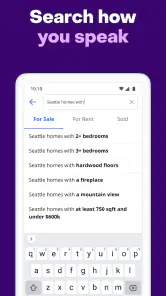
The search functionality is top-notch, allowing you to filter properties based on a myriad of preferences such as price, number of bedrooms, and even school districts if that's on your checklist. I find those filters most valuable as a way to narrow a big search, not as a guarantee that every matching home will meet the same standard in person.
My practical tip is to avoid setting every preference at once. I would first filter for the things that determine whether a home is feasible, such as price and bedroom count, then use the map to explore nearby areas. Only after seeing the range of results would I add softer preferences. This makes it easier to tell whether a missing result is because of a strict filter or simply because there are few matching homes.
There is a useful trade-off here: tight filters reduce noise, but they can also hide options that are close enough to deserve a second look. If the results feel unusually sparse, I loosen one condition at a time and see what changes. That is more informative than clearing everything at once, because I can tell which preference was doing most of the limiting. For a buyer or renter with a firm budget, I would keep that boundary steady and experiment with less essential criteria instead.
Using the map to plan a better shortlist
One of my favorite features is the map view, which provides an aerial overview of available properties in the desired area. It's like having a bird's eye view of your future neighborhood. Plus, it’s super easy to switch between the map and list views, which is perfect for those of us who like to compare options visually.
The map is especially handy for noticing how a shortlist is distributed across an area; a home that looks close in a list may sit in a different pocket than another option. I use that view to decide what deserves a closer look, not to judge the full feel of a neighborhood. For a realistic weekday routine, I might save a few possibilities during a commute break, compare their locations later, and then arrange a proper visit rather than trying to make a decision from a quick glance.
My next step would be to compare the map with the route and routine I actually expect to have, rather than assuming that nearby pins mean equal convenience. A location that looks appealing on screen may still require checking travel times, access, and the immediate surroundings in person. The app is strongest at helping me spot where to investigate; it is not a substitute for walking or driving the area at a time that reflects my normal day.
Reading listings without treating them as guarantees
Another highlight is the detailed property information. Each listing comes with high-quality photos, a comprehensive description, and even a Zestimate, which gives you an estimate of the property’s market value. This is incredibly useful for getting a ballpark figure and gauging if a property is a good deal.
I treat that estimate as a prompt for further questions, not as proof that a home is fairly priced. A market estimate cannot replace checking the property’s condition, understanding the local competition, or reviewing the terms of a sale or rental. Photos are useful for spotting layout and features, but they can only show selected views. If I am seriously interested, I make a note of what the listing leaves me wondering about and ask those questions before committing time or money.
A small but worthwhile habit is to compare the description against the photos instead of absorbing each separately. If an important feature is mentioned but hard to see, I would ask about it. If the pictures show a detail that the description does not explain, I would add that to my viewing checklist. This turns browsing into preparation and helps avoid the false confidence that can come from a polished presentation.
For someone comparing homes for sale, the estimate can help frame what to research next, while a renter may find the listing’s stated details more immediately useful for deciding whether to inquire. Neither type of search should stop at the screen. Before making a commitment, I would confirm the current status and terms with the relevant contact, and inspect the property or arrange an appropriate viewing.
Alerts, pace, and search habits
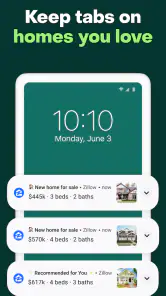
And let’s not forget the notifications feature. If you’re serious about finding a place, you can set alerts for new listings that match your criteria. This way, you’re always in the loop and can jump on opportunities as they arise.
Alerts can save repeated manual searches, but they can also make a home search feel urgent. I would keep the criteria focused enough that notifications remain relevant, and revisit them if the results are consistently off target. For anyone wondering whether the app is useful without being ready to move, browsing and comparing can still help clarify priorities; the trade-off is that alerts are most valuable when you are prepared to follow up promptly.
I would also treat an alert as a reason to review a listing, not as a signal that I must act immediately. In a competitive search, speed can matter, but rushing past basic questions can cost more than taking a moment to check the details. If I am only exploring, I can leave alerts aside and use manual browsing to learn what the area offers. If I am actively looking, a narrower alert is more practical than a constant stream of loosely matched possibilities.
Trust, privacy, and user choice
Searching for a home can involve sensitive decisions, so I prefer to be deliberate about what I share and what I act on. Before creating an account or responding to a listing, I look at the choices the app presents and consider whether I need that step for my current search. I do not assume that a listing, estimate, or notification tells the whole story; I use each as a starting point and verify important details directly before making a financial or housing decision.
My approach is to separate browsing from outreach. I can learn about the range of options before deciding whether I want to contact anyone, and I would pause at any point where a request for information feels unnecessary for the next step I have chosen. For a first pass, I do not need to turn every interesting listing into a conversation. That keeps the search intentional and gives me time to compare choices on my own terms.
It is also worth thinking about how much attention a housing search deserves on a shared device or in a busy day. I would avoid treating an open app or a saved search as private by default, and I would review the account choices presented to me if I decide to sign in. These are ordinary precautions, not a reason to avoid the app; they simply help keep a personal search aligned with the level of engagement I actually want.
This is also where Zillow differs from a simple classified-listing feed: the combination of map browsing, filters, property details, and alerts makes it useful for building and refining a search in one place. A local agent or property manager may be a better source for tailored guidance, while another listing service may be worth checking when I need a second view of a particular area. I would not rely on any single app as the sole basis for choosing a home.
Compared with searching through separate local pages or general classified listings, this app gives me a more joined-up way to move from an area search to a shortlist and then to follow-up questions. The alternative can still be better when I need local context, a specialist property type, or confirmation from someone directly involved. I would use Zillow for breadth and early comparison, then use those other sources to test whether a promising option stands up to closer scrutiny.
Who will get the most from it?
I think the app fits people who are at the beginning or middle of a housing search: renters comparing areas, buyers trying to understand what their budget may reach, and anyone who wants one place to browse both property options and their locations. It is particularly useful when your priorities are still taking shape, because changing a filter or switching views gives you a practical way to see the consequences.
It is less suitable as a one-stop answer for someone who needs a detailed valuation, legal or financial advice, or a confident account of a property’s condition. It is also not my preferred stopping point when the search is highly specialized or a small local market makes each listing depend on details that only an in-person visit or direct conversation can clarify. In those cases, I would treat the app as a starting screen and put more weight on local expertise and direct verification.
Final Thoughts
Overall, Zillow: Homes For Sale & Rent is a powerhouse of an app for anyone looking to dive into the real estate market. Its comprehensive features and user-friendly design make it a must-have tool for prospective buyers and renters alike.
For me, it is best for people who want to explore options, compare areas, and keep track of new possibilities without starting from scratch each time. It is less suited to someone expecting an estimate or listing page to settle questions about value, condition, or terms. If you're on the lookout for a new place to call home, give Zillow a try. You might just find that it’s not just about searching for a house—it's about finding the right place where you'll make memories. Happy house hunting!
Zillow: Homes For Sale & Rent Frequently Asked Questions
Can Zillow help me compare homes and rentals in one place?
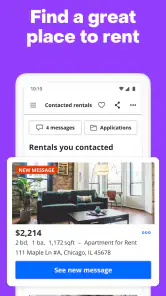
Yes. Zillow: Homes For Sale & Rent is designed to bring home-buying and rental searches together in one mobile app. You can explore listings and review details such as photos, prices, and descriptions, then compare options against your needs. It can be useful when you are still deciding whether buying or renting is the better fit for your next move.
Who develops Zillow: Homes For Sale & Rent, and is it suitable for all ages?
The app is developed by Zillow and is categorized for a general audience, with an Everyone content rating. Its focus is browsing homes for sale and rent, so it may be relevant to people researching housing as well as those actively planning a move. As with any real estate service, decisions about a home should involve the appropriate adults and professionals for your circumstances.
Is Zillow: Homes For Sale & Rent available on both Android and iOS?
Zillow: Homes For Sale & Rent is a mobile app for people exploring homes to buy or rent. Before downloading, check that your device meets the app’s operating-system requirements: the listed minimum is version 10. The app is free to download, so you can install it and explore its real estate search features without an upfront purchase.
What is Zillow: Homes For Sale & Rent?
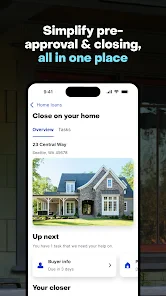
Zillow: Homes For Sale & Rent is a comprehensive real estate app that allows users to search for homes to buy or rent. It provides detailed listings, including photos, prices, and descriptions, and offers tools for buyers, sellers, and renters to make informed decisions about real estate transactions. Its focus is helping users explore housing options and the information attached to each listing from a mobile device.
Is Zillow: Homes For Sale & Rent free to use?
Yes, Zillow: Homes For Sale & Rent is free to download and use. The app provides access to a vast database of real estate listings without any charge. However, some services or features, like mortgage consultations or connecting with a real estate agent, might involve additional costs or fees. It is sensible to clarify any costs directly with a service provider before deciding to use a paid service.
Pros
- Comprehensive property listings.
- User-friendly interface.
- Advanced search filters.
- Regular updates.
- Integrated mortgage calculator.
Cons
- In-app ads can be intrusive.
- Limited international listings.
- Occasional data inaccuracies.
- Requires internet connection.
- Some features need sign-up.
- Category
- House & Home
- Version
- 2025.49.1.97683