Redfin: Buy, Sell & Rent Homes
- 21.59K
- 4.7
- Installs
- 10.00M
- Price
- Free

Screenshots

Analysis by Reviewed
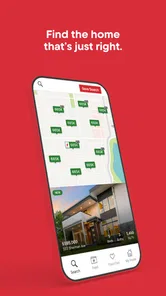
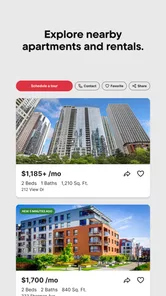
I like a home-search app best when it helps me make a better shortlist, not when it tries to convince me that browsing is the same as buying. Redfin is useful for scanning homes for sale and apartments for rent, with filters that help narrow a broad search into something practical. Its biggest strength is convenience; its main limitation is that a listing screen can only take you so far. I’d use it to organize a search and spot places worth investigating, while treating each listing as the start of a conversation rather than a final decision.
Where it fits in a real housing search
What makes Redfin: Buy, Sell & Rent Homes useful is not simply that it puts properties on a phone screen. The real value is being able to move between broad exploration and a more focused shortlist without committing to a particular route too early. I can use it to get a feel for what appears in an area, then tighten the search when I know which compromises I can live with.
That flexibility matters when a move is still an open question. Someone deciding between renewing a lease and buying, for instance, can browse both kinds of property and compare the general options before beginning a more serious search. I would not treat those listings as a complete financial comparison, but seeing what is available can help turn a vague conversation about location and space into concrete questions.
What the search does well
The app is free, comes from real-estate company Redfin, and sits in the House & Home category. Its broad mix of sale and rental listings makes it handy if your plans are still taking shape: you can compare the kind of homes available in an area before deciding whether renting or buying makes more sense. That flexibility is more useful than a narrowly focused search when your budget, timing, or preferred neighborhood is still under discussion.
Redfin has a 4.7 average from around 159,000 ratings, and it has been installed over five million times. Those figures suggest it has found a sizable audience, but they don’t guarantee that every listing will suit your needs or that the app will answer every property question. I’d judge it by whether it helps me find relevant options quickly, then verify important details before making plans around a home.
A User-Friendly Interface
Right off the bat, what strikes me about the Redfin Houses for Sale & Rent app is its clean and intuitive interface. Navigating through the app feels as smooth as butter. The developers have done a fantastic job in making sure that even someone who's not tech-savvy can easily find their way around. With just a few taps, you can search for homes in your desired area, filter by price, size, and even school district. It's like having a real estate agent right in your pocket!
Search with priorities, not a wish list
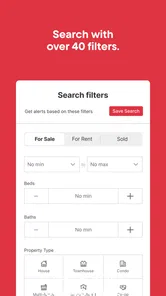
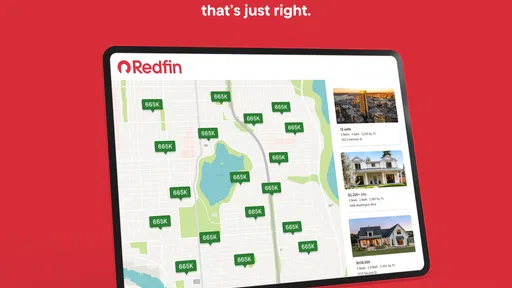
One of the strongest parts of the experience is how search filters can turn an unfocused browse into a useful comparison. You can shape a search around practical needs, such as budget and size, and then see what that leaves in the area you have in mind. I find it more productive to set the true deal-breakers first than to stack up every preference from the start. A strict wish list may produce a reassuringly tidy result, but it can also hide the compromises the local market is asking you to make.
More From Our News Desk

Weather by Xiaomi Review: Clear at a Glance, Less Clear Up Close

X Under Pressure: Can It Recover When Posting Goes Wrong?

Clash of Clans Is Won Between the Battles

Android Auto Makes the Case for Quieter Car Software

MobiOffice: Transforming Mobile Productivity with Seamless Integration

EA SPORTS FC™ Mobile Soccer: Redefining Mobile Sports Gaming
For example, if the number of bedrooms is non-negotiable but the exact neighborhood is flexible, I’d hold the bedroom count steady and explore nearby areas. If location matters more than extra space, I’d reverse that approach. This gives me a clearer sense of what changes when I relax one requirement, rather than making several filter adjustments at once and losing track of why the results changed.
Comprehensive Search Features
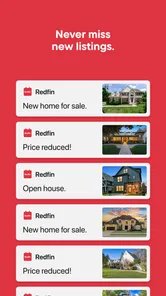
One of the standout features of this app is its comprehensive search capabilities. You can literally customize your search to fit your exact needs. Want a two-bedroom apartment with a pool? No problem! Looking for a cozy cottage in the suburbs? They've got you covered. The app allows you to set notifications for new listings, so you'll never miss out on a potential dream home.
Make alerts work for you
I’d avoid turning on every possible notification at once. A broad search can produce a noisy stream of changes, which makes it easier to overlook the one update that actually matters. I’d start with a realistic area and a price range I can act on, then adjust as I learn what is available. If I’m comparing neighborhoods, I’d save or track them as separate searches where possible, rather than repeatedly changing one set of filters and forgetting what I was looking at.
Filters are most helpful when I use them to rule out deal-breakers, not to describe an imaginary perfect home. For example, setting a workable budget and bedroom count first can reveal trade-offs in location or size that a long list of preferences might hide. School-district filtering can also help families focus their browsing, but it shouldn’t replace checking school information from sources they trust.
Use a shortlist to make better comparisons
When I find several plausible properties, I try to compare them on the same few questions instead of letting the most appealing photos dominate. Does the location work for everyday travel? Is the layout suitable for the people who will actually live there? Are there details in the listing that I need to clarify before spending time on a visit? Keeping those questions consistent helps me notice when a home looks attractive but does not fit the practical brief.
This is also where a phone app has a useful, modest role. I can check a saved option while I have a spare moment, but I would rather make a serious comparison when I can concentrate and discuss it with anyone else involved in the move. A quick browse can identify candidates; it should not be the moment I decide that a property is right for me.
Real-Time Updates
Another aspect I love is the real-time updates. Thanks to this feature, you get the latest listings and price changes as soon as they happen. This is crucial in today's fast-paced real estate market. Imagine getting notified about a price drop on that house you've been eyeing. It's like getting insider info before anyone else!
From a saved search to a useful viewing plan
A realistic use for the app is a renter checking listings during a commute, saving a few plausible apartments, then reviewing them later with a partner against the same budget and location priorities. For a buyer, the equivalent is building a short list over several days and noting which homes deserve a closer look. I wouldn’t treat an alert as a reason to rush into an application or offer; I’d first check the listing details, confirm the current status, and ask about anything that could change the practical cost or suitability.
That extra verification is important because real-estate apps are discovery tools, not substitutes for a viewing, lease review, inspection, or professional advice. Listings can change, and photos can’t tell me how a place feels at different times of day or whether a commute will be tolerable. Redfin is most useful when it helps me ask better questions before contacting an agent or arranging a visit.
When a tour helps—and when it doesn’t
Virtual tours can be a useful first pass if a home is far away or a packed schedule makes it hard to visit every possibility. I would use one to rule out obvious mismatches, such as a layout that will not work, before arranging travel or a viewing. I would not use it to judge noise, the condition of every surface, the feel of the surrounding street, or the experience of moving through the rooms in person. A tour can narrow the list, but it cannot settle those questions.
For an open house, I’d treat the app as a planning aid rather than a substitute for preparation. Before going, I would note what attracted me to the listing and what remains unclear. That makes it easier to use the visit well: check the rooms and features that matter, observe the immediate surroundings, and follow up on details that cannot be established just by looking.
How it compares with other ways to search
Compared with browsing a property portal in a desktop browser, using Redfin on a phone makes quick checks and alert-driven follow-up more convenient. Compared with relying only on an agent, it gives me more room to explore options at my own pace before starting a conversation. The trade-off is that an app’s map, filters, and listing details still reflect what is shown there; they don’t replace local knowledge or direct confirmation. If I need a wider picture of what is available, I’d compare results with another established listing source rather than assume one app covers every property.
In practice, the right alternative depends on what I need next. A second listing service is sensible when I want to check whether my shortlist is broad enough. An agent or property contact is the better next step when I need current status, access, or answers tied to a particular home. For neighborhood context, I would research the area separately instead of assuming a property result can answer every question about daily life there. Redfin works best as one part of that process, not as the whole process.
Redfin may not be the right fit for someone who wants a definitive, comprehensive account of a property without contacting anyone, or for a casual browser who dislikes notifications and frequent market changes. It also isn’t a valuation tool or a guarantee that a home is available. I’d use it to discover and compare possibilities, then switch to direct conversations and independent checks when the decision becomes serious.
Virtual Tours and Open Houses
Let's face it, sometimes our schedules just don't allow us the time to visit every open house. That's where Redfin's virtual tours come in handy. With this feature, you can explore homes from the comfort of your couch. It's almost like being there in person, minus the travel time. Plus, you can easily contact a Redfin agent if you have questions or need more details about a property.
Who I’d recommend it to
I’d recommend it to renters and buyers who are actively comparing areas, want a convenient way to keep up with listings, and are comfortable doing their own follow-up. It can also help someone early in the process learn what their budget tends to buy in different neighborhoods. Redfin is less compelling for a person who needs a guaranteed complete inventory, wants every property question answered inside the app, or is not ready to act on the updates they receive.
It is especially handy for people with a moving decision that is still taking shape: a renter whose current plans may change, a buyer learning which areas merit a visit, or a household trying to compare several locations before choosing where to focus. It is less useful if you are only casually browsing and find changing listings distracting, or if you expect a property app to settle questions that require a conversation or an in-person check.
The app is rated for Everyone, and its current version is 602.1, with a minimum operating-system requirement of 12. It has been around since 2011, so it is a long-running option rather than a new experiment. Still, I’d make sure my device meets that requirement before downloading, and I’d keep the app’s role clear: useful for finding leads, not for making a major housing decision on autopilot.
Final Thoughts
All in all, the Redfin Houses for Sale & Rent app is a powerhouse for anyone in the market for a new home. It's user-friendly, packed with features, and offers a seamless experience from start to finish. Whether you're a first-time homebuyer or a seasoned real estate investor, this app is definitely worth checking out. Happy house hunting!
My more measured verdict is that Redfin is a strong starting point, especially when I want to browse both rentals and homes for sale without turning the search into a project. Its filters, alerts, and tours can make early research easier, but none removes the need to verify a listing and see whether a property works in real life. I’d install it for the shortlist-building stage, keep alerts focused, and use other sources or direct contact when accuracy and completeness matter most.
Redfin: Buy, Sell & Rent Homes Frequently Asked Questions
Is Redfin easy to use for someone new to real estate apps?
Redfin is designed to help people explore homes for sale and apartments for rent through a mobile search experience. You can enter an area, browse listings, and review photos and property details as you compare options. If you are new to real estate apps, starting with a broad search and narrowing it to the locations or property types that interest you can make browsing feel more manageable.
Can I search for homes by location and compare different options?
Yes. Redfin lets you search real estate listings in an area you choose, which can help you compare homes and rental options in the places you are considering. You can review available listing details and photos as you move between properties. Results depend on what is listed for that location, so searching your preferred area is a practical way to see whether the app fits your needs.
Does Redfin show photos and details for properties?
Redfin provides property listings with photos and information to help you look over possible homes or rentals before deciding what to explore further. You can use those details to compare options and identify properties you may want to revisit. Photos and listing information are useful for initial research, but they are not a replacement for seeing a property in person or reviewing its terms carefully.
Can I use Redfin without creating an account?
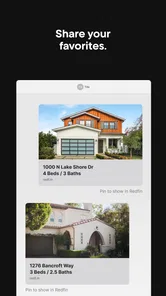
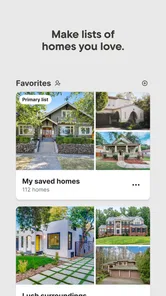
You can use Redfin to explore homes and rental listings, view photos, and check property information. Creating an account can be useful if you want to save favorite properties or receive notifications about new listings, since those features help you keep track of homes you may want to revisit. The app is free to download and use, so you can begin browsing without paying for access.
Is Redfin available on both Android and iOS?
Redfin is a mobile app for people searching for homes to buy or rent. Before downloading, check that your phone meets the app’s operating-system requirements in the relevant app store. Once installed, you can browse property listings, look at photos and details, and use search tools from your device. The app is listed for free, making it easy to try as part of your home search.
Pros
- Comprehensive property listings
- User-friendly interface
- Detailed neighborhood info
- Real-time market updates
- Professional-grade search filters
Cons
- Limited international listings
- Frequent app updates needed
- Occasional map loading issues
- Requires account to save searches
- Notifications can be overwhelming