Edge Lighting - Borderlight
- 10.19K
- 4.8
- Installs
- 50.00M
- Price
- Free
Screenshots
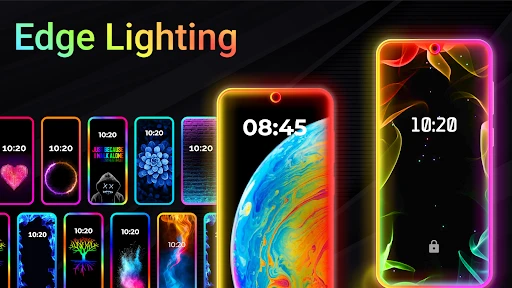
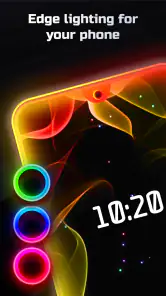
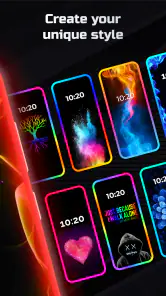
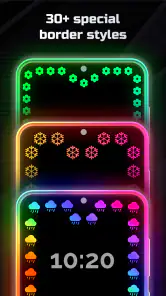
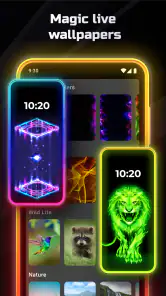
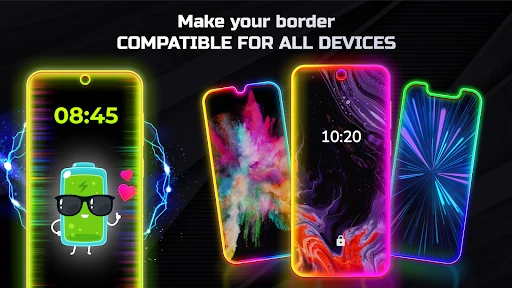
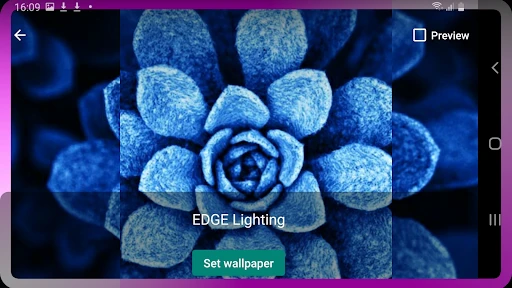
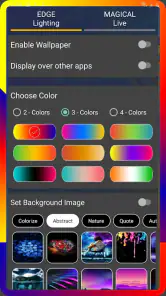
Analysis by Reviewed
My first impression of Edge Lighting - Borderlight is that it is for people who want their phone to feel a little more personal without changing the whole home screen. I like the idea of a colored outline adding a quiet accent when the display is in use, though the effect is most at home on a phone where a glowing border is easy to see. It is a personalization app from ZipoApps, and its appeal is simple: spend a few minutes choosing a look, then decide whether that look suits your everyday use.
A practical first setup
I’d start with one restrained color and a modest border thickness rather than turning every effect up at once. That makes it easier to judge whether the outline complements your wallpaper and icons or competes with them. If you use a busy background, a simpler edge can keep the screen from feeling crowded; with a plain background, a brighter treatment may stand out more. Try the same setup in a couple of ordinary situations—checking the time, opening an app, and viewing a notification—before settling on it.
The useful habit is to treat the first choice as a test, not a permanent decision. I would keep track of which combination feels comfortable after a full day, since a color that looks striking for a minute may become distracting when you unlock the phone repeatedly. This is also a good way to decide whether you want the effect as a regular part of your screen style or only as an occasional visual change.
Settings that deserve a closer look
Color, pattern, and thickness are the main things I’d compare deliberately. Change one at a time and look at the result against your actual wallpaper; otherwise, it is hard to tell which adjustment made the edge feel better. A thin line can preserve the look of the rest of the display, while a heavier one makes the border the focal point. Neither is automatically better—it depends on whether you want a subtle finish or a noticeable frame.
Music-linked lighting is more of a playful extra than a feature I’d leave on for every situation. It could be fun when listening at home, but it may be unnecessary when you only want a clean, calm screen. Notification effects also need a practical test: if several alerts arrive close together, a distinctive glow is only helpful if you can recognize it without stopping to inspect the phone. I’d favor easy-to-tell-apart choices over a different elaborate effect for everything.
Fitting the glow into a routine
For an everyday example, imagine checking your phone while it is on a desk during a study session. A consistent edge can make the screen feel more recognizable when you pick it up, while a special music effect might be better saved for a break. That kind of separation keeps customization enjoyable instead of turning every screen interaction into a show. It also gives you a clear reason to revisit settings: change the look when your routine changes, not just because more options are available.
Compared with changing a wallpaper or icon theme, an edge-lighting effect is a narrower kind of personalization. It adds a border accent rather than redesigning the whole interface, so it suits someone who likes their current layout but wants one visible difference. If you prefer a completely plain screen, or want customization to change how you navigate rather than how the display looks, a wallpaper or launcher-based option will likely be a better fit.
More From Our News Desk

Weather by Xiaomi Review: Clear at a Glance, Less Clear Up Close

X Under Pressure: Can It Recover When Posting Goes Wrong?

Clash of Clans Is Won Between the Battles

Android Auto Makes the Case for Quieter Car Software

MobiOffice: Transforming Mobile Productivity with Seamless Integration

EA SPORTS FC™ Mobile Soccer: Redefining Mobile Sports Gaming
Where expectations matter
I would not choose this app mainly as a battery-saving tool, a notification manager, or a way to make a phone easier to use. Its purpose is visual, and the value comes from whether the effect looks good to you. As with any screen decoration, how noticeable it is depends on the phone and the conditions in which you view it. If you find yourself turning the effect off because it distracts you, that is a useful sign that a simpler style—or no edge effect—is the better choice.
People who enjoy matching colors and small details to their personal style are the natural audience. Someone who wants a set-it-once experience can choose a restrained look and leave it alone; a more hands-on user can experiment in short sessions, comparing one adjustment at a time. I’d avoid making several changes at once, because that makes it harder to return to a combination you liked. A quick note of your preferred color and thickness can save that guesswork if you decide to try another pattern later.
The app is free to install and is rated for Everyone. It has a 4.8 average from around 717,000 ratings, with more than 50 million installs, so it is a well-established choice in this small corner of phone personalization. Optional in-app purchases range from $0.99 to $149.99 per item, which is worth keeping in mind if you explore paid options. The current version is 3.3.17, and it supports Android 5.0 and later.
Getting Started
So, I stumbled upon Edge Lighting - Borderlight when I was navigating through the app store, looking for something to spice up my phone’s look. The installation was as smooth as butter. It didn’t take up much space, so that’s a win in my book! Once installed, the app greets you with a simple and easy-to-navigate interface. I was up and running in no time, ready to add that snazzy glow around my screen.
Features Galore
The app is packed with customization options. You can choose from a variety of colors, patterns, and even adjust the thickness of the light. I spent a good amount of time playing around with the options until I found the perfect one that matched my style. One feature that I particularly enjoyed is the ability to sync the lighting with music. Yes, you heard that right! Your screen lights up in rhythm with your favorite tunes. It’s like having a mini disco right in your hand.
Another cool aspect is the ability to set different lighting effects for different notifications. Imagine having a unique light pattern for each type of notification; it’s both functional and aesthetically pleasing. The app also supports a range of screen types, so whether you’re on a curved or a flat screen, it’s got you covered.
Performance and Usability
Now, let’s talk about performance. One of my initial concerns was the potential battery drain, as I didn’t want my phone to become a glorified flashlight. However, the app is surprisingly efficient. It doesn’t hog your battery life, allowing you to enjoy the lights without constantly reaching for the charger. Kudos to the developers for optimizing it well!
Usability-wise, it’s pretty straightforward. You don’t need to be a tech wizard to figure it out, which is always a plus. The settings are clear, and the app runs smoothly without any annoying glitches or crashes. It’s user-friendly and, dare I say, quite fun to use!
Choosing a setup that lasts
The strongest approach is to think of the border as a frame for the screen, not as a feature that needs to announce itself every time you look down. I’d pick a color already present in the wallpaper or case, then check whether the line remains distinct without overpowering the icons. If the effect makes text or notification cards feel visually crowded, reducing the thickness is a better first adjustment than abandoning the idea altogether.
There is also a useful difference between a setup that looks impressive in a preview and one that works across a whole day. Try viewing it in a dim room and in ordinary daylight, then decide whether the contrast still feels comfortable. A vivid edge can be appealing at night but too prominent when you are quickly checking a message in a bright setting. Keeping the same basic color while changing only the pattern or thickness makes this comparison easier.
Making notification effects practical
Different lighting for different notifications sounds helpful, but I would keep the scheme simple enough to remember. Assigning a unique look to every possible alert can create a little puzzle instead of saving attention. A small number of clearly distinct choices is more useful: the point is to recognize a familiar visual cue at a glance, not to memorize a catalog of patterns. If you still have to pick up the phone and inspect every alert, the decorative effect is not doing much practical work.
I would also avoid treating the border as a replacement for the phone’s normal alert settings. It is a visual accent, not a guarantee that you will notice an important message in every environment. In a meeting, on a commute, or while the phone is tucked away, a screen effect may be irrelevant. For that reason, I see notification lighting as a pleasant extra for a phone that is already configured to handle alerts in the way you need.
Shortcuts for repeatable experimenting
When I want to compare styles, I would make a tiny test routine rather than changing settings whenever the mood strikes. Start with a familiar wallpaper, choose one color, and check the screen in the same few situations. Then adjust one element and compare again. This makes it much easier to tell whether a new pattern actually improves the look, and it gives you a reliable way back if the experiment goes too far.
A note on the combination you like can be surprisingly useful, especially if you enjoy trying several styles over time. Record the color and thickness in plain language, and add whether you preferred a still, understated look or a more animated one. That is not a technical trick; it is simply a way to avoid relying on memory after several rounds of tweaking. It also keeps personalization from becoming a time-consuming project when all you wanted was a small change.
For someone who changes wallpapers often, I would revisit the edge only after changing the background. A border that worked with a dark, quiet image may clash with a colorful photograph. Rather than rebuilding the whole setup, first test the existing color and adjust one setting if needed. This small habit keeps the phone coherent and prevents the app’s options from becoming a reason to constantly tinker.
When another kind of customization is better
Edge lighting has a narrower purpose than a launcher or a full icon theme. It changes the impression of the display without asking you to reorganize how you open apps or find information. That restraint is a strength if you already like your home screen, but it also means the app cannot satisfy someone hoping for a broad redesign. A wallpaper is usually the simpler alternative when all you want is a new background; a launcher makes more sense when layout and navigation are what you want to change.
It is also not the right choice for everyone who wants a more noticeable phone. If the screen is usually face down, kept in a pocket, or used in situations where visual effects are unwelcome, the border may see little use. Someone who values a quiet interface above all else may prefer to skip animated or prominent accents entirely. I would choose this app because I enjoy seeing a carefully matched frame, not because I expect it to solve a functional problem.
Limits worth keeping in mind
Customization brings a trade-off: the more attention the effect draws, the more likely it is to compete with the content you actually opened the phone to see. That matters most for people who check messages repeatedly or prefer a low-distraction display. Start subtle, and give yourself permission to turn the effect down or off if it stops feeling enjoyable. A useful personalization option should fit your habits rather than demand that you adapt to it.
Costs deserve a similarly measured approach. The app is free, but optional purchases are available, with individual items priced from $0.99 to $149.99. I would explore the free experience first and decide whether the basic look already meets your needs before spending anything. The presence of optional purchases does not mean you need to buy something to appreciate the visual concept, and a high listed item price is a reason to check exactly what an item offers before confirming a purchase.
Compatibility is another sensible first check: it supports Android 5.0 and later, while the way a border looks will naturally depend on the display and the phone’s shape. A curved screen may make the outline feel especially integrated, whereas a flat display can still benefit from a clean frame if the proportions suit it. I would judge the effect on the actual device rather than assuming that a look seen on another phone will translate exactly.
Who will enjoy it most
I think this is a good fit for someone who likes visual details, wants a change that does not rearrange the phone, and is happy to spend a little time finding a comfortable combination. It can also suit a person who likes to coordinate a screen with a wallpaper or personal color preference. The best result is not necessarily the most animated one; a steady, restrained edge can be more satisfying if you use the phone throughout the day.
On the other hand, I would skip it if you dislike decorative screen effects, want a tool that improves notification reliability, or expect a full theme system. It is also a poor match if you would rather set up a phone once and never see another visual flourish. There is no need to install it just because customization is available: if your current display already feels right, the app may add more choice than value.
Final Thoughts
In conclusion, if you’re looking to add a dash of personality to your phone, Edge Lighting - Borderlight is definitely worth checking out. It’s easy to use, offers a plethora of customization options, and doesn’t drain your battery like some other flashy apps out there. Plus, the ability to sync with music is just icing on the cake!
Overall, I’d say give it a go and see for yourself. It’s a simple way to make your phone stand out, and who doesn’t love a bit of extra flair? So go ahead, light up your screen and enjoy the glow!
Edge Lighting - Borderlight Frequently Asked Questions
What should I check before installing Edge Lighting - Borderlight?
Edge Lighting - Borderlight is a personalization app for Android devices, aimed at people who want colorful screen borders and live wallpapers. Before downloading, make sure your device runs Android 5.0 or later and consider whether animated effects fit the way you use your phone. The app is free to download, while optional purchases are available, so it is worth checking those choices before you begin.
How popular is Edge Lighting - Borderlight?
The app has an average rating of 4.8 from around 717,000 ratings, with about 10,000 written reviews and over 50 million installs. Those figures suggest it has reached a broad audience, but individual experiences can still differ depending on the device and personal preferences. Reading recent user feedback can help you decide whether its visual style and performance are a good match for you.
Is Edge Lighting - Borderlight free to download, and are there optional purchases?
Edge Lighting - Borderlight is free to download, so you can try its screen-personalization features without paying upfront. The app also offers in-app purchases, with items ranging from $0.99 to $149.99. If you prefer not to spend money, check the purchase options before confirming anything in the app, especially if someone else uses your device.
What is Edge Lighting - Borderlight and how does it work?
Edge Lighting - Borderlight is a customization app that allows users to add colorful borders to their mobile screens. It works by creating visually appealing edge lighting effects around the edges of your device's screen, providing a unique and personalized look. Users can choose from various lighting styles, colors, and speeds to match their preferences. The app is easy to use, requiring only a few taps to set up and enjoy the dazzling effects.
Is Edge Lighting - Borderlight compatible with all devices?
Edge Lighting - Borderlight is designed to work with most Android devices, including smartphones and tablets. It requires Android 5.0 or later, but compatibility may vary depending on the specific model and version of your operating system. Check the app's Google Play Store page for compatibility information before downloading to make sure it is suitable for your device.
Pros
- Enhances device aesthetics
- Customizable lighting colors
- Battery-efficient performance
- Supports notifications
- User-friendly interface
Cons
- Limited free features
- Occasional app crashes
- Ads in free version
- Compatibility issues
- May drain battery
- Category
- Personalization
- Version
- 3.3.17













