Sticker Maker - WAStickers
- 1.91K
- 4.6
- Installs
- 50.00M
- Price
- Free

Screenshots
Analysis by Reviewed
I tend to notice connectivity most when a creative app asks me to move a finished project somewhere else. With Sticker Maker - WAStickers, the main appeal is making stickers from images already on my phone and then sharing them, so the network matters most at that handoff rather than during the creative idea itself. I’d plan to finish a pack when I have a steady connection if I’m eager to send it right away, especially when a chat is waiting for it.
When sharing depends on the moment
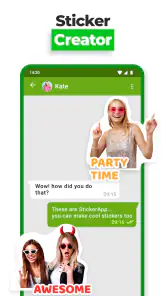
The app is built around creating and sharing sticker packs, with WhatsApp as its clearest destination. That makes it a natural fit for a running group chat: I can turn a familiar photo into a reaction sticker, add a short caption, and send it while the joke is still current. Other platforms can also be part of the sharing flow, but the exact experience depends on the app I’m sending to and the connection available at the time.
I wouldn’t treat “share” as meaning every destination behaves identically. If a pack does not appear where I expect, I’d first check that the creation step is complete and then try the handoff again from the app, rather than rebuilding the stickers immediately. That small bit of patience can save duplicated work when the issue is simply a disrupted transfer.
A good fit for quick mobile creativity
On a phone, the most useful workflow is often brief: choose one clear image, crop around the subject, add only the text or doodle that helps the joke land, and place the result in a pack with a sensible theme. I find that restraint matters. A sticker viewed small in a chat can lose detail, so a clean outline and a short phrase usually communicate better than several decorative touches competing for attention.
That makes this a handy choice for people who want personal reactions rather than a full graphic-design project. Parents might build a small set from family photos, friends can collect inside jokes, and someone organizing a casual event could make a themed pack for the group. I’d avoid using private images in a pack meant for broad sharing; once a sticker leaves a one-to-one chat, it can travel farther than intended.
Small choices that prevent rework
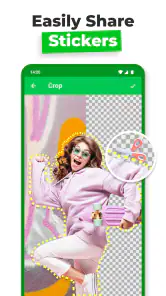
Before cutting out a photo, I look for a subject that stands apart from its background. A busy image can make the edge work fiddly, and adding more effects won’t necessarily fix a cutout that is hard to read. I also group stickers by a single purpose instead of putting every experiment into one pack. That makes the collection easier to browse later and gives me a chance to test a few designs before sharing a larger set.
If I’m creating on the move, I keep the task modest and wait until I can check the result in a conversation before making a lot of similar stickers. The chat view is the real test: a design that looks fine while editing may become crowded at messaging size. This is a practical trade-off with phone-based sticker tools generally, and it favors bold shapes and legible wording over tiny details.
More From Our News Desk

Weather by Xiaomi Review: Clear at a Glance, Less Clear Up Close

X Under Pressure: Can It Recover When Posting Goes Wrong?

Clash of Clans Is Won Between the Battles

Android Auto Makes the Case for Quieter Car Software

MobiOffice: Transforming Mobile Productivity with Seamless Integration

EA SPORTS FC™ Mobile Soccer: Redefining Mobile Sports Gaming
Create Your Own Stickers
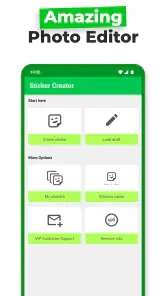
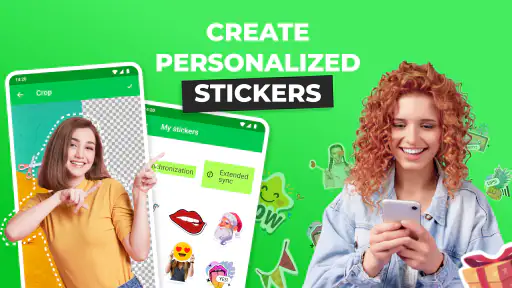
One of the coolest features of Sticker Maker - WAStickers is its ability to transform your photos into stickers. Seriously, how fun is that? You can take any picture from your gallery, cut out the part you want to use, and boom—you've got yourself a custom sticker. The interface is super user-friendly, so even if you're not tech-savvy, you'll find it easy to navigate.
The Fun of Personalization
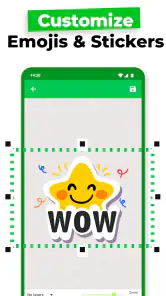
What I really love about this app is the level of personalization it offers. You can add text, doodles, and even emojis to your stickers. It’s like being a digital artist without needing any fancy tools. Plus, the app offers a variety of fonts and colors, so your stickers can be as unique as you are. Trust me, your friends will be asking where you got those cool stickers from!
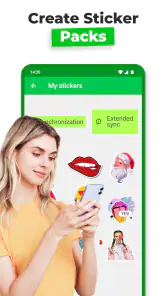
Another awesome aspect is that the app allows you to organize your stickers into packs. This means you can create themed packs for different moods or occasions. Imagine having a sticker pack just for birthdays or another for those inside jokes only your close friends would get. The possibilities are endless!
Easy Sharing
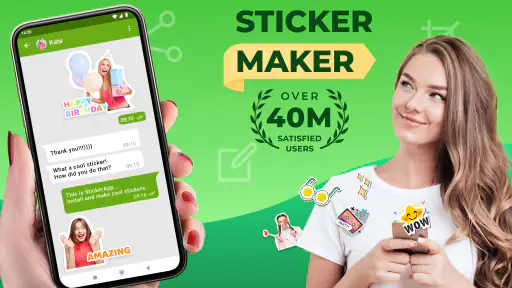
Once your sticker packs are ready, sharing them is a breeze. The app integrates seamlessly with WhatsApp, allowing you to share your creations with just a tap. And it’s not just limited to WhatsApp—you can share your stickers on other platforms too, spreading the fun beyond just one app. It’s a great way to showcase your creativity and bring a smile to someone's face.
Because this is a photography app from ZipoApps, I see its strength as a quick bridge between a picture and a conversation, not as a replacement for a dedicated image editor. It’s free to install, rated for Everyone, and has a 4.6 average from around 675,000 ratings, with over 50 million installs. The current version is 2.2.3, and it runs on Android 5.0 or later. In-app purchases range from $0.99 to $149.99 per item, so I’d check any purchase prompt carefully; casual sticker making does not require treating every optional offer as essential.
Where it fits—and where it doesn’t
Compared with searching through ready-made sticker collections, this app gives me a way to make something tied to a specific person, photo, or shared joke. Compared with a full photo editor, it is more focused and less suited to precise retouching or elaborate layouts. If I needed polished promotional artwork, fine control over layers, or a design that had to look identical across several formats, I’d choose a dedicated editor instead. For quick chat reactions, the narrower purpose is an advantage.
There are trade-offs. Cutting a subject from a complicated background can take patience, and small lettering may not survive the reduction to chat size. The simple workflow helps beginners get moving, but anyone expecting professional selection tools or extensive graphic controls may find it limiting. I’d also keep expectations realistic about connectivity: creating is only part of the process, and sharing relies on the destination behaving properly. If a transfer stalls, I’d check the connection and retry before deleting the pack or starting from scratch.
For a realistic everyday use, imagine a friend sends a photo of a dog making a ridiculous face. I can crop the expression, add a short label, put it in a small pet-reaction pack, and share it with the same group that will understand the reference. I’d make one or two versions first, see which reads clearly in chat, then add more only if they’re useful. That avoids spending time building a large set before knowing whether the idea works at sticker scale.
A practical fit for the right kind of creator
I’d recommend it to people who enjoy personal touches in messaging, especially those who already have photos they want to turn into reactions. It also suits anyone who prefers a straightforward phone workflow over moving images between several editing tools. I’d skip it if I rarely use sticker-friendly chats, don’t want to spend time trimming images, or need a more exact design workflow. The app is most satisfying when the goal is playful and specific, not when every edge and visual detail needs professional precision.
One useful habit is to keep source photos and finished packs organized around the same theme. It makes it easier to revisit an idea without confusing unrelated stickers, and it encourages a cleaner collection instead of a pile of one-off experiments. Before sharing a pack with a larger group, I’d also review every image and caption for context: a joke that works among close friends may not make sense to everyone else.
And guess what? You don’t have to worry about any watermarks on your stickers. The app keeps your creations clean and professional-looking. It’s these little details that make the app stand out in a sea of sticker apps out there.
The Verdict
All in all, Sticker Maker - WAStickers
Making a pack that stays useful
A sticker pack works best when it solves a small, repeatable need instead of collecting every image I happen to like. I’d start with a theme such as greetings, pet reactions, or family occasions, then choose images that make sense together. That way, when I open the pack in a conversation, I’m choosing a reaction rather than searching through a scrapbook. A tidy theme also makes it easier to share the right set with the right people.
There’s a practical balance between personalization and readability. A caption can clarify an expression, but it can also compete with the face or object that makes the image funny. I’d use the text tool for a short cue, not a full sentence, and preview the result at the size it will be used. If the joke needs a long explanation, the source image may not be a strong sticker candidate.
Choosing the right workflow
For a one-off reaction, making a sticker directly from a photo is more convenient than opening a general photo editor, exporting an image, and then finding another tool to package it. For a set that needs consistent typography, careful image cleanup, or several sizes for different uses, a dedicated editor gives me more room to refine the artwork before I turn it into stickers. The right choice depends on whether speed or exact control matters more.
Ready-made sticker libraries are the easier option when I just need a familiar reaction immediately. This app earns its place when the reference is personal: a friend’s expression, a pet’s habit, or a running joke that a public collection could not capture. The trade-off is that the personalized route takes effort. I have to pick the image, make the cutout, and judge whether the finished sticker will make sense to anyone outside the original moment.
On-the-go decisions and connection hiccups
A useful mobile routine is to draft a single sticker while waiting, but postpone sharing a whole pack until I can check that it has reached the intended destination. This keeps a short idle moment from turning into a frustrating editing session if the connection is unstable. I’d also avoid making several near-identical versions before testing one in chat; seeing the actual result tells me whether the crop and lettering work better than repeatedly guessing in the editor.
If the sharing step does not go through, I would separate the problem into two questions: is the pack ready, and is the destination accepting it right now? Rechecking the pack before retrying helps avoid accidental duplicates. If the destination still does not behave as expected, I’d wait and try again when the connection is steadier, rather than deleting a finished set. That is a sensible recovery approach for a tool whose payoff often comes at the point of sharing.
Who will enjoy it most
I think this is especially appealing to people who message the same friends or family regularly and enjoy callbacks that only their group understands. It can also suit someone making a small event-themed collection, provided the stickers are intended for casual chats rather than formal design work. The app’s photo-first approach makes those personal references feel immediate, and its pack organization gives them a home beyond a single message.
On the other hand, I would not choose it as my main creative tool if I needed precise cutout control, polished brand assets, or a design process with lots of revisions. Nor is it a compelling download for someone who never uses custom stickers; the extra personalization only pays off when there is a real conversation or audience for it. That distinction matters more than the number of possible decorative options.
Use it thoughtfully
Because the raw material is often a personal photo, I’d think about who might eventually receive the pack before using an image of another person. A sticker can be forwarded beyond the chat where it began, so a private joke or recognizable face deserves a second thought. For family or group collections, choosing images everyone is comfortable sharing is a simple way to keep the fun from becoming awkward later.
Connectivity shapes the experience most clearly at the handoff: creating a design is only valuable if I can get it into the conversation where it belongs. The app is a good fit when I want quick, personal chat art and can tolerate a little manual trimming and occasional retrying. If I need dependable delivery at a specific moment, intricate image editing, or a ready-made reaction without preparation, another route may suit me better. For casual sticker-making, though, the best reason to use it is that it turns an ordinary photo into a shared reference.
Sticker Maker - WAStickers Frequently Asked Questions
Can Sticker Maker - WAStickers be used for anything besides WhatsApp stickers?
The app is focused on creating personalized stickers for messaging, with WhatsApp as the destination described for adding and using your finished collections. Its tools let you start with images and turn them into sticker designs, so it may suit users looking to customize their chats rather than edit photos for general purposes. Consider whether that WhatsApp-centered workflow matches what you want before downloading.
What kinds of images can I turn into stickers?
You can use your own images to create personalized sticker designs, including photos or other pictures you have permission to use. This gives you room to make stickers from visuals that feel personal rather than relying only on standard designs. The key appeal is transforming an image into something you can add to WhatsApp and send in chats; choose source pictures you are comfortable using.
Is Sticker Maker - WAStickers suitable for beginners who have never made stickers before?
Yes. Sticker Maker - WAStickers is designed to make creating custom stickers approachable, even if you have not used a sticker-making app before. You can start with your own images and use the app’s tools to turn them into personalized designs. The basic idea is simple: create a sticker collection, then add it to WhatsApp so you can use the results in chats.
Can I use my own photos and images to create stickers?
Yes, you can upload your own images and use them to make personalized stickers. This makes the app useful for turning photos or other pictures into visuals that feel more personal than a standard sticker pack. After creating your designs, you can add them to WhatsApp and share them in chats. As with any image-editing app, choose pictures you have permission to use.
What is Sticker Maker - WAStickers and how does it work?
Sticker Maker - WAStickers is an app that allows users to easily create personalized stickers for use in messaging apps like WhatsApp. Users can upload their own images or use the app’s tools to design unique stickers. Once created, these stickers can be added to WhatsApp and shared in chats, enhancing communication with fun, personalized visuals.
Pros
- User-friendly interface for creating stickers.
- Quickly import images from your gallery.
- Wide variety of editing tools available.
- Easy to share stickers on WhatsApp.
- Supports multiple languages.
Cons
- Contains in-app advertisements.
- Limited free sticker packs available.
- Requires internet for some features.
- Occasional app crashes reported.
- No direct integration with other apps.
- Category
- Photography
- Version
- 2.2.3












