Cut and Paste Photos
- 4.21K
- 4.6
- Installs
- 10.00M
- Price
- Free

Screenshots
Analysis by Reviewed
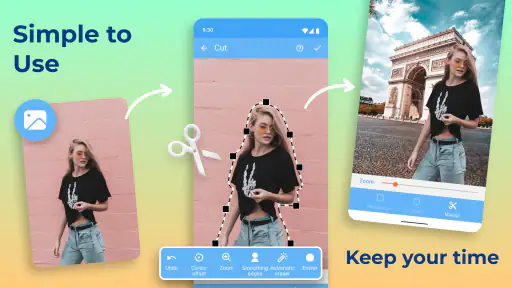
I usually reach for a photo-cutout app when I have a clear, playful idea but don’t want to open a complicated desktop editor. Cut and Paste Photos is built around that simple job: separating part of one image and placing it into another. It’s a photography app from ZipoApps, and its appeal is the directness of that basic workflow rather than a promise to replace a full editing suite.
Who will get the most from a quick composite
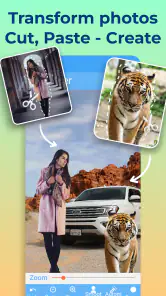
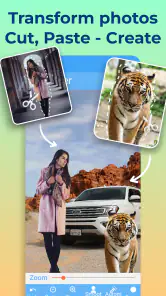
I’d recommend this kind of focused editing to someone who wants to make a joke image, a casual greeting, or a social post without learning a large editor. The appeal is practical: you can start with two pictures and work toward one clear visual idea. If your goal is simply to put a friend beside a landmark, or add a pet to a playful scene, cutting out the subject is more useful than arranging two full photos side by side.
It’s also a reasonable fit for occasional users who don’t want to build a complicated editing routine. You don’t need to plan a whole design project to get value from it; a single cutout can be enough. On the other hand, I’d steer away if you need exact masking for product photography, a client deliverable, or a design that must match a specific color and lighting standard. A general editor with more fine-grained controls is a better choice when precision is the point, not just a fun result.
The app is free to download, while in-app purchases range from $0.99 to $149.99 per item. I’d treat the free download as a way to see whether the workflow suits you, and check any purchase details carefully before confirming one. Its Everyone age rating makes it broadly approachable, though parents should still use their usual judgement about what images children edit or share.
Getting a Cutout to Look Convincing
The first thing you’ll notice about the interface is that it points you toward making a composite, not managing a large library or adjusting every aspect of a photograph. That focus makes the idea easy to grasp, but the quality of the result still depends on your source images and how carefully you define the subject. A clean, well-lit picture with a clear edge is much easier to work with than a busy shot where hair, branches, or similar colors blend into the background.
Where the Editing Can Get Tricky
The app’s automatic cutout approach can save time, but I wouldn’t expect every selection to be ready for sharing without a closer look. Fine edges and overlapping objects are the usual trouble spots in this kind of edit. When a result looks rough, try starting with a photo where the subject stands apart from its background; that often helps more than repeatedly adjusting a difficult image.
A useful habit is to decide on the background before cutting out the subject. If the lighting and viewpoint in the two pictures clash, even a tidy cutout may look pasted on. Matching a bright outdoor subject with a similarly bright scene, for example, can make a quick composite feel more natural. For a deliberately silly meme, that mismatch may be part of the joke rather than a flaw.
More From Our News Desk

Weather by Xiaomi Review: Clear at a Glance, Less Clear Up Close

X Under Pressure: Can It Recover When Posting Goes Wrong?

Clash of Clans Is Won Between the Battles

Android Auto Makes the Case for Quieter Car Software

MobiOffice: Transforming Mobile Productivity with Seamless Integration

EA SPORTS FC™ Mobile Soccer: Redefining Mobile Sports Gaming
Setup Checks Before You Start
If you can’t find the picture you want, first check that it is available in the image picker and that you are looking in the right place on your device. A simple restart of the app can also help when an image doesn’t appear as expected. I’d keep the original photos untouched and work from copies when the edit matters, so you can start again without losing your source material.
The current version is 2.6.8, and Android 6.0 is the stated minimum system requirement. It has a 4.6 average from around 352,000 ratings and over 10 million installs, so it has reached a large audience, but popularity alone won’t tell you whether its cutout style suits your needs.
Making the Workflow More Reliable
When a composite starts to go wrong, I find it helps to simplify rather than add more decoration. Get the main subject placed first, then judge the edge and scale before adding text, stickers, or filters. If the cutout itself is off, extra effects tend to draw attention to the problem instead of hiding it. Saving a version before making a bigger change is a sensible way to preserve a direction you already like.
For a quick everyday use, imagine making a birthday greeting from a clear portrait and a photo of a favorite place. I’d choose the background first, cut the person from a well-lit picture, and keep the added elements restrained so the subject stays readable on a phone screen. That workflow is also useful for a simple invitation or a playful post, where a clean central idea matters more than elaborate retouching.
Recovering when an edit feels stuck
If a cutout is difficult to improve, I wouldn’t keep polishing the same selection indefinitely. I’d undo or start over with a simpler source photo, then check whether the trouble comes from the subject’s outline, the background contrast, or the way the two images fit together. Changing just one of those ingredients at a time makes it easier to see what helped. For example, if the edge looks acceptable but the subject feels out of place, try a different background before attempting another cutout.
It also helps to keep the project modest while you are testing an idea. Place the main subject, inspect the scale, and only then add the secondary elements. If the app closes or the image becomes unavailable, reopening it and checking the image picker is a sensible first step; keeping a copy of the source means you can rebuild without damaging the original. I would avoid assuming that repeated taps will fix a stalled edit, especially when the underlying issue may be a difficult image rather than a temporary glitch.
When the source photo, not the app, is the problem
Some apparent editing failures begin before the image reaches the app. A small subject in a wide shot leaves less clear detail to work with, while a dark subject against a similarly dark background makes its boundary hard to judge. I’d crop or choose a closer, clearer source when possible, rather than expecting a quick cutout tool to reconstruct details that are hard to see in the original. This is a useful distinction: a rough result does not automatically mean the app has malfunctioned.
Composition can cause a similar mismatch. A person photographed from below may look strange pasted into a scene viewed from above, even if the outline is clean. Before blaming the editor, compare the camera angle, apparent distance, and direction of light in both pictures. Those small checks often matter more to believability than adding another filter. If the images were chosen for comedy, of course, an intentionally awkward perspective can be part of the point.
Choosing between a cutout app and other editors
Compared with a standard photo editor, this app’s strength is the narrow, approachable task of combining a selected subject with another image. A full editor is the better fit when you need careful retouching, detailed edge control, or consistent color work across several pictures. A collage tool makes more sense when you want to show whole images together without removing anything. The choice depends on the shape of the job: subject isolation favors this workflow; tonal polish and page layout favor other tools.
For someone deciding whether to install it, the key question is how often they want to make composites rather than general photo adjustments. ZipoApps released it on Apr 25, 2018, and its large install base suggests the basic idea has broad appeal, but an established audience does not guarantee that every tool or result will suit every person. I’d try it for informal, image-led projects and move to a more comprehensive editor when the brief calls for repeatable precision.
When Another Tool Is the Better Choice
This is a focused option for casual composites, not the tool I’d choose for detailed masking, extensive color matching, or a polished campaign image. A general photo editor is usually more suitable when the job involves careful tonal adjustments or many precise refinements. Conversely, a collage maker may be quicker if you only want to arrange whole pictures in a grid and don’t need to isolate a subject. The trade-off here is convenience for a narrow task rather than maximum control.
Unleashing Creativity with Ease
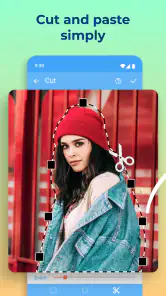
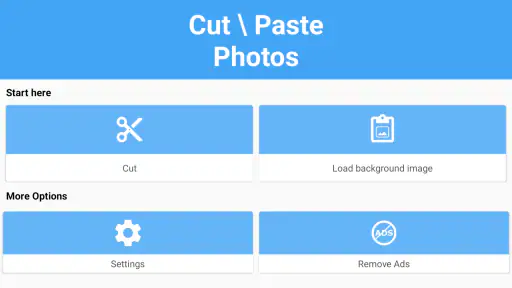
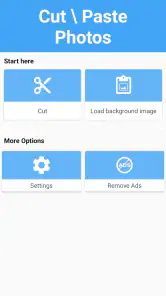
The first thing you’ll notice about Cut and Paste Photos is its user-friendly interface. It’s like walking into a candy shop for your photos. The app allows you to effortlessly cut out parts of any picture and paste them onto another image. The possibilities are practically endless! Whether you’re looking to create a funny meme or a professional-looking montage, this app has got you covered.
Simple Tools for Stunning Results
One of the standout features is the auto-cutting tool. It’s pretty much like magic. You simply outline the area you want to remove, and the app does the rest. It’s not just about cutting, though. The app also provides a variety of editing tools like filters, text, and stickers to add that extra flair to your creations. I found myself spending hours just playing around with all the possibilities.
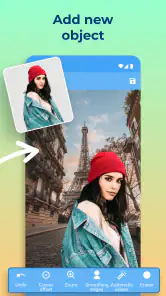
Another feature that deserves a shoutout is the app’s ability to handle multiple layers. This means you can keep adding elements to your images without losing quality. It’s perfect for those of us who like to go a little overboard with our edits!
Sharing is Caring
Once you’re done crafting your masterpiece, sharing it is a breeze. The app is integrated with major social media platforms, letting you post your creations directly from the app. This feature is a lifesaver, especially when you’re in a hurry to share your latest work with the world.
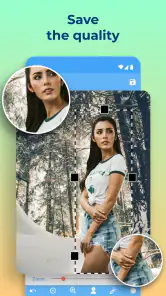
But it’s not just about social media. The app also allows you to save your creations in high resolution, which is great if you’re looking to print them out or use them in other projects. It’s these little touches that make the app stand out in a crowded market.
How I’d approach sharing and saving
For an image meant for a phone screen, I’d review it at the size people are likely to see it rather than judging only while zoomed in. A tiny edge flaw may disappear at normal viewing size, while an oversized subject or mismatched placement can remain obvious. Before sharing, I’d check that the whole composition reads clearly and that any text remains easy to see against its background. That quick final look is more useful than adding another decorative effect.
If I wanted to reuse a composite elsewhere, I’d keep the source pictures and the finished image separate so I could return to the originals for another version. A social post, a greeting, and a print can call for different framing, so one saved result may not be ideal for every destination. The app’s mention of high-resolution saving is appealing for reuse, but I’d still inspect the exported result before relying on it for a print or a project where fine detail matters.
The Bottom Line
In a world where visual content is king, having a tool like Cut and Paste Photos is invaluable. It’s perfect for anyone looking to add a personal touch to their photos without needing a degree in graphic design. The app is straightforward yet powerful, making it accessible to both beginners and seasoned editors.
So if you’re ready to dive into the world of creative photo editing, give it a try. It’s a fun, intuitive app that brings out the artist in everyone. Plus, it’s a great way to turn your ordinary photos into something extraordinary. Trust me, you won’t be disappointed!
My practical verdict
I see this as a handy, purpose-built option when I already know the image I want to make and the source photos are reasonably clear. It is especially suited to quick personal projects, playful posts, and simple greetings where a slightly imperfect edge will not ruin the result. The strongest tip I’d give a new user is to choose compatible pictures first, then keep the edit simple until the subject sits naturally in the scene.
I’d skip it if my priority were exact professional masking, dependable detailed retouching, or a carefully matched commercial image; those jobs call for more control than a focused cut-and-paste workflow promises. For casual experimentation, though, it offers an approachable route from an idea to a composite without requiring a desktop editor. That is the reason I’d keep it in mind: not as an all-purpose photography suite, but as a direct way to make one kind of image quickly.
Cut and Paste Photos Frequently Asked Questions
Can I combine people or objects from different photos?
Yes. Cut and Paste Photos is made for cutting a subject or other part from one image and placing it into another, which is useful for simple composites, playful edits, and photo montages. The result depends on how carefully you select the edges and position the cutout. You can use your own images as the starting point for these edits.
Can I save or share the photos I edit?
The app is intended for creating customized images by cutting and pasting parts of photos, so saving or sharing a finished edit may be an important part of your workflow. Before installing, consider whether you want a straightforward way to make montages for personal use or social sharing. Keep your original images, too, if you may want to revisit an edit later.
Does Cut and Paste Photos include ads or paid features?
Cut and Paste Photos is free to download, and it also offers in-app purchases. Those purchases range from $0.99 to $149.99 per item, so it is sensible to review any purchase prompt before proceeding. You can begin with the free app and decide whether its available tools meet your needs before spending money.
What devices can run Cut and Paste Photos?
Cut and Paste Photos is a photography app for Android devices, and it requires Android 6.0 or later. Check your device’s operating system before downloading so you know it meets that requirement. The app is developed by ZipoApps and is rated for Everyone, making it suitable for a general audience.
What is Cut and Paste Photos app used for?
Cut and Paste Photos app is designed to allow users to easily edit images by cutting out parts of a photo and pasting them onto another image. This app is perfect for creating fun and creative photo montages or for professional use in designing graphics. Its user-friendly interface makes complex photo editing accessible to everyone.
Pros
- User-friendly interface for easy navigation
- High-quality photo editing tools
- Supports multiple image formats
- Fast processing with minimal lag
- Offers creative and fun editing options
Cons
- Contains ads that can be intrusive
- Limited free version features
- Occasional crashes on older devices
- Requires internet for some features
- Subscription needed for premium tools
- Category
- Photography
- Version
- 2.6.8












