Gaming Mode - Game Booster PRO
- 4.37K
- 4.4
- Installs
- 10.00M
- Price
- Free

Screenshots

Analysis by Reviewed
I’d decide whether Gaming Mode - Game Booster PRO belongs on my phone by asking a practical question: do I want game-specific routines, or am I mainly hoping an app will make demanding games run faster? Those are different needs. This personalization app is built around preparing a phone for play, so its strongest case is helping me manage distractions and repeat a preferred setup. I would not install it expecting a guaranteed fix for lag, overheating, or hardware limits.
Start with the interruption you want to solve
Before changing settings, I’d identify what most often disrupts a session. If it is incoming alerts, call interruptions, or having to adjust the same controls before each game, a dedicated gaming routine may be useful. If the problem is a game struggling with its own graphics demands, I’d first lower its visual settings or check the phone’s built-in tools. A booster cannot turn a device into more powerful hardware.
It is also worth deciding what you can safely mute. A quiet setup can be welcome during a focused match, but it may be the wrong choice while waiting for an important call or delivery update. I’d use different levels of restriction for different situations rather than treating every session as a reason to block everything.
Let's Talk Performance Boost
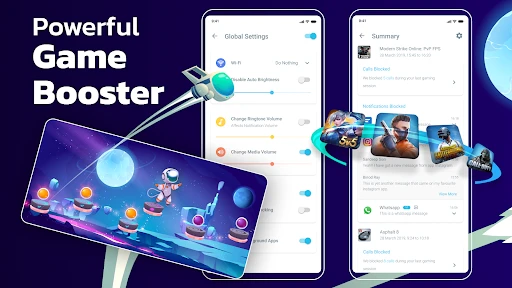
First things first, performance. We all want our games to run smoothly, and that's precisely what this app promises. With just a tap, this app optimizes your device for gaming by freeing up RAM, boosting CPU performance, and silencing those pesky notifications. It's like having a dedicated gaming device without actually needing one!
Customizable Game Profiles
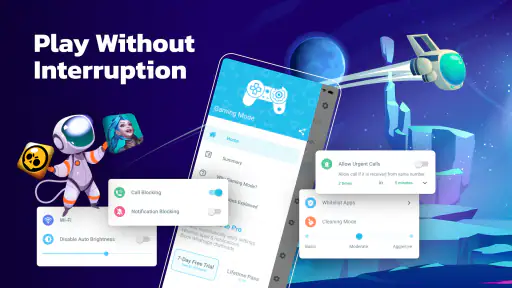
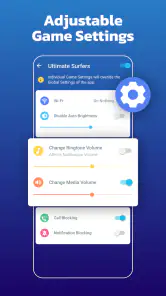
One of the standout features of this app is its ability to create customizable game profiles. Ever wished you could have different settings for different games? Well, now you can. Whether you want to tweak the brightness, change the ringtone, or even disable Wi-Fi for a distraction-free experience, this app has got you covered. It's all about that personalized gaming experience, and I love how easy it is to set up.
The practical advantage is consistency: you can make a profile for a game you play in short bursts and another for a longer, more focused session. Before relying on any profile, I would test it with a game that needs a connection or sound alerts. Turning off Wi-Fi, for instance, is only sensible when the game does not depend on it; a setting that helps concentration in one title could make another unusable.
Use profiles as small, testable routines
I’d keep the first profile deliberately simple. For a game I play while waiting for an appointment, I might prioritize fewer interruptions without changing connectivity. For a longer session at home, I could try a more restrictive setup, then check that the game still behaves as expected. Changing one setting at a time makes it easier to identify what helped and to undo anything that caused trouble.
You May Like

Clash of Clans Is Won Between the Battles

Android Auto Makes the Case for Quieter Car Software

MobiOffice: Transforming Mobile Productivity with Seamless Integration

EA SPORTS FC™ Mobile Soccer: Redefining Mobile Sports Gaming

How Microsoft OneDrive Became a Mobile Productivity Giant

How Google Translate Breaks Language Barriers Effortlessly
This is particularly useful when the phone has more than one role. A device used for work, family messages, navigation, and games can benefit from a predictable switch into play mode, but the profile should suit the context. I would not use the same approach on a commute as I would at home: missing an important notification can be a worse trade-off than an occasional interruption.
User-Friendly Interface
Now, let's talk about the interface. I'm not a fan of overly complicated menus, and thankfully, this app keeps it simple. The intuitive layout ensures that even the least tech-savvy among us can navigate and use all the features without a hitch. It's straightforward, effective, and gets the job done without any unnecessary frills.
In a typical day, I might open a game during a commute break, then return to messages and other apps afterward. A dedicated gaming setup can make the transition into play feel deliberate, but I would still check that normal notification and sound behavior returns once I am finished. This small habit matters more than chasing a theoretical performance gain: it avoids missing something important after the session ends.
A realistic session, from launch to return
Imagine having ten minutes free between errands and opening a game you usually play in short bursts. The useful routine is not necessarily the most aggressive one: I’d start the game with a profile that reduces only the interruptions I can afford to miss, play, then leave the session and check that the phone is back to its ordinary behavior. That simple before-and-after check helps catch an unwanted setting before it affects the rest of the day.
For a game that depends on a stable connection, I would leave Wi-Fi alone and test the rest of the profile separately. For a title I play offline, disabling connectivity might be reasonable if I want fewer distractions, but it can also prevent online features from working. The right setup depends on the individual game, not on a universal “best” profile.
Extra Goodies
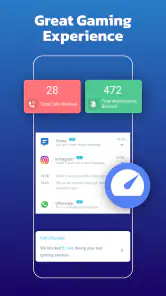
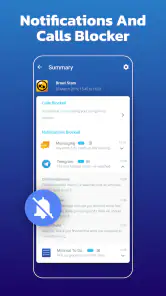
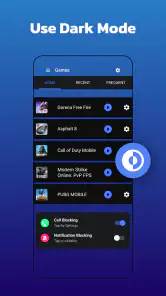
Beyond the core functionalities, Gaming Mode - Game Booster PRO throws in some extra tools to enhance your gaming. Think of features like auto-rejecting calls, blocking notifications, and clearing background apps. These might sound like little things, but trust me, they make a world of difference when you're deep into a game. Plus, there's the added benefit of battery optimization, so your gaming sessions can last even longer.
Compared with relying only on Android’s built-in focus or notification controls, this app’s appeal is its game-by-game approach. The built-in options may be enough if you want a broad, simple quiet mode and do not need separate routines. A general phone-cleaning utility is also not automatically a better choice: I would avoid installing several tools that all claim to manage memory, since overlapping interventions can add clutter without making a game feel smoother.
Where the alternatives make more sense
If I only need one quiet period for the whole phone, the built-in focus and notification controls are a sensible place to start. They avoid adding another app and may be easier to manage for someone who does not switch between different gaming habits. A device’s own gaming tools, where available, may also be a better fit for someone focused on controls specific to that phone rather than a general-purpose profile manager.
On the other hand, a person who repeatedly changes notification preferences for different games may prefer a dedicated utility. The trade-off is another layer to maintain: if the app and system settings both affect alerts, I’d test them together instead of assuming one setting overrides the other. For someone who wants more control over the whole phone, rather than a gaming routine, a broader automation tool may fit better—but it can demand more setup than this straightforward approach.
Who will get the most from it
I see the best fit for someone who plays often, gets interrupted, and appreciates setting up a preferred routine once rather than adjusting the phone manually before every session. It may also suit a household phone shared with other daily tasks, where a game profile can make the switch into play more predictable. If you rarely play, already use your phone’s focus settings, or want a hardware-level fix for a demanding game, I would skip another utility and start with the controls already on the device.
The app is a free personalization tool from ZipoApps, rated for Everyone, and it has a 4.4 average from around 407,000 ratings, with over 10 million installs. It was released in 2019 and is currently at version 1.9.15, for Android 6.0 and later. Optional in-app purchases range from $0.99 to $149.99 per item, so I would explore the free experience first and check the purchase details carefully before paying. The large audience suggests it has broad appeal, but popularity alone cannot tell you whether its controls fit your phone or habits.
The purchase range is a reason to be deliberate, not a reason to assume payment is necessary. I’d try the no-cost experience against a specific annoyance first and decide whether any paid option solves a problem I actually have. If the basic routine already does what I need, there is little value in paying simply because extra options are offered; if I do consider a purchase, I’d review what it includes before confirming.
What to check before committing to a routine
A useful first test is whether the settings you choose behave as expected on your own device. Try the profile with a game that does not rely on every phone function, then check alerts, sound, and connectivity afterward. If an option produces an inconvenient side effect, remove it rather than stacking more settings on top. This keeps troubleshooting simple and makes the app easier to trust in everyday use.
I would also distinguish between convenience and measurable performance. Fewer interruptions can make a session feel better even if the game itself runs no faster. If the main complaint is stuttering, compare the experience with the game’s graphics reduced and unnecessary apps closed. If that does not help, a profile manager may not address the underlying issue, and I would avoid repeatedly changing settings in pursuit of a speed boost it cannot promise.
One sensible way to try it is to start with a single game and change only one setting at a time. That makes it easier to tell whether fewer interruptions, a profile adjustment, or clearing background apps actually improves your experience. If the phone still stutters, check the game’s own graphics settings and close apps you do not need rather than assuming a booster can overcome the device’s limits. This is a more useful test than changing every option at once.
In conclusion, this app is a must-have for any serious mobile gamer. It’s not just about boosting performance; it’s about creating an optimal gaming environment tailored to your needs. So, if you’re tired of interruptions and lag, give Gaming Mode - Game Booster PRO a shot. Trust me, your gaming life will thank you for it!
My recommendation
I’d recommend it most to regular players who want a repeatable way to prepare for different games and are willing to check that each profile suits the moment. Its practical value is in reducing setup friction and helping protect a focused session, not in replacing device-level performance improvements. If you already have a reliable focus routine, play only now and then, or need a fix for weak hardware, the built-in controls or game settings are likely the better first choice.
Gaming Mode - Game Booster PRO Frequently Asked Questions
Does Gaming Mode - Game Booster PRO work on iPhones or iPads?
Gaming Mode - Game Booster PRO is an Android app, so it is not intended for installation on iPhones or iPads. If you are considering it, check that your device runs Android 6.0 or later before downloading. iOS users will need to look for a different app designed for Apple devices.
What does Gaming Mode - Game Booster PRO do when a game starts?
The app is built to help prepare your device for gaming by applying gaming-focused settings, such as limiting interruptions and managing device resources. Its aim is to keep attention and available resources centered on play. The exact effect can depend on the device, game, and settings you use, so it is sensible to try it with the games you play most.
Can I choose which games use Gaming Mode - Game Booster PRO?
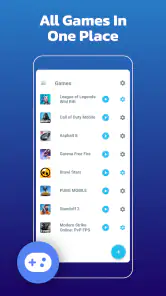
Gaming Mode - Game Booster PRO is intended to support gaming sessions and let you tailor the experience to your preferences. Before relying on it for every title, check how its available settings work with the games installed on your device. Game behavior and device needs vary, so a configuration that feels useful for one game may not be ideal for another.
Will Gaming Mode - Game Booster PRO block calls and notifications while I play?
The app is designed to help reduce interruptions during gaming, including by managing notifications. This can be useful when you want to concentrate on a match or avoid alerts covering the screen. Consider which alerts you still need to receive, and review the app's settings so its behavior suits your routine rather than leaving you unaware of something important.
Do I need to root my Android device to use Gaming Mode - Game Booster PRO?
Gaming Mode - Game Booster PRO is intended for Android users who want gaming-related device settings, and it does not require root access. That makes it suitable to try without changing your device through rooting. As with any utility, review the permissions and options it presents during setup, and use only settings that you understand and are comfortable enabling.
Pros
- Enhances gaming performance significantly.
- Reduces background app interference.
- Customizable settings for different games.
- Improves device battery management.
- User-friendly interface for easy navigation.
Cons
- May not support all devices.
- Some features require in-app purchases.
- Occasional ads may disrupt experience.
- Limited support for non-gaming apps.
- Potential minor bugs with updates.

- Category
- Personalization
- Version
- 1.9.15













