Camera endoscope / OTG USB
- 366.00
- 3.3
- Installs
- 1.00M
- Price
- Free
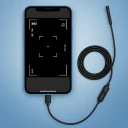
Screenshots
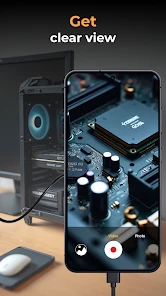
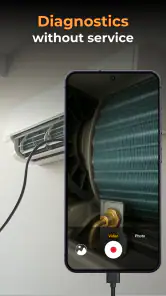
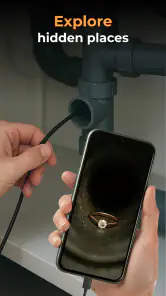
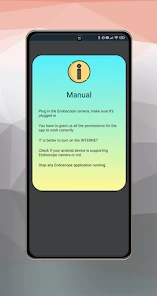
Analysis by Reviewed
If you’re trying an endoscope camera for the first time, the key thing to know is that the app is only one part of the setup: you also need a compatible camera and a phone connection that works with it. I’d treat Camera Endoscope / OTG USB as a practical viewing tool, not a magic fix. Its job is to help you see into places a normal phone camera cannot reach, so the best first test is somewhere easy to access and safe to inspect.
What to expect from the app
This is a free app from One Music Player in the Libraries & Demo category, with an Everyone content rating. It has an average rating of 3.3 from around 8,300 ratings, alongside roughly 366 written reviews, and has passed one million installs. Those figures suggest a useful but mixed experience: I would approach it as a straightforward utility whose success depends partly on the camera and phone you connect, rather than expecting a polished, universal inspection system.
The app is at version 46.0 and runs on Android 5.0 or later. The basic download is free, while optional in-app purchases range from $0.99 to $99.99 per item. I’d start with the free experience and see whether the camera connects and gives you a usable view before considering any purchase. If you only need to inspect something occasionally, paying for extras may not be worthwhile.
Making the first connection
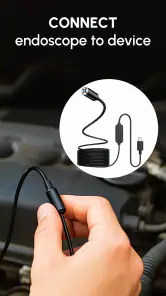
Before plugging anything in, check that your endoscope is intended to work with your phone’s port and connection method. A USB camera that does not match the phone’s connection needs will not become compatible just because the app is installed. Keep the first test simple: connect the camera, open the app, and see whether a live image appears before guiding the cable into a cramped or delicate space.
For a reassuring first success, point the camera at a nearby, well-lit surface. If the picture appears, move it slowly and learn how the cable responds; the view can shift sharply when the tip turns. If nothing appears, unplugging and reconnecting once, checking the physical connection, and confirming the camera is designed for your phone are sensible first checks. This is more useful than immediately assuming the camera is broken or trying it somewhere hard to retrieve.
Getting Started with the Gadget
First things first, setting up the Camera Endoscope / OTG USB is a breeze. You just connect it to your phone via the USB port, and voila, you’re ready to explore the unseen. Most of these endoscopes come with a few handy attachments—like hooks and magnets—that make it super versatile, whether you’re fishing out lost items or inspecting the innards of your car’s engine.
Features that Stand Out
One of the standout features is the camera quality. It’s surprisingly good for such a compact device. You get a clear, crisp image with adjustable LED lights to ensure visibility, even in the darkest nooks and crannies. Plus, the camera is waterproof, so exploring drainpipes or any wet area won’t be a problem.
More From Our News Desk

Clash of Clans Is Won Between the Battles

Android Auto Makes the Case for Quieter Car Software

MobiOffice: Transforming Mobile Productivity with Seamless Integration

EA SPORTS FC™ Mobile Soccer: Redefining Mobile Sports Gaming

How Microsoft OneDrive Became a Mobile Productivity Giant

How Google Translate Breaks Language Barriers Effortlessly
The length of the cord is also worth mentioning. Depending on the model, you can get a cable that extends a few meters, allowing you to delve deep into places you wouldn’t normally reach. This flexibility is a massive plus, whether you're a DIY enthusiast or just someone who loves a good gadget.
First jobs and real-world limits
Rather than beginning with a deep pipe, I’d choose a low-risk target such as looking behind a cabinet or checking an accessible gap beneath an appliance. That gives you a chance to learn how the image changes as the camera rotates and how much slack the cable needs. A common point of confusion is expecting the picture to behave like a phone selfie camera: with the camera tip angled or turned, left and right can feel unintuitive. Rotate it slowly and use a nearby reference point to work out which way the lens is facing.
In a realistic household situation, a small object slips beside a washing machine. I’d first check the gap with the camera, then decide whether there is a clear way to retrieve the item before using an attachment. The camera can help locate it, but it does not make a narrow gap safer to reach into, and a magnet or hook is only useful if the accessory fits the object and the space. This is a good example of the app’s strength: it can reduce guesswork before you move furniture or call for help.
Compared with a flashlight and mirror, an endoscope can show a live view farther inside a narrow opening, but it depends on a compatible camera and a working phone connection. A dedicated inspection screen may be more convenient for frequent repair work, while a phone-based setup makes more sense if you already own the camera and only need occasional checks. I would skip this app if you want a general-purpose camera, expect it to diagnose a fault automatically, or do not have a compatible endoscope to connect.
Performance in Real-Life Scenarios
Using the endoscope is as simple as firing up the app on your phone. The interface is usually user-friendly, offering live video streaming that helps you navigate through tight spaces. I used it to check a clogged pipe, and it provided a clear view of the blockage, saving me a call to the plumber. It’s like having a mini version of those high-tech inspection cameras used by professionals.
However, it’s not just for household problems. I’ve also seen folks use these endoscopes in more creative ways—like checking the insides of musical instruments or looking inside small electronic devices. The versatility is genuinely impressive.
For a more useful inspection, I’d move in short stages instead of pushing the camera all the way in at once: pause to check the image, note where the cable is, then advance only when the route stays clear. If the picture becomes difficult to interpret, pulling back a little can be more effective than twisting the cable repeatedly. A visible mark on the cable can also help you estimate how far it has gone, especially when you need to retrace the same path.
There are limits to what a live view can tell you. A dark or awkward angle may make an object look like a blockage, and seeing a problem does not necessarily reveal its cause or the safest repair. I’d use the image to decide what to inspect next, not as a substitute for professional help with a serious plumbing, electrical, or vehicle issue. Avoid forcing the camera into a space where it could snag or be difficult to retrieve.
Choosing whether it fits your routine
This setup is most appealing if you already have an endoscope camera, like solving small household mysteries, or want to inspect hard-to-see areas before deciding what to do. It can also be handy for hobbyists checking an instrument or examining a component without taking everything apart. If you only need a one-time look, the free app is a sensible place to begin; if your work depends on dependable inspections every day, a dedicated tool may be the better choice.
A few practical questions are worth settling before your first job. Will it work with my camera? The deciding factor is whether the camera and phone connection are compatible, so test them together in an easy spot first. Can it help find a lost item? It can show where an item is if the lens can reach the space, but retrieval still depends on access and any suitable attachment. Is it suitable for wet areas? The original article describes waterproof camera hardware, but I would check the camera’s own instructions and use it only within its stated limits rather than assuming the app makes every setup waterproof.
Getting more reliable results from a phone-based inspection
One useful habit is to separate connection trouble from image trouble. If the app shows no picture, keep the camera outside the target area while you check the connection; if a picture appears but is hard to read, the issue may instead be the angle, lighting, or the surface in front of the lens. Changing one thing at a time makes it easier to tell what helped, rather than moving the cable, changing the light and reopening the app all at once.
For a small inspection, I’d also decide in advance what answer I need. “Is there an object in this gap?” is a manageable question. “What exactly is wrong inside this machine?” may be much harder to answer from a close-up view. That distinction keeps the app useful: it can help me choose whether to investigate further, but it should not turn an uncertain picture into a confident diagnosis.
When a different tool makes more sense
The choice between this phone-based arrangement and a conventional flashlight is not simply about which gives a brighter view. A flashlight is faster when the opening is wide enough to see directly and leaves both hands available for ordinary work. The endoscope earns its place when the route bends or the opening is too narrow for a direct look. If the job involves repeated inspections, awkward positioning, or a need to document findings for work, a dedicated inspection camera may be easier to manage than connecting a separate camera to a phone each time.
I’d also be selective about using a flexible camera around delicate items. A cable can reach places a rigid tool cannot, but that flexibility makes it easier to lose track of the tip or brush against something fragile. For an instrument or small electronic device, I would inspect only through an accessible opening and stop if the route requires pressure. The safer workflow is to use the image to plan access, not to treat the camera as a probe that can push past obstacles.
What a first-time user should decide
Before relying on the setup for a repair, I’d test the camera in a few familiar conditions: a bright surface, a shadowed gap, and a slow turn of the tip. This gives a practical sense of how the view responds without needing to learn under pressure. It also helps answer the questions that matter most: whether the phone recognizes the camera, whether the image is clear enough for the task, and whether the cable can be guided and withdrawn without snagging.
The app is best for curious owners who can treat an inspection as information gathering. It is less suitable for anyone who needs guaranteed compatibility without checking their hardware, expects professional diagnostic guidance, or wants a complete repair system rather than a live view. That is the trade-off I’d keep in mind: it can make a hidden area visible, but the camera, connection, and the user’s judgement still determine what that view is worth.
Final Thoughts
In conclusion, the Camera Endoscope / OTG USB is a must-have for anyone who loves tech or needs to solve everyday problems efficiently. It’s affordable, easy to use, and offers a peek into places you’d never normally see. Whether you're a curious explorer or someone who just wants to make their life a bit easier, this gadget is a worthy addition to your toolkit. So go ahead, dive into the world of endoscopes and discover what’s been hiding under your nose all along!
Camera endoscope / OTG USB Frequently Asked Questions
What is the Camera endoscope / OTG USB app, and what should I know before downloading it?
Camera endoscope / OTG USB is an app in the Libraries & Demo category from One Music Player. It is free to download, with in-app purchases ranging from $0.99 to $99.99 per item. The app is rated for Everyone and requires Android 5.0 or later, so check your device’s operating system before installing.
Does the app work with any USB endoscope or camera?
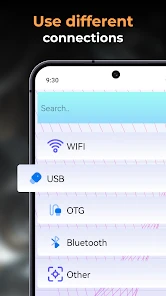
The app’s short description is “Camera endoscope,” and it is presented as a way to connect with an endoscope camera or another device. In practice, the connected camera and phone need to work together over USB OTG, so compatibility can depend on both devices. If you already own an endoscope, check its Android and OTG requirements before downloading.
What is the Camera endoscope / OTG USB app used for?
The Camera Endoscope / OTG USB app is designed to connect and control USB endoscopes, borescopes, and other similar devices via OTG (On-The-Go) support on Android devices. This app allows users to view live camera feeds, capture images, and record videos directly on their smartphone, making it a handy tool for inspection and diagnostics in hard-to-reach areas.
How do I connect my USB endoscope to my Android device using this app?
To connect your USB endoscope to your Android device using the Camera Endoscope / OTG USB app, ensure your device supports OTG connections. Then, simply use an OTG cable to connect the endoscope to your phone. Upon connection, launch the app, and it should automatically recognize the device, allowing you to start viewing the live feed.
Is my Android device compatible with the Camera endoscope / OTG USB app?
Compatibility depends on whether your Android device supports OTG functionality. Most modern Android phones and tablets come with OTG support; however, it is essential to check your device specifications or consult the manufacturer's guidelines. Additionally, ensure that your endoscope is compatible with Android systems and works with the app for optimal performance.
Pros
- Easy connectivity with OTG support.
- High-quality image resolution.
- Compact and portable design.
- Compatible with most Android devices.
- User-friendly interface.
Cons
- Limited compatibility with iOS devices.
- Short cable length for some uses.
- Requires additional app for full functionality.
- No built-in battery
- relies on device power.
- May overheat with prolonged use.
- Category
- Libraries & Demo
- Version
- 46.0











