HD Camera for Android
- 691.00
- 4.4
- Installs
- 5.00M
- Price
- Free

Screenshots


Analysis by Reviewed
If you're someone who loves capturing moments on the go without having to lug around a heavy DSLR, then you're going to want to check out the HD Camera app for Android. This nifty little app not only elevates your smartphone's camera capabilities but also makes photography accessible and fun for everyone. So, grab your phone, and let's dive into what makes the HD Camera app a must-have!
That promise makes the most sense when you treat the app as a convenient alternative to reaching for your phone’s default camera, not as a replacement for dedicated camera equipment. I’d use it for quick portraits, family moments, or a scene I might otherwise miss while opening another tool. It is a free beauty app from One Music Player, rated for everyone, and its audience has grown to over five million installs. Those figures suggest broad interest, but they don’t guarantee the same results on every Android phone: image quality still depends on the device’s camera and the light around you.
Unleashing the Photographer in You
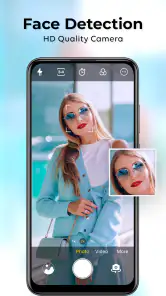
With the HD Camera app, you can transform your Android device into a powerful photographic tool. The app features a user-friendly interface that's easy to navigate, even for those of us who aren't tech-savvy. You'll find a suite of tools that allow you to adjust focus, exposure, and white balance just like a pro. And let's not forget the multiple shooting modes like landscape, portrait, and night mode, which are perfect for capturing any scene with precision.
A repeatable way to get the shot
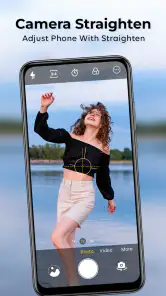
I find it helps to settle on a simple routine rather than changing several controls at once. For a portrait, I’d first check the framing and focus, then make a small exposure adjustment if the face looks too dark or bright. For a landscape, I’d take a moment to confirm the scene is level and choose the mode that suits the light. This makes it easier to tell which adjustment actually improved the result, and it gives you a more consistent look across a set of photos.
A useful everyday example is taking a quick photo of a menu, notice, or handwritten reminder. Focus and exposure matter more than a dramatic filter in that situation: tap carefully on the subject, check that the text is readable, and take another frame if glare or shadows obscure it. For a spontaneous selfie, switching to the front camera before composing saves time, while checking the background helps avoid taking several nearly identical shots. These are small habits, but they matter more than constantly hunting for a new effect.
Features That Stand Out
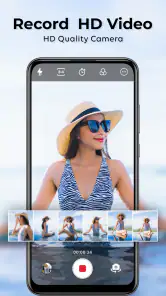
One of the standout features of this app is its ability to shoot in high definition. The images come out crisp, clear, and full of detail. It's like having a mini studio in your pocket. Plus, the app supports both front and rear cameras, so you can snap that perfect selfie or capture a breathtaking sunset with ease.
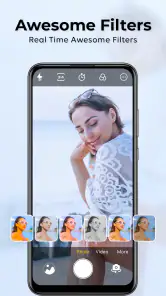
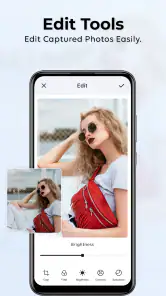
The app's editing tools are another highlight. They're robust yet simple, allowing you to tweak your photos right after taking them. Adjust brightness, contrast, and saturation, or add a filter to give your photos a unique look. Sharing your masterpieces is just a tap away, directly from the app to your favorite social media platforms.
For a cleaner workflow, I’d decide before shooting whether a picture needs an edit or should stay natural. A quick brightness correction can rescue a slightly dim indoor photo, but pushing contrast and saturation too far can make skin and colors look less believable. If you plan to share several pictures together, keeping edits restrained helps them feel like one set. I’d also keep an untouched original when the image matters, so later edits don’t become the only version you have.
Settings and practical trade-offs
Before relying on any camera app for an important moment, I recommend trying it in the conditions where you expect to use it. Check how the controls feel with one hand, whether the chosen camera is the one you want, and how exposure changes affect the scene. The app’s version 1.46 runs on Android 5.0 and later, but a phone’s hardware and software can still shape the experience. A brief test in daylight and indoors is a better guide than assuming every device will produce identical results.
Compared with the camera app already on your phone, this one is appealing if its accessible controls and straightforward edits suit the way you shoot. The default camera may be the better choice when you rely on device-specific options or already know its shortcuts by heart. And if you need extensive retouching or precise editing, a dedicated photo editor is likely a better fit than expecting a capture app to do everything. I’d choose the tool that makes the particular task easier, rather than switching apps just for the sake of it.
User Experience
What I love most about the HD Camera app is how it balances functionality with simplicity. There's no steep learning curve here. From the moment you open the app, everything feels intuitive. Buttons are where you'd expect them to be, and each feature is thoughtfully designed to enhance your photography experience without overwhelming you with options.
The app runs smoothly, with minimal lag, even on older Android devices. And for those of you worried about storage space, the app is lightweight, ensuring it doesn’t hog your phone’s memory.
There are a couple of sensible limits to keep in mind. A camera app cannot create good light where there is none, and a night mode is not a guarantee of sharp results if the phone moves or the subject does. Likewise, high-definition capture doesn’t automatically mean every image will look better than a phone’s built-in camera; the lens, sensor, and conditions remain important. I’d be cautious about making it my only option for fast-moving subjects or a once-only event until I had tested it on my own device.
The app is free to install, with optional in-app purchases ranging from $0.99 to $99.99 per item. I’d explore the basic camera workflow first and consider a purchase only if I encounter a specific paid option I genuinely want. It has a 4.4 average from around 46,000 ratings, alongside 691 written reviews, but I’d treat those as a general signal of reception rather than a promise that every feature will match my preferences. It was released on May 22, 2023, and the age rating is Everyone.
Faster routines for everyday shooting
Speed comes less from tapping quickly than from knowing what you need before opening the camera. If I’m photographing a child’s drawing or a receipt, I decide whether the goal is a readable record or an attractive picture. For a record, I prioritize even light, a straight-on angle, and legible focus; for a portrait, I pay more attention to expression and background. That small decision prevents me from fiddling with filters when the useful result is simply a clear image.
When light is changing, I avoid making several adjustments between every frame. I first settle on the composition, then make one exposure change and compare the result on screen. If the subject is moving, I favor a quick, usable shot over a string of refinements that could mean missing the moment. This is a practical trade-off for any phone camera, and it is especially worth remembering when using a separate camera app that you are still learning.
Where it fits among camera choices
Compared with a basic camera interface, the appeal here is having focus, exposure, white balance, and several shooting modes available alongside straightforward edits. That can be useful when the built-in app feels too bare or its controls are awkward for the way I want to work. On the other hand, many native camera apps are closely matched to their phone’s hardware and may offer more convenient access to manufacturer-specific functions. I wouldn’t assume that installing another camera automatically improves the camera itself; the benefit is the controls and workflow it gives you.
It also occupies a different place from a dedicated editing app. I’d use this camera for capture and quick adjustments, then move to a specialist editor only when a picture needs detailed retouching or a more deliberate finish. Keeping those jobs separate can save time and reduce the temptation to overwork an ordinary snapshot. If you mostly take casual photos and share them as they are, the built-in editing options may be enough; if polishing images is the main point, a camera app alone is unlikely to satisfy you.
Small checks that prevent missed shots
One habit I recommend is checking the front or rear camera before the moment arrives, rather than discovering the wrong view after you have framed everything. I also make a quick test shot when changing from bright outdoors to a dim room. The preview can look acceptable while the final image reveals blur or uneven exposure, so reviewing one frame helps me adjust before taking several more. This is particularly useful for a group photo, where asking everyone to pose again is inconvenient.
For a simple family outing, I might use the rear camera for a landscape, switch to the front for a quick selfie, and use a restrained brightness adjustment later for an indoor snapshot. I would not try to make every image look identical: daylight, shade, and indoor lighting naturally differ. Instead, I aim for a consistent approach—steady framing, deliberate focus, and edits that do not erase the scene’s natural color. That repeatable routine is more valuable than treating every shooting mode as a guaranteed solution.
Who will appreciate it, and who may not
I can see this being useful for someone who wants a little more hands-on control than a simple shutter button offers but does not want a complicated photography setup. It suits casual portraits, travel details, food, documents, and everyday moments where focus or exposure needs a quick correction. The approachable layout is also a plus for a family member who wants to experiment with camera controls without first learning a technical vocabulary.
I’d skip it if my current phone camera already gives me the controls I use and opens more quickly, or if I depend on specialized hardware features tied to the manufacturer’s app. It is also not the right answer for someone expecting a phone app to compensate for poor lighting, a shaky hand, or a camera sensor that struggles in the dark. A more advanced camera workflow or separate editor may be worth learning for deliberate photography, while the native app is often the sensible option for a fleeting moment.
Final Thoughts
In a world where capturing and sharing memories is just a part of everyday life, having a reliable camera app is essential. The HD Camera app is a fantastic choice for anyone looking to elevate their mobile photography game. Whether you're a seasoned photographer or someone who just loves snapping pics of your lunch, this app has something for everyone. Give it a try, and you might just find yourself inspired to explore the world through a new lens.
My recommendation is straightforward: try it if you want an approachable camera with focus, exposure, white-balance controls, shooting modes, and simple edits gathered into one place. It is especially suited to casual photographers who want to make small adjustments without turning every picture into a project. If you prefer your phone’s native camera, need specialized controls, or expect professional-grade results regardless of lighting and hardware, staying with your current setup or choosing a more specialized tool may serve you better. For everyday snapshots, though, a few repeatable habits can make this a handy option to keep available.
HD Camera for Android Frequently Asked Questions
Can I use HD Camera to record video as well as take photos?
Yes. HD Camera is presented as a camera app for capturing photos and recording video, so it may suit users who want both functions in one place. Its store summary highlights bright HD selfies and recording memorable moments. Your experience can also depend on the camera hardware and capabilities of your Android device.
Is HD Camera appropriate for children and families?
HD Camera has an Everyone age rating, which makes it suitable for a broad audience from a content-rating perspective. Families should still consider the app’s camera-related permissions and supervise any in-app purchases, especially when a device is shared. The age rating describes the intended content suitability, while families can use Android settings to manage access and permissions.
What Android version do I need to install HD Camera?
HD Camera requires Android 5.0 or later, so check your device’s software version before downloading. The app is listed as a Beauty app and is designed for Android users interested in taking photos and recording video. Its age rating is Everyone, making it suitable for a broad audience, though device compatibility and camera capabilities can affect how it runs.
Who makes HD Camera, and how popular is it?
HD Camera is developed by One Music Player. It has more than five million installs and an average rating of 4.4 from around 46,000 ratings, giving prospective users a useful sense of its reach and reception. Those figures are only one part of the picture, so it is still worth considering the features, permissions, and purchase options that matter to you.
What are the key features of the HD Camera app for Android?
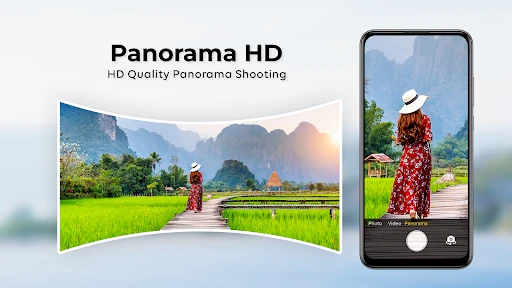
The HD Camera app for Android boasts a variety of features that enhance the quality of photos and videos. Key features include high-resolution photo capture, a wide range of filters and effects, manual controls for exposure and focus, and a user-friendly interface. Additionally, it supports panoramic and slow-motion video modes, making it a versatile tool for both amateur and professional photographers.
Pros
- High-quality photo capture
- User-friendly interface
- Multiple shooting modes
- Fast autofocus
- Lightweight app size
Cons
- Limited editing tools
- Ads in free version
- Occasional bugs
- No cloud backup
- Requires Android 5.0+

- Category
- Beauty
- Version
- 1.46