App Cloner Premium & Add-ons
- 881.00
- 1.9
- Installs
- 5.00M
- Price
- Free

Screenshots
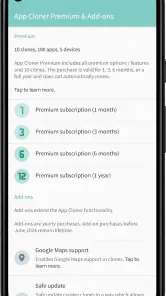
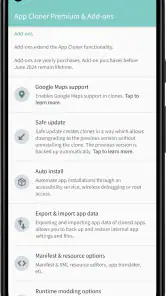
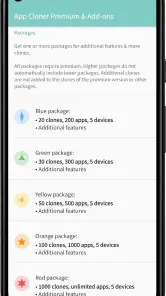
Analysis by Reviewed
For me, App Cloner is best understood as a specialist tool, not a general-purpose app manager: it aims to give you separate copies of selected apps, which can be useful when one login or profile isn’t enough. That idea is appealing, but cloning is not a guarantee that every app will behave like a fully independent installation. I’d consider it when I have a clear reason to separate app sessions, and I’d test the particular app I need before building a daily routine around it.
What the separate copies are good for
A practical example is keeping a personal account and a small-business account apart on the same phone. Instead of repeatedly signing out and back in, you can try creating a second copy and signing into the other account there. The useful distinction is organizational, not magical: the app can make another instance, but you still need to manage its login, notifications, and data as you would with another app.
This can also help with a temporary project. I might use a cloned communication or social app for a volunteer group, then keep my everyday account in the original. Before relying on that setup, I’d check whether the cloned app receives the alerts I need and whether its sign-in process works normally. If an app depends on device-integrity checks or tightly integrated services, a clone may not be a dependable substitute for switching accounts in the official app.
Where it fits among alternatives
Compared with an app’s own account switcher, cloning is a more hands-on route. An official switcher is usually the simpler choice if it handles the accounts I need, because it avoids maintaining another installation. Android’s built-in work-profile tools can be a better fit for people who want a broader separation between work and personal apps, while App Cloner is more focused on making additional copies of individual apps. The right choice depends on whether I need one extra instance or a more systematic separation across the phone.
I’d also avoid treating a clone as a backup or a privacy vault. A duplicate app is not automatically a second, protected device, and changing its appearance should not be mistaken for securing its contents. The sensible approach is to use the app for convenience, keep account security settings enabled, and avoid putting sensitive information into a setup whose behavior you have not checked.
A small test saves frustration
Before cloning an app I rely on, I’d start with a low-stakes one and check the basics: does it open, can I sign in, do its key screens work, and do alerts arrive as expected? I’d also give the original and duplicate unmistakably different names or icons if those options are available in the version I’m using. That simple labeling step can prevent sending a message from the wrong account, which is an easy mistake when two copies look alike.
Storage and maintenance are worth considering too. A second app instance can mean another set of local data to manage, so I wouldn’t duplicate every app just because the option exists. If the second account is only needed occasionally, signing in and out may be less cluttered. If I use both identities every day, keeping separate instances may save time enough to justify the extra upkeep.
More From Our News Desk

Clash of Clans Is Won Between the Battles

Android Auto Makes the Case for Quieter Car Software

MobiOffice: Transforming Mobile Productivity with Seamless Integration

EA SPORTS FC™ Mobile Soccer: Redefining Mobile Sports Gaming

How Microsoft OneDrive Became a Mobile Productivity Giant

How Google Translate Breaks Language Barriers Effortlessly
Choosing a low-risk first app
I’d make the first trial deliberate rather than cloning whichever app happens to be most important. Pick an account that is easy to sign back into and where a delayed alert would not cause a real problem. Then use the copy for a few ordinary tasks, not just a quick launch: send a message, check whether its account stays signed in, and see if you can tell at a glance which instance is open. That test reveals practical friction that a successful installation alone cannot show.
For example, someone who helps run a neighborhood club might keep their personal messaging account in the original app and try the club account in a second instance. If the club uses the account only during evenings, the extra copy may make it easier to keep conversations distinct. But if its notifications are unreliable or the app requires frequent identity checks, a supported account switcher—or simply using a separate device for the role—may be the less stressful choice.
What the extra instance does not solve
Cloning addresses the inconvenience of having another app instance; it does not take care of the responsibilities attached to another account. You still need to remember which profile is active, keep credentials safe, and review where messages or files are being saved. I would also avoid assuming that separate icons mean separate security boundaries. The distinction is useful for organization, but it should not replace careful account and device practices.
It is worth thinking through the exit plan before setting up a second copy. If you stop using it, make sure you know which account is signed into the original and which is in the clone before removing anything. I would not uninstall a copy until I had checked that any information I need is available through the service itself or another reliable route. This is ordinary account housekeeping, but it matters more when two similar instances are sitting side by side.
If you’ve ever wanted to make a carbon copy of your favorite apps, then App Cloner Premium & Add-ons might just be your new best friend. I dove deep into this app and let me tell you, it’s quite the game-changer. So, grab a cup of coffee, and let’s explore what makes this app so special.
Getting Started with App Cloner
Now, before you get all excited, let’s break down what App Cloner Premium & Add-ons does. At its core, this app allows you to create multiple versions of your existing apps. Imagine having separate instances of your social media apps for personal and work use. Pretty neat, right?
App Cloner is a free app in the Libraries & Demo category, developed by App Listo. It has an average rating of around 1.9 from roughly 27,000 ratings, alongside about 881 written reviews, and has been installed over 5 million times. It is rated for Everyone, and its listed release date is November 17, 2018. Version 3.4.0 requires Android 5.0 or later. The app is free to install, while in-app purchases range from $10 to $320 per item, so I’d check the cost of a specific add-on before deciding it is part of my setup.
Installation is a breeze. Simply download from the official store, and you’re good to go. Once you open it, you’re greeted with a clean, intuitive interface that even a newbie can navigate without much fuss. The app offers a plethora of customization options, but more on that later.
Cloning in Action
So, how does cloning work? It’s as simple as selecting the app you want to clone, choosing your preferred settings, and hitting the clone button. Boom! You’ve got yourself a duplicate. The cloned app behaves just like the original, but you can customize its name, icon, and even its permissions. This is particularly useful if you want to hide the clone from prying eyes.
One of the features I really appreciate is the ability to change the app color schemes and themes. It adds a touch of personalization that makes each cloned app feel unique. You can play around with the settings until it feels just right.
Add-Ons Galore
The "Premium" part of App Cloner Premium & Add-ons isn’t just for show. The app offers a variety of add-ons that enhance functionality. From password protection to incognito mode, these features beef up your app’s security and privacy. I found the incognito mode particularly useful for apps that I prefer to keep under wraps.
Another killer feature is the ability to disable auto-start and app permissions. It gives you control over what your cloned apps can and cannot do. This level of customization is unheard of in most standard apps, and it’s a breath of fresh air for those of us who like things just so.
The Nitty-Gritty: Performance and Usability
Performance-wise, App Cloner Premium & Add-ons holds up well. The cloned apps run smoothly, with no noticeable lag or crashes. The developers have done a fantastic job optimizing the app for various devices and operating systems. Whether you’re on Android or iOS, the experience is seamless.
Usability is another area where this app shines. The developers have clearly thought about the user experience, making the app not only powerful but also easy to use. The help section is comprehensive, and there’s a community forum for troubleshooting and tips. It’s always nice to have a safety net when diving into new tech.
What I would check before paying for extras
Because the core appeal is making separate instances, I would decide what I actually need before looking at any paid additions. If all I want is another login for one compatible app, the basic cloning workflow may be enough to evaluate whether this approach suits me. If I’m considering an add-on, I’d first identify the specific problem it is meant to solve and confirm that it applies to the app I plan to clone. The listed purchase range is broad, so treating every extra as essential would be a poor way to judge the value.
I would also separate cosmetic customization from practical control. A different icon or color can reduce mix-ups, while a permission or startup setting could affect how the copy behaves. Those are not interchangeable benefits: the first helps me recognize the instance, while the second calls for more care because changing app behavior can have side effects. I’d make one adjustment at a time and check that the functions I depend on still work.
Why You Might Love It
So, why might you fall head over heels for this app? Well, if you’re someone who juggles multiple accounts on the same platform, this app is a lifesaver. It’s perfect for freelancers, entrepreneurs, and even social media aficionados. The flexibility it provides is unparalleled.
Additionally, the app’s commitment to privacy and security is commendable. In a world where data breaches are a constant threat, having control over your app’s permissions feels like a superpower.
Who should look elsewhere
I would not make this my first choice if I only switch accounts now and then. In that case, the account switcher built into the original app is usually less work and avoids maintaining another copy. It is also not the right answer for someone who needs a guaranteed, fully separated work environment: a phone’s work-profile option is designed for broader separation, while cloning focuses on individual app instances.
People whose most important apps are essential for work should be especially cautious. If a copy fails to sign in, loses expected alerts, or behaves differently around connected services, the convenience disappears quickly. The average rating is low enough that I would approach it as a tool to test against a specific need, not as a universal fix for multiple accounts. Anyone who is uncomfortable troubleshooting app compatibility may be happier with official account switching or a separate device.
A Few Final Thoughts
At the end of the day, App Cloner Premium & Add-ons is a robust tool for anyone looking to streamline their digital life. While it might not be for everyone, those who need its features will find it indispensable. It’s rare to find an app that balances power with usability so well.
If you’re intrigued and want to give it a whirl, you can find the download link on our website. Trust me, it’s worth the space on your device. Happy cloning!
My recommendation
I’d recommend trying it if you use two accounts in one or two compatible apps often enough that switching becomes tedious. I’d skip it if your apps already offer a reliable account switcher, if you need guaranteed compatibility for work-critical messaging, or if you are looking for a complete work-and-personal phone separation. The low average rating is a reason to keep expectations measured and test your own use case rather than assume every clone will be trouble-free.
For a sensible first run, choose an app where a missed notification would not cause a problem, make one copy, and use it for a few days. Confirm that signing in, notifications, and the functions you care about all behave as expected before moving an important account over. That trial gives you a practical answer to the key question: whether the convenience of a second instance is worth the added setup and maintenance on your device.
App Cloner Premium & Add-ons Frequently Asked Questions
Is App Cloner Premium & Add-ons available for iPhone or iPad?
App Cloner is an Android app, so it is intended for Android devices rather than iPhone or iPad. If you use an Apple device, this app will not provide a way to create duplicate iOS apps. Its purpose is to make additional copies of existing Android apps, with compatibility depending on the app being cloned and the device running it.
Who develops App Cloner, and what kind of app is it?
App Cloner is developed by App Listo and is a utility in the libraries and demo category. Its central purpose is straightforward: it lets you create and install multiple copies of apps already on your Android device. The app may suit people who want separate instances of compatible apps, though the results can vary depending on what they choose to clone.
Does App Cloner Premium & Add-ons work on my Android device?
App Cloner is an Android app with a minimum operating-system requirement of Android 5.0. Before downloading, check your device’s Android version so you know it meets that requirement. The app is listed as suitable for everyone, but whether an individual app can be cloned and run smoothly depends on that app’s compatibility and behavior on your device.
What is App Cloner Premium & Add-ons and how does it work?
App Cloner Premium & Add-ons allows users to create and install multiple copies of their existing apps on the same device. This is particularly useful for managing multiple accounts on social media, messaging apps, and other services that typically support only one account per device. Each cloned app functions independently and can be customized according to user preferences.
Is it safe to use App Cloner Premium & Add-ons on my device?
App Cloner Premium & Add-ons is generally safe to use, but it’s important to download it from trusted sources like official app stores to avoid security risks. Cloning apps can sometimes lead to unexpected behavior, so it's recommended to use it with caution and ensure that the apps you clone do not contain sensitive data.
Pros
- Customizable app icons and names.
- Clone apps without root access.
- Create multiple app instances.
- Enhanced privacy settings.
- Frequent updates and improvements.
Cons
- Limited features in free version.
- Some apps may not clone properly.
- Consumes considerable storage.
- May affect app performance.
- In-app purchases can be costly.
- Category
- Libraries & Demo
- Version
- 3.4.0