IGAMES PS2
- 426.00
- 4.5
- Installs
- 5.00M
- Price
- Free

Screenshots
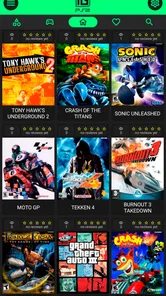
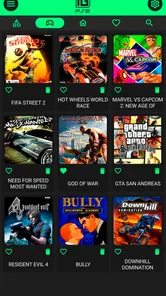
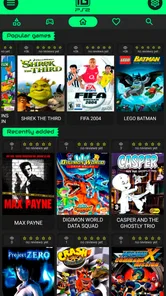
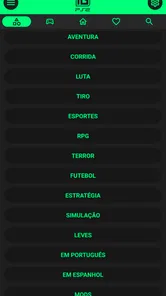
Analysis by Reviewed
When the television is occupied and someone wants a little time with an old favorite, a phone can be a handy alternative. IGAMES PS2 is an Android app from IGames BR in the Libraries & Demo category, intended for people who want to play PS2-era games on a mobile device. I’d think of it as a personal retro setup, not a replacement for a shared console: short solo sessions are convenient, but people using the same device should agree on where game files and saved progress belong.
Making room for a shared-device session
Picture a quiet evening when one person is watching a show and another wants to revisit a long-running game. A phone or tablet can make that possible without taking over the television, and a Bluetooth controller may make play more comfortable than touch input. The trade-off is that a shared device is still shared: agree before changing settings, loading a different game, or continuing someone else’s session. That simple habit matters more than any assumption that the app will manage separate household profiles.
For a family or group of roommates, I’d also decide who is responsible for keeping the game files organized. If several people use the same device, a clearly agreed folder and a quick check before moving or removing files can prevent confusion. This is especially useful when someone is testing a game and another person expects to pick up their own progress later.
A practical routine is to decide who gets the device for a session and to return it with the app in a predictable state. For example, I’d finish a session by saving progress, noting which game I used, and avoiding changes to shared settings unless everyone is comfortable with them. That little handoff routine is more useful than trying to remember later who altered a control layout or selected a different file.
It also helps to distinguish “my game” from “my device.” A person may bring their own legally obtained files to a household phone, but that does not automatically make the phone’s settings or storage private. If people have different comfort levels about sharing, I’d keep the arrangement simple: one agreed user manages setup, and everyone else checks before making changes.
Set expectations before installing
The app is free to install, with in-app purchases listed from $0.89 to $5.99 per item. I’d look over any purchase prompt before confirming it, particularly on a device used by more than one person. That is a practical shared-device boundary, not a reason to avoid the app: keeping purchases intentional makes it easier to know who chose an extra and why.
IGAMES PS2 is rated for Everyone, but that age label does not tell a household whether every game someone chooses will suit every player. I’d make game selection a separate conversation, especially if a younger person will use the phone. The app’s rating is one useful starting point; it is not a substitute for deciding which particular titles belong on a shared device.
More From Our News Desk

Weather by Xiaomi Review: Clear at a Glance, Less Clear Up Close

X Under Pressure: Can It Recover When Posting Goes Wrong?

Clash of Clans Is Won Between the Battles

Android Auto Makes the Case for Quieter Car Software

MobiOffice: Transforming Mobile Productivity with Seamless Integration

EA SPORTS FC™ Mobile Soccer: Redefining Mobile Sports Gaming
Before a child or guest uses the app, I’d also explain the difference between the app itself and the game being opened through it. That avoids treating the app’s age label as a blanket approval of every possible game choice. A shared-device rule such as “ask before loading a new title” is straightforward and does not depend on assuming the app has household controls.
Its current version is 1.5.1, and it requires Android 8.0 or later. Checking the device’s Android version is a sensible first step before planning a gaming session. The app has a 4.0 average from around 20,000 ratings and over 1 million installs, which suggests a sizeable audience, but those figures cannot tell me how it will feel on a particular phone or fit a household routine.
Setting Up and Playing on Android
The first thing you'll notice about IGAMES PS2 is how straightforward it is to get started. After a quick download and installation, the app welcomes you with a clean interface that feels both modern and nostalgic. Remember those days when you had to blow into your PS2 disc to make it work? Luckily, you won't have to do any of that here.
Setting up the app is a breeze. It guides you through the process of loading your favorite PS2 ROMs, which, let's be honest, is a crucial part of the experience. Just make sure you have your legally obtained ROMs ready to go. A few taps here and there, and you're set to relive those epic gaming moments.
What the play experience asks of you
Now, onto the meat of it: the gameplay. I tested out a few classics like "Final Fantasy X" and "Shadow of the Colossus," and man, was it a trip down memory lane! The app does a fantastic job of emulating the PS2's graphics and sound, so much so that I almost forgot I was playing on my phone.
Performance-wise, IGAMES PS2 is pretty solid. I experienced minimal lag and the controls were surprisingly responsive. Of course, nothing beats the feel of a real PS2 controller, but the touch controls here are customizable and do the job quite well. If you're serious about your gaming, you might want to consider a Bluetooth controller for the full experience.
On a phone, touch controls have one practical weakness that nostalgia can obscure: your hands cover part of the screen, and a long session can feel cramped. I’d start with a short play session and adjust the layout before settling into a demanding section. A controller is the better choice for games that rely on precise movement or frequent button presses; touch controls are more convenient when I’m travelling light or only have a few minutes.
That makes the app a better fit for different games in different ways. A quick check-in during a commute or a quiet break can work well with touch controls, while a long session with frequent inputs is more comfortable with a controller. I’d test the controls during a low-pressure part of a game first, rather than discovering in a difficult moment that the on-screen layout does not suit my hands.
Compared with browsing a library of retro titles or playing a modern mobile game, this app is a more hands-on route: you need to bring your own legally obtained game files and be willing to set them up. That extra step is worthwhile for someone who already has a personal collection and wants to play it on a compatible Android device. If you want a ready-to-play catalogue with no file preparation, a conventional mobile game or a licensed retro collection is likely the easier option.
The choice is less about which approach is universally better and more about what you want to do. A licensed collection is convenient when you want to browse and start playing without managing files. A modern mobile game is usually the simplest choice for a shared device where several people want their own quick sessions. This app makes more sense when the appeal is revisiting games you already have access to and you are willing to handle the setup yourself.
Saving, settings, and household handoffs
One of the standout features of IGAMES PS2 is its savestate functionality. Anyone who has ever played a PS2 game knows that saving your progress is crucial, especially in those longer RPGs. With this app, saving and loading states is a breeze, which means you can pick up right where you left off, anytime, anywhere.
For a shared device, I’d make a habit of saving before handing it to someone else and checking which state I’m loading when I return. A savestate is handy for pausing outside a game’s usual save points, but it can also be easy to overwrite or confuse with another session if several people take turns. Treating it as a convenient snapshot rather than a substitute for careful file organization keeps the feature useful.
One small but worthwhile habit is to treat the game’s ordinary save and a savestate as separate kinds of progress. I’d use a savestate for convenience, then also save through the game when that option is available. That gives me a more deliberate handoff point and reduces the chance that a quick pause becomes the only record of a session someone else may need to continue.
Another nifty feature is the ability to tweak the graphics settings. You can adjust resolution and rendering options to suit your device's capabilities. This means even if you're on an older phone, you can still enjoy a smooth gaming experience. Plus, it supports cheat codes! Remember using those to get unlimited health or ammo? Ah, the memories!
My advice is to change one graphics option at a time and try the same scene again before making another adjustment. That gives you a clearer sense of whether a change helps on your device, instead of leaving you unsure which setting affected the experience. Cheat codes can be fun for revisiting a game casually, but I’d keep a separate save before experimenting so a playful run does not disrupt progress someone else cares about.
That one-change-at-a-time approach is especially useful when you are troubleshooting. If a game feels uncomfortable or performance seems off, changing several options together makes it hard to know what helped. I’d first try a brief session with the existing setup, then adjust only what seems necessary. It is a patient way to avoid turning a nostalgia session into an evening spent guessing at settings.
Who should choose another option
The main limitation is that this is not a plug-and-play library: the user needs to supply game files, and setup therefore asks more of you than opening a typical mobile game. Device performance and the comfort of on-screen controls can also vary from one person’s setup to another. I would skip it if you want a curated selection ready immediately, dislike adjusting emulator settings, or need an uncomplicated shared gaming arrangement with separate personal spaces.
I’d also choose something else if the main goal is to keep a household’s gaming completely separated by person. The practical approach here depends on people coordinating files, saves, and changes themselves, so it suits a device with a clear owner or cooperative users better than a phone passed around without discussion. For a group that wants independent accounts and a ready-made catalogue, a different kind of gaming service is a more natural match.
It is also not the best pick for someone who expects every old game to feel exactly like it did on original hardware. A phone is a different screen and control setup, and performance depends on the device. If the physical controller feel, television display, and straightforward family turn-taking matter most, a console setup remains the better choice. This app’s appeal is portability and personal access, not reproducing every part of a living-room experience.
A household verdict that depends on the setup
So, is IGAMES PS2 worth your time? Absolutely. It's a well-crafted app that brings the magic of the PlayStation 2 right to your fingertips. Whether you're a long-time fan wanting to relive the classics or a newcomer curious about the golden era of gaming, this app has something for everyone.
In conclusion, if you're yearning for a bit of nostalgia and classic gaming fun, give IGAMES PS2 a try. Just be ready to lose track of time as you dive deep into some of the best games ever made. Ready to embark on your retro gaming journey? You won't regret it!
My household verdict is more measured: I’d recommend it to someone comfortable managing their own game files, adjusting a few settings, and coordinating politely when a device is shared. Before installing, check that the Android device meets the minimum requirement and decide how the household will handle purchases, game choices, and save files. If those small boundaries sound easy, this can be a convenient way to make a quiet break feel more personal; if you want a no-setup, shared-library experience, another kind of gaming app will fit better.
For a realistic household routine, I’d keep the first session deliberately simple: one person chooses a legally obtained game file, checks that it opens, and tests touch controls before anyone plans a longer turn. If the phone is already used for everyday tasks, agree on a stopping point and return it ready for the next person rather than leaving a game half-configured. That makes the app most useful as a personal option for spare moments, not as a substitute for a shared console night.
My recommendation is strongest for an adult or older teen who already understands the appeal of PS2 games and is happy to take responsibility for setup. It can also suit a household where one person manages the device and lets others take turns under simple ground rules. Someone who wants instant access, independent profiles, or a complete ready-made library should look elsewhere; here, the freedom to bring your own collection comes with the work of managing it.
IGames BR’s app is free to install and rated Everyone, which lowers the barrier to trying it, but I would still make the household decisions first. With Android 8.0 or later, a compatible device, legally obtained files, and a shared understanding about purchases and saved progress, it offers a portable way to revisit older games. Without those pieces in place, the setup can feel more like a chore than a shortcut to a relaxing session.
IGAMES PS2 Frequently Asked Questions
Can I install IGAMES PS2 on my iPhone or iPad?
IGAMES PS2 is an Android app, and its stated minimum operating system is Android 8.0. If you are considering it for an iPhone or iPad, check the relevant app store for an iOS version before downloading; the Android app is not an iOS installation. For Android users, confirm that the device meets the minimum system requirement.
What should I check before installing IGAMES PS2 on my Android device?
Before downloading, check that your device runs Android 8.0 or later and has enough available storage for the app and anything you use with it. It can also be helpful to review the app’s permissions and make sure you are comfortable with them. Taking a moment to check these basics can help avoid installation or setup surprises.
Can I use IGAMES PS2 without an internet connection?
Whether you can use IGAMES PS2 offline depends on how the app works with the content you want to access. Some app features or downloads may require a connection, while content already available on your device may work differently. If offline play is important to you, review the app’s own instructions and test the relevant feature before relying on it while travelling.
Does IGAMES PS2 include PS2 games, or do I need to provide them?
IGAMES PS2’s store summary says it brings childhood PS2 games to mobile, but that description alone does not establish what game files are included or how they are accessed. Check the app’s details and setup instructions before installing, and only use game files you have the right to access. This is especially important if you expect particular titles to be available.
Can I connect a controller to play with IGAMES PS2?
A controller can make games more comfortable to play, but support depends on the app and the device you use. Before downloading, consider checking the app’s settings or help information for compatible input options. If you plan to use a particular controller, confirm that it works with your Android device as well as with the features you intend to use.
Pros
- Extensive game library available.
- User-friendly interface design.
- Smooth emulator performance.
- Customizable controls.
- Frequent updates for stability.
Cons
- Requires high storage space.
- Not all games run smoothly.
- In-app ads can be intrusive.
- Limited cloud save options.
- Occasional app crashes.