Expo Go
- 493.00
- 4.3
- Installs
- 5.00M
- Price
- Free

Screenshots
Analysis by Reviewed
I would choose Expo Go when I want to try a JavaScript and React app project on a phone without first turning the task into a full native-development setup. It is best understood as a companion for building and previewing apps, not as a finished app for everyday consumers. That distinction matters: if you want to explore how a project behaves on a real device, it can be a handy place to start; if you simply want a polished tool for a particular daily task, this is probably the wrong kind of download.
My decision comes down to what you need from a mobile development workflow. Are you learning React, checking a small experiment, or showing a prototype to someone nearby? Expo Go is aimed at those moments. Do you need a standalone, production-ready app that behaves independently of a development workflow? Then you should compare it with the tools and build process suited to that end goal rather than expecting this app alone to do everything.
Choosing the right role for Expo Go
I would judge Expo Go by the role you need it to play: it is most useful when you already have a JavaScript and React project and want to inspect it on a phone. In this section, I’ll separate that focused preview role from the broader work of building and validating an app, so you can decide whether its convenience fits your next step.
A phone-side preview, not a general-purpose app
Expo Go is a free app from Expo Project, in the Libraries & Demo part of the app world. The useful mental model is a viewer for projects built with JavaScript and React: the development work happens elsewhere, while the phone gives you a more realistic sense of how the project looks and responds on a handheld screen. That makes it particularly appealing to learners and developers who want to test ideas in context instead of relying only on a desktop preview.
The distinction from a typical mobile app is important. You do not install it because it offers a set of consumer features of its own; you install it because it can be part of a workflow for trying app projects. If you have no interest in building or previewing software, the category label may sound intriguing, but the practical value will be limited. I would not recommend it as a substitute for a normal app with a finished, independent purpose.
Its audience is broad in one sense: beginners can use a phone preview as a way to make abstract code feel tangible, while experienced developers can use the same general idea to check a prototype. But the benefit depends on having a compatible project and the development context that goes with it. The app is the device-facing side of that process, not a magic shortcut that creates an app from a brief.
When the quick preview is worth more than a full setup
The strongest case for Expo Go is reducing the distance between changing an idea and seeing it on a phone. On a laptop, a layout can seem fine while its spacing, text, or touch targets feel awkward at handheld size. A device preview makes those issues easier to notice early, when they are still inexpensive to fix. For a learner, that feedback loop can also make experimentation more motivating: a small change in the project has a visible result on an actual mobile screen.
More From Our News Desk

Weather by Xiaomi Review: Clear at a Glance, Less Clear Up Close

X Under Pressure: Can It Recover When Posting Goes Wrong?

Clash of Clans Is Won Between the Battles

Android Auto Makes the Case for Quieter Car Software

MobiOffice: Transforming Mobile Productivity with Seamless Integration

EA SPORTS FC™ Mobile Soccer: Redefining Mobile Sports Gaming
One practical habit I recommend is using the phone for questions that only a phone can answer well. Check whether the first screen makes sense without explanation, whether a button is easy to reach, and whether a longer label wraps in a way that still looks intentional. Keep desktop tools for editing and detailed debugging; use the mobile preview to judge the experience as a person holding the device. That division avoids treating the phone as a replacement for the rest of the development workflow.
It can also be useful when a teammate or friend needs to react to a prototype. Instead of asking someone to imagine how a desktop mock-up might translate to a small screen, you can show the idea in a more familiar setting. I would keep the conversation focused: ask whether the flow is understandable and where they hesitate, rather than presenting an early preview as a finished product. The value here is quick feedback, not a guarantee that the project is ready to ship.
Where it beats the usual alternatives
Compared with relying only on a desktop preview, a phone-based check gives a better feel for physical screen proportions and touch interaction. Compared with jumping directly into a more involved native development path, Expo Go can suit early exploration when the project is being built with JavaScript and React. These are different trade-offs, not a universal ranking. A desktop preview is convenient while editing; a device preview is more revealing for mobile presentation; a fuller native workflow may be a better fit when the project’s technical needs call for it.
The useful advantage is therefore not that Expo Go replaces every other tool. It is that it can make the early feedback stage feel less ceremonial. For a small learning exercise, a quick look at a working screen may be more valuable than investing time in a heavier setup before you know whether the idea is worth pursuing. For a serious product, though, I would treat that convenience as one stage of development, not the whole development strategy.
A less obvious benefit is how it changes the questions you ask. When a project is only on a laptop, it is easy to focus on whether the code runs. Seeing it on a phone encourages you to assess whether the interface communicates clearly, whether the content fits, and whether the flow feels natural at a glance. That shift is especially useful for prototypes, where the main risk is often a confusing experience rather than a lack of technical ambition.
Everyday situations where it makes sense
Imagine you are learning React after work and have made a small screen for tracking a personal routine. You have the basic idea working on your computer, but you are unsure whether the labels are readable and whether the main action is obvious. Opening the project on your phone gives you a fast reality check. You might discover that a control is easy to miss or that the screen feels crowded; those are useful observations before you spend time polishing details that do not solve the real problem.
Another good use is a quick prototype review with a colleague. A developer can make a small change, then let someone else look at the project in a mobile context and describe what they expect to happen next. I find this more informative than asking for vague feedback such as whether the design “looks good.” A specific task—find the main action, move through the intended flow, or explain what a screen is for—can reveal misunderstandings while the work is still flexible.
For teaching, the same approach can help connect code to outcomes. A student can make a modest interface change and see how the result appears on a device, which is a clearer lesson than discussing screen behavior in the abstract. It is most helpful when the exercise stays small and the goal is learning or exploration. If the class expects a finished, distributable product, a preview app should not be mistaken for the final delivery method.
Trade-offs and reasons to choose something else
The main limitation is also part of the product’s purpose: a preview tool only helps if your project fits its workflow. Someone who expects to install a complete app and start using it without code or a project to open may find little to do. Likewise, if you are working on an app that needs a development path beyond the kind of preview Expo Go supports, you may need a different or more complete setup. That is not a reason to dismiss it; it is a reason to decide early what stage of work you are actually tackling.
There is also a difference between seeing a project run and validating every aspect of a final app. A quick preview is excellent for catching interface problems and getting an early feel for behavior, but it should not be your only check before release. I would still plan proper testing for the target devices and the needs of the finished project. The easy first look can create confidence, but confidence should come from checking the complete experience, not from a single successful preview.
If your priority is learning programming from the beginning, you will still need an editor, learning materials, and time to understand JavaScript and React. Expo Go does not remove that learning curve. If your priority is simply to use a ready-made service, an app designed for that service is a better choice. And if your project’s requirements point toward a native-focused workflow, choose the development approach based on those requirements rather than forcing a convenient preview into a job it was not meant to do.
What switching into the workflow involves
Trying Expo Go is a relatively low-commitment decision because the app is free, but the larger investment is your project workflow. If you already work with JavaScript and React, the idea of using a mobile preview may fit naturally. If you are starting from scratch, allow time to learn how the project is created and how the phone preview connects to that work. The app can make results visible; it cannot make the surrounding development knowledge unnecessary.
Switching away later is less about replacing a consumer service and more about changing how you preview or build a project. That can mean adjusting your development setup and retesting the experience in the tool you choose next. To keep that option open, I would avoid treating early preview behavior as proof that every requirement is covered. Write down what you have actually checked—layout, navigation, or a particular interaction—so that moving to a different workflow does not leave assumptions disguised as test results.
It is also sensible to use each stage for the question it answers best. Use a quick phone preview to judge whether a screen is understandable. Use the development environment to inspect and change the project. Use a more complete testing and release process when the goal is a finished app. This separation prevents a common mistake: expecting one convenient tool to handle ideation, coding, quality checks, and distribution equally well.
How it is received and what to expect
The app has an average rating of 4.3 from around 32,000 ratings, and it has passed five million installs. I read that as a sign that the idea is useful to a substantial audience, not as a promise that it will suit every project or every user. The reviews are one point of context; the more important question is whether you are building with JavaScript and React and want a phone-side way to inspect the result.
It is free and rated for Everyone, which makes trying it less of a financial decision than a workflow decision. The app was released on December 8, 2015, and the current version is 57.0.9, with Android 7.0 as the minimum operating system. Those details help set expectations for compatibility, but they do not change the central point: its value comes from pairing it with a suitable project, not from opening it as a standalone entertainment or productivity app.
For someone weighing alternatives, I would compare by purpose rather than by feature checklist. If you need to see a React project on a phone during early development, Expo Go is a sensible option to try. If you only need to inspect a static design, a design preview tool may be more direct. If you are ready to build and validate a complete app against specific technical needs, a fuller development workflow may be more appropriate. The right choice depends on whether you are exploring, reviewing, or preparing to deliver.
My recommendation
I recommend Expo Go to people who are actively learning or building with JavaScript and React and want a practical view of their work on a phone. Its best use is focused and clear: bring an early project into a mobile context, notice what a desktop view hides, and gather feedback before investing too much in polish. For that purpose, it can make experimentation feel immediate and give beginners a more concrete sense of how a mobile interface behaves.
I would skip it if you are looking for a standalone app to solve an everyday personal task, or if your project already requires a different development route. It is also not a replacement for careful testing before release. My advice is to start with a small project, use the phone preview to answer specific interface questions, and move to a more complete workflow when the project’s needs outgrow that role. It is most worthwhile as a fast feedback companion, not as the entire app-building process.
Expo Go Frequently Asked Questions
What is Expo Go, and what can I use it for?
Expo Go is a companion app for previewing React Native projects built with the Expo framework. After starting a project with Expo’s development tools, you can open it on a supported Android or iOS device and test changes without first creating a standalone app build. It is primarily intended for development and testing, rather than as a general-purpose app or a way to publish finished apps.
How do I open an Expo project in Expo Go?
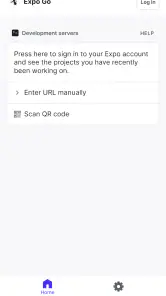
Install Expo Go from the official app store for your device, then start the project using the Expo development server, commonly with the `npx expo start` command. Scan the displayed QR code or open the project link, and make sure your phone and development computer can communicate over the network. Connection options and menus may differ by platform and Expo SDK version, so follow the instructions shown by your current development tools.
Does Expo Go support every React Native library and project?
No. Expo Go includes a defined set of native capabilities, so a project that depends on a custom native module or configuration not included in the client may not run in it. Many JavaScript-based features and supported Expo modules work without creating a custom build, but compatibility depends on the project and its SDK version. Check the relevant library’s Expo guidance; a development build may be needed when Expo Go cannot provide a required native dependency.
Is Expo Go free, and does using it require an Expo account?
Expo Go is generally available as a free download through the official Android and iOS app stores. For basic local testing, you can typically start a project and connect your device without purchasing a subscription, though some workflows or online services may require an Expo account. Expo’s tools and service terms can change, so review the current information from Expo before relying on a particular feature or assuming that every hosted service is free.
Is Expo Go suitable for publishing or running a finished app?
Expo Go is mainly a shared preview client for development; it is not the same as installing your project as its own finished app. It may be useful for checking screens and behavior during development, but it does not replace creating and testing a standalone production build. Before release, build your app with the appropriate Expo workflow and test that build on target devices, especially if the project uses native modules, permissions, or platform-specific configuration.
Pros
- Preview React Native projects on a device without building a native app.
- Scan a QR code to open a project shared from a development server.
- Available for both iOS and Android.
- Useful for testing layouts and basic interactions during development.
- Free to download and use.
Cons
- Requires a development server or compatible project to be useful.
- Does not support every native module or custom native configuration.
- Not intended for publishing finished apps to app stores.
- Some projects may behave differently in Expo Go than in standalone builds.
- Primarily aimed at developers
- so it may not suit casual users.
- Category
- Libraries & Demo
- Version
- 57.0.9