Gamers GLTool with Game Tuner
- 765.00
- 4.5
- Installs
- 5.00M
- Price
- Free

Screenshots
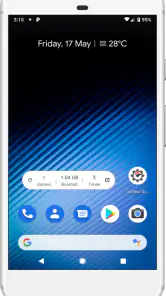
Analysis by Reviewed
My first question with a game-tuning app is practical: what can I change before a match, and how easy is it to undo a setting if the result feels worse? Gamers GLTool with Game Tuner is aimed at players who want more control over mobile-game graphics and performance without digging through every game’s menus. I’d treat it as a tuning tool to test carefully, not a magic switch that can make every phone run every game perfectly.
Start with the problem you actually have
Before opening the app, I’d identify what is going wrong: choppy motion, a phone that warms during a long session, or an unstable online match. Those issues can feel similar while having different causes. Graphics adjustments may help when a game is demanding the device, while a network-related tool is more relevant when the connection is the weak point. Starting with one clear problem makes it easier to tell whether a change helped.
This is a free gaming utility from Trilokia Inc., listed in the Libraries & Demo area. It has a 4.5 average from around 45,000 ratings and over 5 million installs, which suggests it has reached a broad audience, though popularity alone cannot tell me how it will behave on a particular phone. Its Everyone age rating makes the audience broad, and version 0.0.7 is listed for Android 4.3 and newer.
Unleashing the Beast: What is Gamers GLTool?
So, what exactly is Gamers GLTool with Game Tuner? Imagine having a Swiss Army knife for your mobile games. This app is designed to optimize your gaming experience by tweaking various settings on your device. Whether you’re dealing with lag, overheating, or just want to boost those frame rates, this app aims to tackle those issues head-on. And trust me, it’s packed with features that even the pickiest gamer will appreciate.
Feature Galore: What’s Inside?
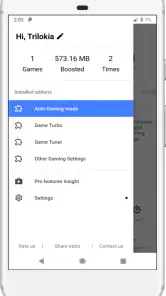
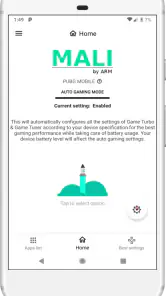
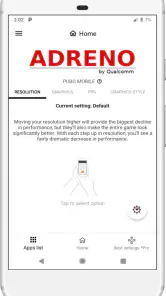
Once you fire up the app, you’re greeted with an interface that’s straightforward and easy to navigate. One of the standout features is the Game Tuner. This handy tool lets you adjust graphics settings on a per-game basis. So, if you need to lower the graphics quality for smoother gameplay, it’s just a few taps away.
Another cool feature is the Zero Lag Mode. Who doesn’t want to eliminate lag, right? This mode optimizes your device settings, ensuring that your games run as smoothly as possible. Plus, the app supports a wide range of devices, so chances are, it’ll work with your phone or tablet without a hitch.
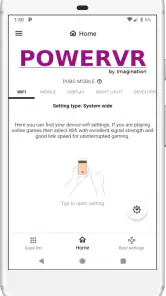
Let’s not forget about the Ping Booster. If you’ve ever been frustrated by high ping rates during an intense match, this feature is your savior. By optimizing your network settings, it helps stabilize your connection, which is a game-changer for online multiplayer games.
More From Our News Desk

Clash of Clans Is Won Between the Battles

Android Auto Makes the Case for Quieter Car Software

MobiOffice: Transforming Mobile Productivity with Seamless Integration

EA SPORTS FC™ Mobile Soccer: Redefining Mobile Sports Gaming

How Microsoft OneDrive Became a Mobile Productivity Giant

How Google Translate Breaks Language Barriers Effortlessly
A careful setup beats changing everything at once
For a useful first run, I’d choose one game I know well, note how it normally feels, and then adjust only its graphics through Game Tuner. That gives me a fair comparison: if movement becomes smoother but distant detail is harder to see, I can decide whether that trade suits the game. I would avoid changing several settings before testing, because then it is difficult to identify which adjustment made the difference.
There is also a useful distinction between a graphics problem and a connection problem. If a match looks smooth but players appear to react late, a graphics preset is unlikely to be the first thing I’d blame; Ping Booster is the more relevant place to test. If the picture itself stutters in offline play, network tuning is less likely to address it. Neither tool can remove every cause of lag, so I’d compare the same game and situation before and after rather than trusting a mode’s name.
Hands-On Experience
Now, onto my personal experience with the app. Installing Gamers GLTool with Game Tuner was a breeze. Once it was up and running, I jumped into one of my favorite games, and the difference was noticeable. The game ran smoother, and I didn’t experience any of the dreaded lag spikes.
One thing that stood out was how the app managed device temperature. Usually, after an hour or so of gaming, my phone feels hot enough to fry an egg. But with this app, it stayed surprisingly cool. It’s clear that the developers have put a lot of thought into optimizing performance without sacrificing your device’s health.
Where it fits in a normal gaming routine
Picture a quick session after work: I have a few minutes before joining friends in an online game, and the last session felt uneven. I’d open the tuner, pick that title, make one modest graphics change, and test it in a short practice round before entering a match. If the display feels better, I can keep that setup for the game; if aiming or reading the scene gets harder, I can return to the previous balance. That small test is more useful than making a dramatic change right before a competitive round.
The main handoff is between the tool and the game itself. A change only matters if the game responds to it, so I’d check the actual play experience rather than assume a selected option guarantees a specific frame rate. For multiplayer, I’d also separate local performance from internet conditions: a smoother image does not automatically mean a more reliable connection, and a network adjustment does not fix a device struggling to render a scene.
How it compares with built-in settings
Many games already offer their own graphics controls, and those can be the simpler choice when you only need to lower detail in one title. The advantage of a dedicated tuner is having a place to work through per-game adjustments and related tools rather than relying on memory between sessions. The trade-off is another layer to learn and check. If a game’s own settings solve the problem cleanly, I wouldn’t add extra tweaking just for its own sake.
Compared with leaving everything at default, this app makes sense for someone willing to experiment and compare. It is less appealing if you want a guaranteed one-tap fix or prefer not to alter how games are configured. I’d also be cautious about expecting an older device to behave like newer hardware; tuning can make sensible compromises, but it cannot create processing power that the phone does not have.
Making a fair comparison between sessions
When I’m deciding whether a change is worth keeping, I try to compare like with like: the same game, a similar stage, and roughly the same length of play. A quiet menu or short loading screen tells me little about how a busy scene will feel. I also pay attention to the part of the experience I actually care about—whether controls feel responsive, whether visual detail remains readable, and whether the phone stays comfortable to hold. This is a more useful test than chasing a setting simply because it sounds more powerful.
There’s a practical reason to change only one game at a time, too. A graphics compromise that helps a fast action game may not suit a slower title where small details matter more than split-second response. Keeping the adjustment tied to the game you tested makes it easier to judge the trade-off next time you open it, instead of applying one broad preference to every kind of play.
Choosing the right tool for the job
For someone who plays several demanding games and likes to fine-tune them, a single tuning utility can be more convenient than remembering separate adjustments and hunting through different menus each time. But convenience is not the same as control in every case. A game’s own graphics menu is usually the more direct option when it exposes the setting you need, while this app is more appealing when you want to explore per-game changes alongside its performance and connection tools.
I’d skip the extra layer if I rarely play on my phone, have no specific performance complaint, or simply prefer the developer’s intended visual settings. I’d also avoid making changes immediately before a ranked or otherwise important match. Test them in a low-pressure session first; the small risk of a worse-looking scene or an unfamiliar feel is easier to manage when a match does not matter.
When the workflow needs a reset
If an adjustment makes a game feel worse, I’d step back rather than stack another change on top. Return to the previous graphics balance where possible, then test again under ordinary conditions. If only online play is affected, check whether the same delay appears in another session or on another connection before altering graphics. This simple separation helps avoid treating every symptom as a device-performance problem.
It’s also sensible to stop when the phone is persistently hot or the game remains unstable despite reasonable settings. A tuner can help you explore compromises; it is not a diagnosis for every device issue. If the game’s built-in options already produce a stable experience, there is little value in adding complexity just to keep adjusting.
The limits that shape the result
Zero Lag Mode is an appealing name, but I would read it as an optimization option, not a promise that lag disappears. Performance can vary with the game, device, and what is happening during play. Lowering graphics may improve responsiveness while making the image less detailed, and a cooler-feeling session is not a reason to ignore persistent heat or other device problems. My practical rule is to keep a setting only when the gameplay feels better and the visual trade-off is acceptable.
Likewise, Ping Booster is worth considering when the connection seems involved, but it should not be treated as a replacement for a reliable network. If the problem happens only in one room or on one connection, I’d compare another location or network before attributing the issue to the game tuner. That simple check can prevent unnecessary changes to graphics when the real friction is elsewhere.
The Verdict
So, is Gamers GLTool with Game Tuner worth your time? In my opinion, absolutely. It’s a must-have for anyone serious about mobile gaming. The range of features, from graphics tuning to ping optimization, makes it a powerful ally in the quest for the perfect gaming experience. Plus, the app’s user-friendly interface ensures that you don’t have to be a tech wizard to get the most out of it.
Whether you’re a casual player or a hardcore gamer, this app has something to offer. It’s like having a personal gaming assistant in your pocket, always ready to help you get the most out of your games. So, give it a shot and see how it can transform your gaming sessions.
For me, the best fit is a player who can name a specific annoyance, test one adjustment at a time, and accept that smoother play may mean less visual detail. Someone whose games already run well, or who wants settings to work without any trial and error, may be better off sticking with each game’s built-in controls. Used thoughtfully, the tuner is a practical way to explore that balance rather than a substitute for it.
Happy gaming!
Gamers GLTool with Game Tuner Frequently Asked Questions
What does Gamers GLTool with Game Tuner do, and is it a game?
Gamers GLTool with Game Tuner is a companion app for tuning game graphics, not a game you play on its own. Its GFX optimizer is intended to help adjust graphics for a more suitable gaming experience. If you want a new game to play, this is not that; it is for people who want to explore graphics settings for games on their Android devices.
Who develops the app, and is it suitable for younger users?
Gamers GLTool with Game Tuner is made by Trilokia Inc. and has an Everyone content rating, making it suitable for a broad audience. Its purpose is graphics tuning rather than entertainment content or gameplay. As with any app, younger users may benefit from guidance when changing settings, particularly so they understand that adjustments can affect how a game looks and performs on their device.
Is Gamers GLTool with Game Tuner free to download, and what should I expect from it?
Gamers GLTool with Game Tuner is a free Android app from Trilokia Inc. Its focus is tuning game graphics through a GFX optimizer, with the goal of improving the gaming experience. It is categorized among library and demo apps, so think of it as a companion for adjusting game settings rather than a game to play by itself.
Will Gamers GLTool with Game Tuner work on my Android version?
The app supports Android 4.3 and later, but compatibility can still depend on your device and the games you use. Gamers GLTool with Game Tuner is designed to work across a range of Android devices, and the results of graphics adjustments may vary with the device’s hardware. Check your Android version before downloading and consider how your device handles the games you want to tune.
What is Gamers GLTool with Game Tuner?
Gamers GLTool with Game Tuner is an advanced app designed to enhance the gaming experience on Android devices. It optimizes your device's performance by adjusting graphics settings, managing game configurations, and reducing lag during gameplay. This tool is essential for gamers seeking smoother performance and improved graphics quality in their mobile games.
Pros
- Enhances gaming performance significantly.
- Customizable game tuning options.
- Improves device cooling efficiency.
- User-friendly interface.
- Boosts battery life during gaming.
Cons
- May not be compatible with all devices.
- Some features require in-app purchases.
- Minor bugs in certain game settings.
- Requires regular updates for optimal use.
- Can drain battery if misconfigured.
- Category
- Libraries & Demo
- Version
- 0.0.7