Modiface Haircut:Hair Makeover
- 765.00
- 3.9
- Installs
- 1.00M
- Price
- Free
Screenshots
Analysis by Reviewed
When I’m tempted by a new haircut but not ready to commit, I’d rather test the idea visually than rely on imagination alone. Modiface Haircut: Hair Makeover gives that kind of low-stakes preview: a way to explore how different looks might sit on your face before deciding whether to bring an idea to a stylist. Its best role is not to predict an exact salon result, but to help turn a vague “maybe I should change my hair” into a few clearer preferences.
Who gets the most out of a virtual try-on?
I find this kind of beauty app most useful when I have a specific decision to make, rather than when I’m just browsing for entertainment. If you’re torn between keeping your current length and trying a shorter cut, or curious whether a different shade might suit your usual style, a quick visual experiment can help you narrow the options before booking a salon appointment.
It can also make a consultation more concrete. I’d take a few saved versions to a stylist and use them to explain the direction I’m considering, while treating them as references rather than promises. Hair texture, density, natural growth patterns, and lighting all affect a real result, so the image is a conversation starter—not a guarantee of an exact match.
Getting Started with the App
First things first, downloading Modiface Haircut: Hair Makeover is a breeze. Available on both Android and iOS, it’s a quick install and doesn’t hog your phone’s memory, which is a win-win in my book. Once you launch it, the interface is sleek and user-friendly, making navigation a walk in the park.
What a try-on can—and can’t—tell you
For a more useful comparison, I’d start with a clear, front-facing photo and keep the lighting and expression consistent across attempts. Then change one thing at a time: try a cut first, compare a couple of colors separately, and save the versions that genuinely appeal to you. This makes it easier to see what you prefer instead of letting several simultaneous changes blur the decision.
A virtual preview is less dependable for questions that depend on movement or texture. It can suggest the outline of a bob or the general impression of a new color, but it can’t show how a fringe will behave on a windy commute or how much daily styling a particular cut may need. If low-maintenance hair is your priority, ask a stylist about upkeep before treating a striking preview as a practical plan.
Features that Stand Out
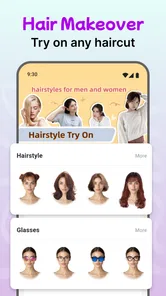
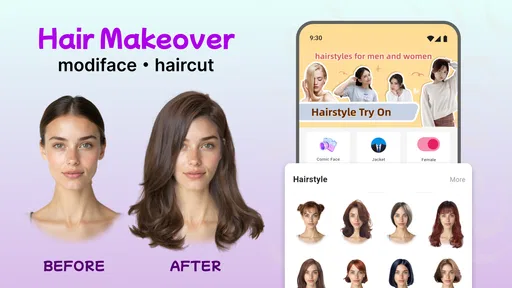
The app really shines with its vast array of features. You can upload a photo of yourself or use the live camera feature to try on hairstyles in real-time. I was pretty impressed with how accurately the app mapped different hairstyles to my face. The precision is top-notch, and let me tell you, seeing yourself with a bob or pixie cut without the actual snip is both thrilling and a relief.
More From Our News Desk

Weather by Xiaomi Review: Clear at a Glance, Less Clear Up Close

X Under Pressure: Can It Recover When Posting Goes Wrong?

Clash of Clans Is Won Between the Battles

Android Auto Makes the Case for Quieter Car Software

MobiOffice: Transforming Mobile Productivity with Seamless Integration

EA SPORTS FC™ Mobile Soccer: Redefining Mobile Sports Gaming
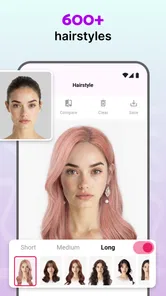
The color options are also something to rave about. Want to see what you’d look like as a fiery redhead or with pastel pink strands? The app’s got you covered. The colors look super realistic, thanks to the advanced AI technology. It’s like trying on wigs but way less hassle.
Making a fair comparison with other options
Compared with browsing haircut galleries or looking at a single inspiration photo, trying a style against your own face can make the choice feel more personal. Physical wigs offer a different kind of evidence because you can see and feel how hair sits, while a salon consultation is better for judging what is achievable with your hair. I see this app as a quick visual sandbox between those options, not a replacement for either.
For an everyday example, imagine opening it before a weekend appointment because you’re considering a major change but can’t settle on a length. I’d test a few distinctly different silhouettes, keep the two that feel most like me, and show those to the stylist. That’s more actionable than arriving with a vague request to “do something different,” while still leaving room for professional advice.
Choosing a useful photo and a sensible workflow
One practical detail that can make or break a try-on is the starting image. I’d choose a photo where my face is visible and my hairline isn’t hidden by a hat, heavy shadow, or an object close to my head. A plain background and even light also make it easier to judge whether a style itself appeals to me, rather than getting distracted by a messy visual fit.
If I’m comparing options for a real appointment, I’d keep a small set of results rather than saving every experiment. I’d label them in my own photo library by the feature I’m comparing—such as “shorter shape” or “warmer tone”—so I can explain the idea without asking a stylist to decode a long run of similar images. This is especially helpful when I like the general silhouette but want a different length or a less dramatic color.
Customization and Ease of Use
One of my favorite parts is the customization options. You can tweak the intensity of the color, adjust the cut's length, and even play around with highlights and lowlights. It’s all about making it work for you. Plus, the app doesn’t bombard you with ads, which is a huge plus in my books. It’s straightforward and lets you focus on the fun stuff.
There is a practical trade-off, though: a preview is only as convincing as the photo and the fit of the overlay. I’d avoid judging a subtle shade change from a dim selfie, and I wouldn’t assume a cut will look identical from every angle based on one view. When a result looks oddly placed, retaking the photo in even light is a better test than immediately ruling out the hairstyle.
Exploring Styles and Trends
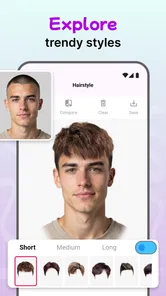
If you’re anything like me and love to keep up with the latest trends, the app’s regularly updated style library is a goldmine. From celebrity-inspired cuts to fashion runway trends, it’s all here. I found myself spending way too much time experimenting with styles I’d never even considered before. Who knew I could pull off curtain bangs?
For someone who already knows exactly what cut they want, the trend-browsing side may matter less than a reliable discussion with a hairdresser. I’d also be cautious about treating a fashionable look as automatically suitable: a style that looks exciting on screen may ask for more maintenance or a different finish than I want in daily life. The useful discovery is sometimes not “this is my next haircut,” but “I like the shape, though I’d want it softer or longer.”
How it fits into an ordinary beauty routine
I can see this being handy during a quiet moment at home before a haircut, especially when I have a saved reference photo but can’t tell whether its overall shape would work with my own face. Rather than copying that picture exactly, I’d use the app to test the broad direction—shorter, longer, darker, or brighter—and then bring the best-fitting idea to a professional. That keeps the experiment practical instead of turning a passing trend into an impulsive appointment request.
It’s less useful as a daily styling tool. If I’m deciding how to part my hair tomorrow or whether a particular product will control frizz, a virtual haircut preview won’t answer that. Its value is concentrated in the decision stage: exploring possibilities, comparing a few directions, and communicating an idea. Knowing that limit helps me avoid expecting a makeover app to solve routine hair-care questions.
Current version and what it means for regular users
Modiface Haircut: Hair Makeover is a free beauty app from One Music Player, with optional in-app purchases ranging from $0.99 to $99.99 per item. It is rated for Everyone, and its current version is 34.1.4. The app has a 4.0 average from around 24,000 ratings, with over 1 million installs and 754 written reviews, so there is a sizable audience trying it for this kind of visual experimentation.
Those version and release details tell me where the app stands today, but they don’t establish what changed between releases or prove that a particular feature improved. If you already use it, the practical reason to check for the current build is simply to make sure you’re using the version currently offered for your device. The app’s release date is January 12, 2023, and it requires Android 5.0 or later; people on iOS should check compatibility on their own device before installing.
What to keep in mind before committing
The main limitation is the gap between a digital preview and a real haircut or color service. A screen can help me decide whether I’m drawn to a direction, but it can’t account for every detail a stylist considers, and color on a display won’t be a precise shade reference. I’d use the image to communicate my preference, then ask what adjustments would suit my hair and routine.
It may also be the wrong choice if you need a technically detailed consultation, an exact color match, or a realistic sense of how a style moves and feels. In those cases, a hair professional or trying on a wig is the more informative route. If your goal is simply to explore looks privately and arrive at an appointment with clearer ideas, this app has a more focused role.
Who should skip it, and when another option helps more
I’d skip a virtual preview as the main decision tool if I were planning a complex color correction, working around a sensitive scalp, or trying to judge how a cut will behave with a strong natural wave or curl pattern. Those choices depend on details a still image can’t settle. A stylist who can examine the hair in person is better placed to discuss what is realistic, how the change may affect upkeep, and whether a reference needs adapting.
For a simple “would I enjoy this general look?” question, the app is more convenient than arranging a consultation just to explore possibilities. For “can my hair reach this exact shade safely?” it is not. That distinction is important: use the visual tool to clarify taste, and use professional advice for feasibility, technique, and maintenance.
Customization and Ease of Use
One of my favorite parts is the customization options. You can tweak the intensity of the color, adjust the cut's length, and even play around with highlights and lowlights. It’s all about making it work for you. Plus, the app doesn’t bombard you with ads, which is a huge plus in my books. It’s straightforward and lets you focus on the fun stuff.
Before spending on an optional item, I’d first try the basic experience and decide whether its style previews suit the way I want to compare looks. The listed purchase range is broad, so it’s sensible to check the in-app price and what an item includes before confirming anything. That small pause keeps a casual experiment from turning into an unplanned purchase.
Sharing Your New Look
Once you’ve crafted your dream look, sharing it with friends is a cinch. The app lets you save your makeover photos and share them directly to social media platforms or through messaging apps. I had a blast sending my new 'looks' to friends and getting their reactions. It’s a great way to get a second opinion before making any real-life changes.
When I ask friends to weigh in, I’d send only a couple of clearly different options and ask a specific question, such as which length feels more like my everyday style. Too many near-identical previews invite vague reactions, while a focused comparison can reveal what I’m actually drawn to. I’d also remember that a friend’s vote is useful input, not a substitute for choosing a look I’m comfortable wearing.
What to watch as the app evolves
The current version is a useful point of reference, but a version number by itself doesn’t tell me which parts of the experience have changed. If I return to the app after a while, I’d judge it by the practical things that matter during a try-on: whether the styles I want to compare are available, whether the result sits convincingly on my photo, and whether saving a short list is straightforward. Those checks matter more to a haircut decision than assuming a newer build automatically means a better preview.
For regular users, the most meaningful improvement would be one that makes comparison clearer without encouraging false confidence. Until I can judge a look under real lighting, from different angles, and with my own hair’s texture, I’d continue to treat every result as inspiration. That is not a reason to avoid the app; it is simply the right boundary for using a visual makeover responsibly.
Final Thoughts
In a nutshell, Modiface Haircut: Hair Makeover is a gem for anyone looking to experiment with their hairstyle without the commitment. It’s fun, easy to use, and genuinely helpful in making those big hair decisions. Whether you’re looking to spice things up or just curious about how a new style would suit you, this app is worth a try. So, go ahead, download it, and get ready to unleash your inner hairstylist. Who knows? You might just find your next signature look.
My recommendation is to approach it as a low-pressure idea generator: useful for narrowing down choices, less useful as a promise of salon results. If you enjoy trying different looks and can keep that distinction in mind, the free starting point makes it an easy app to explore. If accuracy for a major cut or color decision is what matters most, take your favorite preview to a stylist and let their advice shape the final choice.
Modiface Haircut:Hair Makeover Frequently Asked Questions
Can I save or share the makeover looks I create?
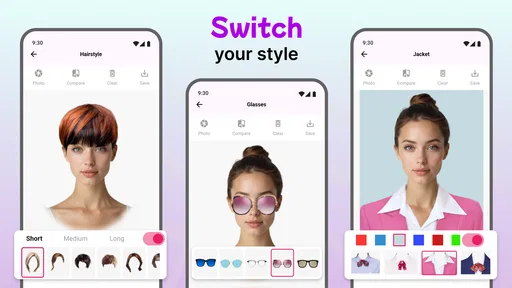
A natural question before downloading is whether a hairstyle experiment can be kept for later or shown to someone else. Modiface Haircut: Hair Makeover is centered on visual experimentation with hair, color, glasses, and jackets, so you can explore combinations as a personal style exercise. If saving or sharing a particular result matters to you, check the app’s available controls after opening it; the main appeal is trying looks before making a real-life change.
Does the app require a photo, or can I experiment with a live camera view?
The experience is designed to let you preview different looks on an image of yourself, and its virtual try-on concept may involve a live image or a photo-based preview. Either approach is meant to help you judge how styles, colors, and accessories might suit your appearance. For a useful comparison, choose a clear, well-lit image or camera view so facial features and hair are easier to see.
Can I change my hair color without changing the hairstyle?
Yes, hair color is one of the makeover ideas the app is intended to let you explore, alongside different hairstyles. That makes it possible to consider a color change as part of your style planning rather than focusing only on a new cut. Treat the result as a visual preview, though: the way a shade appears on screen can differ from how it looks on your hair in person.
Can I use Modiface Haircut: Hair Makeover to preview glasses and jackets as well as hairstyles?
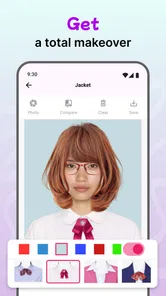
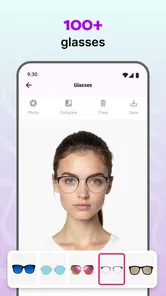
Yes. The app is intended for trying on different hairstyles and hair colors, and its makeover options also include glasses and jackets. This makes it useful for exploring more than a haircut alone and seeing how several style choices work with a photo or face preview. It is a beauty app, so the experience is focused on visual experimentation rather than booking a salon service.
Does Modiface Haircut: Hair Makeover offer a cartoon face option?
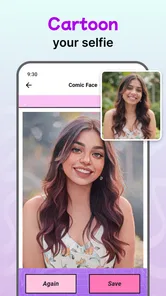
Yes, a cartoon face option is part of the app’s makeover concept. It gives you another way to play with your appearance alongside trying hairstyles, hair colors, glasses, and jackets. If you are mainly looking for a lighthearted style tool, this option can add variety to the experience; the app’s central purpose remains previewing different looks rather than producing a professional portrait.
Pros
- Realistic hairstyle simulation
- Wide variety of styles and colors
- Easy to use interface
- Regular updates with new features
- No internet required after download
Cons
- Limited free options available
- May lag on older devices
- Ads can be intrusive
- Requires precise photo alignment
- Some features need in-app purchases













