FaceApp: Perfect Face Editor
- 76.22K
- 4.3
- Installs
- 500.00M
- Price
- Free

Screenshots
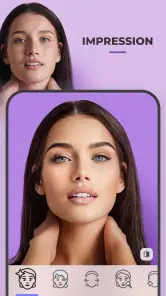

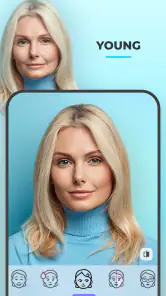
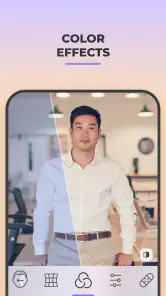
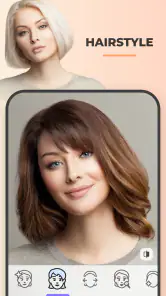
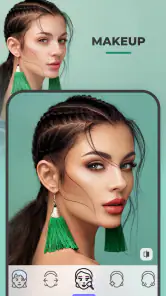
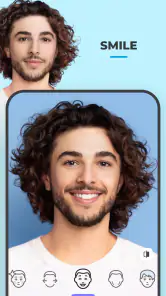
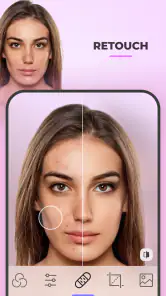
Analysis by Reviewed
I treat a face-editing app differently from a simple filter camera: the photo is the subject, not just a background for an effect. That makes FaceApp interesting for quick experiments, but it also means I think about what I’m choosing to upload before I start. FaceApp: Perfect Face Editor is a free photography app from FaceApp Technology Ltd, and its appeal is easy to understand: it lets me preview changes to a portrait without committing to them in real life. The sensible approach is to enjoy the creative side while keeping control of the pictures I select.
Trust starts with the photo I choose
For me, the first trust decision happens before an effect is applied: it is deciding which portrait to use. I don’t assume that a photo becomes low-stakes just because an edit is playful. If I’m curious about the app, I can begin with an ordinary selfie that I would be comfortable using for a casual experiment, rather than a private or sensitive image. That lets me explore the experience without treating every picture on my phone as fair game.
I also separate editing from sharing. Making a transformed portrait does not mean I need to post it, send it, or keep it. I can view the result, decide it is not for me, and move on. That distinction matters most when an image includes another person, or when an edit changes someone’s appearance in a way they might not find funny. My cautious rule is simple: if I would hesitate to show the original photo to the person in it, I should not use it for a joke transformation either.
Make a portrait experiment useful
I get the most from a face editor when I have a question in mind, rather than tapping effects at random. If I’m curious whether a shorter-looking style might suit me, I’ll compare a few options on the same portrait, then save only the versions that help me decide what to ask a stylist. Keeping the lighting, angle, and expression consistent makes those comparisons more meaningful. It also helps me avoid mistaking a change in the photo’s conditions for a change caused by the edit.
For a realistic everyday example, imagine I have a well-lit selfie before a haircut appointment. I can test a visual direction, show a friend the result, and use it as a conversation starter—not as a promise of what the salon can reproduce. If I’m editing a picture for a profile or a family chat instead, I’d judge the result by whether it still looks like me and fits the audience, not just by how dramatic the transformation is.
Unknown
Start with a photo you’re comfortable using
My first practical tip is to choose a clear, well-lit portrait and make a copy of the original before editing. That gives the app a better starting point for a convincing result, and it leaves me free to compare the edit with the untouched image later. I would use a casual selfie for playful experiments, but pick a less sensitive picture if I’m simply testing what the effects can do. That small choice makes the experience feel more deliberate without taking away the fun.
I also try not to judge an edit from one glance. I look at the whole portrait, then check whether the changed feature still sits naturally with the rest of the face and the photo. A result that looks amusing on a phone screen may feel less suitable when shared elsewhere. Saving a few alternatives instead of overwriting my starting point gives me room to reconsider without turning a quick experiment into a permanent choice.
Useful for ideas, not a substitute for a real decision
The app is particularly handy when I’m curious about a haircut or hair color but don’t want to rely on imagination alone. I can show a result to a friend or take it as a rough visual reference before talking with a stylist. I wouldn’t treat an edited image as a reliable preview of exactly how a real salon change will look, though: a digital transformation can’t account for how a style works with my hair texture, upkeep, or daily routine. For subtle touch-ups, a conventional editor with manual controls may be a better fit; for quick, dramatic portrait experiments, FaceApp is the more entertaining option.
That distinction is useful when choosing between FaceApp and the usual alternatives in photography. A standard photo editor is often better when I want to tune the whole image—such as cropping, balancing light, or making restrained adjustments myself. A camera filter app is a better match when I want an effect applied while taking a picture. FaceApp’s appeal is narrower and more immediate: I start with a portrait and explore how a face might look changed. I wouldn’t choose it as my only photo tool, but it can be the more engaging option for that specific kind of trial.
Where I’d draw the line
I’d skip it if my main goal were detailed retouching with precise control over every adjustment, or if I didn’t want to use a face-focused service at all. I also wouldn’t upload someone else’s portrait casually; getting their permission is the considerate choice, especially when an edit could be shared or misunderstood. The app is rated for Everyone, but that doesn’t mean every edited image is appropriate for every audience. I’d think about context before posting a transformation, particularly if it changes someone’s appearance in a way they might not welcome.
It is also not the right choice for every kind of portrait. A group photo, an image with an obstructed face, or a picture I’m not comfortable using may be better left alone or edited with a general-purpose tool. If I’m creating a polished professional headshot, I’d prioritize a natural likeness and deliberate, controlled adjustments over a striking transformation. For a private, low-stakes experiment, the trade-off feels different; for an image that represents someone publicly, I’d be much more selective.
Its popularity is substantial: it has more than 500 million installs and an average rating of 4.3 from around 5.3 million ratings. Those figures suggest broad interest, not that every user will like the results or feel the same about using a face editor. The app is free to install, with in-app purchases ranging from $4 to $99.99 per item, so I’d check the purchase details shown in the app before paying for anything. It’s intended for Everyone, and it has been available since February 14, 2017.
Features That Stand Out
One of the most exciting features of FaceApp is its ability to provide incredibly realistic transformations. Whether you want to see yourself with a new hairstyle, different hair color, or even a different age, this app has got you covered. The AI technology behind the app is top-notch, ensuring that the edits look natural and seamless. I found myself completely amazed at how accurate and lifelike the changes appeared. It's like having a personal stylist and makeup artist right in your pocket!
User Experience
Getting started with FaceApp is as easy as pie. The interface is user-friendly and intuitive, allowing you to dive straight into editing your photos. You can either take a new selfie directly within the app or choose an existing photo from your gallery. Once you've selected an image, the magic begins. The app offers a variety of filters and effects that you can apply with just a tap. It's almost addictive to see how a simple change in hair color or style can make a world of difference.
That quick, tap-based flow is convenient, but it can make it easy to keep trying variations without deciding what you actually want from the image. I find it more useful to pick one portrait, explore a small set of edits, and compare them before moving on. That gives the experiment a purpose and makes it easier to notice when an effect has gone from playful to unconvincing. If I only want ordinary color correction or a crop, opening a full photo editor is usually the more direct route.
Keeping the workflow practical
A useful way to make the app less impulsive is to decide what the finished image is for before opening the editing options. A portrait meant for a private laugh can tolerate a bolder change than one I plan to use as a profile picture. For a profile, I would compare the edited version with the original at the same size and ask whether the result still feels recognizably like me. If the transformation draws attention away from the person and toward the effect, I’d choose a milder option or leave the photo untouched.
I’d also avoid building a decision around a single flattering preview. If I’m exploring a look for a real-world change, I’d collect only a few alternatives and use them to describe the direction I like, rather than treating the images as a prediction. This is especially useful for hair: a visual mock-up can help me explain “shorter” or “lighter,” but it cannot tell me how the style will behave day to day. A stylist’s advice and my own maintenance preferences still matter more than a convincing screen result.
Privacy and Security
Of course, with any app that uses AI and facial recognition, privacy concerns are bound to arise. Rest assured, FaceApp has taken measures to ensure your data is secure. The app only uses your uploaded photos to apply the desired effects and does not store any personal data. It's always wise to read through the privacy policy, but in my experience, I've felt comfortable using the app without worrying about my data being compromised.
For me, trust is less about assuming that every image is harmless and more about making a deliberate choice each time. A face photo can feel more personal than a landscape, so I’d pause before selecting anything sensitive or someone else’s image. I’d also keep sharing decisions separate from editing: an image can be fun to make and still not be something I want to post. That simple boundary is useful whether I’m testing a look privately or preparing a picture for other people to see.
Choices worth making before sharing
When I’m deciding whether a result belongs in a group chat or on a public profile, I think about the people who may see it and the meaning they could attach to it. An age transformation or a substantial appearance change can be read as a joke, a comment, or a serious comparison, depending on the audience. I’d add context when sharing with friends and avoid presenting an altered portrait as an untouched photograph. That is not about taking the fun out of editing; it is a way to prevent a visual gag from becoming an awkward misunderstanding.
There is also a practical question of what to do with images after I’ve finished experimenting. I would keep only the versions I genuinely want, rather than saving every tap-through result by default. That keeps my photo library easier to manage and makes it less likely that an unintended draft gets shared later. If I am unsure whether I want a particular portrait in an editing workflow, the easiest choice is to pick another picture or skip the experiment altogether.
Who will enjoy it—and who may not
I think the best fit is someone who enjoys visual what-ifs: trying a different hairstyle, comparing a playful transformation, or making a portrait that gives friends something to react to. It is also useful for people who find it hard to imagine a change from words alone and want a rough visual prompt before making a decision. The experience is direct enough for a casual user who does not want to learn layers, masks, or detailed adjustment tools.
On the other hand, I would point a careful portrait retoucher toward a manual editor, where they can make restrained changes deliberately. Someone who avoids face-focused services, does not want to select personal portraits, or is uncomfortable with the idea of editing another person’s likeness may be happier with a general photo tool—or no edit at all. The app’s broad reach, including more than 76,000 written reviews, says little about whether its particular approach suits an individual’s comfort level. I’d make that call based on the images I want to use and the kind of results I actually need.
Final Thoughts
In conclusion, if you're looking for a fun and easy way to play around with your look, FaceApp: Perfect Face Editor is definitely worth a try. It's not just about vanity or curiosity; it's about exploring different sides of yourself in a creative and entertaining way. Whether you're looking to shock your friends with a hilarious transformation or seriously considering a new hairstyle, this app will surely have you hooked. Plus, it's always fun to see how you might look a few decades down the line!
My cautious recommendation is to use it for the kinds of portraits and experiments you’re comfortable handling, and to keep your expectations realistic. The app suits people who want fast, striking face transformations without learning a manual editing workflow. It is less suited to anyone seeking fine-grained retouching or who would rather avoid face-focused editing altogether. I’d treat its results as creative possibilities, not evidence of how I—or anyone else—should look.
Before installing, I’d also keep the purchase side in perspective: it costs nothing to get started, but optional in-app items can range from $4 to $99.99. I would check the specific purchase screen rather than assume every effect or option follows the same terms. If my aim is only to try a quick portrait transformation, I can begin without treating a purchase as necessary; if I’m considering paying, I’d first decide what extra value I expect from it.
My bottom line is that FaceApp works best when I treat it as a focused portrait playground, not a complete photography toolkit or a source of definitive appearance advice. Its strongest appeal is the speed with which I can explore a visual idea; the trade-off is that I need to choose images thoughtfully and judge results with some distance. If that balance sounds comfortable, it is an entertaining app to try. If control, restraint, or avoiding face edits matters more to you, a conventional editor—or leaving the portrait as it is—will likely feel like the better choice.
FaceApp: Perfect Face Editor Frequently Asked Questions
Can FaceApp change hairstyles, makeup, or facial features?
Yes. FaceApp focuses on selfie retouching and portrait transformations, with effects that can change hairstyles, apply makeup, and alter features such as a smile. It also offers aging effects, gender swaps, and artistic filters. These tools are intended for creative changes to portraits, so preview the result and choose effects that fit the look you want.
Is FaceApp a photography app or a general-purpose image editor?
FaceApp is a photography app centered on natural beauty and selfie retouching. Its tools are mainly for portraits and facial effects rather than broad adjustments to landscapes, objects, or every part of an image. If you want to transform a selfie or portrait, that focus may suit you; for general image editing, consider whether you need a wider set of tools.
How much storage space does FaceApp need on my device?
The space an app uses can vary with the device and app version, so it is sensible to check the available storage on your phone before downloading. Also allow room for photos you import and edited images you save. If storage is limited, review the space available and remove files you no longer need before adding another photo app.
Can I try FaceApp before deciding whether to pay for anything?
FaceApp is free to download, and you can explore its free experience before deciding whether paid options suit your needs. Some features are offered through in-app purchases, so check the details shown in the app before confirming a transaction. Trying the available free tools first is a practical way to see whether its portrait-editing style works for you.
Is FaceApp appropriate for editing photos of children?
FaceApp has an Everyone content rating, and it is designed for selfie retouching and portrait effects. Parents can still decide what is appropriate for their family and how portrait-altering tools should be used. If a child’s photo is involved, consider their comfort and privacy, and review the app together before editing or sharing an image.
Pros
- User-friendly interface makes editing easy.
- Offers realistic aging effects.
- Wide range of filters and effects.
- High-quality processing of photos.
- Regular updates with new features.
Cons
- Free version has limited features.
- Requires internet for most functions.
- Some filters require premium access.
- Can be slow on older devices.
- Privacy concerns with uploaded photos.

- Category
- Photography
- Version
- Varies with device