Reface: Face Swap AI Generator
- 56.60K
- 3.7
- Installs
- 100.00M
- Price
- Free

Screenshots






Analysis by Reviewed
I find Reface easiest to enjoy when I treat it as a quick creative experiment rather than a full photo-editing studio. It turns a selfie into a playful starting point for face swaps and AI-made imagery, which can be a fun way to make a friend laugh or give a group chat something unexpected. The main appeal is the immediate transformation; the main question is whether the result feels worth the time and connection it takes to produce and share it.
When the connection becomes part of the experience
Reface is a photography app from NEOCORTEXT, INC., and its AI-focused tools make connectivity relevant to the experience. Browsing the available material, creating an effect, and getting a finished result are moments when a steady connection can matter. I would use it when I have reliable access rather than assume every part of the app will work the same way in a low-signal setting.
That changes how I’d plan a casual session. If I’m about to board a train or head somewhere with patchy reception, I’d make the images I want beforehand instead of counting on the app to generate them at the last minute. For a quick joke at home, the wait is less of a concern; for a time-sensitive post, any network pause can interrupt the flow.
A better fit for short mobile sessions
The app makes most sense on a phone when I have a clear selfie ready and a few minutes to browse. Rather than opening it with no idea what to make, I’d decide whether I want a funny clip, a stylized portrait, or a hairstyle experiment first. That small choice helps me avoid scrolling through options just because they are there.
A practical example: if a friend sends a birthday message, I could pick a suitable effect, make a lighthearted image, check that the face looks natural enough, and send it back. I would still preview the result before sharing. Faces can look convincing in one frame and awkward in another, especially when the source photo has a turned head, strong shadows, or hair covering the face. A bright, front-facing selfie is a better starting point than a group photo or a dim snapshot.
Recovering when a result disappoints
Not every attempt will be a keeper. If the face sits strangely or the expression clashes with the source, I’d try a different selfie before blaming the effect itself. A neutral expression, even lighting, and a face unobstructed by glasses or hands give the app a cleaner starting point. This is a useful trade-off: taking a few seconds to choose a better photo can save repeated processing and make the final result easier to share.
If a creation stalls, I’d first check whether the connection is stable, then reopen the task and try again rather than repeatedly tapping the same control. When a clip is close but not quite right, switching to another template is often more productive than trying to rescue a poor match. Reface is aimed at quick, playful transformations, so I wouldn’t use it when I need precise retouching, careful compositing, or professional control over every detail.
More From Our News Desk

Weather by Xiaomi Review: Clear at a Glance, Less Clear Up Close

X Under Pressure: Can It Recover When Posting Goes Wrong?

Clash of Clans Is Won Between the Battles

Android Auto Makes the Case for Quieter Car Software

MobiOffice: Transforming Mobile Productivity with Seamless Integration

EA SPORTS FC™ Mobile Soccer: Redefining Mobile Sports Gaming
Use it thoughtfully with personal photos
Because the app works with faces, I’d be selective about which images I choose and where I share the results. I’d stick to my own photos or pictures used with permission, especially when a transformation could be mistaken for a real video. A funny edit is still a depiction of a person, and the more realistic it looks, the more important the context becomes.
I’d also avoid treating a generated image as evidence of something that actually happened. Reface is best for clearly playful posts, private jokes, and creative experiments, not for making claims about another person. That distinction matters even when the result is meant harmlessly: an image can travel beyond its original audience once it is posted or forwarded.
For people comparing it with ordinary photo editors, the difference is the emphasis. A standard editor is usually the better choice for cropping, color correction, blemish cleanup, or arranging several images precisely. Reface is more appealing when the goal is a face-led transformation that would take more effort to assemble manually. If you want a natural portrait with subtle adjustments, a conventional editor will likely feel less distracting; if you want a surprising variation to share, Reface has a clearer purpose.
It suits curious users who enjoy short creative sessions and don’t mind trying a couple of source photos to get a good match. It is less suitable for anyone who needs predictable, finely controlled edits, dislikes AI transformations, or wants to avoid putting personal images through a connected creative workflow. Its mature 17+ rating is another reason to consider whether it is appropriate for the person using it.
Making the most of a short session
I’d treat each attempt as a small creative decision, not just a tap through a feed. Pick the kind of result first, then choose a source image that matches the mood: a straightforward portrait for a comic swap, or a more composed selfie if the goal is a polished-looking AI image. This also makes it easier to judge whether the output succeeded, because I’m comparing it with a specific intention rather than hoping every template will work equally well.
For a group chat, I’d make one result, check it on the phone screen, and share only if the joke reads clearly without explanation. A face that seems amusing to the person who made it may be confusing to someone who sees it later without context. Keeping the audience in mind is a practical part of the workflow, particularly with realistic-looking transformations.
Have you ever wondered what it would be like to swap faces with your favorite celebrity or see yourself as a character from your favorite movie? Well, wonder no more, because Reface has got you covered! This nifty little app has taken the internet by storm, and for good reason. Let me take you through my experience with this app and why it’s worth your time.
Getting Started with Reface
First off, downloading Reface is a breeze. Available on both Android and iOS, you can find it easily in your app store. Once installed, you’re greeted with a clean and simple interface. It’s user-friendly and doesn’t bombard you with unnecessary features, which I personally appreciate. You can dive straight into the fun without a steep learning curve.
How It Works
The magic of Reface lies in its AI technology. It’s pretty amazing how it can seamlessly swap your face onto just about any video or GIF. All you need is a selfie, and the app does the rest. Trust me, watching your face on a blockbuster movie scene is both hilarious and impressive. The AI is surprisingly accurate, making the swaps look genuine, yet funny.
What’s even cooler is the variety of content available. Whether you want to see yourself as a pop star, an action hero, or a meme, the library of clips is extensive. It’s updated regularly, so there’s always something new to try out. I found myself losing track of time, just exploring the endless possibilities.
Features That Stand Out
Apart from the face-swapping feature, Reface offers a few other goodies. You can create face morphing videos and GIFs, which are perfect for sharing on social media. There’s also a feature where you can animate photos, bringing static images to life. It’s not only entertaining but also a bit eerie in a good way!
Another aspect worth mentioning is the app’s speed. Swapping faces and rendering videos happens faster than I expected. You don’t have to wait ages to see the final result, which is a big plus in my book.
Things to Keep in Mind
While Reface is free to download, it does come with some in-app purchases and a subscription model. The free version allows you to have a lot of fun, but if you’re like me and hate watermarks, you might consider the premium version. It’s also worth noting the app occasionally pops up ads, but honestly, they’re not too intrusive.
Privacy is another aspect to consider. The app requires access to your camera and photos, which is understandable. However, as with any app, make sure you’re comfortable with its privacy policy before diving in.
Choosing it over a conventional editor
One useful distinction is that Reface is built around transformation, while a general-purpose editor is built around correction. If I’m preparing a family photo, fixing its crop, or adjusting its overall look, an ordinary editor gives me a more direct set of controls. Reface makes more sense when I want the face itself to become the premise of the image or clip.
That difference matters if you’re deciding whether to keep it on your phone. I wouldn’t replace my regular editing tools with it, because the two solve different problems. I’d open Reface for a playful result, then use a conventional editor for tidy, restrained changes. If my priority is a realistic portrait that still looks like an untouched photograph, I’d skip the transformation and use the simpler tool.
Questions I’d consider before using it
Is it suitable for a quick post? Yes, when I have a clear idea, a compatible photo, and enough time for a preview. I wouldn’t make it my only option for a deadline-sensitive post, because a network delay or an awkward result could turn a quick task into repeated attempts. Is a selfie necessary? A clear, unobstructed face is the safest starting point for the kind of result the app is designed to make.
Would I use someone else’s photo? Only with their permission, and I’d be especially careful before sharing a realistic-looking edit beyond a private joke. Can it replace a standard photo editor? Not for detailed corrections or precise composition. Those choices come down to what you want to make, not just which app has more effects.
Final Thoughts
Overall, Reface is a fun and entertaining app that brings a unique twist to face swapping. Whether you’re looking to kill time or impress your friends with creative videos, it does not disappoint. The app is playful yet sophisticated, thanks to its powerful AI. If you haven’t tried it yet, I’d say go for it. You’re bound to have a good laugh and maybe even surprise yourself with what you can create!
If you’re ready to jump into the world of face swapping, you can find the download links on the app store pages for both Android and iOS. Happy swapping!
Cost, age rating, and practical expectations
The app is free to download, with in-app purchases ranging from less than a dollar to around eighty dollars per item. I’d start with the free experience and decide whether I’m using it often enough to justify paying; a one-off joke is a poor reason to commit to a purchase. Reface has a 3.7 average from around 1.8 million ratings, which suggests a widely used app that still won’t suit everyone. Its 100 million-plus installs show how familiar the format has become, but popularity alone doesn’t guarantee that every effect will land well on your photo.
It first appeared in late 2019, and version 6.14.0 requires Android 9 or later. The mature 17+ age rating also deserves attention if you’re choosing an app for a younger family member. I’d check the current purchase choices in the app before spending, and I’d keep expectations modest: a clever transformation is entertainment, not a substitute for editing tools that let you control each detail.
My connectivity verdict
For me, the best way to use Reface is in a stable-connection moment, with a suitable photo already picked and a clear idea of what I want to make. That keeps browsing purposeful and makes a slow or failed attempt less frustrating. If I only need a carefully polished portrait, I’d reach for a conventional editor; if I want an amusing face-led transformation and can take a moment to preview it, Reface is an easy one to try. Its appeal is real, but it’s strongest when I treat it as light creative play and share the results responsibly.
Reface: Face Swap AI Generator Frequently Asked Questions
Does Reface work with both photos and videos?
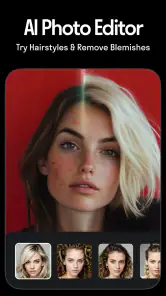
Yes. Reface’s tools cover pictures and videos, so you can use it for more than still-image edits. The app focuses on AI-generated photos, hairstyle changes, and face filters, alongside its recognizable face-swap effects. If you are choosing an app for a particular kind of creative edit, consider whether you want to work with a photo, a video, or both.
What kinds of edits can I make with Reface?
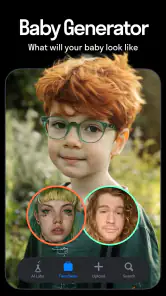
Reface is a photography app built around AI-assisted visual changes. Its advertised uses include creating AI photos, changing hairstyles, and applying face filters to pictures and videos. Face swaps are also a central draw, making the app suitable for playful transformations as well as trying out different looks. The available options make it worth exploring if you want several styles of edits in one app.
Is Reface suitable for users who want more than a basic face swap?
Reface is a photography app for creating AI photos, changing hairstyles, and applying face filters to pictures and videos. Face swapping is a central part of its appeal, but the range of creative effects also makes it worth considering if you want to experiment with different looks and share playful edits.
What is Reface: Face Swap AI Generator?
Reface is an AI-powered app that allows users to swap faces in photos and videos. It leverages advanced AI technology to create realistic and entertaining face swaps, providing users with endless possibilities for creativity and fun. The app is popular for its simplicity and realistic results.
How does Reface ensure user privacy and data security?
Reface takes user privacy seriously by implementing robust data protection measures. The app states that it processes images on secure servers and does not store photos or videos after processing. Users are encouraged to review the app's privacy policy for detailed information on data handling practices.
Pros
- Impressive face swap accuracy.
- Wide variety of templates.
- User-friendly interface.
- Regular updates with new content.
- High-quality video outputs.
Cons
- Contains in-app purchases.
- Limited features in free version.
- Occasional glitches in processing.
- Requires strong internet connection.
- Privacy concerns with data usage.
- Category
- Photography
- Version
- 6.14.0