PixelLab - Text on pictures
- 5.46K
- 4.0
- Installs
- 100.00M
- Price
- Free

Screenshots
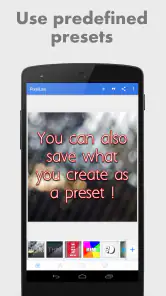
Analysis by Reviewed
For a first try, I’d keep the goal small: turn one ordinary photo into a clear image with a short, readable message. PixelLab - Text on pictures is a free photography app from App Holdings built around adding text and visual touches to pictures. It’s aimed at people who want more control over lettering than a basic gallery editor offers, without needing to start with a full desktop design program.
What to Expect from a Text-Focused Editor
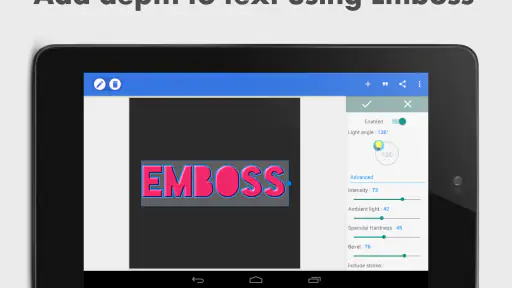
The main thing to expect is a hands-on way to build an image around words. Rather than treating a caption as an afterthought, PixelLab lets you work on the lettering’s appearance and placement, then add visual extras such as stickers, drawing, or depth effects. That focus is useful when the message is the point of the picture: a quote card, a quick announcement, or a meme where the exact position and style of the text affect the joke.
I would not approach it as an all-purpose photography studio. If your first priority is correcting exposure, removing objects, or making a portrait look professionally retouched, a dedicated photo editor is a better starting point. PixelLab makes more sense when you already have an image—or want to work on a plain background—and need to shape text into a graphic. Keeping that distinction in mind makes the first session much less overwhelming.
The app is free to install, and its Everyone content rating makes it suitable for a broad audience. App Holdings released it on April 10, 2015, and the current version is 2.1.4, with Android 5.0 as the minimum requirement. It has a 4.0 average from around 552,000 ratings and over 100 million installs. Those figures show that it is widely used, but the more practical question is whether its text-first approach matches what you want to make.
Explore the Creative Possibilities
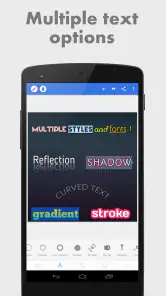
First things first, let’s dive into what makes PixelLab - Text on pictures a standout in the realm of photo editing apps. It’s not just about adding text; it’s about making that text pop! With over 100 fonts to choose from, you can express yourself in virtually any style imaginable. From elegant serif fonts to bold, eye-catching scripts, the choices are vast and cater to all tastes.
Features That Spark Creativity
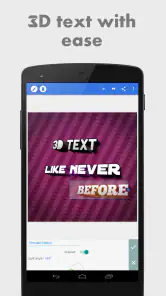
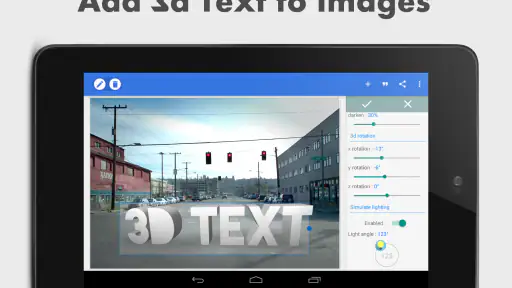
Diving deeper into the app, you’ll find a treasure trove of features that allow for extensive customization. Think about adding 3D text, stickers, and even drawing on your pictures. If you’re like me and love tinkering until everything is just right, you’ll appreciate the ability to fine-tune text size, color, and positioning with precision. The app also sports a nifty feature where you can import your own fonts, which is a dream come true for those with a unique style.
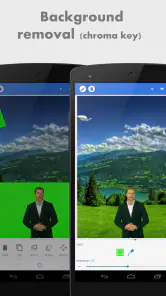
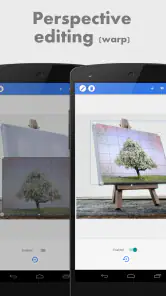
One feature I particularly enjoyed is the perspective tool. It allows you to give your text a dynamic look as if it’s part of the original photo. It’s perfect for creating fun memes or professional-looking marketing material. And let’s not forget the plethora of background options available, from solid colors to stunning landscapes, enabling you to craft the perfect backdrop for your textual art.
First Setup and a Simple Workflow
For a first project, I’d choose a photo with a clear subject and decide what the words need to do before opening the styling choices. A short label, a date, or a few words of context is easier to place well than a full paragraph. If you are making a small announcement for a club or family event, write the essential information first, then use the editor to give it visual hierarchy: the main phrase should catch the eye, while secondary details should stay readable without competing.
There is no need to make a custom font or add a 3D effect just to get a useful result. Start with a familiar type style, place it over an area that is not full of detail, and check the contrast. If the words blend into the photograph, moving them to a quieter patch can work better than adding more decoration. This is a practical first success: a finished image that communicates clearly, even if it is not elaborate.
When you open the editor, start by choosing a photo that has a relatively uncluttered area for your words. Add a short line, then adjust its size and placement before experimenting with color or depth effects. I find it easier to settle the message and layout first; decorative choices are more useful once the text is legible. For a quick birthday greeting or a simple sale announcement, that order keeps the result focused instead of making every tool compete for attention.
A practical detail is to check the image at the size people will actually see it. Text that looks large while editing can become hard to read as a small social post or message attachment. Keep important wording away from busy edges, and use a strong contrast against the photo. If the background is too distracting, a plain background can be a better starting point than trying to rescue the composition with more stickers or effects.
User Experience and Interface
Navigating through the app is quite straightforward, even for newbies. The user interface is clean and intuitive, which is a blessing because nobody wants to spend hours figuring out how to do something simple. Plus, the app doesn’t bombard you with ads, a rarity these days, which makes for a pleasant editing experience.
I also loved how smoothly the app runs. No lagging or crashing, which is a huge plus, especially when you’re in the creative zone. You know those moments when inspiration strikes, and you just want to get your ideas down as quickly as possible? Yeah, this app gets that.
Everyday Uses Beyond a Quick Caption
A useful way to think about PixelLab is as a pocket-sized lettering desk. I can picture using it after taking a photo of a homemade cake: add a small title and a date, then send the finished image to relatives without turning the photo into a full invitation. For a community notice, the same approach can produce a compact graphic with the time and place made prominent. The task stays manageable because the app lets you make the lettering itself the main design decision.
It can also suit people who post regularly but do not need a rigid template for every image. A small account sharing book recommendations, for example, could use a consistent font and placement while changing the picture and wording each time. That is a useful trade-off: the app gives you room to make each graphic by hand, but consistency depends on remembering your own choices. I would keep a simple reference image or note of the font and colors I like rather than expecting a full brand system to do that work.
For product photos or informal listings, text can explain a detail that is not obvious in the image, such as a size or a short feature. I would keep that wording brief and avoid covering the item itself. The perspective effect may help lettering feel connected to a photographed sign or surface, but it is a visual flourish, not a substitute for taking a clear product photo. If buyers need precise information, plain, readable text is more helpful than an effect that looks clever but slows down the message.
Small Choices That Make a Difference
The perspective effect is most convincing when it supports the photo’s existing angle rather than fighting it. I’d use it for a playful sign or meme, then pull back if the words start to look detached from the scene. Similarly, importing a font can help a recurring project feel distinctive, but a font that looks striking on its own may be less readable in a long caption. For quick graphics, I’d prioritize clarity over novelty.
It also helps to think of each edit as a single-purpose composition. If the image is meant to announce an event, give the date or key message the strongest visual weight and let stickers play a supporting role. If it is just a personal photo, a small caption may be enough. This restraint is useful because the app offers many ways to decorate, and using all of them at once can make a picture feel crowded.
One less obvious workflow tip is to test a layout with plain text before spending time on imported fonts or dimensional styling. If the words do not fit comfortably in the chosen space in a simple style, a more decorative font may make the problem worse. I would shorten the copy or move it to a less busy area first. That saves time and helps separate a layout issue from a styling issue.
Another useful trade-off is deciding whether the background should carry the image or simply support the message. A photo brings personality, but its detail can compete with lettering; a solid background can make a notice easier to scan, though it may feel less personal. For a quick social graphic, I would choose based on the message rather than assuming every design needs a photograph. This small decision often matters more than adding another sticker or effect.
Where It Fits Among Photo and Design Apps
Compared with the basic text tools bundled into many gallery editors, PixelLab’s appeal is the room to adjust lettering and treat it as part of the composition. That extra control is useful for a meme or quote image where a default caption style feels limiting. Compared with broad graphic-design apps, it is more direct for a one-image task, but it is not where I would go first for coordinated pages, reusable campaign layouts, or a polished document with many elements to manage.
That makes the choice fairly simple. If your routine is mostly cropping and correcting photos, pick an editor built around those jobs. If you need carefully arranged text on a single picture, this app is a sensible place to experiment. If several people need to follow the same visual rules, or if you need a set of matching materials, a template-based design tool will usually be easier to keep consistent. PixelLab’s flexibility is enjoyable, but it asks you to make more of the design decisions yourself.
Who It Suits—and When to Choose Something Else
I’d recommend it to someone making memes, quote images, simple invitations, or graphics for a small social account, especially if text treatment matters more than complex photo retouching. A realistic everyday use is adding a location and a short note to a weekend photo before sharing it with friends. The workflow is also handy for a quick thumbnail or a basic promotional image when you want to position lettering yourself.
For a polished multi-page design, precise brand templates, or detailed color correction, I’d reach for a broader design or photo-editing tool instead. This app’s strength is direct, hands-on text work; it is not the choice I’d make when the main job is extensive image repair or a coordinated campaign. Beginners can get a satisfying result without learning a complicated layout system, but anyone expecting a complete professional publishing suite may find the focus limiting.
I would also steer away from it if the finished graphic must follow strict brand rules and be repeated by several people. A hands-on editor is rewarding when you want to place and style each element yourself, but that freedom can lead to small differences between versions. For a one-off birthday image, that is no concern; for a batch of formal materials, a tool built around shared templates is a safer fit.
Common Questions Before You Begin
The app is free to install, with in-app purchases listed at $2.99 per item, so I’d start with the free experience and only consider a purchase if a particular option matters to your workflow. It has an Everyone content rating, and the listed minimum Android requirement is version 5.0. The current version is 2.1.4. On the store, it has a 4.0 average from around 552,000 ratings and more than 100 million installs, which suggests it has reached a broad audience, though popularity alone cannot guarantee it will suit your style.
If you’re wondering whether you need design experience, I don’t think so: begin with one line and adjust only a few properties until it reads clearly. If you’re asking whether it can replace a full photo editor, I’d say no; it is best when adding and shaping visual text is the main task. The useful next step after a first image is to save a version you like and reuse the same restrained approach on another photo, rather than changing every style choice at once.
People often want to know whether paying is necessary before they can make something worthwhile. I would not assume that it is: try a modest project with the free app first, then decide based on whether a specific paid item would remove a real obstacle for you. Since purchases are offered per item, it makes sense to judge each one by its usefulness rather than treating an upgrade as a required first step.
It is also worth thinking about where the final image will be viewed. For a phone message or a small social post, a few large words are easier to read than a dense block of details. If the image has to communicate instructions or several dates, I would use a more spacious layout or a tool designed for information-heavy designs. PixelLab works best when the visual idea can be expressed simply.
The Final Word
So, is PixelLab - Text on pictures worth the download? I’d say a resounding yes! It’s versatile, user-friendly, and packed with features that cater to both casual users and professionals alike. Whether you’re looking to spruce up your Instagram game or create eye-catching graphics for a project, this app has got you covered.
In a world where visual content is king, having an app like PixelLab in your toolkit is invaluable. It’s not just about editing photos; it’s about transforming them into something that speaks volumes. Give it a try, and let your imagination run wild!
PixelLab - Text on pictures Frequently Asked Questions
Can I use PixelLab to create designs for social media or personal projects?
Yes. PixelLab is built for editing images with text, stickers, and drawing tools, so it can help you make social posts, personalized messages, and other visual projects. You can adjust text and add creative elements to suit the image. It is a photography app, making it a useful option when you want to work directly with pictures.
Does PixelLab support adding stickers and drawing on images?
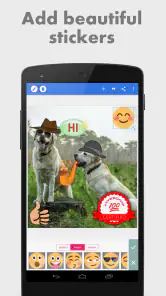
Yes. PixelLab lets you add stickers and draw on images, alongside its text-editing features. These tools make it possible to combine lettering, illustrations, and decorative elements in one design. You can use them to personalize a photo or create a graphic with a different look from a simple text overlay, then explore the available editing options at your own pace.
Can PixelLab be installed on my Android device?
PixelLab is an Android app that requires Android 5.0 or later. If your device meets that requirement, you can consider downloading it and trying its photo-editing tools. It is listed as a free app, so you can start using it without an upfront purchase, while optional in-app purchases are available.
Is PixelLab free, and what does it cost to use the extra features?
PixelLab is free to download and use, with in-app purchases priced at $2.99 per item. The free app focuses on editing images with text, stickers, and drawing tools, while purchases can provide additional options. This gives you the opportunity to try its main creative features before deciding whether any paid items are worthwhile for your projects.
What is PixelLab and how does it enhance my photos?
PixelLab is a versatile photo editing app that allows users to add a variety of text styles, fonts, and effects to their pictures. With a user-friendly interface, it caters to both amateur and professional photographers looking to enhance their photos with creative text overlays, 3D text, and various design elements. The app provides numerous customization options, making it ideal for creating social media posts, digital art, and personalized messages.
Articles Related to PixelLab - Text on pictures
Clash of Clans Is Won Between the Battles
Its raids are quick; its community is a long-term project of coordination, teaching, rivalry, and shared responsibility—with all the friction that entails.
Android Auto Makes the Case for Quieter Car Software
The car interface is no longer judged by how much it can do, but by how quietly it helps. Android Auto shows what drivers now expect—and what still gets in the way.
MobiOffice: Transforming Mobile Productivity with Seamless Integration
MobiOffice: Word, Sheets, PDF is redefining mobile productivity with a surprising blend of functionality and innovation.
EA SPORTS FC™ Mobile Soccer: Redefining Mobile Sports Gaming
Dive into EA SPORTS FC™ Mobile Soccer, where immersive gameplay and strategic depth transform mobile sports gaming.
Pros
- User-friendly interface for beginners
- Wide range of font styles available
- Advanced text customization options
- Supports 3D text creation
- Regular updates with new features
Cons
- Limited export options
- Ads can be intrusive
- Some features require in-app purchases
- Occasional performance lags
- No direct social media sharing

- Category
- Photography
- Version
- 2.1.4











