Pixlr AI Photo Editor
- 54.95K
- 4.3
- Installs
- 100.00M
- Price
- Free

Screenshots
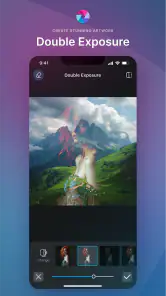
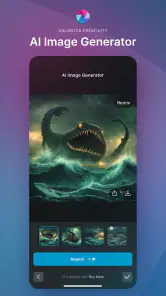
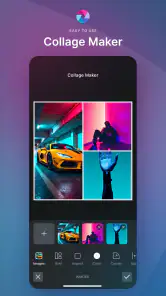

Analysis by Reviewed
I reach for a photo editor most often when I want to turn a quick phone snapshot into something worth sharing, not when I’m planning a painstaking retouch. That’s the kind of everyday use where Pixlr AI Photo Editor makes sense: it gives me creative tools, collage making, and AI-assisted edits in one mobile app. It is a free photography app from Pixlr Pte Ltd, though some features or content may involve in-app purchases, so I’d check the cost shown in the app before committing to anything paid.
One phone, several people, different editing habits
In a shared household, an editing app can become a communal tool: one person might make a birthday collage, another might add a caption to a school-event photo, and someone else may simply want to brighten a picture before sending it to relatives. Pixlr’s mix of single-image edits and collage creation suits these small, practical jobs better than an app focused only on elaborate retouching.
A realistic example is sorting through a few pictures after a family outing. I could pick one image for a quick filter, then combine several moments into a collage and add a short label. That keeps the task on a phone rather than requiring a desktop editor. I’d still review every crop and text placement before sharing: a collage template can make photos feel cohesive, but it can also shrink important details or give each image less room than it deserves.
Set expectations before handing over the phone
Pixlr is easy to explore, but its creative options can encourage trial and error. If I were letting a child or another family member use my device, I’d first explain that edits can change the look of an image and that a polished result is not necessarily a faithful record of what happened. I’d also keep an eye on any purchase prompts and make clear that the app is free to start, while in-app purchases range from $0.99 to $79.99 per item.
For a shared device, it’s sensible to agree on a simple boundary: ask before buying anything, and check the finished image before posting it publicly. These are household habits rather than special Pixlr controls. They matter because editing, saving, and sharing are separate decisions; a picture that looks ready to post may still contain people, details, or a location the family would rather keep private.
Coordinate edits without creating confusion
When several people edit pictures on one device, it helps to decide who is working on which image and to keep the original photo available. I’d avoid treating an edited version as the only copy of a meaningful family picture. That way, a strong filter, background removal, or a playful sticker can be tried without losing the option of a more natural version later.
Pixlr is more suited to quick creative coordination than to a formal shared photo archive. I wouldn’t choose it as the place to organize a household’s entire camera library; its appeal is making an individual image or collage look different. If everyone wants to contribute to one finished design, agree on the intended size and purpose first. A social post, a small message attachment, and a print-ready keepsake can call for different crops and text sizes.
Easy to Use, Hard to Put Down
First things first, let’s talk about the user interface. The moment I launched Pixlr AI Photo Editor, I was greeted with a clean and intuitive layout. It’s designed in such a way that even beginners can navigate through the features with ease. The icons are self-explanatory, and the tools are neatly categorized so you don’t get lost while editing your photos.
Feature-packed Editing Tools
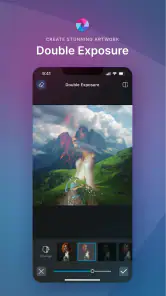
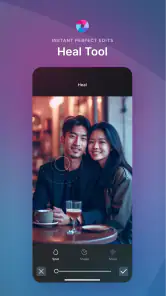
One of the standout features of Pixlr is its AI-powered tools. The app comes loaded with a plethora of editing options including filters, overlays, and effects that can transform your ordinary photo into something extraordinary. What I found particularly impressive is the AI Cutout tool which allows you to effortlessly remove backgrounds with just a few taps. It’s as if you have a mini Photoshop right in your pocket!
Filters and Effects Galore
Pixlr doesn’t hold back when it comes to filters and effects. Whether you’re going for a vintage look or a modern vibe, the app has got you covered. I had a blast experimenting with different filter combinations to create unique visuals. Plus, the app gives you the flexibility to adjust the intensity of the filters, ensuring that you have complete control over the final output.
Text and Stickers for Creative Flair
Adding text and stickers to photos has never been easier. Pixlr offers a wide array of fonts and stickers that you can use to personalize your images. The text tool is straightforward, allowing you to change font styles, sizes, and colors in just a few steps. This is perfect for creating memes or adding quotes to your photos.
For more careful results, I’d use the AI Cutout tool on a photo with a clear subject against a relatively distinct background, then inspect the edges before calling it finished. Hair, fine branches, and objects that blend into the background can be harder to separate cleanly. A useful workflow is to make the cutout first, place it in the intended design, and only then decide whether extra effects help; heavy styling can disguise a rough edge, but it can also make the subject look less natural.
The same restraint helps with filters. Rather than stacking several effects immediately, I’d adjust one at a time and compare the image with its original mood in mind. A subtle treatment can unify a set of photos, while a strong one may flatten skin tones or obscure details. This is where Pixlr’s adjustable intensity is more useful than simply choosing a preset and accepting it unchanged.
Filters and effects versus a dedicated editor
Compared with a basic gallery editor, Pixlr gives me a broader creative range, particularly when I want overlays, decorative elements, or a collage in the same session. Compared with a desktop program built for precise layer work and detailed corrections, it is naturally a quicker, more casual option. I’d choose Pixlr for a social image, a meme, or a fast visual experiment; for exact retouching, consistent professional output, or intricate composites, I’d rather use a more specialized editor.
It is also worth separating “AI” from “automatic perfection.” AI-assisted cutouts can save time, but they still need a human check, especially when the image matters. The app is best for users who enjoy trying visual ideas and can spend a moment reviewing the result. Someone who wants one-tap corrections with no creative choices may find the abundance of options less appealing, while a photographer who needs fine control over every adjustment may outgrow a mobile-first workflow.
Text and stickers for useful, not just playful, edits
Text and stickers work well for quick invitations, labels, and humorous posts, but I’d keep readability in mind. A decorative font that looks fun on a large preview can become difficult to read once the image is viewed on a smaller screen. I’d place text away from faces and important objects, use contrast that remains clear over the photo, and avoid adding so many stickers that the original moment disappears beneath decoration.
For a household, that makes the app useful for low-stakes creative tasks, especially when different ages want to personalize the same kind of image in their own way. Its content rating is Everyone, and the app’s history in mobile photography goes back to its release on November 14, 2012. The current version is 3.8.2, with a minimum operating-system requirement of 9. I’d still look at the device’s own purchase and sharing settings before handing it to a child; an age rating is not a substitute for family rules about spending or posting.
Collages that tell a small story
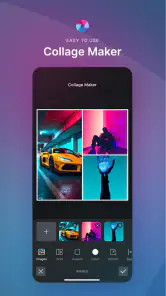
Another feature worth mentioning is the ability to create collages. Pixlr makes it simple to combine multiple photos into a single frame, with plenty of templates to choose from. This is great for sharing memories or creating themed collections without the hassle of using a desktop editor.
Collages are strongest when the pictures have a clear connection: a sequence from one outing, a before-and-after, or a small set of related details. I’d choose the images before selecting a layout, because the template should support the story rather than dictate it. If the subjects are all in different positions or lighting, a uniform filter can help them sit together visually, though it won’t fix every mismatch.
Sharing is Caring
Once you’ve created your masterpiece, sharing it on social media is a breeze. The app has built-in sharing functions that allow you to post your edited images directly to platforms like Instagram, Facebook, and Twitter. It’s a seamless process that ensures your photos reach your friends and followers in no time.
Before sharing, I’d check the final crop and make sure any caption or sticker is still legible in the version I’m sending. Direct sharing is convenient, but it can make the jump from editing to posting feel almost automatic. For a family image, I prefer one deliberate pause to confirm that everyone is comfortable with the audience and the finished edit.
Who will enjoy it, and who may want another tool
Pixlr has earned a 4.3 average from around 1.2 million ratings, and it has been installed over 100 million times. Those figures suggest broad appeal, but they don’t mean the app is the right fit for every editing style. I’d recommend it to casual creators, people who like experimenting with looks, and anyone who wants collages and playful text without moving to a computer. I’d steer users toward a simpler editor if they only need basic light and crop adjustments, or toward a more specialized desktop tool if precision and repeatable professional edits are the priority.
The best way to decide is to try a small task first: edit one photo, test a collage with a few images, and see whether the controls feel comfortable. The free starting point makes that a practical trial, while paid items are worth considering only if a particular option genuinely improves your routine. I wouldn’t buy anything just because it appears during experimentation; first check whether the free tools already do the job you came for.
In conclusion, Pixlr AI Photo Editor is a versatile and powerful tool that caters to both amateur photographers and seasoned pros. Its combination of AI-driven tools and user-friendly interface makes it a top choice for anyone looking to enhance their photo editing skills. Whether you’re a casual user or a photography enthusiast, this app is definitely worth checking out. Happy editing!
A practical household verdict
For me, Pixlr works best as a shared creative utility, not as a family photo manager or a replacement for careful image editing. It can turn a handful of ordinary snapshots into a tidy collage, help someone try a cutout, or add a readable caption in a short session. The trade-off is that creative freedom also means more chances to over-edit, and AI selections deserve inspection rather than blind trust.
If your household wants a quick way to make images more expressive and is comfortable setting its own boundaries around purchases and sharing, I’d give it a try. If you need strict account separation, detailed photo-library organization, or precise professional retouching, I’d look elsewhere for those specific needs. As a free mobile editor with optional paid items, Pixlr earns its place when the goal is to make a picture more personal and shareable without turning the task into a desktop project.
Pixlr AI Photo Editor Frequently Asked Questions
Can I edit photos in Pixlr AI Photo Editor without advanced editing experience?
Pixlr AI Photo Editor is designed to make photo editing approachable, including for people who are new to editing. Its AI tools can help automate some editing tasks, while filters, overlays, and effects offer ways to adjust the look of an image. You can start with straightforward changes and explore more options as you become comfortable with the app.
Can I use Pixlr AI Photo Editor to make collages and generate images?
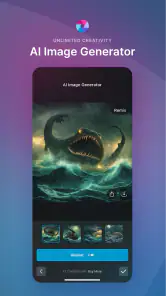
Yes. Pixlr AI Photo Editor is described as offering AI photo retouching and image generation, along with collage design and editing. This makes it relevant if you want one app for polishing a photo, experimenting with generated images, or arranging pictures into a collage. The exact tools you see may depend on the app version and the features available to you.
What is Pixlr AI Photo Editor and how does it work?
Pixlr AI Photo Editor is a powerful photo editing application that uses artificial intelligence to enhance and edit images. It provides users with a variety of tools and features to transform their photos, such as filters, overlays, and effects. The AI technology helps in automating complex editing tasks, making it user-friendly for both beginners and professionals.
Is Pixlr AI Photo Editor free to use, or does it require a subscription?
Pixlr AI Photo Editor offers both free and premium versions. The free version provides access to basic editing tools and features, which is sufficient for casual users. However, for advanced features and an ad-free experience, users can opt for the premium subscription. This subscription unlocks additional tools and capabilities, enhancing the overall editing experience. In-app purchases are available, with items ranging from $0.99 to $79.99.
Can Pixlr AI Photo Editor be used offline, or does it require internet access?
Pixlr AI Photo Editor primarily requires an internet connection for full functionality, especially when using AI-powered features and cloud storage. However, some basic editing tools may be accessible offline. To fully utilize its capabilities, including accessing the latest updates and features, having an internet connection is recommended.
Articles Related to Pixlr AI Photo Editor
Clash of Clans Is Won Between the Battles
Its raids are quick; its community is a long-term project of coordination, teaching, rivalry, and shared responsibility—with all the friction that entails.
Android Auto Makes the Case for Quieter Car Software
The car interface is no longer judged by how much it can do, but by how quietly it helps. Android Auto shows what drivers now expect—and what still gets in the way.
MobiOffice: Transforming Mobile Productivity with Seamless Integration
MobiOffice: Word, Sheets, PDF is redefining mobile productivity with a surprising blend of functionality and innovation.
EA SPORTS FC™ Mobile Soccer: Redefining Mobile Sports Gaming
Dive into EA SPORTS FC™ Mobile Soccer, where immersive gameplay and strategic depth transform mobile sports gaming.
Pros
- Intuitive user interface for easy navigation.
- Wide range of AI-powered editing tools.
- Supports various image formats.
- Cloud storage integration for easy access.
- Regular updates with new features.
Cons
- Contains in-app purchases for premium features.
- Requires internet for some functionalities.
- Occasional ads can be intrusive.
- Limited free version capabilities.
- High battery consumption during use.

- Category
- Photography
- Version
- 3.8.2











