B612 AI Photo&Video Editor
- 20.35K
- 4.1
- Installs
- 500.00M
- Price
- Free

Screenshots

Analysis by Reviewed
On a shared household phone, a camera app can become a little creative station: one person wants a quick selfie, someone else wants to add a playful effect, and a third just needs a tidy collage of the day. B612 AI Photo&Video Editor suits that casual, pass-the-phone kind of use better than a complex editing suite. I’d treat it as a fun tool for making pictures and short clips feel more personal, while keeping in mind that shared devices work best when everyone knows which photos they are editing and where the finished versions will be saved.
A shared camera for quick household moments
The app is most at home in brief, informal sessions: a selfie before heading out, a few pictures at a family meal, or a playful clip made while waiting for someone. Because the effects are part of the camera experience, people can see a creative direction before committing to a finished image. That makes it easier to take turns and choose a look together, instead of handing someone a plain photo and asking them to imagine how it might turn out.
That convenience has a trade-off. A live preview can encourage people to keep trying variations, and a shared phone can quickly fill with near-duplicates. I’d agree on a simple routine: take a small number of shots, review them together, and keep only the ones the group actually likes. It saves time later and avoids making the camera roll harder to navigate.
The Latest on B612 AI Photo&Video Editor
Starting without turning it into a family project
For a household, the useful first step is to agree on a simple boundary: use the app for images you have permission to edit, and check before changing someone else’s portrait or sharing a result. That matters especially when children borrow an adult’s phone. I wouldn’t assume a shared camera app provides separate family profiles or parental controls; instead, rely on the device’s own account and privacy settings, and keep the app’s use supervised when that is appropriate.
B612 is a free photography app from SNOW Corporation, and its long-running popularity gives a new user plenty of examples of the kind of playful look it is built around. It has a 4.1 average from around 7.4 million ratings and more than 500 million installs. Those figures suggest a familiar, widely used option, but they don’t guarantee that every filter or editing style will suit your taste. I find the best way to judge it is to try a few effects on an ordinary photo rather than expect every automatic enhancement to look natural.
First Impressions Matter
Downloading the B612 AI Photo&Video Editor was a breeze. The app is lightweight, and getting started is as simple as snapping your fingers. No complicated setups or tedious sign-ins. Just you and your creative instincts ready to explore. The interface is sleek and intuitive, designed for those who want to dive right into editing without a steep learning curve.
Features Galore
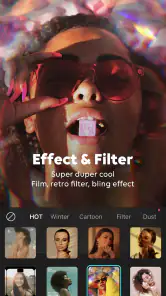
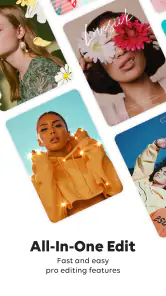
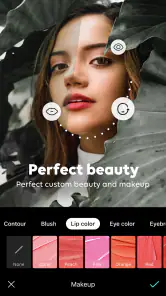
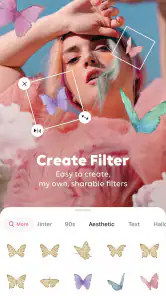
When it comes to features, B612 doesn’t skimp. This app is loaded with a plethora of editing tools that cater to both beginners and seasoned pros. The AI-powered beauty filters are a standout, automatically enhancing your photos and videos with a single tap. If you’re someone who loves experimenting, the app’s vast array of filters and effects will keep you entertained for hours.
More From Our News Desk

Clash of Clans Is Won Between the Battles

Android Auto Makes the Case for Quieter Car Software

MobiOffice: Transforming Mobile Productivity with Seamless Integration

EA SPORTS FC™ Mobile Soccer: Redefining Mobile Sports Gaming

How Microsoft OneDrive Became a Mobile Productivity Giant

How Google Translate Breaks Language Barriers Effortlessly
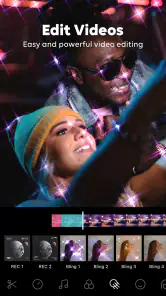
Another highlight is the real-time beauty effects. Whether you’re capturing a quick selfie or recording a vlog, these effects work in real-time, ensuring you look your absolute best at all moments. The app also supports high-definition video recording, a feature that’s a godsend for content creators looking to maintain quality while on the go.
Making shared moments easier to sort
A small workflow choice makes a difference when several people use the same device: capture first, then review the result before passing the phone along. A quick check helps avoid saving several nearly identical takes and makes it easier to spot whether a filter has softened details more than you intended. For a household outing, I’d use a collage for a handful of related moments rather than squeeze every photo into one frame; the result stays readable on a phone screen and is easier to send to relatives.
For a more natural finish, I’d start with a light effect and reduce its intensity before trying extra adjustments. This is especially useful for family photos, where skin tones and facial details should still look like the people in the picture. If the goal is careful retouching, precise color work, or a polished project with a detailed timeline, a dedicated photo or video editor is usually a better fit. B612 is strongest when speed and a ready-to-use look matter more than fine control.
Customization is Key
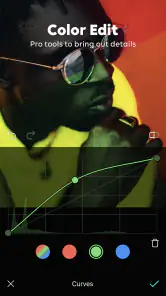
B612 offers a surprising amount of customization options. From adjusting the intensity of filters to tweaking every little detail in your photos, the app gives you the freedom to get the exact look you’re aiming for. The collage feature is particularly fun, allowing you to stitch together your favorite moments into a single frame. It’s perfect for creating memories that are both beautiful and shareable.
Choosing the right device routine
If you’re coordinating around one phone, agree on whether people should edit a copy or leave the original untouched when the device’s photo workflow allows it. That simple habit makes it less stressful to experiment, particularly if someone applies a strong beauty effect and later prefers the unedited image. I’d also avoid starting a long editing session when the battery is already low: effects and video work can make a quick task turn into more time on the screen than planned.
The app is aimed at a broad audience: its content rating is Everyone, and it is free to install, with optional in-app purchases ranging from $0.99 to $59.99 per item. That makes it easy to try without paying upfront, but I’d review any purchase prompt before tapping, especially on a device used by children. The current version is 14.6.15, and it requires Android 9 or later on Android devices. For iOS users, the practical check is simply whether the current app is compatible with their device and available through the relevant store.
Things to Keep in Mind
While B612 is a fantastic app, it’s not without its quirks. The occasional ad can be a bit intrusive, but it’s a small price to pay for a free app that offers so much. Also, some features require an internet connection, so it’s something to consider if you’re planning a photo-editing spree in a remote area.
Battery consumption is another aspect I noticed. Extensive use of the app, especially with the more advanced features, can drain your battery faster than usual. It’s wise to keep a charger handy if you’re planning on a long editing session.
When another editor makes more sense
Compared with a basic camera app, B612 gives you effects while you frame a shot, which is handy when you want to see a playful result immediately. Compared with a full-featured editor, it is less suited to controlled, layered work or a carefully assembled video. I’d recommend it to people who enjoy selfies, quick clips, stickers, and collages, but skip it if your priority is a clean camera view, minimal decoration, or detailed post-production. The app’s version history began with its release on October 9, 2014, but what matters in daily use is whether its current creative style feels right to you.
Picking the right tool for the job
In practical terms, the choice is less about which camera app is universally best and more about when you want the creative part to happen. A standard phone camera is the calmer option for a quick, unembellished record of a moment. B612 makes more sense when you want to see an effect as you frame the picture and prefer a playful result without moving into a separate editing workflow. A dedicated editor is the better choice when you need measured adjustments, multiple layers, or a video assembled with more control.
I’d also separate “easy to make” from “right to share.” A fun filter can help a group relax in front of the camera, but it doesn’t automatically make a portrait suitable for a public post. For a household picture, I’d let the people in it have a say before sharing, particularly if the effect changes someone’s appearance noticeably. That small pause is useful regardless of which app takes the photo.
Using it for everyday moments
One practical use is a quick birthday snapshot before guests arrive: I can frame the group, try a subtle effect in the preview, and decide whether the result feels lively without making everyone look noticeably altered. For children taking turns, I’d keep the activity simple—take a few pictures, choose one, and make a small collage together—rather than leave a shared phone open-ended. That keeps the app enjoyable without turning a short creative break into a long session.
It also works well when a photo needs a little personality but not a full editing project. A sticker or filter can make a casual message feel more playful, while a collage can gather a few moments from a walk or meal into one image. My tip is to compare the edited result with the original before sharing; a look that seems fun in the moment can feel too strong later, especially on portraits.
What to expect before sharing
People often wonder whether they need to pay to get started. I’d begin with the free experience and only consider a purchase if a specific paid option is genuinely useful to you. On a family phone, it’s sensible to make sure the person holding the device understands that optional purchases exist and knows to ask before confirming anything. That is a device-use agreement, not a special family feature in the app.
Another useful expectation is that a live effect is a creative choice, not a guarantee of a better photo. Lighting, movement, and the people in the frame still matter. If you’re making a picture for a document, a work profile, or a moment where accurate appearance matters, I’d use a standard camera and leave the beauty treatment out. B612 is more enjoyable when the aim is expressive and informal.
Age, trust, and personal boundaries
Its Everyone content rating makes the app broadly approachable, but that alone doesn’t settle whether it is right for every child or every shared-device routine. I’d show younger users how to avoid editing someone else’s image without permission and how to pause if a purchase prompt appears. For teens, a quick conversation about which pictures they intend to share can be more helpful than assuming a playful camera effect is harmless in every context.
For adults sharing a phone, the same courtesy applies: avoid leaving edited portraits in a confusing state, and tell the next person when a photo is only a draft. If privacy or account separation is central to your household, manage that through the phone’s own settings and user arrangements rather than expecting B612 to act as a family organizer. That distinction keeps expectations realistic.
The household verdict
My household recommendation depends on the people using the phone. It’s a good fit for anyone who enjoys expressive selfies, quick video, stickers, or an easy collage, especially when the goal is to make an ordinary moment feel more playful. It is less compelling for someone who wants a neutral camera, dislikes beauty effects, or expects a precise editing workspace. If several people share one device, a clear agreement about drafts, permissions, and purchases matters more than trying to turn the app into a shared photo manager.
Before installing, I’d ask one simple question: will the people using it actually enjoy choosing effects, or do they mostly want to take a picture and move on? If it’s the first, B612 can be an approachable creative option. If it’s the second, the built-in camera is likely to feel quicker and less distracting. Either way, the app works best when its playful tools are a choice rather than the default treatment for every photo.
The Final Verdict
In the end, B612 AI Photo&Video Editor is a delightful app that’s well worth a spot on your home screen. It’s perfect for anyone who loves to play around with photos and videos, whether it’s for social media clout or personal enjoyment. With its easy-to-use interface, powerful features, and endless customization options, it’s a must-have for any photography enthusiast. So, go ahead, give it a try, and let your creativity run wild!
For a shared household device, my verdict is a little more measured: it can make spontaneous photos and small creative sessions more enjoyable, provided the people using it respect each other’s images and keep purchases and sharing intentional. I’d choose it for quick, expressive edits rather than as the household’s only camera or a replacement for a precise editor. If that balance sounds right, it’s an easy app to try; if you prefer untouched photos and a quiet, practical camera, the built-in camera may be the better everyday choice.
B612 AI Photo&Video Editor Frequently Asked Questions
Is B612 available in my language?
If you are considering B612, check the language options shown on your device’s app store and within the app before downloading. The editor’s core appeal is its visual toolkit—filters, effects, and stickers—so you can explore creative options without relying on written instructions for every step. Your experience with menus and labels may depend on the language settings available on your device.
Does B612 save edited photos and videos automatically?
Saving behavior is worth checking when you first use any photo or video editor, especially if you want to keep an original unchanged. After making an edit in B612, review the on-screen save or export options and confirm where the finished content is stored on your device. This simple check helps you manage your originals and edited copies according to your own workflow.
Can I keep the original photo while editing it in B612?
If preserving an untouched original matters to you, check how B612 handles a test image before working on important photos. Use a copy when you want to be extra cautious, then review the finished edit and its saved location. That approach lets you experiment with filters, effects, stickers, and adjustments while keeping your preferred version organized.
Does B612 put a watermark on edited photos or videos?
Watermarks can affect whether an edited image is ready to share, so inspect the save or export screen when you finish a test edit. Look at the result before posting or sending it, and check whether any available settings affect the final appearance. This is a practical step for anyone who wants a clean-looking image or clip for personal use or social sharing.
Can I share my B612 edits with other apps?
B612 is intended for making creative photo and video edits on a mobile device, and finished content can fit into a workflow that involves sharing. Once you save an edit, use your device’s usual sharing options to choose where it goes. Check the final file before sharing, particularly if you have added several effects or stickers and want the result to look as intended.
Pros
- Intuitive and user-friendly interface.
- Wide range of filters and effects.
- Supports HD photo and video editing.
- Fast processing speed for edits.
- Frequent updates with new features.
Cons
- Some features require in-app purchases.
- Can be resource-intensive on older devices.
- Occasional ad interruptions.
- Limited free version capabilities.
- Requires internet for certain features.
- Category
- Photography
- Version
- 14.6.15