Pandora - Music & Podcasts
- 865.66K
- 3.9
- Installs
- 100.00M
- Price
- Free

Screenshots
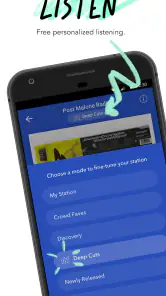
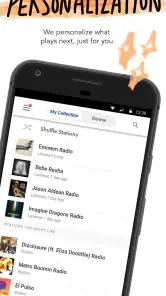
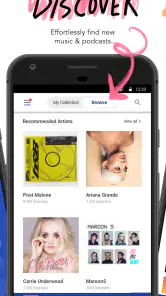
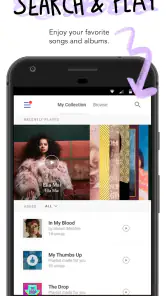

Analysis by Reviewed
I tend to judge a listening app by how quickly it gets me from a half-remembered artist to something worth hearing. Pandora’s main draw is that I can start with a song or artist and let a station take over, rather than spending time building a playlist before I press play. That makes it especially useful when I want background music and don’t have a precise queue in mind.
That radio-first approach also shapes the experience: it is less about choosing every track in advance and more about steering what comes next. If I want a familiar starting point with room for discoveries, Pandora - Music & Podcasts is an easy app to try. It is a free music and audio app from Pandora, with optional in-app purchases; the average rating is 3.9 from around 3.4 million ratings, and it has over 100 million installs. Its Teen age rating is worth noting for families choosing listening apps together.
Quick starts, with a radio-style trade-off
Getting a station going is simple: search for an artist or track you already like, then let Pandora fill in the listening session. In my experience, this suits chores, desk work, or a drive when browsing a large library would be more distracting than helpful. Giving tracks a thumbs-up or thumbs-down is a practical way to nudge the station over time; those choices are most useful when I make them honestly rather than tapping through without thinking.
The trade-off is control. A station can introduce music I would not have picked, which is part of the appeal, but it is not the same as deliberately assembling an exact sequence of songs. If I have a particular album order or a carefully planned playlist in mind, an on-demand service may fit better. Pandora makes more sense when I want recommendations to do some of the choosing.
Podcasts for planned listening
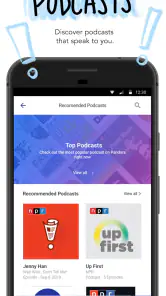
The podcast section broadens the app beyond music, with options spanning genres such as storytelling, news, and comedy. Recommendations can help me find a show that fits what I already listen to, though I still prefer searching directly when I know the exact title I want. A useful routine is to browse and choose episodes before a commute, then keep the queue focused so I am not making decisions while I should be paying attention to the road.
Offline downloads can help when a connection is unreliable or unavailable, such as on a flight. I would prepare episodes while connected and check that they are ready before leaving, rather than assuming a last-minute download will work in a weak-signal spot. That small bit of planning is more valuable than having a long queue full of things I may not actually want to hear.
Discovering the Magic of Pandora
Alright, so the first thing you notice when you dive into Pandora is its super intuitive interface. It's like the app just knows what you're in the mood for. You start off by entering a song or artist you love, and boom, Pandora creates a custom radio station just for you. It’s like having a personal DJ who somehow understands your vibe perfectly.
More From Our News Desk

Weather by Xiaomi Review: Clear at a Glance, Less Clear Up Close

X Under Pressure: Can It Recover When Posting Goes Wrong?

Clash of Clans Is Won Between the Battles

Android Auto Makes the Case for Quieter Car Software

MobiOffice: Transforming Mobile Productivity with Seamless Integration

EA SPORTS FC™ Mobile Soccer: Redefining Mobile Sports Gaming
But that’s not all. The real magic happens with the app’s ability to introduce you to new artists and tracks you might never have come across. It's like wandering through a musical wonderland, where every path leads to a potential new favorite. Plus, the app learns from your thumbs up and down, so the more you use it, the better it gets at curating your stations.
Podcasts Galore
Now, if you're a podcast junkie, Pandora has got you covered. The podcast section is brimming with options across genres. Whether you’re into storytelling, news, or comedy, there’s something for everyone. And the best part? The app’s recommendation system works here too, suggesting podcasts based on your listening habits.
One thing I absolutely love is the ability to download episodes for offline listening. It’s a lifesaver for those long flights or commutes where Wi-Fi is just a distant dream. You can queue up episodes and have hours of content ready to binge.
Why Pandora Stands Out
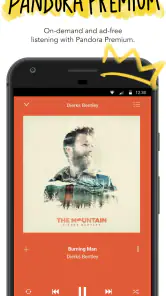
Let’s talk about why Pandora continues to be a go-to for many, even with all the competition around. First off, the free version is pretty darn good, offering a lot without making you reach for your wallet. Of course, if you want to ditch the ads and get more skips, the premium version is worth considering.
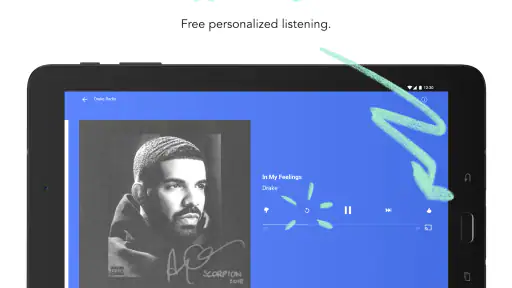
Another standout feature is the personalized playlists. These aren’t just random collections of songs. They’re tailor-made based on your listening history and preferences. It’s like having a playlist fairy sprinkling personalized music magic just for you.
And hey, if you're a stats nerd like me, you'll appreciate the detailed listening reports. It’s fascinating to see which artists and genres you’ve been vibing with over the months.
The Final Note
In a world full of streaming apps, Pandora keeps things fresh and exciting. Whether you’re a music lover or a podcast enthusiast, there’s something here for everyone. The app’s ability to constantly learn and adapt to your tastes is truly its superpower.
So, if you haven’t given Pandora a spin yet, what are you waiting for? Dive in, explore the endless possibilities, and let the music (and podcasts) play on. Trust me, your ears will thank you.
Choosing the right listening habit
A realistic weekday use is to start an artist station while making breakfast, then switch to a podcast episode for the walk or ride to work. That handoff works well if I want music without managing every selection and spoken content when I’m ready to concentrate on a particular story. I would keep work, exercise, and relaxed listening stations separate: the feedback I give during one mood can influence what I hear later, so a single station may not suit every part of the day.
Compared with services built around searching for a specific song and arranging it in a fixed order, Pandora’s strength is the low-effort discovery loop. Compared with radio, it gives me a more personal starting point and lets my reactions guide future selections. If exact track control is the priority, another on-demand service is likely the better fit; if finding a steady stream around an artist is the goal, Pandora’s format feels natural.
Free listening and paid choices
The app is free to install, and optional purchases are listed from $0.99 to $10.99 per item. The free experience can be a sensible way to see whether station-based listening suits you before spending anything. I would not pay simply because I listen often: first notice whether the limits or interruptions in your own use are genuinely getting in the way, then compare the available purchase options with what you need. That keeps the decision grounded in your habits rather than the promise of features you may rarely use.
For a household, the Teen rating is a useful prompt to review whether the app and its listening environment suit the person using it. For an individual listener, the more practical question is whether recommendations are welcome or whether choosing each song matters more. Those preferences, rather than the size of the catalogue, are what decide whether Pandora feels relaxing or restrictive.
When listening gets demanding
For ordinary listening, the app’s simple station workflow avoids a lot of repeated browsing. I would expect the experience to depend on the quality of the connection when streaming, and I would use episode downloads when I know I will be offline. Downloads also take preparation and device space, so I would save only episodes I expect to finish instead of collecting a large backlog.
Long sessions can make small habits matter: choosing a station before driving, keeping podcast queues intentional, and using thumbs feedback when a track is a poor match all reduce needless interaction. I would avoid judging a recommendation from one unexpected song; a few thoughtful reactions give the station a clearer signal than repeatedly restarting it whenever the mood shifts.
Performance in everyday use
I would describe Pandora’s performance appeal as convenience rather than raw speed: the most direct path is to pick a starting artist or song and listen, while detailed curation takes more active browsing. Stability and responsiveness can vary with the device and connection, so I would not treat a pause or slow load as proof that the app itself is at fault. Keeping the app and device in good working order, and preparing offline episodes ahead of travel, are sensible ways to avoid preventable interruptions.
On a device with limited storage, offline episodes deserve a little planning; on a connection that is inconsistent, downloaded listening is the safer option for a journey. If you mainly want a hand-picked album sequence, or you need an uninterrupted session with tightly controlled selections, another kind of music service may serve you better. I recommend Pandora most to listeners who enjoy being guided by stations, want music and podcasts in one place, and are comfortable shaping recommendations gradually.
A station setup that avoids unwanted spillover
One useful way to get more consistent results is to treat each station as a distinct listening context rather than expecting a single one to cover every mood. I would start one with an artist associated with focused work, and a separate one for exercise or a relaxed evening. Then I can give feedback based on the kind of session I actually want, instead of disliking a perfectly good track simply because it does not suit the moment. This takes a little more setup, but it makes the thumbs controls more meaningful over time.
There is also a practical difference between discovering music and revisiting favorites. When I want fresh suggestions, I let the station run and resist skipping every unfamiliar track immediately. When I want something familiar, I begin with an artist or song I already trust. That small choice sets expectations: Pandora is most satisfying when I regard a station as a guided stream, not a promise that every selection will be a personal favorite.
Keeping queues useful on busy days
For a day with several short trips, I would choose podcast episodes by duration and subject before heading out, rather than adding a large stack because it is available. A focused queue makes it easier to pick up where I left off and reduces the chance that I spend the first few minutes of a walk browsing. If the journey changes or I finish an episode sooner than expected, I can still choose what comes next; the point is to make the default choice easy, not to lock myself into a rigid plan.
Music and spoken audio serve different kinds of attention. A station is handy when I want a soundtrack while cooking or tidying, because I can let it continue without choosing each track. A podcast suits a walk where I want to follow a particular conversation or story. Switching between those uses is convenient, but I would avoid assuming that one queue will always be right for both. A little intention at the start saves fiddling later.
Who will appreciate the format
I would recommend Pandora to someone who knows a few artists they like but does not want to manage every song in a playlist. It is also a reasonable option for listeners who want music and podcasts within one listening app and are happy to explore recommendations. The free entry point makes it easy to see whether that radio-led style feels natural before deciding whether any paid option is worthwhile.
I would steer away from it if your main pleasure comes from choosing an exact track order, replaying a particular album from beginning to end, or keeping tight control over every selection. Those listeners are usually better served by an on-demand music service designed around direct track and album selection. Likewise, anyone who dislikes algorithmic suggestions may find the station format more distracting than liberating, even if they use feedback to adjust it.
What to expect from the listening experience
For a new user, the quickest test is simple: choose an artist you know well, let the station play for a while, and notice whether the recommendations feel like useful discoveries or interruptions. Then try a different starting point for another mood. That tells you more about the app’s fit than browsing every section at once, and it also gives the recommendation system a clearer starting signal.
If a stream pauses, I would first consider the connection and whether I am trying to listen somewhere with inconsistent coverage. For a planned offline stretch, downloads are the more dependable preparation, provided I leave enough room on the device and verify the episodes before setting off. This is not a reason to save everything in advance; it is a reason to prepare only the audio I genuinely expect to use.
Final performance verdict
Pandora’s appeal is not that it removes every decision, but that it makes the first decision small: pick an artist, start a station, and refine the results as you listen. That can feel quick and low-effort in everyday use, while searching for a precise title or carefully arranging a sequence naturally takes more attention. The app is best when its recommendations are part of the experience rather than something to work around.
My practical recommendation is to try it during a routine where you can judge its station style fairly, such as cooking, desk work, or a familiar commute. Keep a couple of stations for different moods, use feedback selectively, and download only podcast episodes you have a clear reason to keep offline. If those habits make listening easier, Pandora is a useful fit; if you keep wishing you could dictate every next track, a more hands-on alternative will probably suit you better.
Pandora - Music & Podcasts Frequently Asked Questions
Is Pandora suitable for younger listeners?
Pandora has a Teen content rating, which is worth checking before a younger listener downloads the app. Parents and guardians can use that rating as a guide when deciding whether the app fits their household. Pandora is a music and audio app, and its listening options include artists, albums, playlists, and podcasts.
Who makes Pandora, and how widely is it used?
Pandora is developed by Pandora and has an average rating of 3.9, based on around 3.4 million ratings. It has over 100 million installs, giving prospective listeners a sense of its broad reach. Those figures can help with general context, though personal preferences and listening needs are still the best guide to whether the app is a good fit.
Is Pandora available on Android and iOS?
Yes. Pandora - Music & Podcasts is available for Android and iOS, so you can use it on a compatible device running either platform. The app is free to download, and its Teen content rating is useful to consider when deciding whether it is appropriate for younger listeners. Pandora is listed in the Music & Audio category.
How much does Pandora cost, and are there purchases inside the app?
Pandora is free to download, and in-app purchases are available, ranging from $0.99 to $10.99 per item. The app’s free experience and optional purchases may suit different listening preferences, so check the purchase details shown in your app store before buying. Pandora is developed by Pandora and has an average rating of 3.9 from around 3.4 million ratings.
What is Pandora - Music & Podcasts?
Pandora is a popular music streaming app that offers users access to a vast library of songs, podcasts, and personalized radio stations. It uses a sophisticated algorithm to recommend music based on your preferences, providing a unique listening experience. Available on both Android and iOS, it caters to various musical tastes and interests.
Pros
- Extensive music library available.
- Personalized playlists for users.
- Offline listening feature.
- Podcasts available within app.
- User-friendly interface.
Cons
- Ads in free version.
- Limited skips in free version.
- Some features require premium.
- Occasional app crashes.
- Not available in all regions.
- Category
- Music & Audio
- Version
- Varies with device












