YouTube Create
- 852.00
- 3.4
- Installs
- 1.00M
- Price
- Free

Screenshots

Analysis by Reviewed
I judge a mobile editor by whether it helps me finish a real clip without turning a small task into a software lesson. YouTube Create is aimed at that quick, practical kind of editing, especially for people who plan to publish on YouTube. It is a free video editing app from Google LLC, currently presented as a beta, so I would approach it as a convenient tool to try rather than assume every part of the experience is settled.
What free access means in practice
The app costs nothing to try, which makes the decision less about a purchase and more about whether its workflow fits your needs. I see that as a meaningful advantage for someone who edits occasionally: you can test the process on a small clip before deciding whether it deserves a regular place in your routine. Free access does not, by itself, tell me how every part of the experience will suit a particular creator, so I would judge it by the time and effort it saves on your own videos.
YouTube Create is still in beta, and I would keep that in mind when choosing it for anything time-sensitive. For a casual post or a practice edit, trying a developing tool is a reasonable trade. For a deadline-bound project where I cannot afford workflow surprises, I would keep a familiar alternative available until I know how the app behaves on my device and with my footage.
Getting started and deciding what you need
The first thing I noticed about YouTube Create was how incredibly user-friendly it is. You don’t need to be a tech whiz to navigate through its features. From the moment you open the app, it’s like the interface is holding your hand and guiding you through the entire process. I mean, who doesn’t love a good, intuitive design?
Where a phone-first workflow helps
The appeal is clearest when the footage is already on your phone and the edit is modest: trimming a short clip, joining a few moments, or adding a layer before sharing. For example, after recording a quick cooking tip, I would rather tidy the beginning and end, add a music bed, and move on than transfer everything to a computer for a tiny adjustment. A phone editor is especially handy when an idea is fresh and I want to publish while the moment still feels current.
One useful habit is to decide the clip’s purpose before editing. If it is a quick update, keep the sequence tight and use only the additions that clarify it. If it is a tutorial, check that each cut preserves the step being shown. That simple choice prevents a lightweight editing process from becoming a string of decorative effects, and it makes a compact tool more effective than a larger editor used without a plan.
Features to Explore
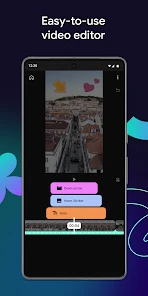
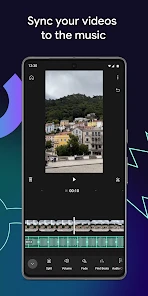
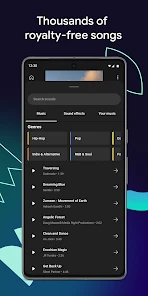
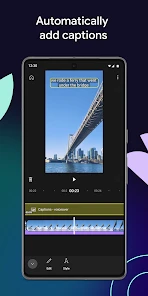
One of the standout features is the easy video editing tool. Seriously, editing videos has never been this straightforward. You have access to a plethora of editing options that let you trim, splice, and overlay content with just a few taps. The transitions are smooth, and there’s even a feature to add music directly from a free library. No more worrying about copyright strikes on your videos!
More From Our News Desk

Weather by Xiaomi Review: Clear at a Glance, Less Clear Up Close

X Under Pressure: Can It Recover When Posting Goes Wrong?

Clash of Clans Is Won Between the Battles

Android Auto Makes the Case for Quieter Car Software

MobiOffice: Transforming Mobile Productivity with Seamless Integration

EA SPORTS FC™ Mobile Soccer: Redefining Mobile Sports Gaming
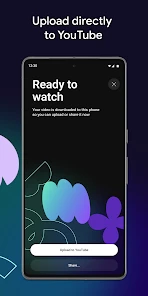
Another feature worth mentioning is the custom thumbnail creation. It’s like they’ve taken all the good stuff from Photoshop and simplified it for mobile use. Plus, the app allows you to schedule your posts directly to YouTube. So, you can plan your content without breaking a sweat.
These tools are most valuable when I treat them as parts of one publishing routine rather than reasons to overwork an edit. A thumbnail is worth attention because it gives a viewer a quick visual cue about the clip; it need not become a separate graphic-design project. Likewise, music can help set a mood, but I would listen back against speech before settling on it. A track that feels pleasant on its own can compete with a quiet voice once the video is played on a phone speaker.
Small workflow choices that make a difference
For a short explainer, I would record the points in the order I expect to use them, then trim pauses and mistakes before adding music or visual polish. This keeps the edit focused and makes it easier to spot whether a cut has removed context. It is a simple way to get more from a phone editor without assuming that extra effects will make the video clearer.
I would also treat the thumbnail as a final check on the story, not merely a decoration. If the image suggests something the clip does not deliver, it sets the wrong expectation. Choosing a frame or design that accurately reflects the subject can make the whole post feel more coherent, even when the video itself is brief.
Performance and usability
In terms of performance, YouTube Create runs like a charm. I tested it on both Android and iOS, and it was smooth sailing all the way. The app didn’t crash once, which is more than I can say for some other apps out there. The upload speeds are pretty impressive too, so you’re not left twiddling your thumbs waiting for your video to go live.
Usability-wise, it’s a big win. Even if you’re new to content creation, you’ll find yourself picking up the pace in no time. The tutorials provided are clear and concise, making the learning curve almost non-existent.
For a dependable everyday workflow, I would still review the finished clip before posting: check the opening, listen for speech getting lost under music, and make sure the thumbnail matches what the video actually shows. This is a practical safeguard with any quick editor, not a reason to avoid one. I would also keep an original copy of important footage until I am happy with the published result, rather than relying on an editing session as the only version of a moment I care about.
What to check before relying on it
A useful first test is to make a short edit using the kind of material you normally record, rather than judging the app with a random sample clip. Notice whether selecting footage, making a small correction, and preparing a post feels natural on your phone. If the process is comfortable for a simple video, that is a better sign for your routine than a quick tour of tools you may never use.
Before sharing anything important, I would watch the whole result from beginning to end and make sure the final cut still makes sense without the editing screen in front of me. That catches abrupt starts, missing context, and audio that becomes hard to follow. Keeping the unedited recording until I am satisfied also gives me a way back if I later want a different version.
How it compares with other editing choices
Compared with the usual alternatives, this sits on the convenient end of mobile video editing. A more advanced desktop editor is a better fit when I need detailed control, a complex timeline, or a polished project built from many sources. A general-purpose mobile editor may suit someone who wants a broader creative workspace, while this app makes more sense for a creator who values a direct route from a phone edit to a YouTube post. The trade-off is straightforward: less friction for simple publishing, but not necessarily the depth I would want for a demanding production.
That distinction matters if you are choosing a tool for a recurring project. A short weekly update or a basic tutorial can benefit from keeping the workflow on one device. A video with many carefully timed layers, extensive revisions, or a need for close control over every edit is more likely to outgrow a streamlined phone app. I would start with the simpler option for ordinary clips, then move to fuller software when the project itself—not habit—calls for it.
A realistic day-to-day use
Imagine I have recorded a brief update between errands and want to share it while the subject is still timely. I can use a phone-first workflow to remove the dead air at the start and end, make the sequence easier to follow, and consider whether a music layer helps or distracts. I would then check the thumbnail against the actual message and review the finished video before publishing. The benefit is not that every edit becomes effortless; it is that a modest task can stay modest instead of turning into a transfer-and-setup project.
That same approach suits a small business owner posting a quick demonstration, a student sharing a straightforward project, or a hobbyist documenting a simple process. The key is that the footage and intended result are manageable on a phone. If the work begins to require repeated revisions or a carefully organized collection of clips, the convenience of staying mobile may no longer outweigh the limits of a simpler workflow.
Who gets the most value
If you’re still on the fence about trying it out, let me give you a nudge. It’s perfect for creators who want professional-quality videos without the hassle of complex software. Whether you’re vlogging, creating tutorials, or just sharing your day-to-day life, this app has got you covered.
It is also a sensible first step for someone who has footage but keeps postponing publication because editing feels intimidating. The app is free, and its beta status makes it reasonable to explore without treating it as a permanent commitment. It is rated for teens, and it has an average rating of 3.4 from around 15,000 ratings, with over a million installs. Those figures suggest a substantial audience, though they do not tell me whether its particular workflow will suit your project.
I would skip it if I mainly edit long, layered projects or need a desktop-style environment for precise work. I would also choose another approach if my priority were to create a highly customized visual identity rather than finish straightforward clips efficiently. For a casual creator, though, the useful question is not whether it replaces every editor; it is whether it removes enough hassle from the kind of video I actually make.
When another editor is the better choice
I would choose a fuller editor when a project depends on exact timing across many layers, substantial revision, or a more involved visual treatment. Those needs are different from trimming and preparing a short phone video, and convenience alone cannot compensate if the workflow does not provide the control I need. Likewise, someone who rarely posts to YouTube may prefer a general-purpose tool that better matches where and how they share their work.
The app’s teen content rating is another practical consideration for families deciding whether it is suitable for a younger user. I would look at the editing and publishing routine as a whole, not just the age label: a young creator may find a straightforward editor approachable, while posting decisions and supervision remain matters for the family.
My verdict on trying it
In a world where content is king, having the right tools at your disposal is crucial. And with YouTube Create, you’re not just getting an app; you’re getting a partner in your creative journey. So go ahead and give it a shot. Who knows? It might just become your new favorite tool!
My recommendation is to try it on a small, low-pressure clip first: trim a short recording, test how music sits beneath any speech, and see whether the thumbnail and posting flow fit your habits. That gives you a useful answer without committing an important project to a new routine. If that simple path feels natural, the app can earn a place in your toolkit; if you keep wishing for more control, a fuller editor will be a better match.
YouTube Create Frequently Asked Questions
Is YouTube Create available for Android and iOS?
YouTube Create is a mobile video-editing app intended for use on smartphones and tablets. Before downloading, check that the app is available for your device through its app store and that your operating system meets the store’s current requirements. Compatibility can depend on the specific device and software version, so checking the app page on your phone is the practical way to confirm.
Who develops YouTube Create, and is it connected to YouTube?
YouTube Create is developed by Google LLC and is focused on making and editing videos on mobile devices. Its name and purpose make it a natural fit for creators who want to prepare videos for YouTube, while the editing process itself is centered on working with clips and adding creative touches. You can also share finished videos through YouTube or other social platforms.
Is YouTube Create suitable for short-form videos as well as longer projects?
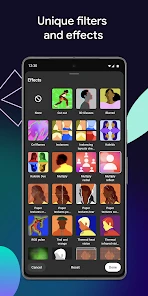
YouTube Create is a general mobile video-editing app, so users can work with footage and shape it into videos for different creative purposes. You can trim and combine clips, then add elements such as text, stickers, transitions, filters, and music. Those tools are useful when preparing a concise social video or organizing a larger edit on a mobile device.
Does YouTube Create require an internet connection to edit videos?
YouTube Create is designed for editing videos on a mobile device, where you can arrange footage and add creative elements. Some parts of an editing workflow, such as accessing online services or sharing a finished video, may depend on connectivity. If you expect to work while offline, check which tools and media are available on your device before starting a project.
How popular is YouTube Create?
YouTube Create has an average rating of 3.4 from around 15,000 ratings, with about 850 written reviews and more than one million installs. Those figures offer a broad snapshot of how the app is being received, but they do not predict whether its tools will suit your own workflow. Consider the editing features you need and try the app to judge the experience firsthand.
Pros
- Easy video editing for beginners
- Wide range of filters and effects
- Direct upload to YouTube
- Supports multiple video formats
- Free to use with YouTube account
Cons
- Limited advanced editing features
- Occasional app crashes
- Ads present in free version
- Requires internet connection
- Limited to YouTube platform
- Category
- Video Players & Editors
- Version
- Varies with device













