KineMaster - Video Editor
- 89.00K
- 4.4
- Installs
- 500.00M
- Price
- Free

Screenshots
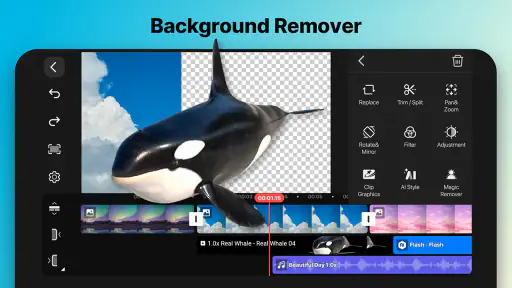
Analysis by Reviewed
My first-week impression of KineMaster - Video Editor is that it gives phone editing more room to breathe than a basic clip trimmer. I can build a project from separate visual and audio elements, refine cuts closely, and preview the result as I work. That flexibility is appealing when a quick social post grows into something with titles, a voiceover, and several shots that need to land in time.
The first week: learning to edit in layers
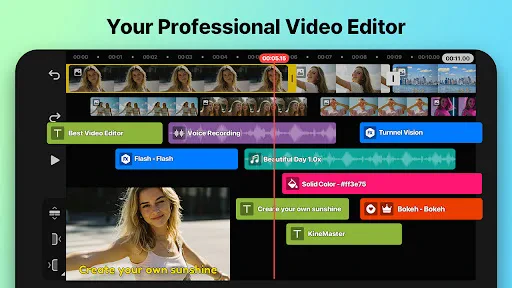
The main adjustment is thinking in tracks rather than treating a video as one strip. I would start with the main footage, then add text, images, or extra sound on their own layers. That makes revisions less disruptive: changing a title does not require rebuilding the underlying sequence. Frame-level trimming is useful for tightening a pause or matching a cut to a spoken phrase, though it takes more attention than tapping an automatic template.
For a practical first project, I’d edit a short cooking clip: arrange the steps in order, add a brief title, and record a voiceover after the rough cut is in place. Doing the narration late means I can explain what the finished sequence actually shows instead of trying to fit the edit around a script recorded too early. The same workflow suits a family recap or a small business product video.
Articles Related to KineMaster - Video Editor
Making the first edit easier to manage
I’d begin with a short sequence rather than importing every clip from a camera roll. Pick the moments that tell the story, arrange them in order, and only then add text or sound. This keeps the timeline legible while you learn how selecting and adjusting one element differs from changing the footage underneath it. It also gives you a quick way to judge whether the layered approach feels useful or just slower than you need.
A practical detail is to make a rough cut before polishing. If I add transitions and decorative elements while the order is still changing, I have more to revisit after moving a clip. Once the sequence works without embellishment, I can add a title where it helps the viewer, then use extra audio only if it improves the explanation or mood. That order saves effort and keeps the finished video from feeling overworked.
Month-to-month value: a tool for repeat projects
KineMaster is a video editing app from KineMaster, Video Editor Experts Group, and its appeal becomes clearer when editing is a recurring habit rather than a one-off experiment. The app is free to install, with in-app purchases listed from $0.49 to $77.77 per item. Its broad set of controls can make it useful for someone who regularly creates clips and wants to shape them on a phone instead of moving every project to a computer.
The asset store can help when a project needs a visual extra, but I would use it with restraint. A consistent title style and a few purposeful transitions usually make a series feel more coherent than adding a new effect to every shot. Before building a reusable style, I’d test it on a short clip: this exposes awkward text placement or a distracting transition before those choices spread across several videos.
You May Like

Clash of Clans Is Won Between the Battles

Android Auto Makes the Case for Quieter Car Software

MobiOffice: Transforming Mobile Productivity with Seamless Integration

EA SPORTS FC™ Mobile Soccer: Redefining Mobile Sports Gaming

How Microsoft OneDrive Became a Mobile Productivity Giant

How Google Translate Breaks Language Barriers Effortlessly
Where repeat use pays off
For someone posting a weekly recipe, hobby update, or small shop demonstration, the real recurring benefit is not simply having many controls. It is being able to reuse a sensible editing routine: select the footage, make a clean sequence, add a short identifying title, and record any explanation that the visuals do not make clear. A familiar process reduces decision-making without forcing every video to look identical.
For example, after filming a quick repair at home, I could cut out the pauses, keep the close-up that shows the important step, and record a brief explanation over the relevant moment. If the result is meant for a friend, a plain, clear edit is enough; if I’m making a series, consistent text placement can help viewers recognize the format. The useful distinction is between repeating a workflow and repeating every creative choice.
Maintenance, fatigue, and choosing the right tool
Keeping a mobile editing workflow manageable means checking the project before export: listen once with headphones, watch once without stopping, and look for text that appears too briefly to read. I’d also keep the source footage organized until I’m satisfied with the final version. Layered editing gives more control, but it also means more elements to review when something feels out of sync.
The trade-off is attention. A beginner who only wants to trim a clip and share it may find a simpler editor faster, while someone making a polished, repeatable series may value the extra control. A phone screen can also feel cramped when a project has many layers, and detailed editing is less comfortable on the go than a quick cut. If you regularly work with complex timelines or prefer a larger workspace, desktop editing may be a better fit.
What can make the workflow tiring
The same freedom that makes layered editing useful can create small maintenance chores. When a title, an image, and a voiceover are separate parts of the project, I have to check that each still lines up after changing the footage. This is manageable in a short clip, but it can make a casual edit feel like a task if I keep adding elements without a clear reason. I’d rather use two or three purposeful layers than turn every shot into a separate design problem.
There is also a difference between a project that is easy to edit on a phone and one that is comfortable to finish there. A short vertical-style social clip is a natural mobile task; a long piece with many revisions is harder to inspect on a small screen. If I found myself repeatedly zooming around the timeline or making tiny adjustments while away from a desk, I would treat that as a signal to simplify the cut or move the work to a larger editing setup.
How it compares with simpler editors
Compared with the basic editors built around trimming, arranging, and applying a ready-made look, KineMaster makes more sense when I want to position elements independently and fine-tune timing. That control is a real advantage for a voiceover-led explainer or a product clip with several shots. It is not automatically a better choice for every post: if the job is only removing the beginning and end of a recording, the extra layers and controls can be needless friction.
At the other end, desktop video editors usually offer a more comfortable workspace for long or intricate projects. I would not choose a phone editor just to avoid a computer if the timeline had become difficult to manage. The sensible dividing line is the project, not a claim that one format is universally superior: KineMaster fits short, hands-on edits where being able to work on the phone matters, while larger productions benefit from roomier controls and a bigger display.
Who should keep it installed?
The app is rated for Everyone, has a 4.4 average from around 6 million ratings, and has been installed over 500 million times. It first appeared on December 26, 2013, and version 8.0.6.35848.GP lists Android 8.0 as its minimum operating system. Those figures suggest a widely used, established option, but they do not remove the need to see whether its layered workflow suits your own projects.
I’d keep it installed if I were making short videos often enough to benefit from precise trimming, multiple layers, and on-phone voice recording. I’d skip it if my edits were almost always a single cut with no extra sound or graphics; a simpler tool would take less effort. For me, the lasting value comes from having control when a project needs it, not from using every effect just because it is available.
Deciding whether the free start is enough
The app costs nothing to install, while optional in-app purchases range from $0.49 to $77.77 per item. I’d start by editing a real clip with the tools already available and only consider paying if a specific limitation is getting in the way of work I actually do. That approach is more useful than browsing add-ons first: it helps separate a genuine need from the temptation to collect effects and assets that may never make it into a finished video.
It is also reasonable to ask whether a phone can handle the kind of edit you have in mind. The app supports multi-layer projects and 4K editing, but a busy timeline remains more demanding to manage than a short sequence, whatever the resolution. I’d test the intended workflow on a small project before committing a large batch of footage. That gives a clearer sense of whether the screen, precision controls, and overall pace suit your habits.
Why KineMaster Stands Out
First things first, KineMaster is not your average video editing app. It's packed with features that make it feel like a professional editing suite right in your pocket. From the moment you open the app, you're greeted with a user-friendly interface that's intuitive and easy to navigate, even for a newbie like me.
Features That Make a Difference
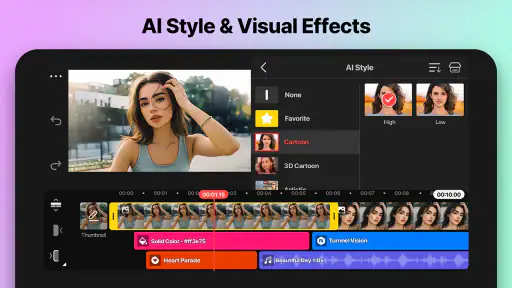
The app offers multiple layers of video, images, and text, along with multi-track audio. What does that mean for you? You can overlay your videos with effects, sounds, and images without breaking a sweat. The precision editing tools allow you to trim by frame, so you get your cuts just right.
But wait, there's more! KineMaster also supports 4K video editing. Yes, you read that right. You can edit and export videos in stunning 4K resolution. Plus, with real-time video and audio recording, you can add voiceovers or background music on the go.
Customization and Control
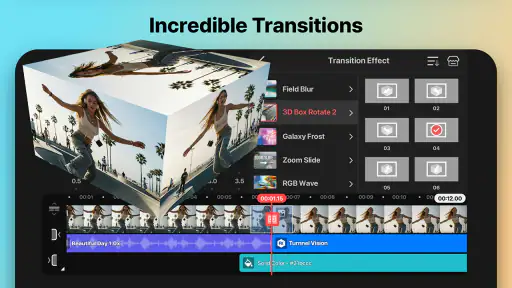
One of the best things about KineMaster is the level of customization it offers. You have a plethora of effects, animations, and transitions at your disposal. Whether you're creating a simple slideshow or an elaborate short film, you can tweak and tailor every aspect to your liking.
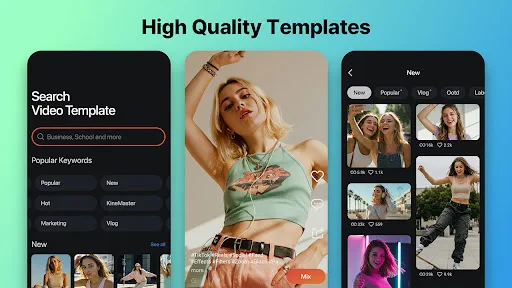
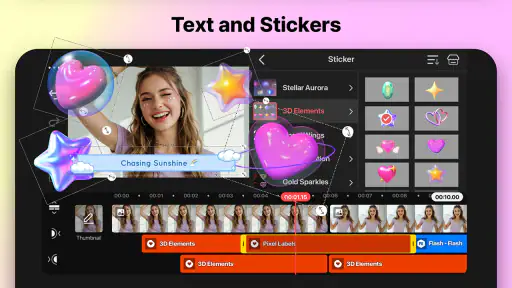
The app also comes with a handy asset store where you can download additional effects, stickers, and fonts to keep your content fresh and engaging. It's like having a candy store for video creators!
Performance and Ease of Use
KineMaster performs exceptionally well, even on older devices. It's smooth, responsive, and doesn't crash every time you try to render a video. The drag-and-drop functionality makes it easy to arrange clips and elements, and the instant preview feature lets you see your changes in real-time without any lag.
For those worried about the learning curve, fear not. KineMaster comes with plenty of tutorials and tips to help you get started. Whether you're a seasoned editor or just getting your feet wet, you'll find the guidance you need.
Final Thoughts
In a world where content is king, having a reliable video editing app like KineMaster on your phone is a game-changer. It's versatile, powerful, and most importantly, user-friendly. Whether you're editing videos for your social media, YouTube channel, or just for fun, KineMaster provides all the tools you need to craft your masterpiece.
So, if you're ready to take your video editing skills to the next level, give KineMaster a try. You won't be disappointed!
Making the habit sustainable
The lasting test for me is whether editing becomes a repeatable part of making a video, rather than a separate evening spent decorating it. A useful routine is to decide the purpose before opening the editor: explain a process, preserve a memory, or show a product clearly. That choice helps determine whether a title, extra audio, or an effect earns its place. If I can finish a straightforward clip without second-guessing every control, the app is earning its space.
One small workflow choice can prevent avoidable rework: keep a clean original recording and make the first pass with only the strongest moments. Then add narration once the sequence is stable, and check that the voice remains easy to follow over any other sound. This is especially handy for a quick how-to filmed between errands; a few clear close-ups and a concise explanation are more useful than a heavily decorated timeline.
When a different editor makes more sense
If I were making a one-off clip for a group chat, I would not automatically reach for a layered editor. A built-in editor or a simpler mobile alternative can be the better choice when speed matters more than exact placement. KineMaster earns the extra attention when I need to balance narration with footage, place text independently, or refine a cut to a particular moment. The difference is not about how serious the creator is; it is about how much control the specific edit needs.
Likewise, someone producing a longer piece with frequent revisions may be happier on a desktop editor, where a larger display makes it easier to inspect several tracks at once. I would also think twice if I rarely make videos: learning a more involved timeline has little payoff when a simple trim covers nearly every need. On the other hand, a phone-first creator who edits regularly can appreciate having those controls close at hand without turning every small project into a computer session.
My long-term verdict
After the novelty of trying effects wears off, the strongest reason to keep the app is its combination of close timing control and separate media layers. Those are practical tools, not just options to explore once. They help with recurring formats, voice-led explanations, and short edits where a small change in timing makes the result clearer. The weaker case is casual trimming: there, its depth can feel like overhead rather than value.
I would treat the free start as a chance to test an actual project, not as a promise that every useful extra will be included without cost. Make one short edit, see whether the controls fit your hands and habits, and decide about purchases only when a real need appears. For me, KineMaster is worth keeping when I make videos often enough to benefit from its layered approach. If that describes you, it can be a dependable mobile workspace; if not, a simpler editor may be the more comfortable everyday choice.
KineMaster - Video Editor Frequently Asked Questions
Can I trim and split clips in KineMaster?
Yes. KineMaster includes tools for arranging and refining video clips, so you can shape a project rather than simply combine files untouched. You can start with straightforward edits such as trimming and ordering clips, then add other elements as needed. If your usual edits are simple, it is still worth considering whether you want the extra creative controls that come with a broader mobile editor.
Can I record or add a voiceover while editing?
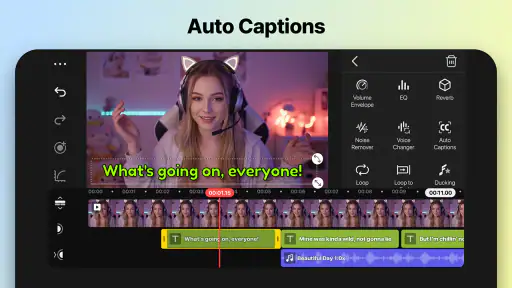
KineMaster includes voiceover tools, which can help you add spoken narration to a video project. You can combine voiceover with video layers, subtitles, effects, and other audio or visual material as you build an edit. If narration is central to your videos, look through the audio controls and consider whether editing and organizing those elements on your phone or tablet suits your workflow.
Can I save a project and continue editing it later?
KineMaster is designed for editing video projects on a mobile device, and its range of editing tools makes it possible to work on more than a quick one-step cut. If you plan to return to an edit later, keep track of the project and the media it uses on your device. When moving to another device, remember that projects are not automatically synced between devices.
Can I edit videos without an internet connection?
KineMaster is a mobile video editor for making and refining projects directly on a phone or tablet. Whether a particular task works offline can depend on the feature or content involved, so it is sensible to check the app’s behavior on your device before relying on it without a connection. Keep any video and audio files you need accessible on the device while editing.
Can I use my own music, photos, and video clips in a project?
KineMaster is built around assembling and refining video projects, and its editing controls let you work with visual material, audio, and multiple layers. You can bring these elements together to make an edit that fits your idea, then add text, transitions, or effects as needed. Before starting, make sure the media you want to use is available on your device and appropriate for your intended project.
Pros
- User-friendly interface for easy editing
- Supports multiple video layers
- Real-time video and audio recording
- Wide range of effects and transitions
- High-quality video exporting options
Cons
- Watermark in free version
- Limited features without subscription
- Occasional app crashes
- Requires significant storage space
- Complex features may overwhelm beginners

- Category
- Video Players & Editors
- Version
- 8.0.6.35848.GP