Edits, an Instagram app
- 2.52K
- 4.7
- Installs
- 10.00M
- Price
- Free

Screenshots
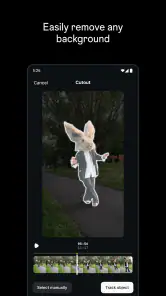
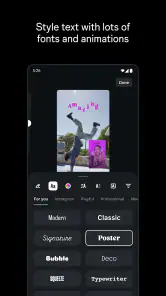

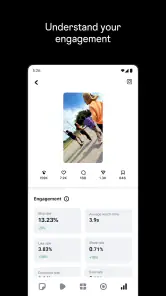
Analysis by Reviewed
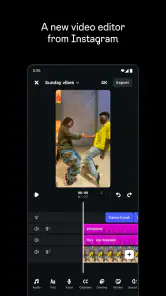
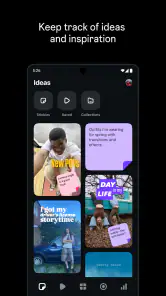
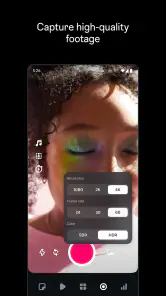
When I choose a video editor, I first ask whether I want a quick route from a clip to a social post or a flexible workspace for a more involved project. Those are different jobs, and choosing by that distinction saves frustration. Edits is Instagram’s free app in the video-editing category, aimed at creators who want to prepare videos for sharing. It is rated for Everyone, and its 4.7 average from around 469,000 ratings suggests that many people have found it useful. I’d consider it especially if Instagram is already where I plan to publish, rather than expecting a general-purpose editing studio.
Choose it for the whole posting workflow
For a simple everyday example, imagine filming a short clip while making dinner, then wanting to trim it into a clear, watchable post before the moment passes. A focused creator editor can make that path feel less cumbersome than moving between a camera roll, a separate editing app, and a social platform. The practical question is not whether an editor can do everything; it is whether it helps you finish the kind of video you actually make.
I would also think about where the finished file needs to go. If Instagram is the destination, a tool from Instagram has an obvious appeal: the editing and sharing steps belong to the same creator ecosystem. If I regularly deliver work to clients, build longer projects, or need precise control over a complex timeline, I would compare it with a dedicated desktop or mobile editor before switching. Those tools may suit that work better, but their extra depth can be unnecessary for a quick social clip.
Match the editor to your everyday clips
The dinner example is only one version of the quick-post workflow. I can also see Edits making sense for a small business owner capturing a new dish, a student assembling a brief campus moment, or a creator recording a simple behind-the-scenes update. In each case, the useful outcome is a finished video that is ready for the social destination—not a project with every possible production choice explored.
To keep a short edit from turning into a time sink, I’d decide on the point of the clip before opening the editor. For a cooking moment, that might mean keeping only the action that explains what is happening, then ending on the finished plate. This is a practical editing habit rather than a promised app feature, but it helps me judge whether a creator-focused tool is doing its job: can I make the clip clearer without adding unnecessary steps?
Creators who post regularly may also benefit from setting a simple personal checklist: check the opening, remove pauses that do not add context, and watch the final version once with the sound on. If the clip works only because I remember what happened while filming, it probably needs a clearer visual or a tighter cut. A lightweight workflow is most useful when it helps me make those decisions quickly instead of encouraging me to keep adjusting a post indefinitely.
Unleashing Creativity with Filters
Now, let's dive into one of the coolest features of this app—its filters. Edits offers a plethora of filters that cater to every mood and style. Whether you're looking to add a vintage touch, a vibrant hue, or a subtle glow, there's something for everyone. I was particularly blown away by the retro filters which give your pictures that nostalgic feel, reminiscent of old-school film cameras. The best part? You can adjust the intensity of each filter, making sure your photos are exactly how you envisioned them.
More From Our News Desk

Weather by Xiaomi Review: Clear at a Glance, Less Clear Up Close

X Under Pressure: Can It Recover When Posting Goes Wrong?

Clash of Clans Is Won Between the Battles

Android Auto Makes the Case for Quieter Car Software

MobiOffice: Transforming Mobile Productivity with Seamless Integration

EA SPORTS FC™ Mobile Soccer: Redefining Mobile Sports Gaming
Easy-Peasy Editing Tools
Aside from the filters, Edits comes packed with a range of editing tools that are super easy to use. Even if you're not a pro at photo editing, this app makes it simple to tweak brightness, contrast, and saturation. I found the cropping tool particularly handy for getting the perfect frame. Plus, the user interface is intuitive, meaning you spend less time figuring out how to use the app and more time creating stunning images.
Although those controls make the original review’s photo-editing examples sound appealing, there is an important decision point: Edits is presented as a video editor for creators. I would judge it by the video workflow I need, not assume that every photo-oriented tool or effect described above is available in the current app. Before building a routine around any particular control, I’d check it in the installed version and test it on a throwaway clip. That small trial is a better way to avoid planning a project around an editing option that may not match what you need.
Keep effects in service of the footage
When I try a new editing style, I prefer to apply it to one short, ordinary clip rather than begin with something important. That makes it easier to spot whether a treatment helps the subject or merely makes the image look busy. If the footage includes several lighting conditions, I’d review the whole sequence after making an adjustment: a look that suits one shot can be distracting on the next.
This is also where I would resist trying to make every post look identical. A recognizable style can help a feed feel considered, but consistency does not require applying the same visual treatment to every subject. For a quick creator workflow, a restrained edit that preserves the original scene may be more effective than a dramatic look. I would judge the result on a phone screen at the size people are likely to watch, not only while zoomed in on an editing view.
The Magic of Presets
For those days when you're feeling a bit lazy, Edits has got you covered with its presets. These are pre-made combinations of filters and settings that you can apply with just one tap. I love how they take the guesswork out of editing and are perfect for when you want to quickly jazz up a photo before posting it on Instagram. They’re also great for maintaining a consistent aesthetic on your feed.
A useful habit for creators is to decide on the feel of a post before editing: bright and energetic for a lively moment, or restrained when the subject should carry the clip. That keeps quick effects from becoming a substitute for a clear idea. If a preset-based approach is available in your workflow, I’d use it as a starting point and check the result against the actual footage; the same look can land differently across indoor lighting, daylight, and mixed scenes.
If you're someone who likes to go beyond basic edits, Edits also offers advanced options. You can play around with curves, levels, and even add text overlays to your images. It's like having a mini Photoshop right in your pocket!
That kind of advanced-control expectation is where I would be cautious. A mobile creator editor may be convenient for shaping a post, but it is not automatically a replacement for a specialist editor when a project depends on exact color work, layered graphics, or a detailed sequence. I’d start with a short test: edit one representative clip, export or share it the way I normally would, and check whether the result and the handoff fit my routine. That answers more than browsing feature names alone.
When another kind of editor makes more sense
Compared with the usual alternatives, Edits is most compelling as a creator-oriented option tied to Instagram, while a general mobile editor may be preferable when I want to publish across several platforms or keep editing separate from a social account. A desktop editor is often the more sensible choice for long-form work, detailed audio timing, or a project that needs repeated revisions. I would not switch simply because an app is popular; I’d switch when it removes a real step from the way I make videos.
The distinction is less about which category is universally better and more about what I need to hand over at the end. A social-first editor is appealing when the final audience and destination are already clear. A general-purpose mobile editor can be a better fit if I routinely reuse the same finished file in different places, while a desktop workspace may be worth the extra setup for projects with many scenes or revision rounds. I would compare the time saved by a simpler path with the control I might give up.
There is also a small but important cost to changing tools: learning where controls live, rebuilding a repeatable look, and checking that the finished video fits the destination. I’d avoid moving an entire workflow at once. Trying one low-stakes post first lets me see whether Edits feels natural and whether sharing from it is genuinely easier than using my current editor. If it is not, keeping the old workflow is a perfectly reasonable choice.
For that first test, I’d choose a clip that represents my normal work rather than a perfect, unusually easy sample. I’d note how long it takes to get from selecting footage to a version I am comfortable sharing, whether I can make the changes I care about, and whether the final handoff is convenient. If I often move drafts between devices or collaborate with someone else, I would test that specific part of the process before making the app central to my routine.
Check the practical fit before committing
A common question is whether a free editor is automatically the cheapest choice. The download costs nothing, but the real cost is time: learning another interface, repeating edits, or moving a file into a second app can outweigh the benefit of a no-cost tool. I would give Edits a fair trial on a routine post and compare the whole process, not just the moment spent trimming or adjusting a clip.
Another useful check is device compatibility. The app’s minimum operating-system requirement is version 9, so I would make sure the device I intend to use meets that baseline before planning around it. The current release is version 408.2.0.58.77; as with any app, I would check the installed version before relying on a particular workflow, especially if I have built instructions for someone else around it.
Sharing Made Simple
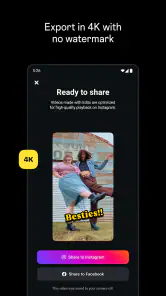
One of the things I appreciate most about Edits is how seamlessly it integrates with Instagram. Once you're done perfecting your masterpiece, sharing it directly to your feed or stories is a breeze. The app even suggests the best hashtags to use, which is a neat little feature for boosting your post's visibility.
Edits was released on April 21, 2025, and its current version is 408.2.0.58.77. It has passed 10 million installs, and the minimum operating-system requirement is version 9. Those details help set expectations about reach and compatibility, but they do not replace a practical check on the device and workflow I plan to use. I’d also treat suggestions for hashtags as prompts rather than a growth strategy: choose tags that accurately describe the post, and do not let them distract from whether the video itself is clear and worth watching.
The Instagram connection is most useful when it removes an actual handoff. If I finish a clip and intend to share it there, keeping the editing and publishing steps close together sounds convenient. If my process depends on sending a file to a client, archiving a project in a particular format, or preparing versions for several destinations, I would test those steps rather than assume a social-sharing path covers them. My recommendation depends on the route the video must take after editing, not merely on how quickly I can make a change.
People also often want to know whether this kind of app suits a beginner. I think it can be a sensible place to start if the goal is a short social video and the person is willing to learn by making small, low-stakes posts. Beginners should still keep expectations grounded: an approachable creator tool does not make every editing decision automatic. Choosing the best moment, keeping a clip understandable, and checking the finished result remain part of the work.
On the other hand, I would steer someone toward a specialist alternative if their routine depends on detailed timelines, careful sound work, layered visual elements, or frequent revisions. That does not make a social-oriented editor poor; it means the job has changed. The same applies to creators who need one repeatable process for multiple publishing destinations. A general mobile or desktop editor may earn its place by offering a better fit for that broader workflow, even if it takes more effort to learn.
For anyone wondering whether to replace a familiar editor outright, I would say no—not until a real test shows a clear advantage. Keep the existing tool for important work, make one ordinary post in Edits, and compare the finished result and the steps involved. If you find yourself switching back and forth for routine tasks, that is useful evidence that the new app is not simplifying your process. If it lets you finish the kind of Instagram video you already make with less friction, then a gradual switch makes sense.
For a new creator, the strongest reason to try it is the chance to make and share short-form work without committing to a complicated editing setup. For an experienced editor, the question is whether its Instagram-centered convenience outweighs the control and flexibility they already rely on elsewhere. The free price makes a low-risk trial possible, but time spent learning any new workflow still matters. If a quick social edit is the goal, I’d give it a test; if the job calls for meticulous production or broad delivery options, I’d keep a more specialized alternative in the mix.
In conclusion, if you're an Instagram enthusiast looking to enhance your photo editing game, Edits is definitely worth checking out. Its combination of user-friendly tools, stunning filters, and seamless Instagram integration make it a must-have app for anyone looking to elevate their social media presence. Give it a try, and let your creativity run wild!
Edits, an Instagram app Frequently Asked Questions
Can I install Edits on an older Android device?
Check your device’s operating-system version before downloading Edits. The app requires Android 9 or later, so a device running an earlier version will not meet the minimum requirement. If your phone is up to date enough, Edits may be a fit if you want a video editor built for creators and videos intended to be shared.
Who makes Edits, and what is the app designed for?
Edits is an app from Instagram in the Video Players & Editors category. Its purpose is clear from its short store description: it is a video editor for creators who want to make videos they are proud to share. It may suit people preparing video content, while someone looking primarily for a still-photo editor should consider whether that focus meets their needs.
Do I need an Instagram account to use Edits?
Edits is a video editor for creators, and its store summary describes making videos to share with Edits. Because it is an Instagram app, people considering a download may want to think about how closely they plan to use it with Instagram. You can use the app to work on videos, but sharing them is the step that connects the editing process with a social platform.
What kind of content can I create with Edits?
Edits is a video editor, rather than a photo-editing app. It is aimed at creators who want to make videos they are proud to share, so it is relevant for preparing video content before sharing it through Instagram. If your main need is adjusting still photos, this app’s central purpose may not match what you are looking for.
What is Edits and how does it work with Instagram?
Edits is a versatile photo editing app designed to enhance your Instagram experience by providing advanced editing tools and features that are not available within Instagram itself. It allows users to apply unique filters, adjust lighting, and add creative effects to their photos before uploading them to Instagram, ensuring a more polished and professional look.
Pros
- User-friendly interface.
- Wide range of editing tools.
- Seamless Instagram integration.
- High-quality output images.
- Frequent updates and new features.
Cons
- Requires internet for full functionality.
- Some features behind paywall.
- May consume significant device storage.
- Occasional crashes reported.
- Limited support for video editing.
- Category
- Video Players & Editors
- Version
- 408.2.0.58.77













