iTunes
- 28.00M
- 4.7
- Installs
- 10.00B
- Price
- Free

Screenshots
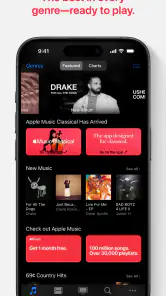
Analysis by Reviewed
My first impression of iTunes is that it makes the most sense when you want a familiar place to buy, organize, and play media rather than simply press play on whatever a streaming service happens to recommend. That difference shapes both its appeal and its friction: a personal library can feel reassuringly yours, but keeping that library tidy and accessible takes a little thought. Apple’s long-running media app sits in the video players and editors category, though its everyday role is closer to a media hub than an editing tool. It’s free, rated for everyone, and has a 4.7 average from around 130 million ratings, a scale that tells me it has become a routine part of many people’s media habits.
Where people can get stuck
The first snag is often knowing what kind of experience you’re opening. The name can bring to mind a desktop music manager, a store, or a player, and those expectations aren’t always identical across devices. Before building a workflow around it, I’d check which iTunes experience is available on the device I plan to use and whether the task is buying, organizing, or simply playing something I already have. That small check prevents a common frustration: looking for a control in one version that belongs to another device or setup.
Another point worth understanding is the difference between owning a media item and having convenient access to it. A purchase-focused library suits people who like choosing specific albums or videos, while a streaming-first listener may expect an endless catalogue available through a subscription. Those are different habits, not just different buttons. If I mostly want background music and rarely revisit the same collection, a streaming service may involve less library upkeep. If I care about keeping chosen albums together and returning to them, iTunes’ organizing role feels more useful.
The Latest on iTunes
Setup checks that save time
When I’m setting up a personal library, I start with a simple question: where do I want my collection to live, and which device will I use most often? I then test one album or video before adding a lot more. I check that it appears in the library, that playback works, and that I can find it again after leaving the app. This modest trial run is more helpful than importing or purchasing a large collection and only then discovering that my preferred routine doesn’t fit.
I also keep my first round of organization uncomplicated. A few clear playlists or familiar categories are easier to maintain than an elaborate system built before I know how I use the app. For instance, I might make one playlist for a regular commute and another for music I’m still exploring. If a title is hard to locate, I look at how it was added and whether I’m searching the right part of the library, rather than immediately assuming it has disappeared. A small, repeatable library routine is a better starting point than trying to arrange everything perfectly in one sitting.
Unleashing the World of Media
When I first launched iTunes, I was greeted with a sleek and intuitive interface that made me feel right at home. It’s like stepping into a massive music store, except it’s on your device, and you don’t have to awkwardly ask a clerk for assistance. You can browse through millions of songs, albums, and playlists with ease. And the best part? You can customize your library just the way you like it! Whether you're into pop, rock, jazz, or classical music, iTunes has got you covered.
Syncing Across Devices
One of the standout features of iTunes that I found incredibly useful is its ability to sync across multiple devices. Imagine listening to your favorite playlist on your iPhone during a morning jog and then seamlessly switching to your MacBook when you're back at home. It’s almost magical how everything stays in sync without any hiccup. Plus, it supports both downloading and streaming, so whether you're online or offline, your music is always with you.
More From Our News Desk

Clash of Clans Is Won Between the Battles

Android Auto Makes the Case for Quieter Car Software

MobiOffice: Transforming Mobile Productivity with Seamless Integration

EA SPORTS FC™ Mobile Soccer: Redefining Mobile Sports Gaming

How Microsoft OneDrive Became a Mobile Productivity Giant

How Google Translate Breaks Language Barriers Effortlessly
More Than Just Music
While music is the heart of iTunes, it’s not just limited to that. I delved into the vast collection of movies, TV shows, and podcasts available, and it’s like having a mini cinema right in my pocket. The app offers high-quality content that caters to every taste and mood. Feeling like a comedy tonight? Or maybe a gripping thriller? Whatever your preference, iTunes delivers.
For a realistic everyday use, I can picture choosing an album before leaving home, then downloading it so a commute doesn’t depend on a stable connection. Later, I might pick a film for a quiet evening and keep that separate from the music I play every day. That separation matters: a library is easier to enjoy when I decide what belongs in the regular rotation and what I only want to revisit occasionally. It also helps me avoid treating every purchase or saved item as something that must be played immediately.
The trade-off is that a broad media hub can feel less direct than an app built for one job. A dedicated music player may make local audio files its central concern, while a subscription service may make discovery and instant access its main draw. iTunes is most compelling when I want a place to manage selected media and move between browsing and playback. If I only need quick radio-style listening, or I want advanced video editing, I’d choose a tool designed around that narrower purpose instead.
Workflow recovery when something seems missing
If a track or video doesn’t show up where I expect, I try to retrace the last step before repeating it. I check whether I was browsing the library or the purchasing area, confirm that I’m using the same device or account context as before, and search for a distinctive part of the title. Then I reopen the app and try playback again. Repeating a purchase or adding the same item several times before checking can create more clutter without solving the original issue.
For a playback interruption, I narrow the problem down: does it affect one item or everything, and does the same item work when I’m online? If only one title is affected, I look at that item’s availability and download status; if all playback has stopped, I check the connection and restart the app before changing my library. This is not a guarantee that every issue is local, but it keeps troubleshooting practical and avoids deleting a collection in response to a temporary hiccup.
When the app may not be the cause
Media that appears to be missing can sometimes be a matter of where I’m looking, not whether it exists. A title may be in a different section from the one I opened, or a device may not have the offline copy I expected. I check those possibilities first and avoid making a second purchase until I’ve confirmed the library view and account I’m using. For downloads, I also plan ahead: opening a title while I still have a reliable connection is a calmer test than discovering on a trip that I assumed it was ready offline.
Apple is the developer, and iTunes has been around since October 18, 2010. It is free, has an Everyone content rating, and has passed 10 billion installs, with around 28 million reviews. Those figures help explain why the name is familiar, but they don’t settle whether it fits a particular listener. My more useful test is whether I enjoy maintaining a chosen collection. If I do, the app’s library-centered approach can be worth the occasional setup check; if I want everything to happen automatically, that same approach may feel like work.
Who I’d recommend it to
I’d suggest iTunes to someone who wants to buy and arrange music or video in a familiar Apple media environment, especially if revisiting a personally selected collection matters more than following an endless stream of recommendations. It can also suit households or individuals who switch between listening and watching and prefer to keep those habits under one broad media umbrella. The app’s free price makes it easy to try, though individual media purchases and any separate service choices should be considered on their own rather than assumed to be included.
I’d be more cautious if you mainly use Android devices, depend on a specialized local-file player, or want one subscription to cover all the entertainment you browse. In those situations, a platform-native player or a streaming app may provide a simpler daily routine. The same goes for anyone who expects a video player to include editing tools: the category label can create that impression, but iTunes’ practical strength is managing and playing media, not making videos. Choosing by your actual routine matters more than choosing by a broad category name.
My practical verdict
And if you're into discovering new content, the curated playlists and recommendations are spot on. I’ve stumbled upon some hidden gems that I would've never found otherwise!
Now, let's talk about user experience. iTunes is designed to be user-friendly, and it truly is. The layout is clean, and navigation feels natural. I was a bit worried about the learning curve at first, but it turns out, everything is pretty straightforward. Even if you're not a tech guru, you’ll get the hang of it in no time.
Moreover, with a strong focus on accessibility, iTunes ensures that everyone can enjoy its features. From customizable settings to a range of accessibility options, it’s clear that a lot of thought has been put into making the app inclusive.
In conclusion, if you’re searching for an app that brings a comprehensive media library, paired with a seamless user experience, look no further than iTunes. It has transformed how I consume media, and I bet it will do the same for you. So go ahead, give it a try, and let the world of music and entertainment open up to you!
iTunes Frequently Asked Questions
What is iTunes and what can it be used for?
iTunes is a media player, media library, and online radio broadcaster developed by Apple Inc. It is used for playing, downloading, and organizing digital multimedia files, including music and videos, on personal computers running the macOS and Windows operating systems. Additionally, iTunes can be used to purchase music, movies, TV shows, and audiobooks from the iTunes Store.
Is iTunes available for both Mac and Windows users?
Yes, iTunes is available for both Mac and Windows users. Apple provides a version of iTunes for Windows operating systems so that users can enjoy the same features as those available on Mac. Users can download it directly from Apple's official website or through the Microsoft Store for Windows 10.
Can I use iTunes without an Apple ID?
While you can use iTunes to play media files stored locally on your computer without an Apple ID, you will need an Apple ID to access and purchase content from the iTunes Store. An Apple ID is necessary for downloading music, movies, and other media, as well as for accessing iCloud and other Apple services.
How do I back up my iPhone using iTunes?
To back up your iPhone using iTunes, connect your device to your computer and open iTunes. Select your device icon when it appears in iTunes. Under the 'Summary' tab, you’ll find a 'Back Up Now' button. Click it to start the backup process. Ensure your computer has enough storage space to store the backup.
What are the main differences between iTunes and Apple Music?
The main difference between iTunes and Apple Music is their primary functionality. iTunes is a media library and player where users can purchase and own their music, videos, and other media permanently. In contrast, Apple Music is a subscription-based streaming service that provides access to a vast library of music without ownership, allowing you to stream songs online or download them for offline listening as long as your subscription is active.
Pros
- Extensive music catalog available.
- High-quality audio streaming.
- Seamless integration with Apple devices.
- Family sharing options available.
- Offline listening supported.
Cons
- Subscription required for premium features.
- Limited customization for playlists.
- Not available on Android devices.
- Requires Apple ID for access.
- Can be data-heavy when streaming.
- Category
- Video Players & Editors
- Version
- Varies with device