PLAYit-All in One Video Player
- 18.49K
- 4.5
- Installs
- 500.00M
- Price
- Free

Screenshots
Analysis by Reviewed
I judge a phone media player by a few practical things: whether it opens the files I already have, whether I can find them without fuss, and whether its extras are useful enough to justify another app. PLAYit-All in One Video Player aims to cover both video and music, so it makes most sense for someone who keeps a mix of media on their phone and would rather use one player than switch between several. It is a free app from PLAYIT TECHNOLOGY PTE. LTD., with a 4.5 average from around 6.7 million ratings and over 500 million installs. That reach suggests it has become a familiar option, though popularity alone doesn’t tell you whether its particular mix of tools suits your habits.
Start with the files and the way you watch
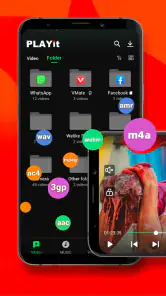
The useful question is not simply whether a player claims broad format support, but whether it makes your own collection easy to use. PLAYit is designed to handle video and audio in many formats, which is handy if you receive clips through chats, keep older files, or move media between devices. Instead of immediately converting a file or searching for a separate player, you can try opening it here first. For a quick check, I’d start with the video or song I actually need, then see whether browsing the rest of the library feels straightforward.
A realistic everyday use is a long commute: I might open a saved video while waiting, switch to music when I’m walking, and use the floating player when I need to reply to a message without losing my place. That flexibility is the strongest reason to consider this app over a basic player that only handles one kind of media. The trade-off is that a feature-rich player can feel busier than a simple playback app. If I only watch the occasional clip and already like my phone’s built-in player, the extra tools may not change much.
The Latest on PLAYit-All in One Video Player
Seamless Video Playback
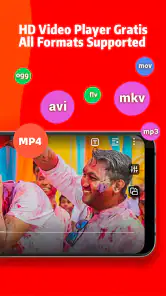
Right off the bat, the first thing you’ll notice about the PLAYit-All in One Video Player is its sheer ability to handle an impressive range of video formats. Whether you're dealing with the common MP4 or the slightly less popular MKV, this app has got you covered. I tested it out with a bunch of different files, and it didn’t even break a sweat. The interface is clean and intuitive, making it a breeze to navigate through your media library.
High-Quality Audio Experience
Now, it’s not just about the visuals. The audio player in this app is something to write home about. It supports all major audio formats, ensuring that your tunes sound as crisp as they should. I especially loved the equalizer feature, which lets you tweak the sound output to your liking. Whether you’re a bass head or prefer a more balanced sound, PLAYit’s got your back.
Additional Features
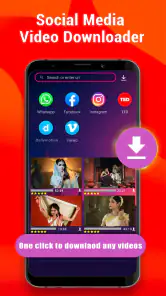
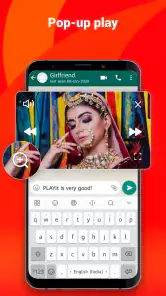
PLAYit isn’t just a video player—it’s a multimedia powerhouse. The app includes a floating play function that lets you multitask while watching your favorite shows. Imagine watching your favorite series while texting your friends or browsing the web; it’s a game-changer. Plus, the built-in downloader is a nifty tool, allowing you to grab videos directly from social media sites.
The floating player is most helpful when you want to keep a clip visible while doing something else, rather than when you’re trying to concentrate on a film. I’d treat it as a convenience for casual viewing, not a substitute for a larger screen or uninterrupted playback. The downloader also changes the feel of the app: it can bring playback and saving into one workflow, but it may be unnecessary if you already save videos through another app or prefer to keep your library organized manually. For media you already have on your phone, opening the file directly is the simpler route.
More From Our News Desk

Android Auto Makes the Case for Quieter Car Software

MobiOffice: Transforming Mobile Productivity with Seamless Integration

EA SPORTS FC™ Mobile Soccer: Redefining Mobile Sports Gaming

How Microsoft OneDrive Became a Mobile Productivity Giant

How Google Translate Breaks Language Barriers Effortlessly

Why Google Sheets Is the Ultimate Mobile Productivity Tool
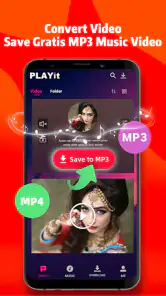
One of the standout features is the app’s ability to convert video to audio with just a tap. This is perfect for those times when you just want the audio, without the distraction of the visuals. It’s a small feature, but it makes a huge difference in how you consume media.
Choosing it over a simpler player
Compared with the usual alternatives, PLAYit’s appeal is breadth: one app brings together local video, music playback, a floating window, a downloader, and video-to-audio conversion. A minimalist player may be a better fit if you want fewer controls and only need to open files. A dedicated music app can make more sense if music is your main habit and you want that app’s focused listening experience. I’d choose PLAYit when flexibility matters more than keeping every task in a separate, specialized tool.
One practical tip is to think about where your media comes from before deciding. If you often receive clips or keep different file types, try PLAYit with those files first rather than judging it from a single familiar video. If your media is already neatly handled by your phone’s default apps, there is little reason to switch everything at once. Keep the old player available while you test the library browsing and playback controls; that makes it easy to decide whether the convenience is real for your routine.
What to expect before switching
PLAYit is free to download, but it also offers in-app purchases ranging from $0.99 to $25.99 per item. I’d begin with the free experience and only consider a purchase if a specific paid option matters to me. It is rated Teen, and the current version is 2.7.42.38, with Android 5.1 or later required. Those details matter if you are choosing a player for a younger user or installing it on an older Android phone; on iOS, check the relevant store page for device compatibility before switching.
Changing players does not mean you need to move your media into a new collection, but it can mean adjusting to a different way of browsing and using controls. I’d test a few ordinary tasks before settling in: open a video you watch often, find a song, try the equalizer, and see whether the floating player fits how you multitask. If one of those steps feels awkward, a simpler alternative may be more pleasant even if it has fewer extras. And if your priority is watching on a television or managing a larger home library, a phone-first all-in-one app may not be the best tool for that job.
Check the fit with your daily routine
I’d also consider how you expect to find something once you have more than a handful of files. A player can support many formats and still feel inconvenient if its library view doesn’t match the way you remember your media. If you tend to think in terms of a particular folder, artist, or recently received clip, spend a few minutes trying those routes. This is a more revealing test than opening a single file and deciding that playback works. The app is most useful when both opening and returning to media feel easy.
There is a small workflow advantage to keeping the playback and conversion tools together: when a video is really something you want to listen to, you can turn it into an audio-focused experience instead of keeping the screen occupied. I’d use that for material where the picture adds little, such as a talk or a clip I want to revisit for its sound. It is less compelling for music already stored as audio, where conversion adds an unnecessary step. That distinction helps keep the app’s extra tools practical rather than treating every feature as something to use all the time.
Who will appreciate the all-in-one approach?
PLAYit is a better match for people who regularly handle mixed media on a phone: someone who receives videos in different formats, listens to saved audio, and sometimes wants a clip to remain visible while replying to a message. It can also suit a person who dislikes deciding which of several players should open a file. The main benefit is convenience across those situations, not a promise that every task will be better than in a dedicated app.
I’d be less quick to recommend it to someone who wants a deliberately plain interface, uses only one type of media, or already has a smooth system for browsing and playing files. A focused music app is the sensible choice if listening is the priority; a basic video player may be preferable when all you need is reliable playback with minimal extras. For watching films attentively, I’d also choose the screen and setup that suit that experience rather than relying on a floating window designed for multitasking.
Questions worth settling during a trial
Does it replace a default player immediately? I wouldn’t make that decision up front. Try it with several files you actually use and keep the old option until you know which one makes them easier to find. Does the downloader need to be part of your routine? Only if you prefer saving and playing media within the same workflow; if you already manage downloads elsewhere, it may not improve anything. And does the audio conversion suit every video? No: it is most useful when the sound is what you want to keep, rather than as a routine step for clips you still watch.
For an older Android phone, the listed minimum operating system is Android 5.1, but the experience still depends on the device and the files you play. I’d check that the app installs on the phone, then test the actual media that matters before relying on it for a trip or a long offline viewing session. Teen is the app’s content rating, a point worth considering when choosing apps for a younger user. On iOS, I’d confirm compatibility in the relevant app store before planning a switch, since device requirements can vary by platform.
How I’d test it without disrupting my setup
I wouldn’t make a new player the default for every file on day one. I’d first use it for one specific job, such as a video that another app struggles to open, then try a song and a clip I often revisit. That gives me a fair comparison without making it harder to fall back on the familiar option. If the app proves convenient, I can gradually use it for more; if not, nothing about the rest of my media routine needs to change.
It is also worth separating a playback problem from a library problem. If a file opens and plays well but takes too long to locate later, the benefit may be limited for someone with a large, carefully arranged collection. Conversely, if the files you need are easy to find but a format causes trouble elsewhere, PLAYit’s broad-format approach may matter more than its extra tools. I’d judge those two parts independently instead of letting one successful test stand in for the whole experience.
Final Thoughts
Overall, I’d say PLAYit-All in One Video Player is a solid choice for anyone looking to enhance their media viewing experience. It’s packed with features that are not only practical but also enhance the way you interact with your media files. Whether it’s the seamless video playback, the high-quality audio, or the extra perks like the downloader and video-to-audio converter, this app truly lives up to its name as an all-in-one solution.
If you’re tired of juggling multiple apps just to play your media in different formats, give PLAYit a shot. It’s like having a Swiss Army knife for media on your phone, and honestly, who wouldn’t want that?
My recommendation
I’d install it when the problem is genuinely a mixed-media routine: videos and audio arriving from different places, occasional format friction, and a real use for floating playback or conversion. Start with the free version, test a few everyday files, and decide based on how quickly you can get from opening the app to the media you want. The optional purchases are a reason to be deliberate, not a reason to assume you need to pay before trying it.
For someone who values a compact toolkit more than a single-purpose player, PLAYit earns a place on the shortlist. If simplicity, a specialized listening setup, or a larger-screen viewing experience matters more, I’d stay with the alternative that already serves that purpose. The deciding point is not how many tools an all-in-one player can gather, but whether its particular mix makes your own phone-media habits easier.
PLAYit-All in One Video Player Frequently Asked Questions
Does PLAYit let me control playback speed?
Playback speed can make a difference when you watch lessons, interviews, or other videos at your own pace. Before downloading PLAYit, consider whether this is an important part of your routine and check the controls available in the app on your device. Its main purpose is playing video and music files, so your choice should also reflect the playback features you use most.
Can I cast PLAYit videos to a TV or another screen?
If you usually watch videos on a television or a larger display, it is worth checking whether PLAYit works with the casting or screen-sharing options available on your device. Compatibility can depend on your phone, the receiving screen, and the connection between them. If watching directly on your device is enough, the app’s combined video and music playback may be more relevant to your decision.
Can I create playlists or manage a music queue in PLAYit?
People who listen to music regularly may want playlists or a queue to keep tracks organized. Before downloading PLAYit, think about whether you need those features alongside basic audio playback, and explore the app’s controls after installation. PLAYit combines music and video in one player, but your preferred way of arranging tracks should guide whether it suits your listening habits.
Can I adjust the sound or use an equalizer in PLAYit?
Audio controls matter if you like to tailor sound for different headphones, speakers, or types of music. Consider whether you need an equalizer or other sound adjustments before choosing PLAYit, and check the options available in the version on your device. The app is designed to play music as well as video, so it may be convenient if you want both in one place.
Can I manage playback with headset or lock-screen controls?
If you listen while your phone is in a pocket or your screen is locked, convenient playback controls can be important. Think about how you usually control music and whether your device’s headset or lock-screen options meet your needs. PLAYit brings audio and video playback together, but it is sensible to try your usual listening setup before relying on it as your everyday music player.
Pros
- Supports various video formats.
- Easy-to-use interface.
- High-quality video playback.
- Built-in video downloader.
- Audio and video sync options.
Cons
- Contains ads.
- Limited advanced features.
- Occasional bugs.
- In-app purchases.
- Requires internet for some features.
- Category
- Video Players & Editors
- Version
- 2.7.42.38