Yandex Maps and Navigator
- 1.59K
- 4.0
- Installs
- 100.00M
- Price
- Free

Screenshots
Analysis by Reviewed
I find Yandex Maps and Navigator most convincing when a journey involves more than simply following a line on a screen. It brings searching, route planning, traffic information and offline maps into one Maps & Navigation app, which makes it useful for both everyday trips and unfamiliar streets. I would not treat it as an automatic replacement for every navigation app, though: the best choice depends on where you travel and how much you rely on its map details.
Keeping a journey manageable from the start
What I value most is the chance to make a few decisions before I’m already on the move. When I’m heading somewhere unfamiliar, I search for the destination, look over the route options and decide whether driving, walking or public transport makes the most sense. That check also gives me a moment to notice whether the final approach looks awkward or whether I should save the map area while I still have a connection.
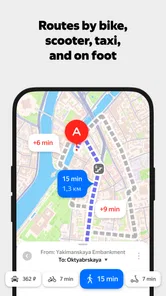
A useful habit is to search for the destination before leaving, then compare the suggested ways of getting there rather than accepting the first route. The app supports driving, walking and public transport directions, so I can weigh a quicker-looking drive against a route that avoids taking the car. If I already know an area has unreliable coverage, downloading its map while I’m connected can make the journey less dependent on a live connection. That preparation matters more than trying to fix a missing map halfway through a trip.
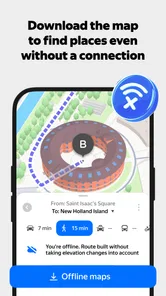
Offline access is especially practical for a visitor arriving in a new city who wants to find a hotel or a nearby landmark without relying on mobile data. It is still sensible to plan and download the area before going offline: a saved map can help with orientation, but it is not a substitute for checking the route and travel conditions while connected. For a long drive, I would also review the route before setting off and keep voice directions on so I can concentrate on the road rather than repeatedly checking the screen.
What traffic and place search are good for
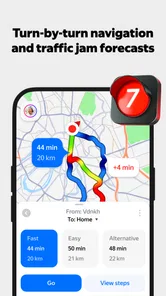
Traffic information is most useful when it changes a decision, not just when it adds color to the map. On a familiar commute, I would check it before leaving and compare the options; if the roads are moving normally, there may be little reason to change my usual route. In an unfamiliar city, traffic context can help explain why the suggested drive takes longer than expected. I would still allow a buffer for a busy period, since live guidance cannot make congestion disappear or guarantee that every delay is captured.
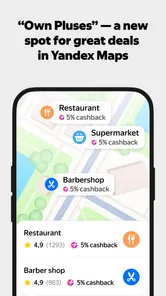
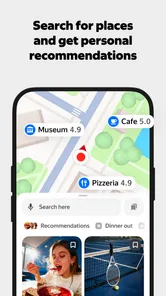
The same practical approach applies to searching for organizations and places. Instead of treating the map as only a navigation screen, I can use it to locate a restaurant or other destination and then decide whether it fits the day’s plan. When a place matters—say, a meeting venue or a train stop—I would check the destination details and the final stretch on the map before starting. That small check can prevent the common mistake of reaching the right neighborhood but approaching from the wrong side of a large block.
Getting Started with Yandex Maps
First things first, if you’re like me and get lost easily, you’ll love how user-friendly Yandex Maps and Navigator is. Upon launching the app, you’re greeted with a clean interface. It’s like the app knows what you want before you even tap the screen. You can easily search for locations, and the app provides multiple route options, whether you’re driving, walking, or using public transportation.
More From Our News Desk

 X
XX Under Pressure: Can It Recover When Posting Goes Wrong?
A resilience-focused review of X, examining setup, mistaken posts, interruptions, weak connections, and the gaps that matter when recovery needs to be dependable.

 Clash of Clans
Clash of Clans Is Won Between the Battles
Its raids are quick; its community is a long-term project of coordination, teaching, rivalry, and shared responsibility—with all the friction that entails.

 Android Auto
Android Auto Makes the Case for Quieter Car Software
The car interface is no longer judged by how much it can do, but by how quietly it helps. Android Auto shows what drivers now expect—and what still gets in the way.

 MobiOffice: Word, Sheets, PDF
MobiOffice: Transforming Mobile Productivity with Seamless Integration
MobiOffice: Word, Sheets, PDF is redefining mobile productivity with a surprising blend of functionality and innovation.

 EA SPORTS FC Soccer Mobile 26
EA SPORTS FC™ Mobile Soccer: Redefining Mobile Sports Gaming
Dive into EA SPORTS FC™ Mobile Soccer, where immersive gameplay and strategic depth transform mobile sports gaming.

 Microsoft OneDrive
How Microsoft OneDrive Became a Mobile Productivity Giant
Discover how Microsoft OneDrive defies expectations, reshaping mobile productivity with its surprising features and unmatched integration.
Latest News



Features That Make It Stand Out
One of the coolest features is the real-time traffic updates. If you’ve ever been stuck in a traffic jam, you know how frustrating it can be. But with this app, you get live traffic information, which helps you dodge those pesky gridlocks. It’s like having a traffic cop in your phone! Another nifty feature is the offline maps. You can download maps of different areas and use them even when you’re off the grid. This is a lifesaver when you’re traveling abroad and want to avoid those hefty roaming charges.
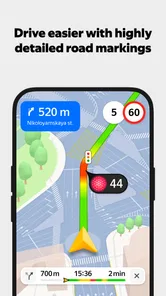
Moreover, the app offers voice navigation, which is pretty spot-on. It’s like having a friendly navigator telling you where to go without being overbearing. The voice is clear, and the instructions are timely, ensuring you don’t miss a turn. For the visually inclined, the map details are incredibly vivid. You can see buildings, landmarks, and even parking spots! Trust me, finding a parking spot in a busy area can be a game-changer.
How it fits alongside other map apps
Compared with familiar alternatives such as Google Maps or Apple Maps, I see Yandex as another useful option to test against the places and routes I actually use. The basics overlap: search, directions and traffic are central to all of them. What can make one better for a particular person is the quality and usefulness of local map information, so I would compare results for a few regular destinations before relying on it as my only navigation tool. If another app gives clearer local directions or better fits your device habits, there is no need to switch just for the sake of switching.
I also wouldn’t assume that every map feature works identically in every place. Traffic guidance depends on having useful current information, while an offline map is only helpful for the area saved in advance. For a trip where being on the correct route is critical, I would keep a second map app available as a backup and check the route before departure. That is a sensible travel habit, not a reason to dismiss Yandex; it simply recognizes that no navigation app can anticipate every road change or local exception.
A practical test for your regular routes
Before making it my default, I would try a small set of searches that reflect how I actually travel: a home-to-work trip, a place I visit only occasionally, and a destination whose entrance is not obvious. This is more revealing than browsing around without a purpose. I can see whether the app points me to the right part of a block, offers a sensible way to approach a destination, and presents route choices I would genuinely consider.
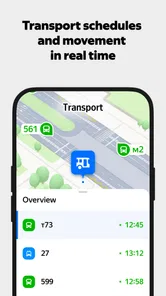
For public transport, I would compare the suggested journey with the stops and landmarks I recognize rather than treating the map as a promise that every connection will be convenient. For driving, I would look at the route before pulling away and let voice guidance handle routine turns. That division of labor suits the app well: use the screen to plan and check, then avoid fiddling with it while moving.
Who is likely to get the most from it
This is a strong candidate for someone who regularly moves around cities, wants driving and public-transport choices in the same app, or travels to places where preparing an offline map is useful. A realistic example is leaving work during a busy commute, checking traffic before choosing whether to drive, and using voice directions to keep attention on the road. A weekend visitor could instead save the destination area in advance, search for a place to eat, and walk there without constantly switching between separate tools.
It may be less appealing if you only need occasional directions and already trust another map app’s local coverage, or if you prefer not to prepare downloads before travel. Offline maps reward a little planning; they do not remove the need to think ahead. And while the app can help surface places and route choices, I would still verify important details for a time-sensitive appointment rather than assuming a map result settles every last-mile question.
Where the convenience has limits
The app’s range of tools is helpful, but a single screen cannot remove the uncertainty built into travel. A suggested route is still a proposal, and live traffic is only useful when its information reflects what is happening on the roads. I would not make a tight appointment depend on an optimistic arrival estimate, especially in an unfamiliar area. Leaving extra time and checking the route before setting out are simple safeguards.
Offline use also has a clear boundary: the useful map is the one I remembered to save. If I change plans and head to a different area, downloading a map earlier will not solve that problem once I am disconnected. For a traveler who changes destinations impulsively or needs current traffic throughout the journey, staying connected is the more comfortable way to use it. Someone who wants navigation with almost no preparation may find a familiar alternative easier.
What to know before installing
Yandex Maps is free, rated for Everyone, and developed by Direct Cursus Computer Systems Trading LLC. Its current version is 26.7.2 and it requires Android 8.0 or later. It has an average rating of 4.3 from around 1.7 million ratings, with over 100 million installs. Those figures suggest a widely used option, but they do not tell me whether its local coverage will suit a particular neighborhood; trying a few familiar searches is a more useful test.
One practical question is whether it can help without internet: downloaded maps are the answer for basic offline orientation, provided the needed area was saved beforehand. Another is whether it suits a non-driver: yes, because walking and public-transport routes are among the ways to plan a trip. If you mainly want live driving guidance, check the proposed route while connected before setting off, and use voice directions rather than handling the phone while moving. Those small habits make the app more useful without expecting it to do the thinking for you.
Features That Make It Stand Out
One of the coolest features is the real-time traffic updates. If you’ve ever been stuck in a traffic jam, you know how frustrating it can be. But with this app, you get live traffic information, which helps you dodge those pesky gridlocks. It’s like having a traffic cop in your phone! Another nifty feature is the offline maps. You can download maps of different areas and use them even when you’re off the grid. This is a lifesaver when you’re traveling abroad and want to avoid those hefty roaming charges.
Moreover, the app offers voice navigation, which is pretty spot-on. It’s like having a friendly navigator telling you where to go without being overbearing. The voice is clear, and the instructions are timely, ensuring you don’t miss a turn. For the visually inclined, the map details are incredibly vivid. You can see buildings, landmarks, and even parking spots! Trust me, finding a parking spot in a busy area can be a game-changer.
Why You Should Give It a Try
Aside from the features, I personally love the customization options. You can choose your preferred map theme, whether you like it dark or light. Plus, the app integrates with other services seamlessly. Need a cab? You can book one directly from the app. Hungry? Find nearby restaurants and check their reviews. It’s like a Swiss army knife for urban explorers.
And let’s not forget about the community-driven aspect. Users can add photos, reviews, and even update map data. It’s like being part of a community that’s constantly improving the app. Plus, the more you use it, the better it gets at predicting your preferences. It’s almost like the app gets to know you over time.
The Final Verdict
In a world filled with navigation apps, Yandex Maps and Navigator is a breath of fresh air. It’s reliable, accurate, and packed with features that make getting from point A to B a breeze. Whether you’re a daily commuter or an occasional traveler, this app has something for everyone. So, if you haven’t already, give it a whirl. Who knows, it might just become your new favorite travel companion. Happy navigating!
Yandex Maps and Navigator Frequently Asked Questions
Can I search for businesses and other organizations in Yandex Maps and Navigator?
Yes. Searching for organizations is one of the app’s core uses, alongside finding routes and checking transport information. You can look up a place when planning an outing or trying to locate a destination, then use the map and directions to plan how to get there. This can make the app useful before a trip as well as while navigating.
Does Yandex Maps and Navigator provide traffic and transport information?
Yes. The app brings together traffic and transport information with map search and directions, so you can review more than just the route itself. This is helpful when deciding how to travel or checking conditions as you plan. The available information can vary by location, so it is sensible to check the details shown for your destination before setting off.
Can I use Yandex Maps and Navigator to plan public transport journeys as well as driving routes?
Yes. Yandex Maps and Navigator includes public transport routes alongside driving directions, so it can help with different kinds of journeys. You can search for a destination and check the available route information before setting off. The app also offers traffic information and map search, making it useful for planning a trip rather than simply following turn-by-turn directions.
What features does Yandex Maps and Navigator offer?
Yandex Maps and Navigator offers a comprehensive set of features including detailed maps, real-time traffic updates, and voice-guided navigation. It also provides users with offline maps for use without an internet connection, public transport routes, and the ability to search for nearby points of interest such as restaurants, gas stations, and ATMs.
Is Yandex Maps and Navigator available globally?
Yandex Maps and Navigator primarily focuses on Russian-speaking countries but is available globally. However, the app offers the most detailed and accurate data in Russia and neighboring countries. Users outside these regions can still benefit from basic navigation and mapping features, although some local details may be limited.
Pros
- Intuitive user interface for easy navigation.
- Accurate real-time traffic updates.
- Offline maps for areas with no internet.
- Detailed public transport routes available.
- Voice guidance in multiple languages.
Cons
- Limited coverage in rural areas.
- Occasional minor bugs in app performance.
- Map updates can be slow in some regions.
- Requires significant storage space.
- Some ads in the free version.