Weather: Live radar & widgets
- 26.81K
- 4.7
- Installs
- 10.00M
- Price
- Free
Screenshots
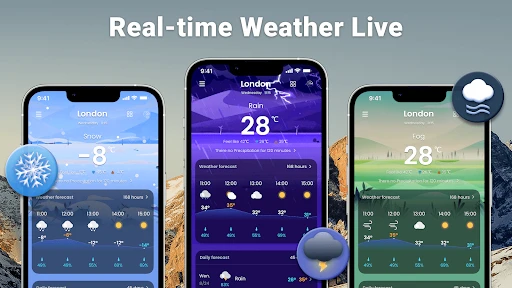
Analysis by Reviewed
I judge a weather app by whether it helps me make a better decision quickly, not by how many panels it can squeeze onto a screen. Weather: Live radar & widgets is aimed at people who want radar, forecasts, and a home-screen glance in one place. I’d consider it when rain could affect a commute, a walk, or weekend plans, but I wouldn’t treat any phone forecast as a guarantee: conditions can shift, and a radar view is most useful as a guide rather than a promise.
The practical question is whether you prefer seeing weather unfold on a map or simply checking a temperature and moving on. This app leans toward the visual, hands-on approach while still offering widgets for quick checks. If you want a simple daily summary with as little interaction as possible, a basic forecast app may feel calmer. If you like checking how weather is moving around your area, the radar gives you a reason to open this one.
Features That Make a Difference
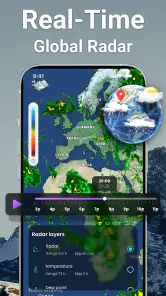
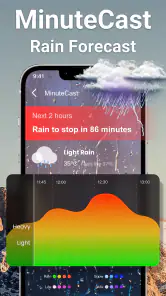
First off, the real-time radar is a game changer. I’ve tried various weather applications, but the live radar feature in Weather: Live radar & widgets takes the cake. It provides up-to-the-minute imagery that lets you track storms, rain, and other weather phenomena as they happen. No more guessing games when planning your day!
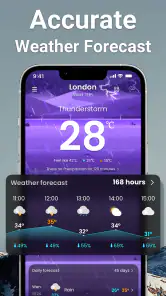
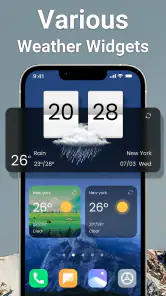
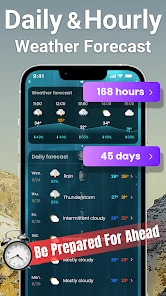
The app also boasts a variety of widgets that you can customize to fit your needs. Whether it's a sleek widget that shows the current temperature or a detailed one that provides a weekly forecast, you can choose what suits your home screen best. I personally love the hourly forecast widget — it’s like having a weather channel right on my phone.
Making Radar Useful in Everyday Routines
The radar is most valuable when I have a flexible plan and need to decide whether to leave now, wait, or bring rain gear. For example, before walking to a nearby appointment, I can check the map alongside the forecast instead of relying only on the icon for the day. That distinction matters: a daily rain symbol can be too broad to guide a short trip, while radar helps me think about what may be approaching. I still leave a buffer for changing conditions rather than timing a walk to the minute.
A useful habit is to check the same view at two points in the day: once while making plans and again before heading out if the weather looks unsettled. That makes the app more of a decision aid than a background display. For a longer drive or outdoor event, I’d use it as one input alongside local guidance and the conditions I can see, not as a substitute for official warnings.
From a Quick Check to a Full Plan
For a realistic weekday example, I might check the hourly widget while getting ready, then open the radar if rain seems likely before my trip across town. If the map suggests unsettled weather, I can take a jacket or shift a flexible errand; if the plan is fixed, I can simply prepare rather than trying to predict an exact dry window. The useful part is the sequence: a glance for orientation, then a closer look only when the decision warrants it.
This also helps keep the app from becoming a stream of constant checking. I don’t need to watch radar while working indoors or revisit it every few minutes. I’d reserve a more detailed check for a time-sensitive outdoor choice, and use the widget for routine awareness. That distinction matters for anyone who enjoys weather detail but doesn’t want a forecast app to interrupt the day.
User-Friendly Navigation
One thing I appreciate about the app is its user-friendly interface. Navigating through the app is a breeze, thanks to its intuitive design. You can easily switch between different views, such as radar, forecast, and current conditions, without any hassle. This ease of use makes it accessible for everyone, from tech-savvy users to those who just need a simple weather update.
Moreover, the app supports a wide range of locations. Whether you’re planning a trip abroad or just want to check the weather in another city, this app has got you covered. I found it incredibly useful for checking the weather for my upcoming travel destinations, ensuring I pack just right.
Choosing Locations and Widgets with Care
When checking another city, I find it helps to make sure I’m looking at the destination rather than my current location before acting on a forecast. That small pause avoids a common travel-planning mistake: packing for home while assuming the same conditions will follow me. For a trip with several stops, I’d focus on the places that affect the next day’s plans instead of filling the app with locations I rarely need.
Widgets work best when they answer a question at a glance. I’d put the hourly view where I can see it before leaving, then use the full app when I need the map or more context. A detailed widget can be useful for someone who plans around changing conditions, but it can also make a home screen feel busy. If you mainly want today’s temperature, choose a simpler view rather than adding detail you won’t check.
Keeping Travel Checks Focused
When I’m preparing for a trip, I’d use saved locations as a short planning list rather than treating the app as a complete travel itinerary. Checking the destination before packing is helpful; checking every stop days in advance can create a false sense of certainty because conditions may change. A better routine is to review the places that affect the next leg, then check again closer to departure.
There is also a small but useful distinction between checking a city’s general forecast and deciding what to wear for a specific outing. If my plans include time outdoors, I’d use the hourly view to think about when conditions may be less comfortable, while keeping a backup plan. The app can make that comparison convenient, but it cannot know whether I’ll be exposed to wind, shade, or shelter along my route.
Notifications and Alerts: Never Be Caught Off Guard
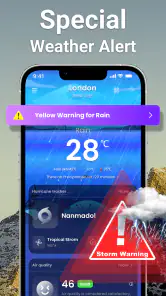
Another fantastic feature is the customizable notifications. You can set alerts for specific weather conditions that matter to you, like severe weather warnings or daily rain forecasts. This feature ensures you’re always prepared, come rain or shine. I’ve set mine up to alert me about sudden temperature drops, which has been super handy during the unpredictable fall season.
Additionally, the app’s alert system is incredibly reliable. I can’t count the number of times it has notified me before a sudden downpour, allowing me to avoid getting drenched. It’s like having a sixth sense for weather changes!
Finding the Right Balance with Alerts
Alerts are most helpful when they match decisions I actually need to make. I’d start with only the conditions that could change a commute or an outdoor plan, then adjust if the notifications feel too frequent or too broad. Too many alerts can become easy to ignore, which defeats their purpose. I also wouldn’t rely on a phone notification as my only source for urgent weather information; for hazardous conditions, I’d pay attention to official local alerts as well.
That balance is part of the trade-off with an all-in-one weather app. Radar and alerts reward regular checking, while a simpler forecast may suit someone who wants to glance once in the morning. People who need highly specialized meteorological analysis may prefer a dedicated weather service, whereas everyday users who want a visual local check can get more from this app’s combination of views.
Where Other Weather Apps May Fit Better
The usual alternatives fall into two broad camps: minimalist forecast apps and specialist weather tools. A minimalist option is often a better match if I only need the day’s temperature and a short summary, especially when maps and extra choices would make me less likely to check at all. A specialist service may suit someone who routinely makes decisions requiring more technical weather analysis. I wouldn’t choose this app simply because it has several views; I’d choose it if switching between a map, forecast, and widget helps me decide what to do.
For someone who wants one consistent glance and rarely changes plans based on rain, a basic app can be more convenient than a radar-oriented routine. On the other hand, if I’m deciding whether to take a walk before a shower or move an outdoor chore, the map gives me a useful second perspective. Neither style is automatically better. The right choice depends on whether weather movement affects my timing or whether a daily summary is enough.
Cost, Compatibility, and What to Expect
The app is free to install, with optional in-app purchases listed from $5.99 to $9.99 per item. I’d begin with the free experience and decide whether any paid option is worth it only after I know which parts I use regularly. That keeps the choice tied to an actual need instead of paying for extras before seeing whether the radar, forecast, or widgets fit my routine.
It is developed by Weather Forecast & Widget & Radar, has an Everyone age rating, and requires Android 6.0 or later. The current version is 2.0.8. It has a 4.7 average from around 389,000 ratings, with over 10 million installs. Those figures suggest broad use, but they don’t tell me whether the app’s presentation suits my habits; the best test is whether its main screen and alerts are useful on an ordinary day.
What Switching Actually Involves
Switching from another weather app is relatively low effort if all I need is a forecast, but there is still a small setup cost: choosing locations, arranging a widget, and deciding which alerts deserve attention. I’d keep my old app around briefly if it is already configured for trips or local warnings, then compare the information I actually use before replacing it. There is little reason to maintain two competing sets of alerts indefinitely.
I’d make that comparison over ordinary days rather than judging from one dramatic forecast. Does the widget show enough to answer my morning question? Do I open the radar when rain affects a plan, or do I keep relying on my previous app? If the new layout becomes part of my routine, I can remove the old widget and reduce duplicate notifications. If not, switching back is straightforward; the main cost is the time spent arranging the setup.
Who Will Get the Most from It
I’d recommend this app most readily to people who walk, cycle, run errands, or plan outdoor activities on flexible schedules. They can use the map and hourly view to make a practical choice without turning every forecast into a research project. It also makes sense for households where one person wants a quick home-screen check while another prefers opening the app to look at the weather around a destination.
I’d be less enthusiastic for someone who wants no more than a temperature and a brief daily outlook. In that case, a compact forecast app may be easier to live with. I’d also steer people who need specialized forecasting toward a dedicated service rather than implying this everyday app replaces expert tools or official alerts. Its value is convenience across common weather checks, not a claim that one interface covers every need.
Final Thoughts
In conclusion, Weather: Live radar & widgets is more than just a weather app; it’s a comprehensive tool that equips you with all the necessary information to tackle any weather scenario. With its real-time radar, customizable widgets, and reliable alerts, it’s a must-have for anyone who likes to stay informed about the weather. Whether you’re a casual user or a weather enthusiast, this app delivers everything you need and more. So, if you’re tired of being caught off guard by the weather, give this app a try and see how it transforms your daily routine.
My recommendation is more specific: I’d try it if I often make plans around showers, want a radar view without opening a separate service, or like having an hourly forecast on my home screen. I’d skip it if I only want a quiet, minimal temperature check, or if I need specialist forecasting tools rather than an everyday local-weather companion. For most people deciding between a radar-focused app and a basic forecast, this is the more useful choice when seeing weather movement changes what they do next.
Weather: Live radar & widgets Frequently Asked Questions
Is Weather: Live radar & widgets suitable for someone looking for a simple local weather app?
The app brings weather forecasts, weather radar, and weather widgets together in one local weather app. That makes it a practical option if you want to check conditions and view weather information from your home screen rather than use separate tools. Its focus is weather, so it is best suited to people who want forecast-related information in one place.
What age rating does Weather: Live radar & widgets have?
Weather: Live radar & widgets has an Everyone age rating, so it is intended for a general audience. It is a weather app rather than a game or social platform, and its main purpose is to present local weather information, forecasts, radar, and widgets. Parents can still review the app and its purchase options before letting a child use it.
Which devices can run Weather: Live radar & widgets?
Weather: Live radar & widgets is an Android weather app for devices running Android 6.0 or later. Before downloading, check your device’s operating system version in its settings to make sure it meets that requirement. The app is free to download, and its Everyone age rating makes it suitable for a general audience.
Who makes Weather: Live radar & widgets, and is it widely used?
The app is developed by Weather Forecast & Widget & Radar and brings forecasts, radar, and weather widgets together in one local weather app. It has a 4.7 average from around 389,000 ratings, with over 10 million installs. Those figures suggest it has reached a broad audience, although individual experiences with forecasts and features can vary.
What features does Weather: Live radar & widgets offer?
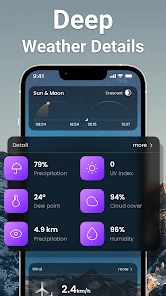
Weather: Live radar & widgets provides real-time weather updates, interactive radar maps, and customizable widgets for your home screen. It offers detailed forecasts, including temperature, precipitation, wind speed, and humidity. Users can also receive severe weather alerts and track weather patterns over time. The app is designed to be user-friendly, providing quick access to the most important weather information.
Pros
- Accurate weather forecasts
- User-friendly interface
- Customizable widgets
- Real-time radar updates
- Comprehensive weather data
Cons
- Frequent ads disrupt usage
- Requires internet for updates
- Limited free features
- Battery drain on continuous use
- Some features need premium
- Category
- Weather
- Version
- 2.0.8