VPN Proxy Speed - Super VPN
- 21.13K
- 4.7
- Installs
- 50.00M
- Price
- Free
Screenshots
Analysis by Reviewed
I treat a VPN as a tool for specific moments, not as a magic shield for everything I do online. VPN Proxy Speed - Super VPN is aimed at people who want a quick way to route a phone’s connection through a VPN, without having to learn much about network settings. I’d still make privacy decisions carefully: a VPN changes who handles your traffic, so it’s worth thinking about what you need protected and what you’re comfortable trusting.
Trust starts with clear expectations
This is a free productivity app from TOPAPPS TECH PTE LTD, with optional in-app purchases. It has a 4.7 average from around 1.4 million ratings, and more than 50 million installs. Those figures suggest it has reached a broad audience, but popularity alone cannot tell me how a service handles sensitive information. I wouldn’t treat a large user base or an easy connection screen as proof of privacy.
The practical question is what you want the VPN to do. If I’m using public Wi-Fi to check a timetable or read general news, a simple connection button can be convenient. If I’m handling banking, work files, health information, or anything especially sensitive, I’d first review the app’s current privacy details and the choices it presents, then decide whether it meets my needs. A VPN is only one part of safer browsing; it doesn’t make a suspicious link or an unsafe account harmless.
What to check before connecting
I’d take a moment to look over any permission prompts rather than approving them on autopilot. A VPN needs to establish a network connection, but unrelated access requests deserve a separate decision. On Android, I’d also check the system’s VPN indicator after connecting and confirm that the phone shows the connection as active. That small habit helps avoid assuming protection is on when it isn’t.
Account and purchase choices matter, too. The app is free to download, with in-app purchases ranging from $1.49 to $39.99 per item. Before buying anything, I’d check the price shown in the app and whether the purchase fits how often I expect to use it. If I only need occasional protection on café Wi-Fi, paying for extras may not make sense; a frequent user should compare the available options with their actual needs instead of buying on impulse.
Everyday use and the trade-offs
A realistic routine might be connecting before joining a hotel or café network, using the phone for ordinary browsing, then disconnecting when I’m back on a trusted connection and no longer need the VPN. I’d avoid leaving it on simply out of habit if it causes trouble with a site or service. Some websites may react differently when traffic comes through a VPN, and a connection that works for browsing may not be ideal for every app.
For a first-time VPN user, a straightforward mobile app can be less intimidating than configuring a service manually. The trade-off is that convenience doesn’t answer every trust question. Someone who wants detailed control over connection behavior, account management, or technical settings should compare this app with VPN providers that clearly expose those controls and explain them in a way the user can evaluate. If your main need is simply private browsing on a phone, a lightweight VPN workflow may be enough; if you need a carefully documented service for work or high-risk activity, I’d look for stronger evidence and more transparent controls before choosing.
The app is rated for Everyone and supports Android 7.0 or later; its current version is 4.3.8. Those details make it accessible to many Android users, but I’d still keep the operating system updated and check that the installed app is current. A VPN cannot compensate for an outdated phone, reused passwords, or sharing sensitive details with the wrong site.
Choosing a workflow that fits your day
One useful way to decide whether this kind of app belongs on your phone is to identify the moment you would actually open it. For example, if I’m waiting at a station and need to check a train change on public Wi-Fi, I can connect before opening the browser, do the quick task, and disconnect afterward. That keeps the VPN tied to a clear purpose rather than becoming a vague promise that everything is now safe. It also makes it easier to notice when a connection fails or a website behaves differently.
I’d use a similar routine when moving between networks: finish anything that depends on a local connection, connect the VPN once the phone has joined the public network, and then check the system indicator before entering information. If a payment page or work tool refuses to load, I wouldn’t keep tapping through prompts or assume the VPN is broken. I’d pause, consider whether the service is rejecting VPN traffic, and decide whether to continue on another trusted connection. That simple choice is often safer than disabling protections without thinking.
What a VPN can and cannot change
A VPN can change the route your phone’s traffic takes, but it does not hide every part of your online behavior. Websites can still recognize an account you sign into, and app permissions, cookies, and tracking settings remain separate issues. I find this distinction important because “connected” can feel like a complete privacy setting when it is really one layer. For a more private routine, I’d pair the connection with sensible browser settings, unique passwords, and care around links and downloads.
There is also a practical distinction between protecting traffic on an unfamiliar network and choosing a service for ongoing, sensitive work. For the first job, a quick mobile connection may be convenient. For the second, I’d want to understand the provider’s privacy terms, support options, account controls, and technical behavior in detail before relying on it. If I can’t evaluate those points to my satisfaction, I’d choose a service that makes them easier to assess or avoid sending sensitive information over a network I don’t trust.
Where it sits among VPN choices
Compared with setting up a VPN manually, an app-led approach lowers the effort involved in getting connected. That is a real benefit for someone who wants a simple phone workflow and does not want to manage network configuration. The trade-off is that manual setup or a more technical provider may give an experienced user clearer choices about protocols, routing, and connection rules. I would not pick a simple app expecting it to replace that level of control.
It also differs from browser-only privacy tools. A browser extension generally affects browser traffic, while a phone VPN is intended to route traffic from the device through its VPN connection. That broader scope can be useful, but it makes trust and troubleshooting more important: if an app stops working while the VPN is active, I’d test whether disconnecting resolves it before changing several settings at once. For people who only want to block trackers in a browser, a dedicated privacy browser or content-blocking tool may be a more direct fit.
Small checks that prevent avoidable surprises
Before relying on the connection for a task, I’d check that the VPN indicator is still present after switching between Wi-Fi and mobile data. Network changes can interrupt a session, and seeing the indicator once at the start is not the same as confirming it remains active later. If I’m about to enter sensitive information, I’d check the connection again and make sure I’m on the genuine site or app. These checks take little time and address a common source of false confidence.
I’d also avoid treating the fastest-looking choice as automatically the best one for every situation. A nearby route may be sensible for ordinary browsing, while choosing a different location can sometimes make a site behave differently or affect access. If a service is important, I’d test it before the moment I urgently need it, then keep a fallback such as switching to a trusted network. That is more reliable than discovering a compatibility problem during a time-sensitive task.
Who is likely to find it useful
I can see the appeal for someone new to VPNs who wants a simple way to try a mobile connection for routine browsing on shared networks. It may also suit a person who travels occasionally and prefers an app-based workflow over manual setup. The free download makes it easy to consider, though I’d still review the choices on screen and avoid assuming that optional purchases are necessary for my use case.
I’d be more cautious if I needed a VPN for confidential work, had strict organizational requirements, or wanted to inspect and tune detailed network settings. In those cases, the right choice is the provider whose controls and privacy explanations I can evaluate, not simply the one that is easiest to start. Someone who rarely uses public Wi-Fi and already has a trusted connection may not need another always-on layer at all. A VPN is useful when it addresses a specific risk; it is not a requirement for every phone owner.
First Impressions and Setup
When it comes to surfing the web safely and anonymously, a Virtual Private Network (VPN) can be your best friend. Recently, I checked out the VPN Proxy Speed - Super VPN app, which promises to keep your online activities private and secure. So, let’s dive into my experience with this app.
First Impressions and Setup
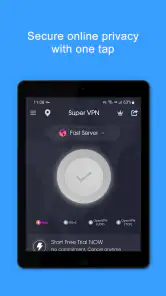
First things first, downloading and installing the app was a breeze. It’s available for both Android and iOS, so no worries about compatibility. The app’s interface is clean and user-friendly, which is always a plus in my book. No one wants to navigate a cluttered app when they’re trying to secure their data, right?
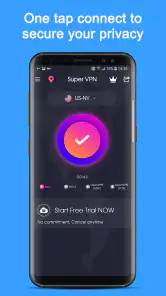
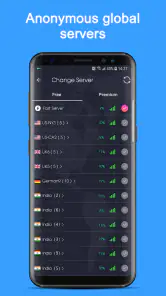
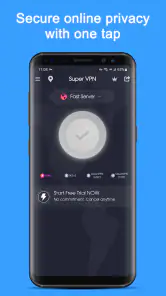
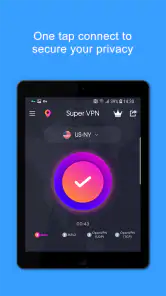
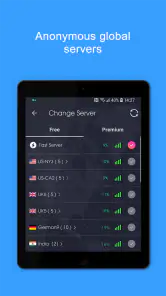
Once installed, setting up the VPN is simple. You just hit the big connect button, and you’re good to go. It automatically connects you to the fastest available server, but you can manually choose from a list of servers if you’re feeling picky. I appreciate having options, especially when I want to stream content from specific regions.
Performance and Features
Now, let’s talk about performance. One of my main concerns with any VPN is how it affects my internet speed. With this app, I was pleasantly surprised. The speeds were impressive, even when connected to servers on the other side of the globe. Streaming videos and browsing the web felt seamless, with minimal buffering or lag.
The app boasts a range of features designed to enhance your online privacy. There’s military-grade encryption, which sounds super secure, and the app doesn’t keep logs of your activity. That’s a big deal for anyone concerned about privacy. Plus, it offers unlimited bandwidth, so you can surf, stream, and download to your heart’s content without worrying about hitting any data caps.
I also found the kill switch feature quite handy. It automatically blocks internet traffic if the VPN connection drops, ensuring your data isn’t exposed. It’s these little touches that make a big difference in keeping your online activities safe.
User Experience and Compatibility
Using the app daily, I found it to be quite reliable. It connected quickly each time and didn’t crash, which is more than I can say for some other VPNs I’ve tried. The app supports multiple devices, so I could secure my phone, tablet, and laptop with one account. That’s some serious convenience!
Compatibility-wise, it worked smoothly with all my apps and websites. I didn’t encounter any issues accessing content on streaming platforms, which can sometimes be a hit or miss with VPNs.
Final Thoughts
All in all, this app is a solid choice if you’re looking to boost your online privacy and access content from around the world. It’s easy to use, performs well, and offers all the features you’d expect from a top-tier VPN app. Whether you’re a VPN newbie or a seasoned pro, this app has something to offer.
So, if safeguarding your online presence is a priority, give this app a try. I reckon it might just become your new go-to for online security. Happy surfing!
VPN Proxy Speed - Super VPN Frequently Asked Questions
How much storage space should I allow for VPN Proxy Speed - Super VPN?
Before downloading, make sure your device has enough free storage for the app and its installation files. The amount needed can vary with the device and operating system, so checking the available space in your device settings is a sensible step. Leaving some room afterward also helps avoid storage problems when updating apps or saving other content.
Can I use VPN Proxy Speed - Super VPN on public Wi-Fi?
A VPN is commonly used when connecting through public Wi-Fi, since it can add a layer of privacy to internet traffic. VPN Proxy Speed - Super VPN is described as a VPN proxy focused on safer browsing. You can connect it before using a public hotspot, but remember that a VPN does not replace careful habits such as avoiding suspicious links and protecting account passwords.
Can VPN Proxy Speed - Super VPN help me access content that is restricted in my location?
The app is presented as a way to connect through VPN servers and access restricted content. Whether a particular website or service works can depend on its own policies, the connection, and the server you use. A VPN does not guarantee access to every service, and users should follow local laws and the terms of the websites or apps they visit.
Does VPN Proxy Speed - Super VPN work on my device?
VPN Proxy Speed - Super VPN is available for both Android and iOS devices. On Android, it requires version 7.0 or later. Users can download the app from the Google Play Store for Android or the Apple App Store for iOS. The application is designed to be user-friendly and provides a seamless experience across different mobile devices.
What is VPN Proxy Speed - Super VPN?
VPN Proxy Speed - Super VPN is a mobile application that provides users with a secure and fast virtual private network (VPN) service. It allows you to browse the internet anonymously and access restricted content by connecting to various servers worldwide. The app aims to enhance online privacy and security for Android and iOS users.
Pros
- Fast connection speeds
- User-friendly interface
- No registration required
- Unlimited bandwidth
- Works with multiple protocols
Cons
- Contains ads
- Limited server locations
- No kill switch feature
- May log user data
- Free version has restrictions

- Category
- Productivity
- Version
- 4.3.8












