Voice Recorder & Voice Memos
- 10.87K
- 4.8
- Installs
- 10.00M
- Price
- Free
Screenshots
Analysis by Reviewed
I like a voice recorder best when I can start capturing a thought before it disappears, then find the file again without turning the app into a project. Voice Recorder & Voice Memos is aimed at that everyday need: quick recordings, a way to keep them organized, and tools for doing something useful with the audio afterward. It’s a free Music & Audio app from Simple Design Ltd., and its broad appeal is reflected in a 4.8 average from around 238,000 ratings and over 10 million installs.
Recording Made Easy
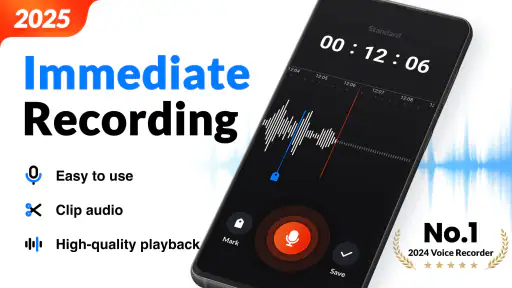
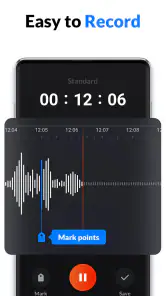
First off, let’s talk about the recording feature. It’s super intuitive—just a tap and you’re off capturing sound. The app supports high-quality recordings, which is a huge plus if you’re looking to capture nuances in sound. I found this especially useful during meetings where clarity is key. Plus, it’s got a neat little feature that lets you pause and resume recordings, which is perfect if you’re trying to avoid those awkward silences or coughs.
Useful in the middle of a busy day
A realistic use for this kind of recorder is capturing a reminder while walking between errands, then returning to it later rather than typing with one hand. I’d also use it for a quick rehearsal note, a personal idea, or a short conversation where everyone understands that recording is taking place. In a lecture or work meeting, I’d still treat the recording as a backup to my own notes: a long audio file can take time to revisit, and a recording is not a substitute for permission or for checking important details.
Pause and resume can make a practical difference when a meeting breaks or you need to stop briefly. Instead of creating several fragments that must be pieced together later, I can keep a session continuous and avoid recording an unnecessary gap. Before an important session, I’d make a short test recording and play it back. That small check helps catch a muted microphone, distracting background noise, or a poor position before the conversation is underway.
Organizing Your Memos
One of the standout features for me is the organization system within the app. You can create folders for different types of recordings, label them, and even color code them if you’re feeling fancy. Gone are the days of scrolling endlessly to find that one memo from last month. The app makes it a breeze to keep everything tidy and accessible.
Folders and labels are most valuable when I use them before the recording list gets crowded. I’d settle on a simple naming habit—such as a topic and a recognizable context—then put the memo in the right folder while I still remember what it contains. Color coding can help distinguish areas like personal notes and work material at a glance, but it works best as a small visual cue rather than a replacement for clear names.
Sharing and Editing
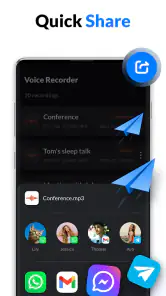
Once you’ve got your recordings, sharing them is a piece of cake. The app allows you to send your files via email, social media, or even upload them to your favorite cloud storage. What’s more, if you’re a bit of a perfectionist like me, you’ll appreciate the basic editing tools available. Trim those unnecessary bits, tweak the volume, and even add a bit of reverb if you’re feeling adventurous.
More From Our News Desk

Weather by Xiaomi Review: Clear at a Glance, Less Clear Up Close

X Under Pressure: Can It Recover When Posting Goes Wrong?

Clash of Clans Is Won Between the Battles

Android Auto Makes the Case for Quieter Car Software

MobiOffice: Transforming Mobile Productivity with Seamless Integration

EA SPORTS FC™ Mobile Soccer: Redefining Mobile Sports Gaming
Editing is handy for making a memo easier to replay, but I’d keep an untouched original whenever the recording matters. A trimmed clip is better for sharing a key passage; the full version is safer if context may become important later. I’d also listen through before sending: a neat edit cannot fix words that were masked by noise or a speaker who was too far from the phone.
Sharing depends on where you send the file and whether your phone has a suitable connection. If you’re away from reliable service, you can still plan the workflow: record first, review the memo, and send it when network access is available. I wouldn’t assume that cloud transfer or transcription will work without a connection. For sensitive conversations, I’d think carefully about the destination and who can access a shared copy before tapping send.
Transcription and everyday limits
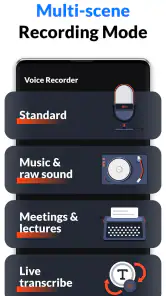
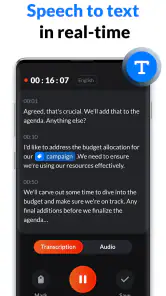
And let’s not forget the transcription feature, which is a game-changer. Turn your voice memos into text with just a few taps. It’s not perfect, but it’s definitely handy when you need a quick text version of your recordings.
I’d use transcription to locate a remembered phrase or get a rough written starting point, not as a final record of a detailed interview. Names, specialized terms, overlapping voices, and noisy rooms can all make text less dependable, so I’d check it against the audio before quoting or sharing it. That distinction matters: the recording preserves what was captured, while a transcript is a convenient aid that may need correction.
The app is a good fit if you want a straightforward recorder with folders, basic editing, sharing, and transcription in one place. It is less suited to someone who needs a full audio workstation, advanced controls for production, or a dependable transcription workflow for formal documentation. Compared with a phone’s most basic built-in recorder, the added organization and editing can be useful; compared with specialist audio software, the simpler approach is easier to pick up but offers less depth. The right choice depends on whether convenience or detailed control matters more to you.
User Experience
The user interface is clean and straightforward, which I absolutely love. No one wants to navigate a maze to find basic features. The developers have clearly focused on making the app accessible to everyone, regardless of tech-savviness. Plus, it’s light on resources, so it won’t hog your device’s memory.
The app is free to download, with optional in-app purchases listed from $2.49 to $19.99 per item. It is rated for Everyone, and version 1.3.0.0 requires Android 8.0 or later. Those details make it easy to judge whether it suits your device and budget; the core appeal is still its uncomplicated recording and organizing workflow.
When connection matters
Connectivity shapes what happens after the microphone stops. Sending a recording, placing it in cloud storage, or requesting a transcript may involve network access, so I’d avoid promising myself an instant handoff when I’m on a weak connection. A sensible routine is to confirm the recording is saved, give it a useful name, and wait to share until the connection is steady. If it is an important file, I’d keep track of where I saved or sent it rather than assuming a transfer completed just because I tapped the share option.
For data-conscious use, I’d be selective about what I upload and how often I request text conversion, particularly when a memo contains personal or work-sensitive details. The app’s recording tools are useful for ordinary notes, but privacy also depends on my sharing choices and the services I send files to. If you mainly need private, on-device note-taking and do not want to deal with sharing or connected services, a simpler recorder may suit you better; if you need to distribute clips or turn them into searchable text, this app’s extra steps can be worthwhile.
Choosing the right recording routine
I’d recommend this recorder most to people who want more than a bare record button but don’t want to learn a complicated audio editor. Students can capture a revision explanation in their own words, then sort it by subject for later listening. Someone working through a list of errands can make separate short memos rather than one long recording that is hard to scan. For a musician or speaker, it can also be a handy place to preserve a quick idea, though I wouldn’t treat its basic editing tools as a substitute for a production setup.
One useful habit is to decide what the file is for before recording. A reminder can have a short descriptive name and stay in a personal folder; a meeting note may need a date or topic in its label and a quick check that the sound is clear. This tiny bit of preparation makes the folders more useful later and reduces the chance of sharing the wrong clip. If you record often, a consistent naming pattern matters more than creating a large number of folders.
What to expect from a phone recorder
In an everyday scenario, imagine leaving a meeting with one action item you don’t want to forget. I’d record a brief summary while it’s fresh, play it back once to confirm I can hear it, then trim away any unnecessary lead-in before sharing it with the right person. That workflow uses the app’s recording, playback, editing, and sharing strengths without relying on a transcript to get every detail right. If the clip is important, I’d keep the full recording until I know the shorter version has the context needed.
Compared with the standard recorder that comes with a phone, this app’s appeal is the fuller workflow: folders and labels help manage a growing collection, while editing and transcription offer ways to work with recordings after capture. The trade-off is that every extra step creates another decision. If you only make an occasional short note and never need to sort or share it, a built-in recorder may be faster and simpler. If you need precise audio control, layered editing, or dependable text for formal records, a specialist tool is a better fit.
Keeping recordings dependable
A question I’d ask before using any recorder for an important occasion is whether the phone will be in a useful position for the whole session. A clear app interface cannot overcome a microphone blocked by a case, a phone left in a bag, or several people talking at once. I’d place the device where it can pick up the main speaker, make a quick test, and avoid relying on one recording as the only record of a high-stakes discussion. Those simple precautions make a more noticeable difference than polishing a clip afterward.
Another practical point is how I handle a recording when a connection drops or a share takes longer than expected. I’d first return to the recording list and confirm the file is there, then retry the transfer only when the network is stable. For a file that matters, I’d avoid making several uncertain copies or edits in a rush; I’d keep one clear original and check the destination after sending. That approach is useful even if the connection is normally reliable, because mobile service can change as you move between places.
There is also a sensible boundary around transcription. It can save time when I need a rough text version or want to find a phrase, but it should not be treated as a perfect account of a conversation. I’d listen back before acting on an unclear name, number, or instruction, and I’d choose another workflow when exact wording is essential. This is especially important for interviews, appointments, and discussions where a small transcription error could change the meaning.
A practical fit, with clear limits
People who record ideas, reminders, lessons, or ordinary meetings are likely to get the most out of this app. Its combination of quick capture and organization makes it easier to turn scattered audio into something I can revisit. It may not be the right choice for someone who wants a fully local, minimal tool and has no use for sharing or transcription, or for anyone who needs professional recording controls. The best reason to choose it is that its extra tools match a real routine, not simply that they are available.
Overall, Voice Recorder & Voice Memos is a solid choice for anyone needing a reliable recording tool. Its combination of simplicity, functionality, and a few advanced features makes it a standout in its category. Whether you’re recording fleeting thoughts or important business meetings, this app has got you covered. Give it a whirl, and you might just find it becoming an indispensable part of your daily routine.
Voice Recorder & Voice Memos Frequently Asked Questions
Can I rename or organize recordings after saving them?
Clear names make it easier to find a recording later, especially when you use the app for classes, meetings, or personal reminders. Voice Recorder & Voice Memos is presented as a practical recording tool, and its existing feature description mentions customizable labels and folders for organizing audio files. You can use a consistent naming approach to distinguish recordings by subject or occasion.
Can I share a recording with someone else?
Sharing can be useful when you need to send a memo to a colleague or pass along an interview or other audio file. The app’s feature description says recordings can be shared via email or social media. The exact steps may depend on the sharing options available on your device, so it is sensible to check the selected recording before choosing where to send it.
Can I record audio without an internet connection?
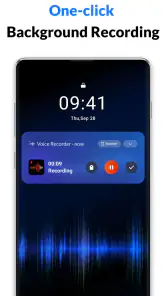
Voice Recorder & Voice Memos is presented as a tool for recording audio anytime and anywhere, which makes it suitable for capturing a thought, conversation, or other sound while you are away from a reliable connection. If you plan to share or back up a recording, those actions may depend on the connection and service you use. The app is listed in the Music & Audio category.
What features does the Voice Recorder & Voice Memos app offer?
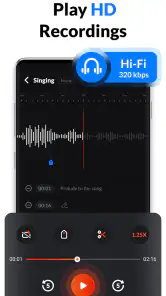
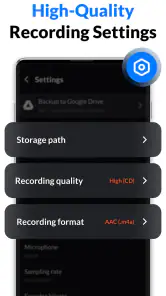
The Voice Recorder & Voice Memos app offers a range of features designed to cater to both casual users and professionals. It includes high-quality audio recording, easy editing tools, file management options, and the ability to share recordings via email or social media. Additionally, it supports various audio formats, making it versatile for different needs. Users can also organize recordings with customizable labels and folders, ensuring efficient management of their audio files.
Is the Voice Recorder & Voice Memos app free to use?
Yes, the Voice Recorder & Voice Memos app is available for free download on both Android and iOS platforms. While the basic features are accessible without any cost, the app also offers in-app purchases or a premium version. These paid options provide additional features such as advanced editing tools, cloud storage integration, and an ad-free experience, enhancing the overall user experience. In-app purchases are listed at prices ranging from $2.49 to $19.99 per item, so check the available options before purchasing.
Pros
- High-quality audio recording.
- User-friendly interface.
- Supports multiple audio formats.
- Easy sharing options.
- No time limit on recordings.
Cons
- Contains ads in free version.
- Limited editing features.
- Cloud backup requires premium.
- No transcription feature.
- May drain battery quickly.
- Category
- Music & Audio
- Version
- 1.3.0.0













