Sense Flip Clock & Weather
- 8.94K
- 4.2
- Installs
- 10.00M
- Price
- Free

Screenshots
Analysis by Reviewed
Have you ever found yourself caught in a rainstorm without an umbrella, or dressed too warmly on a surprisingly sunny day? Well, let me introduce you to Sense Flip Clock & Weather, an app that's like having a personal weather station right in your pocket. This app not only tells you the time but also keeps you updated with the latest weather conditions. I’ve had the chance to play around with it, and here’s my take on what makes this app a must-have for anyone wanting to stay ahead of the weather.
A practical fit for a weather-focused home screen
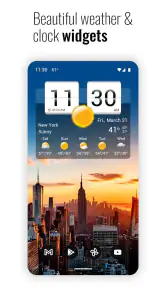
The idea behind this app is easy to understand: instead of opening a separate weather app whenever you check the time, you can bring both kinds of information together through its clock-and-weather presentation and home-screen widgets. That is most useful for people who glance at their phone between tasks, rather than those who want to spend time exploring maps or specialist forecasting tools. I like that its purpose is visible at a glance; the trade-off is that its distinctive clock design may feel unnecessary if you already prefer a plain digital clock or keep your home screen deliberately sparse.
A small but useful habit is to choose a widget size and layout that answers the question you ask most often. If you mainly want a quick sense of the conditions before leaving home, a compact view can reduce clutter. If you check more details while planning, a larger widget may make more sense. I would treat the home screen as a quick briefing, then open the app when I need to examine a forecast rather than trying to fit every detail into one widget.
It also helps to think about where you actually look when checking your phone. If your home screen is already crowded, replacing a less-used widget with this one is more practical than adding it on top of everything else. I would keep the clock-and-weather panel on the page I see first, not bury it among rarely opened apps; otherwise its main convenience disappears. This is a small setup choice, but it determines whether the app becomes a daily glance or something you forget you installed.
The Perfect Blend of Time and Weather
At first glance, Sense Flip Clock & Weather charms you with its sleek design. The app features a flip clock style that’s both retro and modern, making it a visually pleasing addition to your home screen. But it's not just about looks; this app is all about functionality. I found the blend of time and weather information on the same screen incredibly convenient. No more flipping between apps to check the time and weather—it’s all here, neatly packaged.
Weather Accuracy and Features
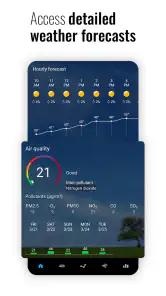
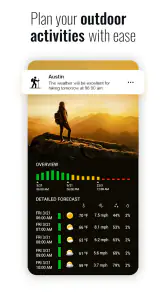
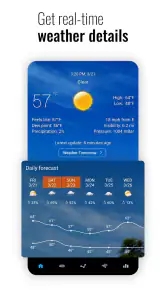
What really impressed me was the app’s accuracy. Using data from reliable sources, it provides real-time updates that you can trust. Whether you’re checking the current temperature, humidity, or wind speed, the app delivers it all in a straightforward manner. Plus, it goes beyond the basics. I loved the detailed forecasts it offers, including hourly and weekly weather predictions. It’s like having a meteorologist at your disposal 24/7!
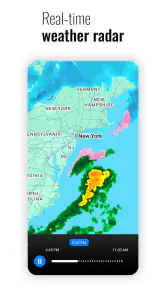
For an ordinary day, the hourly view is the one I’d reach for when deciding whether a walk or commute is better before or after a likely change in conditions. A weekly outlook is more useful for spotting broad patterns than treating a forecast several days away as a promise. I still check again before a weather-sensitive plan, because no phone forecast can remove uncertainty. If your main need is radar tracking or in-depth storm analysis, a dedicated weather service may be a better companion; this app’s appeal is the convenient combination of forecasts with a clock.
More From Our News Desk

Weather by Xiaomi Review: Clear at a Glance, Less Clear Up Close

X Under Pressure: Can It Recover When Posting Goes Wrong?

Clash of Clans Is Won Between the Battles

Android Auto Makes the Case for Quieter Car Software

MobiOffice: Transforming Mobile Productivity with Seamless Integration

EA SPORTS FC™ Mobile Soccer: Redefining Mobile Sports Gaming
One useful way to read the forecast is to turn it into a decision rather than simply checking numbers. Before leaving for a long day, I would look at the hourly changes around the times I expect to be outside, then use the broader outlook only to plan the general shape of the week. That avoids giving a distant forecast more weight than it deserves. For a trip where timing, route, or weather warnings matter, I would still use a specialist service alongside this one instead of asking a home-screen widget to do every job.
Customization and Widgets
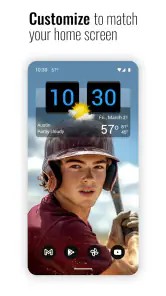
One of the standout features of this app is its customization options. You can tweak the interface to suit your style, with different themes and clock styles available. The app also offers a variety of widgets that you can place on your home screen for quick access. Whether you prefer a minimalistic design or something more detailed, Sense Flip Clock & Weather provides the flexibility to make it your own.
Customization is more than decoration here: it helps determine whether the widget becomes part of a useful routine or just another element competing for attention. I’d start with one clock-and-weather widget, live with it for a day, and only then adjust its appearance or size. That makes it easier to tell whether the layout itself is helpful before spending time styling it. People who enjoy personalizing their home screen are likely to appreciate this flexibility; anyone who wants a completely hands-off setup may find the choice of looks less important than a simpler default widget.
I would also make the widget earn its space by matching it to the way I use weather information. A glanceable layout makes more sense for deciding what to wear or whether to take a jacket; someone who regularly studies forecasts may prefer a larger view, accepting that it takes more room. The trade-off is personal, not a question of which design is universally best. If you change your home-screen layout often, try the widget in its ordinary daily position before settling on a style, so you can judge the information and the appearance together.
Easy Navigation and User Experience
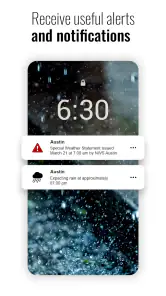
Navigating through the app is a breeze. It’s intuitive and straightforward, making it easy for anyone to use, regardless of their tech-savviness. I found the settings menu easy to understand, and setting up alerts for severe weather conditions was a snap. This app clearly values user experience, providing a seamless interaction from start to finish.
In a realistic morning routine, I’d glance at the home screen while getting ready, use the forecast to decide whether to take a light jacket, and check again before heading out if the weather looks unsettled. That makes the app particularly suitable for commuters, people planning outdoor errands, and anyone who likes seeing local conditions without navigating through several screens. Its store summary also points to local and international forecasts, which is handy for someone who wants to keep an eye on more than one place, though I would still verify important travel plans with a dedicated source.
That same routine shows where the app is most useful: it gives a quick prompt to think about the day, not a reason to stop checking conditions altogether. If I were organizing an outdoor event, I would check the forecast closer to the time and pay attention to how conditions are changing, rather than relying on an earlier glance. For a familiar commute or a quick errand, the widget is likely enough to guide a practical choice; for a long journey or a plan that could be disrupted by severe weather, I would want more detailed tools as well.
There are a few practical trade-offs to consider. A widget needs a place on the home screen, so it may not suit someone who prefers every inch reserved for apps and shortcuts. Weather information is also only as useful as the forecast for the place and time you care about, so I would not treat a brief glance as a guarantee—especially when making a high-stakes decision. The app is free to install, but it includes in-app purchases, so I’d check what an optional purchase offers before paying rather than assuming every customization or extra is included.
The app is a better match for someone who enjoys a visible, personalized home screen than for someone who wants a weather service to stay out of the way. Its free entry point makes it easy to try the central clock-and-weather approach, while the optional purchases are a reason to be deliberate if you are considering extras. I would first see whether the standard setup answers my everyday questions. If it does, there may be no reason to change anything; if I want more, I would look closely at the purchase details before deciding.
For someone comparing it with the usual weather alternatives, the difference is its clock-first convenience and flip-clock personality. A basic weather app may be a better choice if all you want is a quick condition icon, while a map-led app is a stronger fit if you routinely follow precipitation or severe weather in detail. I see this as a middle ground for everyday checking: more present on the home screen than a typical forecast app, but not a replacement for specialist tools when precision and deeper analysis matter most.
That distinction matters if you are choosing just one weather app. People who rarely use widgets and already have a preferred clock may get more value from a straightforward forecast app that opens directly to the information they need. On the other hand, if you repeatedly check the time and weather together, the combined display can remove a small but frequent bit of friction. I would not choose it for an advanced map workflow, but I would consider it for the everyday question of whether the conditions suit my next outing.
As a weather app from MACHAPP Software Ltd, it has been available since December 28, 2011, and its current version is 8.99.10. It is rated for Everyone and requires Android 6.0 or later. Its average rating is 4.2 from around 156,000 ratings, with about 8,900 written reviews, and it has over 10 million installs. Those figures suggest a well-established choice, but I’d make the decision based on whether its combined clock, forecast, and widget approach fits the way you use your phone.
It is free to download, and that makes trying the basic experience a low-commitment way to find out whether the widget suits your routine. I would check the current purchase options in the app before expecting a particular style or extra to be included. On Android, the minimum requirement is version 6.0, so it is worth checking compatibility on an older phone before planning a home-screen setup around it. Its Everyone rating also makes it broadly suitable for general audiences, though the right choice still depends on whether you want a visual clock-and-weather display or a more specialized forecast tool.
In conclusion, Sense Flip Clock & Weather is more than just a clock or a weather app. It’s a comprehensive tool that keeps you informed and prepared, no matter what the weather throws your way. Whether you’re planning your day, week, or just curious about the current conditions, this app has got you covered. It's reliable, customizable, and easy to use. So, if you’re looking for an app that combines style with substance, this one’s definitely worth a try!
My recommendation is strongest for people who want local conditions close at hand and enjoy giving their home screen a clear purpose. I would skip it if widgets feel like clutter, if I only need a bare-bones forecast, or if detailed radar and specialist analysis are central to how I plan. For everyone in between, the sensible test is simple: place one widget where you naturally check the time, use it through a few ordinary days, and decide whether its combined view genuinely saves effort. That is where this app’s particular mix of clock, forecast, and customization makes the most convincing case for itself.
Sense Flip Clock & Weather Frequently Asked Questions
Will Sense Flip Clock & Weather work on my Android device?
The app requires Android 6.0 or later, so check your device’s operating system before downloading. It combines weather information with flip clock widgets, making it most relevant if you want both at a glance on your home screen. Sense Flip Clock & Weather is rated for Everyone, and it is free to download, with optional in-app purchases.
What is Sense Flip Clock & Weather designed to do?
Sense Flip Clock & Weather is a weather app that brings local and international forecasts together with flip clock widgets. Its central appeal is having time and weather information in one place, particularly on a home screen. If you prefer a dedicated forecast app without clock widgets, its combined design may be less important to your decision.
What should I know about Sense Flip Clock & Weather before downloading it?
Sense Flip Clock & Weather is a weather app from MACHAPP Software Ltd that pairs local and international forecasts with flip clock widgets. It is rated for Everyone, and it can be installed on devices running Android 6.0 or later. The app is free to download, with optional in-app purchases, so you can consider whether its clock-and-weather approach suits the way you use your home screen.
What features does Sense Flip Clock & Weather offer?
Sense Flip Clock & Weather provides a comprehensive suite of features including a flip clock with both digital and analog display options, detailed weather forecasts, sunrise and sunset times, humidity levels, wind speeds, and customizable widget sizes. The app also offers severe weather alerts and supports multiple locations, making it an all-in-one tool for keeping track of time and weather conditions worldwide.
Is Sense Flip Clock & Weather free to use?
Yes, Sense Flip Clock & Weather is free to download and use. However, there are in-app purchases available, priced from around five to sixteen dollars per item, that offer additional features such as premium widgets, ad removal, and enhanced weather data. These features are optional and the core functionalities of the app can be enjoyed without any purchase.
Pros
- Accurate weather updates
- Customizable widget design
- User-friendly interface
- Minimal battery usage
- Supports multiple locations
Cons
- Ads in free version
- Limited widget sizes
- Occasional sync issues
- No radar feature
- Premium features locked
- Category
- Weather
- Version
- 8.99.10