Bible Offline-KJV Holy Bible
- 38.47K
- 4.8
- Installs
- 50.00M
- Price
- Free

Screenshots





Analysis by Reviewed
When I want to look up a passage in the King James Version, I don’t always want to open a browser, sort through search results, or depend on a steady connection. Bible Offline-KJV Holy Bible is built for that straightforward need: a Bible I can keep on my phone and return to in small moments through the day. It sits in the Books & Reference category, is free to install, and comes from Bíblia Offline. Its KJV focus is a real strength if that is the wording you want, though it is less suited to someone who prefers a modern translation or wants several versions side by side.
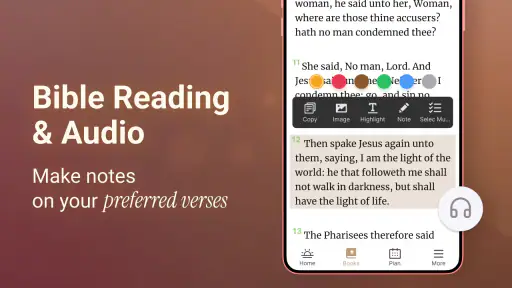
My practical routine starts with a question, a reading plan of my own, or a verse someone mentioned. I open the app, search for a phrase or navigate by book and chapter, then read the passage in context rather than stopping at a single result. That last step matters: familiar lines can read differently when I check the surrounding verses. Once I find something worth revisiting, I can bookmark it, highlight it, or add a note, turning a quick lookup into a record I can use later.
The offline setup is especially useful when I’m travelling, waiting somewhere with unreliable reception, or trying to keep a reading habit without opening a browser full of distractions. It also makes the app a practical choice for a short morning reading: I can open a saved passage, spend a few minutes with it, and move on without needing to get online. The daily verse notification can offer a prompt, but I treat it as a starting point rather than a substitute for reading a whole chapter.
From a quick reading to a useful routine
One of the coolest things about the Bible Offline-KJV Holy Bible is its offline capabilities. You don’t always have Wi-Fi, especially when you’re on the go, but this app ensures that you can still read your favorite scriptures without any hassle. It’s perfect for those moments when you just need a little spiritual uplift, regardless of your location.
The app is designed with a user-friendly interface that makes navigation a breeze. You can easily jump from Genesis to Revelation with just a few taps. Plus, there’s a handy search feature that lets you find specific verses or chapters quickly. It’s like having a virtual concordance at your fingertips!
Turning a passage into a study trail
Now, let’s talk about personalization because who doesn’t love a bit of customization? The app allows you to highlight verses, bookmark favorite passages, and even make notes. This is super handy for keeping track of your thoughts or preparing for Bible study sessions. It’s essentially your digital Bible journal.
A useful habit is to keep notes specific: write down why a verse stood out, what question it raised, or which nearby passage you want to revisit. That makes bookmarks more than a collection of saved lines. For a group discussion, I can look up the passage beforehand, add a thought, and then share the reference with others; the app helps me prepare, while the conversation still benefits from everyone reading the text in context.
More From Our News Desk

Weather by Xiaomi Review: Clear at a Glance, Less Clear Up Close

X Under Pressure: Can It Recover When Posting Goes Wrong?

Clash of Clans Is Won Between the Battles

Android Auto Makes the Case for Quieter Car Software

MobiOffice: Transforming Mobile Productivity with Seamless Integration

EA SPORTS FC™ Mobile Soccer: Redefining Mobile Sports Gaming
Sharing without losing the thread
Another awesome feature is the daily verse notification. Imagine starting your day with an inspiring verse right on your phone screen! It's like a little piece of heavenly motivation to kickstart your day. And guess what? You can even share these verses with friends and family through social media or messaging apps. Sharing the good word has never been easier!
That handoff from private reading to a message is convenient when a friend asks what I’m reading or a passage feels relevant to a conversation. I’d still add a sentence of my own rather than send a verse without context; the recipient may not share my assumptions or know the chapter. If you are reading in a group that uses another translation, the KJV wording can also differ, so it helps to share the book and verse reference along with the text.
Making the screen comfortable
The developers have done a fantastic job making the app accessible to everyone, regardless of their tech-savvy level. The font size and style can be adjusted to suit your reading preferences, which is great for those long reading sessions. Plus, it supports night mode, saving your eyes during late-night reading marathons.
Those adjustments matter in ordinary situations: a larger font can make a brief reading easier when I’m away from my usual glasses, while night mode is gentler when I check a passage before bed. For a longer study session, I’d set the screen how I like it first, then use search and bookmarks to move between passages instead of repeatedly scrolling through a long book.
Listening, with a different kind of attention
For those who love to listen rather than read, the app offers an audio Bible feature. You can listen to the Bible being read aloud, which is perfect for multitasking or for those who prefer auditory learning. It’s like having a personal narrator guiding you through the scriptures!
Audio is handy during a quiet walk or while doing a simple task, but it asks for a different kind of focus from reading. When a line raises a question, I find it more useful to pause and look at the text than to let the passage run on in the background. If careful comparison, extensive study tools, or multiple translations are central to your routine, a dedicated study Bible or a multi-version Bible app may be a better fit than this KJV-centered option.
What the app does well—and where it may not fit
One thing I really appreciate is the lack of ads. Nothing interrupts a moment of spiritual contemplation like a pop-up ad, right? Thankfully, this app keeps things clean and focused on what matters most—the Word.
Its simplicity is also a trade-off. A focused KJV reader is easy to return to, but it won’t suit everyone who wants a broader reference library or a more guided study experience. The app has a 4.8 average from around 9.6 million ratings and over 50 million installs, which suggests many people find this kind of accessible Bible useful; those figures don’t change the basic question of whether the King James text works for you. It is rated for Everyone, and the app is free, with optional in-app purchases ranging from $0.99 to $49.99 per item. I’d check the purchase prompt carefully if it appears, rather than assuming every extra is included in the free version.
Choosing it for the right kind of reading
I’d recommend it most readily to someone who already likes the KJV and wants a practical reading companion rather than a digital library of theological resources. It is particularly useful for a commute, a lunch break, or a quiet pause when I have a passage in mind but don’t want to juggle browser tabs. A reader who is new to the Bible may also appreciate being able to move through books and chapters without first learning a complicated study interface, although the older style of English can take patience.
For example, if a relative mentions a verse over dinner, I can search a distinctive phrase later, read the surrounding section, and save a note about why it came up. The next time we talk, I can share the reference and my own thought rather than relying on memory. That small chain—from question, to reading, to saved note, to conversation—is where the app feels more useful than a plain page of text.
Small habits that make it more useful
I’d use search as a doorway, not as the whole reading session. A phrase may appear in more than one place, and a result by itself can hide the point of the passage. Opening the chapter around the match helps me avoid treating a line as a stand-alone slogan. When I save it, I make the note personal and precise; a short reminder of the question I had is more helpful later than a vague label such as “important.”
Notifications are best treated as optional nudges. A verse arriving at a busy moment can be easy to swipe away, so I’d use it as a prompt to return when I have a minute, not as a measure of whether I have kept up with reading. Similarly, audio works well when my hands are occupied, but I wouldn’t rely on it for close study. Switching from listening to the written passage when something catches my attention makes the experience more deliberate.
The contrast with a printed KJV is mostly about convenience: the phone is searchable, portable, and easier to annotate on the go, while paper avoids screen fatigue and notification temptations. Compared with a general Bible website, an offline reader is more dependable in weak-signal situations and less entangled with unrelated browsing. A multi-translation app has the advantage when wording comparisons matter; this one is a better match when I want to stay with the King James text and keep the workflow simple.
When another option makes more sense
I would skip this app if the KJV’s vocabulary regularly gets in the way of understanding, or if I need parallel translations, cross-references, commentaries, and a substantial research setup in one place. In those cases, a modern-language edition or a study-focused Bible app is a more sensible starting point. It also may not be ideal for someone who wants to read exclusively on paper or keep a long study session away from a phone screen.
Before installing, I’d check that the device runs Android 7.0 or later. The current version is 6.2.8. Once it is on the phone, the key practical question is not how many tools it offers but whether its KJV text, offline reading, and simple personal annotations fit the way I actually read. That is a more useful test than choosing an app only because it has a long list of features.
Final Thoughts
In conclusion, the Bible Offline-KJV Holy Bible is a must-have for anyone who wants to carry the Bible with them everywhere they go. It’s packed with features that enhance your reading experience and make the scriptures more accessible than ever before. Whether you’re a lifelong believer or just exploring the faith, this app is a fantastic tool to have. So go ahead, give it a download, and let the Word inspire you every day!
For me, it works best as a dependable pocket reader: search when I need a passage, save what I want to return to, and use audio or a daily verse when those suit the moment. The current version is 6.2.8 and it requires Android 7.0 or later, so it’s worth checking that your device can run it before installing. If you mainly want an offline KJV with practical ways to revisit and share passages, I’d give it a try. If you need translation comparison or deeper reference material, I’d choose a more study-oriented alternative instead.
Bible Offline-KJV Holy Bible Frequently Asked Questions
Can I use Bible Offline-KJV Holy Bible without an internet connection while traveling?
Yes. Bible Offline-KJV Holy Bible is designed to provide offline access to the King James Version, so you can read scripture while traveling or when a data connection is unavailable. Some functions, such as audio streaming and updates, may need internet access. If offline reading is your main reason for downloading, the app’s focus on the KJV makes it a practical option to consider.
Does Bible Offline-KJV Holy Bible include audio, or is it mainly for reading?
The app is centered on Bible reading and study, and it also offers audio Bible options. That may suit you if you like listening to scripture as well as reading it. Keep in mind that audio streaming may require an internet connection, while the King James Version is available for offline reading. The app’s other study tools include search, bookmarks, highlighting, and notes.
Can I keep track of verses and notes for later study?
Yes. Bible Offline-KJV Holy Bible includes bookmarks, verse highlighting, and note-taking capabilities, which can help you return to passages or keep personal study notes together. Its search function can also help locate a passage when you want to revisit it. These tools may be especially useful if you use the app for ongoing reading and reflection rather than opening it only to look up a verse.
Can I use Bible Offline-KJV Holy Bible to share scripture with other people?
Yes. Sharing verses of the day is one of the app’s stated purposes, making it useful if you want to pass a Bible passage along to friends or family. The app is centered on the King James Version, so shared scripture comes from that translation. You can also use it for personal reading and study, whether or not you choose to share verses.
What does “KJV” mean, and is this app focused on that translation?
KJV means King James Version, and this app is centered on that translation. It may be a good fit if you already read the KJV or want a Bible app built around its wording. If you usually prefer another translation, consider that focus before downloading. The app’s stated purpose is Bible study, reading, and sharing verses of the day.
Pros
- Comprehensive offline access.
- User-friendly interface.
- Includes audio versions.
- Daily verse notifications.
- Customizable reading plans.
Cons
- Limited translation options.
- Occasional app crashes.
- Ads in free version.
- Slow search feature.
- No social sharing.
- Category
- Books & Reference
- Version
- 6.2.8