YouVersion Bible App + Audio
- 590.24K
- 4.9
- Installs
- 100.00M
- Price
- Free

Screenshots

Analysis by Reviewed
I tend to judge a Bible app by what happens in the small gaps of a normal day: can I get to a passage quickly, pick up where I left off, and still use it when I’m away from a reliable connection? YouVersion Bible App + Audio is built for that kind of flexible routine. It is a free Books & Reference app from Life.Church, and its mix of scripture, listening, daily readings, and study material makes it useful for more than simply looking up a verse.
What to expect when you open it
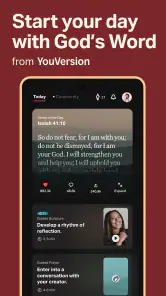
For a quick visit, the app’s value is its range: you can move from reading to a devotional or a reading plan without treating each as a separate activity. In my experience, that makes it easier to turn a spare few minutes into a focused habit. The current version is 11.14.2+7085283, and the app is rated for teens. Its scale is substantial, with over 100 million installs and an average rating of 4.9 from around 8.5 million ratings. Those figures suggest broad appeal, though they can’t tell you whether its approach will suit your own reading style.
What Makes It Shine?
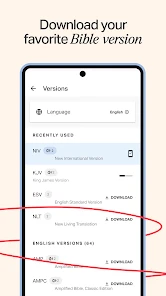
First off, let’s talk about the sheer versatility of the YouVersion Bible App + Audio. It’s not just a digital Bible; it’s a full-fledged resource for believers and curious minds alike. You can choose from a staggering number of translations, more than you could shake a stick at, and they’re available in multiple languages. Whether you’re a fan of the classic King James Version or prefer a contemporary translation, there’s something here for many reading preferences. I find that choice especially helpful when a passage feels unclear: comparing wording can offer context, though it is still worth checking a trusted study resource if you need detailed historical or scholarly interpretation.
The Latest on YouVersion Bible App + Audio
Audio Bible: A Game Changer
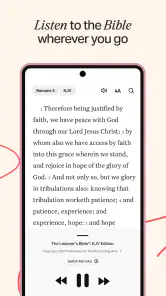
One of my favorite features has to be the audio option. Picture this: you’re driving to work, stuck in endless traffic, and instead of listening to the same old radio shows, you can immerse yourself in the Word. The audio is clear, engaging, and feels like a personal reading session tailored just for you. It’s perfect for those hectic days when sitting down to read isn’t an option. I’d set up the passage before setting off rather than trying to search while driving; the best use of audio is hands-free attention, not interacting with a screen in traffic. For a quieter routine, listening while cooking or walking can also make a longer reading plan feel less tied to a chair.
Community and Connection
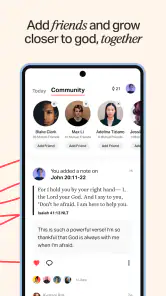
The app isn’t just about solitary study. It fosters a sense of community with its social features. You can invite friends, share insights, and even hold each other accountable through Bible reading plans. It’s like having a Bible study group in your pocket. The shared plans and devotionals can spark meaningful conversations and deepen your understanding of scripture. That social layer is most useful when everyone agrees on a manageable pace; a plan that is too demanding can turn encouragement into pressure. If you prefer private reflection, you can still use the reading and devotional material without making community participation the center of your routine.
Personalization at Its Best
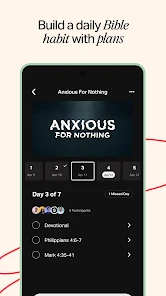
Speaking of plans, the personalized reading plans are a real highlight. Whether you’re focused on a specific topic, trying to read through the entire Bible, or just needing a daily dose of inspiration, there’s a plan that fits the bill. Plus, the app tracks your progress, so you get that satisfying sense of achievement as you tick off each day. A practical tip is to choose a plan that fits the time you actually have, then treat the progress indicator as a guide rather than a streak you must protect. That keeps the habit welcoming if work, family, or travel interrupts your usual schedule.
Easy Navigation and User-Friendly Design
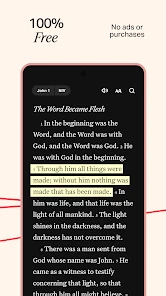
The user interface is clean and intuitive, making it easy to navigate even for those who might not be the most tech-savvy. Searching for specific verses is a breeze, and bookmarking your favorite passages is just a tap away. Everything about the app is designed to make your experience as smooth and enriching as possible. When I’m using it for study rather than a quick reading, I’d save a passage I want to revisit instead of relying on memory; bookmarks give a simple way to return to those moments later. If you mainly want a minimal reader with no plans, audio, or social elements, this broader setup may feel busier than necessary.
More From Our News Desk

Clash of Clans Is Won Between the Battles

Android Auto Makes the Case for Quieter Car Software

MobiOffice: Transforming Mobile Productivity with Seamless Integration

EA SPORTS FC™ Mobile Soccer: Redefining Mobile Sports Gaming

How Microsoft OneDrive Became a Mobile Productivity Giant

How Google Translate Breaks Language Barriers Effortlessly
Offline habits and heavier sessions
Offline access is particularly useful if you know you’ll be somewhere with patchy service. I’d prepare by opening the material I expect to use while connected, rather than assuming every resource will be ready in every situation. That small bit of planning makes the app a better companion on a commute or trip. If you are comparing it with a printed Bible, paper is simpler and needs no battery; if you are comparing it with a basic e-book reader, YouVersion offers a broader mix of audio, plans, and shared reading. The trade-off is that a feature-rich app can draw attention away from the text, so I recommend choosing one task before opening it.
Making a routine work in real life
A useful way to begin is to decide what you want the app to do before browsing its many options. If your goal is a brief morning reading, choose a passage or a short devotional and leave the rest for another time. If you want to explore a theme, a plan can give your reading some direction. This simple separation matters because the app can serve several purposes, but trying to set up a complete study routine on the first visit may make a small habit feel like a project.
For example, I might read a few verses with breakfast, bookmark one that raises a question, and return to it later when I have more time. On a day when sitting down is difficult, audio can take the place of that reading session during a walk. The two approaches complement each other, but they are not identical: listening is convenient for keeping a routine, while reading makes it easier to pause over a phrase or compare translations. I would choose the format according to the moment rather than treating one as a substitute for the other.
Choosing plans without adding pressure
Plans are most helpful when their pace matches your life, not an ideal week you rarely have. Before joining one, I’d look at its topic and daily commitment, then ask whether I can return to it comfortably after a missed day. A plan shared with friends can make it easier to talk about what you have read, but it also makes the pace more visible. If you find that accountability is motivating, that can be a real advantage; if it makes reading feel like a public task, a personal plan or unstructured reading may be a better fit.
Another practical approach is to keep a small number of active intentions. A plan for a particular theme can be useful alongside everyday reading, but collecting several at once risks turning the home screen into a set of unfinished obligations. I would finish, pause, or deliberately leave a plan before starting another. That keeps the app’s variety in service of your reading rather than letting the variety decide what you should do next.
When another format is a better fit
The usual alternatives make different compromises. A printed Bible gives you a quiet, stable reading space and never competes with notifications or battery life, but it cannot switch translations or play audio. A basic scripture reader may be simpler for someone who only wants to search and read. YouVersion is more appealing when you value having reading, listening, plans, and shared activity together; that breadth is also why it may feel like more app than a reader who wants a single text and no extras needs.
For close academic work, I would pair it with a dedicated reference or commentary resource rather than expect a general-purpose Bible app to answer every interpretive question. Comparing translations is a useful first step when wording differs, but translation comparison alone is not a complete explanation of history, language, or context. The distinction is important: this app is a convenient place to read and build a routine, not a replacement for every kind of theological or scholarly tool.
Who will get the most from it
I’d recommend it to readers who want several translations and formats in one place, people building a daily scripture habit, and friends or families who enjoy following a plan together. A realistic routine might be checking a short reading over breakfast, listening to a passage during a walk, then saving a verse to discuss later. It can also suit someone exploring the Bible for the first time, since plans provide a starting point rather than leaving every choice to the reader. On the other hand, someone seeking a strictly academic commentary, a highly customized study library, or a distraction-free paper-like experience may be better served by a dedicated study tool or a print edition.
Speed, stability, and device fit
For ordinary reading and verse searches, I’d expect the app to feel most responsive when the device has a steady connection and the material is already available. Audio, multiple resources, and social activity make heavier sessions more involved than opening a single passage, so I would avoid judging performance from a brief lookup alone. The app is designed for devices running Android 7.0 or later; on an older or storage-constrained device, it is sensible to keep only the resources you need and close other demanding tasks if things feel sluggish. If a session is interrupted, returning to a saved passage or plan is a more dependable habit than expecting to remember exactly where you stopped. I wouldn’t choose it primarily for speed on a very limited device, but its different ways to read and listen can justify the extra complexity for many users.
Keeping the app dependable on busy days
For travel or any stretch with unreliable service, a little preparation is more useful than trying to troubleshoot in the moment. While connected, open the passage you expect to read and check that the material you need is available for your intended use. Offline access helps, but it is wise not to assume every plan element, audio selection, or community interaction behaves exactly like a saved text. If uninterrupted reading is essential, having a paper passage or another simple fallback can be sensible, especially when your device is low on battery.
When the app feels slow, I would first separate a connection problem from a demanding session. A verse lookup and a session that combines audio, several resources, and social activity place different demands on the device and network. Returning to one task at a time can make it easier to find the source of friction. On a device with limited space or older hardware, avoiding unnecessary downloads and keeping the session focused are practical habits; I would not expect a rich, multi-purpose app to feel as lightweight as a single-purpose reader in every situation.
In conclusion, whether you’re a long-time believer or someone exploring faith for the first time, the YouVersion Bible App + Audio is a fantastic tool. It’s more than just an app; it’s a community, a resource, and a daily companion on your spiritual journey. So why not give it a try and see how it can enrich your life? My recommendation comes with one qualification: start with the reading or listening habit you genuinely want, and add plans or social features only if they help. Used that way, it offers a flexible, free place to return to scripture without requiring every feature to become part of your day.
YouVersion Bible App + Audio Frequently Asked Questions
What is YouVersion Bible App + Audio designed for?
YouVersion Bible App + Audio is a dedicated Bible app for reading, listening, and studying scripture. Its daily-use features include audio, a Verse of the Day, offline access, Bible study, and devotionals. It may suit you if you want these activities gathered in one mobile app rather than using a general-purpose reading tool.
Who makes YouVersion Bible App + Audio?
The app is developed by Life.Church and focuses on Bible reading, listening, and study. It is intended for people who want to engage with scripture through a phone, whether that means opening a passage, listening to audio, or following a devotional. The app’s mix of personal and shareable features also makes it possible to choose a more private or social approach.
Is YouVersion Bible App + Audio free to download?
Yes. YouVersion Bible App + Audio is free, so you can download it and explore its Bible reading, audio, devotional, and study features without paying for the app itself. Its free price may make it easier to try as part of your routine. You can decide whether its reading and listening options suit you after exploring the app.
What is the minimum operating-system requirement?
The minimum operating-system requirement is Android 7.0. Before downloading, check the software version on your device to make sure it meets that requirement. The app is also available for iOS, so choose the version that matches your phone. Its Teen content rating is another useful consideration, particularly if the device will be shared with a younger user.
Is YouVersion Bible App + Audio available for both Android and iOS?
YouVersion Bible App + Audio is a mobile Bible app from Life.Church, designed for reading and listening on your phone. It is available for Android and iOS, so you can choose the version that matches your device. Before downloading, check that your device meets the app’s minimum operating-system requirement; the app is rated Teen.
Pros
- Extensive library of Bible versions.
- User-friendly interface for easy navigation.
- Offline access to Bible content.
- Customizable reading plans and reminders.
- Audio feature for hands-free listening.
Cons
- Requires account for personalized features.
- Some content requires internet access.
- Ads in the free version.
- Limited customization for audio playback.
- Occasional app performance issues.
- Category
- Books & Reference
- Version
- 11.14.2+7085283