네이버 - NAVER
- 1.08K
- 3.6
- Installs
- 100.00M
- Price
- Free

Screenshots
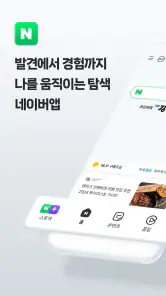


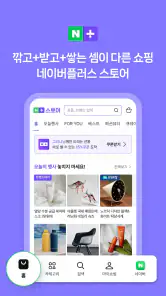


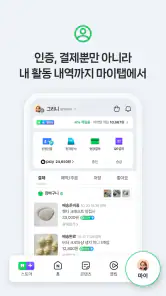
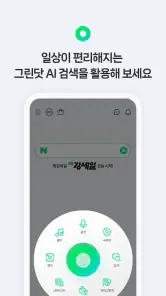
Analysis by Reviewed
I’d approach NAVER less as a single-purpose tool and more as a doorway into a broad Korean online ecosystem. That breadth is useful, but it also explains why first-time users can feel unsure where to begin: search, reading, local information and other services sit under one roof, and the experience makes the most sense when you already know what you want to do. I’d start with one task rather than trying to explore everything at once.
Where users can get stuck
For an English-speaking newcomer, the main hurdle may be language rather than complexity. Some content and service areas are strongly oriented toward Korean users, so translated interface elements do not necessarily make every result or local detail easy to interpret. I’d treat search as the clearest starting point, then open one result at a time and check whether the destination is readable and relevant before relying on it.
That distinction matters if you are looking for a place to eat, for example. A result can help you discover a name or neighborhood, but you may still need to confirm practical details in a language you understand. When the app feels harder to use than expected, I would first narrow the query or try a familiar Korean place name rather than assume the whole service is broken.
The Latest on 네이버 - NAVER
Make setup serve a specific routine
NAVER is free, developed by NAVER Corp., and belongs in the books and reference space, although its range reaches well beyond reading. It has been available since February 25, 2010, and is rated for Everyone. I’d install it because I have a clear reason to use its Korean search and content ecosystem, not simply because I want another general-purpose browser.
A practical first session is to decide whether your priority is looking something up, following Korean news, or finding reading and entertainment. Search for one topic you already know, compare a couple of results, and remember the services you actually return to as part of your routine. This small test is more useful than judging the app by a busy home screen or browsing every section at once.
Recover the task before restarting everything
If a search does not lead where you expected, I’d revise the wording, remove an extra detail, and try a more specific name or a simpler phrase. If a page is difficult to follow, backing out to the search results and choosing a different result is often a better recovery than repeating the same tap. For a place or service, check the name and location carefully; similar-looking results can send you down the wrong path.
For intermittent trouble, separate the app from the connection and the destination: retry the same task after checking that other online content loads, then see whether a different result works. That approach avoids treating every slow or confusing page as an app-wide failure. The useful question is whether search itself is responding, or whether one particular service or result is the sticking point.
More From Our News Desk

Android Auto Makes the Case for Quieter Car Software

MobiOffice: Transforming Mobile Productivity with Seamless Integration

EA SPORTS FC™ Mobile Soccer: Redefining Mobile Sports Gaming

How Microsoft OneDrive Became a Mobile Productivity Giant

How Google Translate Breaks Language Barriers Effortlessly

Why Google Sheets Is the Ultimate Mobile Productivity Tool
Exploring Korea’s digital landscape
When I first opened the 네이버 - NAVER app, I was instantly greeted by a sleek and user-friendly interface. It’s clear that NAVER has put a lot of thought into making navigation as intuitive as possible. This app is like a Swiss army knife for digital services in Korea. Whether you’re looking to catch up on the latest news, find a local restaurant, or even shop online, NAVER’s got you covered.
A broad set of services
One of the standout features that caught my eye was the search functionality. It’s incredibly efficient and returns results at lightning speed. Plus, the integration with services like NAVER Pay and NAVER Maps is seamless. It’s super convenient to search for a location and then immediately check out reviews or pay for services without switching apps. Talk about efficiency!
And let’s not forget about the entertainment factor. The app offers a variety of content, including webtoons, which are a huge hit in Korea. I found myself scrolling through episodes of popular webtoons during my commute, and it’s safe to say I’m hooked.
Personalized user experience
NAVER does an excellent job of tailoring content to the user’s preferences. The AI-driven recommendations are spot-on, whether it’s suggesting a new webtoon to read or a trending news article. It’s like having a personal assistant that gets smarter the more you use the app.
Moreover, the app supports multiple languages, making it accessible to a global audience. This is a big win for anyone interested in Korean culture who doesn’t speak the language.
Choosing it for the right reason
In everyday use, I’d reach for NAVER when I want Korean-focused discovery in one place: checking a topic on the way to work, finding a place to investigate before meeting someone, or reading an episode during a quiet commute. Its appeal is the ability to move from a search toward related content and services without treating every task as a separate app hunt. A quick tip is to use it as a discovery starting point, then verify time-sensitive or important details before making plans.
Compared with a general search app, NAVER feels more rooted in Korean services and content; that can make it more useful for people following Korean topics, but less straightforward for someone who only needs broad international results. A dedicated map or reading app may be the better choice if navigation or long-form reading is your main goal. NAVER’s advantage is range, not necessarily depth in every single activity.
A realistic day-to-day workflow
Imagine I’m meeting a friend after work and want to choose somewhere unfamiliar. I might search a Korean place name or neighborhood, use the results to identify a promising option, and then open the relevant details to check whether it suits the plan. If the information is unclear or the page is hard to interpret, I’d treat NAVER as the lead rather than the final authority: compare another result and confirm any detail that could affect the meeting. That workflow makes the app useful without asking it to remove every language or verification step.
For a Korean learner, a different routine can work better. I’d search for a topic I already recognize, notice the vocabulary and names that recur, and then move to a dedicated dictionary when I need an exact definition. This is a practical way to explore authentic material, but it is not the same as checking a sentence for precise meaning. The distinction matters: NAVER can support discovery and context, while a specialist language tool is the safer choice for careful translation.
When another tool is the better fit
The app has an average rating of 3.6 from around 559,000 ratings, alongside more than 100 million installs. Those figures suggest a widely used service, but they do not guarantee that every section will suit every person. If you are not interested in Korean content or services, its broad selection may feel like extra complexity rather than a benefit. I would also avoid depending on a recommendation feed as the only way to find something specific; a direct search gives you more control over the task.
There is a difference between being curious about Korean culture and needing a dependable tool for a particular job. For language learners, NAVER can be a useful companion for exploring names, topics and media, but it should not replace a focused dictionary or translation tool when precise wording matters. For a traveler, it can help with discovery, while a dedicated map may be easier for turn-by-turn planning. Knowing that boundary makes the app more rewarding and prevents its many options from becoming clutter.
It may also be the wrong choice if you want a quiet, single-purpose reading experience. A broad service app invites you to move between different kinds of content, which is convenient when curiosity is the point but distracting when you simply want to finish a long article or book. In that case, I’d choose a reader designed around reading sessions. The same goes for someone who mainly needs international search: a familiar global search app may get to the answer with less adjustment.
Small habits that make it easier to use
I’d keep searches focused and treat one result as a starting point, especially for names, addresses, and local recommendations. If a broad query produces a mix of useful and irrelevant material, adding a neighborhood or a more exact term can make the next attempt easier to assess. For repeated tasks, it also helps to remember the path that worked rather than browsing the entire app each time. These are modest habits, but they reduce the feeling that every visit requires learning the interface again.
When a page fails to load or a result seems out of date, I’d test a second search before changing several settings or reinstalling anything. If other online content is also struggling, the connection is a more useful first suspect; if only one destination behaves oddly, the issue may be specific to that page or service. This simple comparison helps avoid unnecessary troubleshooting and keeps the focus on completing the original task.
What to expect from its recommendations
Personalized suggestions can be a pleasant way to stumble across Korean news or entertainment, but I would not use them as a substitute for deliberate searching. Recommendations are most helpful when I have time to browse and am open to surprises; they are less helpful when I need a particular answer quickly. A useful balance is to search first for the thing you came for, then explore suggested material only if it adds value. That keeps the feed from becoming the whole experience.
It is also worth approaching unfamiliar results with a little patience. A title, thumbnail, or short preview may be enough to decide whether to open something, but the full page can still be shaped for a Korean-speaking audience. I’d avoid assuming that a translated label means every part of the destination will be equally clear. For important decisions, checking the original context with a language resource or another trusted source is sensible.
My practical verdict
With about 1,100 written reviews and a long-running presence, NAVER is clearly an established choice, but I’d recommend it selectively rather than telling everyone to install it. It is free, and I think it earns a place on the phone of someone who regularly searches Korean topics, follows its content, or wants to explore connected services. If your needs are limited to one narrow task, a specialist app may be simpler; if you want a broad entry point into Korea’s digital world, NAVER is worth trying with one clear routine in mind.
In conclusion, the 네이버 - NAVER app is a gateway to all things Korean, offering a blend of practical functionalities and entertainment options. It’s a versatile app that caters to a wide range of needs, from daily tasks to leisure activities. If you’re looking to immerse yourself in Korean digital culture, this app is definitely worth checking out. Trust me, once you dive in, you might never want to leave!
네이버 - NAVER Frequently Asked Questions
Will 네이버 - NAVER be useful if I mainly want to search for information in Korean?
It may be a good fit if Korean-language search is a priority. 네이버 - NAVER is centered on Naver’s search features and services, and its Korean focus can make it more relevant for finding information connected with South Korea. The app is free to download, so you can try its search experience and decide whether it suits the way you look things up.
Is 네이버 - NAVER intended for smartphones?
Yes. 네이버 - NAVER is designed for smartphones, bringing search features and various services together in one app. That makes it an option for people who want to access Naver from a mobile device rather than relying only on a web browser. Its broad portal approach is worth considering if you prefer one app for several everyday online activities.
What kind of app is 네이버 - NAVER, and who makes it?
네이버 - NAVER is a Books & Reference app developed by NAVER Corp. Its store summary highlights special search features and various services, reflecting its role as more than a basic search box. The app is free to download and has been available since February 25, 2010, making it a long-running mobile option for people interested in Naver’s services.
Can I use 네이버 - NAVER if I am outside South Korea?
Yes, the app can be useful outside South Korea, especially if you want to search for Korean-language information or use Naver services. The experience is geared toward Korean users, so some content and features may feel less relevant if you are looking for local information elsewhere. The app is free to download, and its content rating is Everyone.
What should I know about 네이버 - NAVER before downloading it?
네이버 - NAVER is a free Books & Reference app from NAVER Corp. It is designed for smartphones and brings together search features and various services. Its average rating is 3.6 from around 559,000 ratings, and it has more than 100 million installs. The app has been available since February 25, 2010, and is rated Everyone.
Pros
- Wide range of search results.
- User-friendly interface.
- Fast and reliable service.
- Customizable home screen.
- Comprehensive news updates.
Cons
- Limited language support.
- Occasional ads can be intrusive.
- Requires a stable internet connection.
- Some features are region-specific.
- Account creation is mandatory for full access.
- Category
- Books & Reference
- Version
- Varies with device