Quran for Android
- 17.40K
- 4.7
- Installs
- 50.00M
- Price
- Free

Screenshots



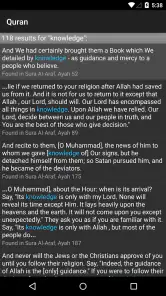
Analysis by Reviewed
When I decide whether to keep a religious reference app on my phone, I look beyond convenience: I want to know whether its everyday use feels clear and under my control. Quran for Android is a free Books & Reference app from quran.com, and its focused purpose makes it easier to judge on those terms than a general reading platform with a crowded mix of content.
A focused tool, not a general reading service
The app is built around the Quran, rather than a broad library of unrelated books. That focus is useful if I want to move directly between reading, listening, and looking up a passage. Compared with a general e-book reader, it is the more natural choice for regular Quran study; someone who mainly wants novels, research books, or a wide-ranging reference collection will likely be better served elsewhere.
Its long-running presence and broad audience offer context, though popularity alone is not a guarantee of privacy or quality. It has a 4.7 average from around 629,000 ratings and over 50 million installs. I treat those figures as a sign that many people use it, not as a substitute for deciding whether its features suit my own habits. It is rated for Everyone, which makes it accessible to a broad age range, while younger users should still follow the guidance of their family or teachers when exploring religious material.
What I can judge about trust
I prefer not to make privacy promises based on an app’s purpose or name. The details I can confidently assess here are the visible reading and listening choices described in the app experience: you can adjust how text appears, select a reciter, and use bookmarking and notes. Those controls help shape how I use the content, but they are not the same thing as account, permission, or data-management settings.
For a careful first run, I would look at the permission prompts on my own device and consider each one before granting access. I would also check the app’s current privacy information and the device’s app settings if I wanted to review or change access later. That is a practical habit for any app, especially one I plan to use often or while signed into a personal device.
Reading and listening on your terms
I recently had the chance to dive into Quran for Android, and let me tell you, it was quite the enlightening experience. If you’re someone like me who cherishes the spiritual connection provided by the Quran, then having an app that makes it accessible anytime, anywhere is a real game-changer.
Beautiful and User-Friendly Interface
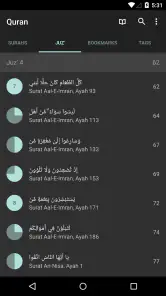
From the moment I launched the app, I was greeted with a sleek and intuitive interface. The developers have clearly put a lot of thought into making Quran for Android user-friendly. Navigating through the app is a breeze, thanks to its clean design and logical layout. You can easily find the Surah or Ayah you're looking for without getting lost in a sea of features.
More From Our News Desk

Weather by Xiaomi Review: Clear at a Glance, Less Clear Up Close

X Under Pressure: Can It Recover When Posting Goes Wrong?

Clash of Clans Is Won Between the Battles

Android Auto Makes the Case for Quieter Car Software

MobiOffice: Transforming Mobile Productivity with Seamless Integration

EA SPORTS FC™ Mobile Soccer: Redefining Mobile Sports Gaming
Customization and Accessibility
One of the standout features of the app is its customization options. Whether you prefer reading in a specific font size or need a particular color scheme for better visibility, this app has got you covered. It's these little touches that make it accessible to a broader audience, including those with visual impairments.
That flexibility also affects when and where I find the app comfortable to use. A larger text setting can make a short reading session easier on a small screen, while a quieter color scheme may suit a dim room better than a bright commute. I would try these adjustments before deciding the interface does or does not work for me; changing legibility is a more useful first step than forcing myself to read at a size that causes strain.
At the same time, visual customization has limits. If I need extensive screen-reader support, a particular display behavior, or a specialized accessibility workflow, I would test those needs directly on my own device rather than assume that text and color options cover everything. For a reader who simply wants to make the page easier to see, those settings are practical; for someone relying on a specific assistive setup, compatibility should be the deciding factor.
Audio and Recitation Options
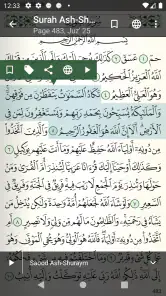
Now, if you're someone who loves to listen to the recitations, this app won’t disappoint. It offers a variety of reciters, allowing you to choose the voice that resonates with your heart. The audio quality is top-notch, and the ability to download recitations for offline listening is a real blessing, especially when you're on the go.
For a useful everyday routine, I would pair listening with a specific purpose instead of letting audio run in the background by default. For example, on a commute I might choose a passage before setting off, then listen without needing to search while moving. If I expect to be offline, I would prepare any recitation downloads in advance and check that they are available before leaving; that small step avoids relying on a connection at the moment I want to listen.
One trade-off is that audio can make a quick session feel effortless, but it is not a replacement for following the text when my aim is careful study. I would use listening for reflection or revision and switch to reading when I want to compare a translation or pause over a particular verse. If my main need were advanced classroom annotation or managing a large research library, I would look for a specialist study tool rather than expect this app to serve every scholarly workflow.
There is a further practical choice when listening away from home: prepare only the recitations I expect to need, especially if storage or mobile data is a concern. Downloading in advance can make a journey more dependable, but it also means spending a moment planning instead of browsing spontaneously. I would use streaming when I have a reliable connection and download when uninterrupted access matters more than that extra preparation.
Bookmarking and Notes
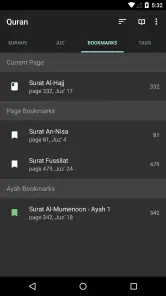
Another feature that I found particularly useful is the bookmarking and notes functionality. It allows you to quickly mark your favorite Ayahs or keep track of where you left off. Plus, jotting down notes and reflections has never been easier. It's like having a digital Quran journal right at your fingertips.
A practical way to make those tools useful is to keep bookmarks for two distinct purposes: one for the place I stopped reading, and another for passages I want to revisit. That prevents a study reference from becoming confused with a simple reading position. I would keep notes brief and tied to a passage, especially if I use them for personal reflections; for formal study, I would verify interpretations with a trusted teacher or source rather than treating a private note as an authoritative explanation.
There is also a device-sharing consideration. Notes and bookmarks can feel personal, so if I use a phone that other people can access, I would check the device’s lock and sharing arrangements before storing reflections there. This is a general precaution, not a claim about a particular account or synchronization feature. The important point is to make a deliberate choice about where private study material lives.
For anyone wondering whether these tools can support a group or class, I would treat them as personal aids rather than assume they provide collaborative study features. A simple approach is to use a bookmark to return to a passage and keep a concise question in a note, then bring that question to a teacher or discussion group. That preserves the app’s convenience without confusing private organization with shared commentary.
Multi-language Support
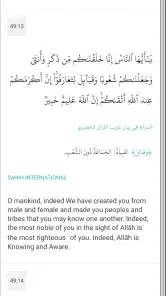
In our diverse world, language support is crucial, and this app delivers on that front. It boasts translations in multiple languages, making it an invaluable tool for non-Arabic speakers who wish to understand the Quran in their native language. This feature significantly broadens its appeal, catering to a global audience.
For a reader working across languages, I would treat a translation as a reading aid rather than a substitute for the Arabic text or for knowledgeable instruction. A useful routine is to read a short passage, consult the translation, and note questions to bring to a teacher or study group. This is especially helpful when a phrase feels unfamiliar: comparing language can prompt better questions, but it does not automatically settle differences in interpretation.
Translation is also where expectations matter. Someone looking for a particular scholarly commentary or a detailed explanation of interpretive differences may need a dedicated reference alongside the app. I would choose the translation that helps me follow the passage, then use a reliable teacher or source for questions that need more than a straightforward reading. The app is most useful here as a portable starting point, not as the final authority on every nuance.
Who will get the most from it
I think it suits people who want a portable Quran for regular reading, listeners who value a choice of reciter, and non-Arabic speakers who benefit from translations. It can also work well for someone building a simple personal routine: read a little, bookmark the stopping point, and return later without carrying a separate book and notebook.
Imagine having ten quiet minutes before work. I could open the app, continue from a saved place, increase the text size if the light is poor, and read without first navigating through unrelated material. On another day, I might listen at home and save a passage to revisit. These are modest workflows, but they are exactly where a dedicated Quran app can be more convenient than a general reader or a browser search.
It also fits a less obvious situation: keeping a reading routine when my day is split into short gaps. I might read a passage while waiting for an appointment, save my place before being called, and return later without trying to remember where I stopped. That kind of continuity is valuable if I am building a habit gradually, though I would avoid turning a personal routine into a race to complete pages. The app makes returning easier; the pace and purpose are still mine to decide.
For a household with different reading preferences, the app’s individual choices can be useful: one person may prefer listening, while another wants to read with a translation. I would still keep expectations modest about shared organization. Personal bookmarks and notes are helpful for one reader’s path through the text, while a family or class that needs coordinated lesson plans may be better off using a separate shared resource.
I would be more cautious if I needed extensive scholarly tools, detailed collaborative annotation, or a single app for many kinds of books. I would also prefer a printed copy when screen use distracts me, when I want a device-free practice, or when a physical page is important to my routine. Convenience is the app’s advantage, not a reason to assume it replaces every form of study.
Compared with the usual alternatives, the trade-off is straightforward. A printed Quran offers a screen-free experience and can be easier for someone who wants a physical reading ritual; a general e-book app is better if I want many kinds of books in one library. A browser can answer a quick lookup, but it may involve more searching and distractions. This dedicated app makes more sense when my regular task is moving between Quran text, recitation, translations, and personal reading markers.
Making an informed choice on the phone
Before relying on any app for a sensitive routine, I like to separate visible choices from assumptions. Here, I can make decisions about how I read, which reciter I select, and whether I use bookmarks or notes. For questions about device access or personal information, I would inspect the permission requests and current privacy information rather than infer how those matters work from the app’s religious purpose.
If I change my mind after installation, the device’s app settings are a sensible place to review permissions. I would also consider whether I want personal notes stored on a device other people can unlock. These checks do not require giving up the convenience of a digital Quran; they simply let me decide what I am comfortable keeping on my phone and which options I want to use.
The app is free, which makes it easy to try without weighing a purchase against occasional use. Its rating of Everyone describes a broad age classification, not a substitute for an adult’s judgment about a child’s reading or listening habits. For a young learner, I would set expectations with a parent or teacher and use the app as one resource among others, especially when questions need explanation.
As an app that has been available since August 10, 2010, it has a substantial history, and its developer is quran.com. I still recommend making the same checks I would make with any app: review the permissions requested on your device, consider whether each is needed for your use, and consult the current privacy information if data handling is a deciding factor. Clear personal choices matter more than assuming trust from a familiar name or a large audience.
In conclusion, Quran for Android is more than just an app; it's a companion for anyone on their spiritual journey. Its thoughtful design and comprehensive features make it a must-have for anyone looking to deepen their understanding of the Quran. Whether you're at home, commuting, or simply enjoying a quiet moment, this app ensures that the sacred text is always within reach. Give it a try, and experience the convenience and serenity it brings to your daily life.
Quran for Android Frequently Asked Questions
Can I read the Quran on my Android device with this app?
Yes. Quran for Android is a dedicated app for accessing Quranic text on an Android device. Its straightforward focus makes it a natural option for readers who want a Quran reference available on their phone or tablet. The app is listed for everyone, so it can be considered by readers across a broad age range.
Who develops Quran for Android, and what kind of app is it?
Quran for Android is a Books & Reference app developed by quran.com. Its focus is providing access to the Quran on an Android device, with the store summary describing it as a beautiful Quran application. It is intended for everyone, so it can suit readers looking for a dedicated app for engaging with Quranic text.
What features does Quran for Android offer?
Quran for Android provides a comprehensive suite of features to enhance your Quran reading experience. It includes a clean and intuitive interface, translations in multiple languages, audio recitations from renowned Qaris, and bookmarks. Additionally, it offers a night mode for easier reading in low light, and a search function to quickly find specific verses or surahs.
Is Quran for Android available for free?
Yes, Quran for Android is completely free to download and use. The app does not include any hidden charges or in-app purchases. It is developed with the intention of providing easy access to the Quran for all users. Although free, it maintains high quality in terms of features and user experience.
Can I use Quran for Android offline?
Quran for Android allows users to download translations and audio recitations for offline use. This feature is particularly useful for users who may not have consistent internet access. Once downloaded, you can access the Quran, translations, and audio without needing an internet connection, making it convenient for reading and listening on the go.
Pros
- Easy-to-navigate interface
- Offline access available
- Multiple language support
- Bookmark and notes feature
- Audio recitations by various Qaris
Cons
- Occasional ads are intrusive
- Limited font customization
- Some translations outdated
- Audio streaming requires internet
- No dark mode option
- Category
- Books & Reference
- Version
- Varies with device