Smart Compass: Digital Compass
- 49.00
- 3.5
- Installs
- 1.00M
- Price
- Free
Screenshots






Analysis by Reviewed
Have you ever found yourself in the middle of nowhere, utterly confused about which direction to take next? Well, that's when Smart Compass: Digital Compass comes to the rescue! Whether you're a hiking enthusiast, a road tripper, or just someone with a questionable sense of direction, this app is here to give you a hand.
When the network helps—and when it doesn't
I find it useful to separate the compass reading from anything that depends on a map or location. Direction is the immediate question: which way am I facing? A map adds context, such as where I am in relation to streets or landmarks. If one part is slow to appear, I would troubleshoot that part rather than assume the entire app has stopped working.
Connectivity matters most when I want a location reference or map view. Before relying on those during a day out, I’d open the app somewhere familiar and see whether the information I expect is available. That simple check can prevent a frustrating pause at a trail junction or in an unfamiliar part of town. For a journey where route details matter, I’d also have another map option ready instead of assuming a compass screen can stand in for one.
Quick checks in real mobile situations
On a short walk, I might use the compass to orient myself after leaving a station, then put the phone away and follow street signs. In a large park, I could compare the direction of a path with a landmark I can see before choosing a trail. These are small decisions, but they suit a tool that gives a bearing rather than a sequence of turns.
My routine would be different on a longer hike. I’d check the direction while stationary, verify it against a map, and avoid making a route decision from a single reading. Near buildings, vehicles, or metal railings, I’d move a little before checking again. Taking a reading in a calm, open spot is more useful than repeatedly staring at a moving needle while walking.
If something looks wrong
If the pointer seems inconsistent, I’d first stop moving, hold the phone level, and recalibrate it with the figure-eight motion described in the app’s setup. I’d then move away from nearby metal or speakers and compare the reading again. This is a practical recovery routine, not a guarantee: phone sensors can be affected by the environment, so I would not make a safety-critical choice based on a reading that still seems unreliable.
If the compass appears steady but the map or location view is not useful, I’d check location settings and connectivity, then switch to a separate map for route details. Keeping those problems distinct saves time: sensor interference calls for repositioning and recalibration, while a map that does not appear as expected calls for checking the phone’s location and network situation. When neither is dependable, I’d pause and use a known landmark or another navigation method rather than pressing on blindly.
A considerate way to use it
I’d open the app for a short check, note the direction, and close or put the phone away while walking. That is easier on attention and avoids turning a compass into a substitute for watching the path. If I am trying the Qibla finder, I’d do the same kind of careful check while standing still, with the phone oriented properly and away from sources of interference.
For data-conscious use, I’d avoid keeping map or location-dependent views open when I only need a compass bearing. I would also review the access requested during installation and make choices that match how I plan to use the app. That is a sensible general habit with any utility that may use location; it does not require assuming that every feature needs constant access.
Getting to Know the App
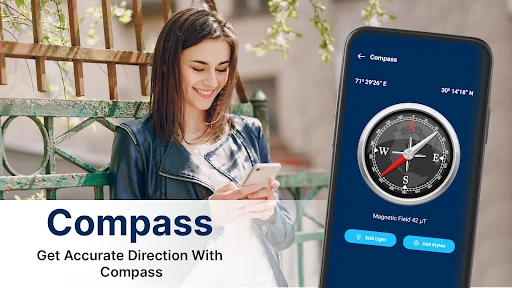
From the get-go, Smart Compass impresses with its sleek and straightforward interface. Upon launching the app, you're greeted with a digital compass that's both intuitive and responsive. It feels like you're holding an actual compass in your hand, minus the hassle of carrying one. The app's design is clean, with a minimalist approach that ensures you focus entirely on the task at hand – finding your way!
Direction Is Only Part of the Job
A compass reading is useful when you already have a sense of where you need to go; it does not replace route planning. I’d use this app to orient myself at a trail junction, check which way a street runs, or confirm the direction of a landmark, then rely on a map or navigation app for turn-by-turn guidance. That distinction matters: a pointer can tell you which way is north, but it cannot by itself decide the safest or most practical route.
For a more reliable reading, hold the phone level and away from metal objects, speakers, or other sources of magnetic interference. If the needle behaves oddly, move to a more open spot and recalibrate before trusting the direction. This small habit is especially useful in a car or near railings, where nearby metal can make a compass reading less dependable. I wouldn’t treat a phone compass as a substitute for a dedicated compass on a serious backcountry trip.
Features That Stand Out
One of the first things you'll notice is the app's accuracy. It utilizes your phone's built-in sensors to provide precise directional readings. This means you can trust it even when you're deep in the woods or exploring unfamiliar urban jungles. Plus, it’s not just a basic compass – it’s a digital compass with an array of nifty features.
- Magnetic and True North: You can toggle between magnetic and true north, catering to both casual users and serious navigators.
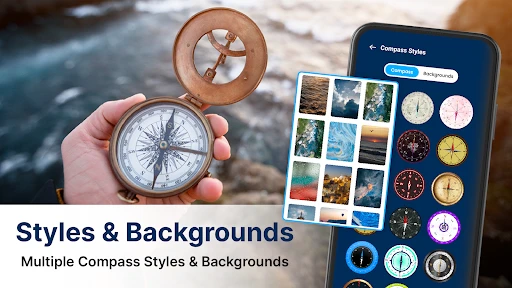
- Multiple Display Modes: Whether you prefer a classic compass look or a digital number display, Smart Compass has got you covered.
- GPS and Map Integration: Not only does it point you in the right direction, but it also shows your current location on a map, which is super handy when you’re exploring new territories.
Network, Maps, and Expectations
The compass and the map serve different purposes, so I’d check the direction first and treat the map view as a helpful location reference rather than assuming it can guide every step of a journey. In a familiar neighborhood, that combination can help me orient myself quickly; on an unfamiliar walk, I’d plan the route with a dedicated navigation tool as well. If the map does not load or location takes time to appear, I would not infer that the compass reading is wrong: I’d check the phone’s location settings and connectivity, then use a separate map if the trip depends on seeing streets or landmarks.
This is also a sensible app to open briefly rather than leave running while walking. I can check a bearing, put the phone away, and continue using a route map only when needed. That keeps attention on the surroundings and avoids treating a compass screen as a live navigation instruction. For an outdoor outing, I’d prepare a paper map or another dependable navigation option before heading somewhere remote, especially where a lost connection could make map details harder to access.
Using the App
Getting started with Smart Compass is a breeze. Simply calibrate your phone by moving it in a figure-eight motion, and you’re good to go. The app is designed to work both online and offline, which is a massive plus if you’re in an area with spotty reception. It’s also incredibly lightweight, so it won’t hog your phone’s resources or battery life.
While it’s primarily a navigation tool, the app can also be a fun gadget to play around with. Ever tried using a compass to find your way to the nearest coffee shop? It’s surprisingly entertaining!
Choosing it for the right kind of outing
I’d recommend this to someone who wants a quick directional reference, especially if they already use another tool for route planning. The combination of compass displays, north options, a location map, and a Qibla finder gives it several useful jobs without making it a full navigation system. For a casual walk, finding a building entrance, or orienting yourself after stepping out of a station, that focused role can be just right.
I would skip it as my only navigation tool for remote travel, complicated hikes, or any situation where I need dependable turn-by-turn instructions. A dedicated navigation app is better when I need a planned route, while a physical compass and a properly prepared map are more appropriate backups for demanding outdoor trips. The trade-off is straightforward: this app is convenient for quick orientation, but it cannot replace the planning and redundancy that a serious journey deserves.
Who Will Get the Most from It
I can see this being handy for someone who wants a quick directional check without opening a full route-planning app: finding the right orientation at a park entrance, working out which side of a building faces a destination, or getting pointed toward a station after leaving a busy street. It is less suitable for someone who expects spoken directions, a planned route, or a complete replacement for a hiking navigation setup. If those are the main needs, a dedicated map or navigation app is the better choice.
The Qibla finder gives the app another practical role for users who need to establish a prayer direction. I’d still pause and check the phone’s orientation carefully rather than making a rushed reading while moving. Compass accuracy depends on the phone’s sensors and surroundings, so the same calibration and interference checks are useful here as they are for ordinary direction finding.
Cost, Compatibility, and Everyday Trade-Offs
Mobile Solution Tech offers this weather-category app for free, with optional in-app purchases ranging from $1.99 to $16.99 per item. I’d start with the free experience and only consider a purchase if I encountered a specific feature I wanted; there is no need to spend just to test whether a basic compass suits your routine. It is rated for Everyone, has a 3.5 average from around 3,000 ratings, and has passed 1 million installs, so it has found an audience, though those figures alone cannot tell you whether it will behave well on your particular phone.
The app was released on September 17, 2023, and its current version is 8.5; it requires Android 6.0 or later. That makes the minimum requirement relevant if you are setting up an older device, while the version number is useful context when checking that you have a current installation. I would also check what the app asks permission to access when installing and allow only what makes sense for the features I intend to use. For a quick compass check, I would avoid leaving location-dependent functions open longer than needed.
How I’d judge it after a week of use
The most useful test is not whether the screen looks convincing in the living room; it is whether the reading is consistent in the places where you actually need it. I’d try it once outside in an open area, then compare the bearing with a familiar landmark. Later, I’d check it near a building or car and notice whether moving away from nearby metal changes the result. Those quick comparisons help me learn when my own phone gives a stable reading, rather than treating every displayed direction as equally trustworthy.
I’d also decide in advance which job I expect the app to do. If I want a north reference, the compass display is the point. If I want to know where a street leads, I need map context and perhaps a separate route planner. If I want the Qibla direction, I should stop somewhere steady and make sure the phone is properly oriented. Having that purpose in mind keeps the app useful and prevents the common mistake of expecting one small utility to answer several different navigation questions at once.
Final Thoughts
In a world where getting lost is just a wrong turn away, having a reliable compass app like Smart Compass: Digital Compass is a game-changer. It’s like having a little navigational buddy in your pocket. Whether you’re plotting your next outdoor adventure or just trying to make it through your daily commute without getting lost, this app is a must-have.
The straightforward design, coupled with its suite of features, makes it an invaluable tool for anyone who needs a little help finding their way. So why not give it a spin and see how it can turn your navigation woes into a thing of the past?
My connectivity verdict
For me, the app’s strongest role is a quick bearing check, with map and location context treated as useful extras that may depend on the phone’s settings and network conditions. That makes it practical for everyday orientation, but I would not plan a trip around assumptions about map availability or use it as my sole safety tool. If you want a compact compass with a few different ways to read direction and a Qibla option, it is worth trying at no upfront cost; if you need route guidance first, choose a navigation app built around that job.
Smart Compass: Digital Compass Frequently Asked Questions
Can Smart Compass: Digital Compass help me find the Qibla direction?
Yes. Smart Compass: Digital Compass includes a Qibla finder alongside its compass functions, making it useful for people who want help identifying the direction of prayer while away from home. As with any compass-based reading, the result depends on your phone’s sensors and surroundings, so move away from metal objects or electronics and calibrate the device if the direction seems unstable.
Who makes Smart Compass: Digital Compass, and is it suitable for everyone?
The app is developed by Mobile Solution Tech and is rated for Everyone. Its straightforward compass-focused purpose may appeal to travelers and people looking for a simple direction tool, including those interested in its Qibla finder. The age rating indicates that its content is considered suitable for a general audience, though each user should still decide whether the app’s features meet their own needs.
What is Smart Compass: Digital Compass and how does it work?
Smart Compass: Digital Compass is a mobile application that transforms your smartphone into a virtual compass, offering precise directions and angles. The app leverages your device's built-in sensors to determine your orientation relative to the Earth's magnetic field. Whether you're hiking, traveling, or exploring new areas, this app provides reliable navigation assistance. Its user-friendly interface makes it accessible for both novice and seasoned travelers.
Is Smart Compass: Digital Compass accurate and reliable for navigation?
Yes, Smart Compass: Digital Compass is designed to offer high accuracy and reliability. It utilizes your smartphone's magnetic sensors to deliver precise directional information. However, for optimal performance, it's crucial to calibrate your device's sensors and ensure there's minimal interference from electronic devices or metal objects. This way, the app can provide the most accurate readings and effectively guide you on your adventures.
Does Smart Compass: Digital Compass require an internet connection to function?
No, Smart Compass: Digital Compass does not require an internet connection to operate. It functions offline, using your device's magnetic sensors to deliver accurate compass readings. This makes it an excellent tool for outdoor activities, such as hiking or camping in remote areas where connectivity might be limited. Users can rely on it for navigation without worrying about data usage or network availability.
Pros
- Accurate and reliable navigation.
- User-friendly interface design.
- Works offline without internet.
- Minimal battery consumption.
- Supports multiple languages.
Cons
- Contains ads in free version.
- Limited features without upgrade.
- In-app purchases can be pricey.
- Occasional bugs in some devices.
- No integration with map apps.
- Category
- Weather
- Version
- 8.5