Translate All Languages Now
- 119.00
- 2.7
- Installs
- 10.00M
- Price
- Free

Screenshots
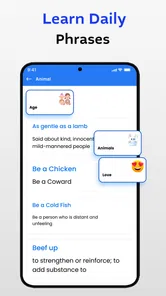

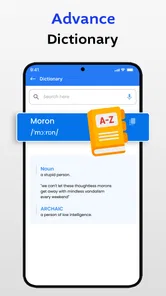
Analysis by Reviewed
When I’m choosing a translation app, I care about what happens when the connection is weak just as much as how quickly I can enter a phrase. Translate All Languages Now is a free productivity app from Mobile Solution Tech, and its focus on translating notes, lectures, and other text makes it relevant beyond travel. Its 3.1 average across around 7,600 ratings suggests a mixed reception, so I’d treat it as a handy tool to try rather than a guaranteed replacement for careful human translation.
Where connectivity shapes a translation
A quick translation is most useful when I can get to it at the moment I need it: checking a phrase before a conversation, making sense of a short notice, or reviewing a line from class. Those situations can be time-sensitive, but they also depend on being able to use the app and obtain a result when the network is available. I wouldn’t build a plan around instant access in a place with unreliable service; I’d prepare important phrases beforehand and keep the original text nearby.
For study, translating a short passage at a time is more practical than dropping in a whole lecture and trusting every sentence equally. I compare the result with the surrounding context, especially for specialist terms, names, and expressions that may have more than one meaning. That small habit makes a translation more useful without pretending it is a substitute for understanding the source.
Useful on the move, with a little preparation
In everyday use, I can see this app helping a student check a note after class, or a traveler work through a menu while connected. A useful routine is to save or copy the original wording somewhere accessible before translating it. If a result looks odd, I can try a shorter sentence or remove unnecessary detail, then compare the alternatives rather than accepting the first wording automatically.
That approach also helps in noisy or rushed situations: I can keep the interaction focused on one question at a time instead of composing a long explanation on a phone keyboard. For anything consequential—medical instructions, legal wording, or an important appointment—I’d confirm the meaning with a fluent speaker or a trusted professional. Convenience is valuable, but a plausible-sounding translation can still miss a nuance.
What to expect when a result disappoints
If a translation fails to appear or does not make sense, I’d first check the connection and try again with a shorter, clearer source. Then I’d preserve the original text and use another translator for comparison. This is a sensible fallback because translation services can differ in wording, and checking a second version may reveal ambiguity rather than prove which one is correct.
The app is free to install, with optional in-app purchases priced from $1.49 to $16.99 per item. It is rated for Everyone, and its current version is 1.5.3, with Android 7.0 or later required. Those details make it easy to consider as a low-commitment option, though I’d check the purchase screen carefully before paying and decide whether its tools fit my own routine.
More From Our News Desk

Weather by Xiaomi Review: Clear at a Glance, Less Clear Up Close

X Under Pressure: Can It Recover When Posting Goes Wrong?

Clash of Clans Is Won Between the Battles

Android Auto Makes the Case for Quieter Car Software

MobiOffice: Transforming Mobile Productivity with Seamless Integration

EA SPORTS FC™ Mobile Soccer: Redefining Mobile Sports Gaming
Why Translate All Languages Now Stands Out
One of the first things you'll notice about this app is its clean and intuitive user interface. I’m not one for overly complicated apps, and thankfully, this one keeps things simple. You can jump straight into translating without having to wade through a sea of unnecessary features. It’s like the developers knew exactly what we needed—an app that just works!
A Multitude of Languages at Your Fingertips
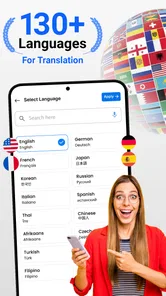
What truly makes Translate All Languages Now shine is its extensive language support. We’re talking about over 100 languages here! From popular languages like Spanish and French to less common ones like Swahili and Basque, this app has you covered. I tried translating some phrases into languages I didn’t even know existed, and it didn’t skip a beat. It’s like having a universal communicator from a sci-fi movie!
Real-time Voice Translation
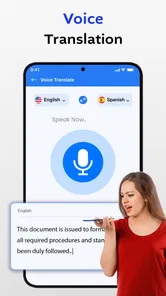
One of the coolest features is the real-time voice translation. Imagine you’re in a bustling market in Tokyo, and you need to ask for directions. Just speak into the app, and it’ll translate your words into Japanese instantly. It’s seamless and incredibly accurate. I tested it with a few of my bilingual friends, and they were impressed with its precision. It’s like carrying a bilingual buddy wherever you go.
Offline Mode for the Adventurous
For those of us who love to wander off the beaten path, Translate All Languages Now offers an offline mode. You can download language packs beforehand, so you’re not left stranded without internet. Trust me, there’s nothing worse than being in a remote area without a network and not being able to ask where the nearest restroom is!
Keeping notes useful after translating
For lectures, I’d treat the app as a first pass rather than a complete study method. A practical workflow is to keep the source sentence beside the translated version, then mark the parts that need checking: a technical term, a reference to a person, or a phrase whose meaning depends on what came before. This makes it easier to revisit only the uncertain bits instead of rereading a whole page later. It also prevents a smooth-sounding translation from quietly replacing the original meaning in my notes.
For a classmate’s short message or a line from a handout, I’d avoid pasting several unrelated paragraphs together. Separate sections give me a clearer way to spot where a translation changes tone or drops a detail. If I need to share the result, I’d include the original wording too, especially when the other person may want to check a name, date, or instruction. That extra care is more useful than trying to make every output sound polished.
A realistic day-to-day use
Picture me leaving a lecture and receiving a brief note from someone who is more comfortable writing in another language. I can translate the main sentence while I’m waiting for a bus, but I’d keep the reply simple: confirm what I understood, ask one direct follow-up if something is unclear, and avoid idioms that could be translated unpredictably. Before acting on a time or place, I’d compare it with the source message. This is a good fit for quick coordination, not for resolving a complicated disagreement through a phone screen.
Travel gives the same workflow a different purpose. When connected, I might use a short translation to understand a menu or ask a basic question, then show the original or translated wording as needed. In a crowded setting, I’d prepare a concise sentence rather than trying to dictate a long explanation. A busy environment can make speech input harder to manage, so text is a sensible fallback when I need more control over exactly what I’m asking.
Choosing it over a general translator
Compared with using a browser translation page, a dedicated phone app can feel more convenient when I need to work directly from a mobile device. The trade-off is that convenience alone does not make a translation more accurate. If I’m comparing several versions of a sentence, I may prefer a second service or a dictionary that explains a particular word; if I’m translating a short everyday phrase, opening this app may be quicker. I’d skip it as my only option for important documents or a long, nuanced conversation.
For a single unfamiliar word, a dictionary can be more helpful because it may show definitions and usage rather than offering just a sentence-level rendering. For a full passage, a translator is more convenient, but it still needs a reader who can notice when context has been lost. I see this app as a practical middle ground for quick text help on a phone, not as a replacement for a language-learning tool, a terminology reference, or professional translation.
When I would choose another approach
I’d be cautious about relying on any quick translation for contracts, health instructions, financial decisions, or a message where a small change in tone could cause real trouble. In those cases, a fluent person or qualified professional is a better route. The same applies when the source is badly written, full of abbreviations, or packed with specialist vocabulary: simplifying the text may help, but it cannot guarantee that the intended meaning survives.
It is also not the right choice for someone who needs a translation to be unquestionably available in a dead zone. I would check that I can get a result before setting off and keep essential wording saved in its original form. That is a more dependable plan than assuming a mobile translator will behave the same way in every location. Connectivity is part of the experience, so a small amount of preparation matters more than it might with a tool that works entirely from material already on the device.
Making sensible use of connected access
When I’m on mobile data, I’d reserve translation requests for the text that actually matters rather than repeatedly submitting the same long passage. Keeping a clean copy of the source also makes retries less frustrating if a request stalls or I switch connections. If the wording seems strange, I’d change one thing at a time—shorten the sentence, remove an aside, or translate a single clause—so I can see whether the problem comes from the phrasing or from an ambiguous source.
For private or sensitive material, I’d pause before putting it into any online translation tool and consider whether a less sensitive summary would do. That is a general data-conscious habit, not a claim about this app’s handling of text. A note about a restaurant or a classroom phrase is different from a personal document, and the amount of detail I submit should match the task. If privacy is a deciding concern, I’d review the app’s current terms and settings before using it for personal content.
What the audience and price mean in practice
With more than five million installs, this is an option many people have tried, but I don’t treat reach as proof of translation quality. Its Everyone age rating makes it broadly accessible, while the mixed average rating is a reminder to test it with ordinary, low-stakes phrases before making it part of an important routine. The app is free to try, and I’d regard the optional purchases as a reason to inspect what is being offered rather than assume that paying will solve a translation problem.
It suits students who want a quick way to examine a short note, travelers who can stay connected for everyday questions, and people who occasionally need to understand a phrase outside their strongest language. It is less suitable for anyone expecting flawless interpretation, a guaranteed answer in poor-signal locations, or specialist translation without review. Android users also need version 7.0 or later; on a compatible device, I’d try the free option first and judge it by the texts I actually need to translate.
It was released on January 19, 2024, and has passed five million installs, which shows that many people have tried it, even though popularity cannot tell me whether a particular translation is right. The app is best suited to quick, low-stakes help and to users willing to check the wording themselves. If you mostly need professional-quality localization, specialized terminology, or dependable help in a critical situation, a qualified translator or another carefully checked tool is the better choice.
All in all, this app is a game-changer for travelers, students, and anyone who finds themselves in need of breaking down language barriers. It’s more than just a translation app; it’s a tool for connection. Whether you’re negotiating prices in a Moroccan souk or just trying to impress your date with some Italian phrases, Translate All Languages Now has your back.
So, if you’re looking to make your life a little easier and a lot more exciting, give this app a whirl. It might just become your favorite travel companion. After all, in a world that’s more connected than ever, understanding each other is more important than ever.
Translate All Languages Now Frequently Asked Questions
Is Translate All Languages Now suitable for translating notes, lectures, and everyday text?
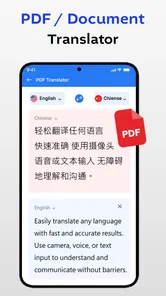
Yes. Translate All Languages Now is a productivity app for translating notes, lectures, and text, so it may be useful for study, work, or day-to-day reading. Its focus on quick translation can help when you need to understand written material across languages. As with other automated translators, review important wording carefully, especially when a small difference in meaning could matter.
What languages does Translate All Languages Now support?
Translate All Languages Now supports over 100 languages, making it one of the most versatile translation apps available. Whether you need to translate from English to Spanish, Chinese to French, or any other combination, this app has you covered. It's ideal for travelers, business professionals, and students who need quick and accurate translations.
Is Translate All Languages Now free to use?
Translate All Languages Now is free to download, and it also offers in-app purchases ranging from $1.49 to $16.99 per item. The app has a free option, while purchases may be relevant to users who want additional access or features. Check the purchase details in the app before confirming anything, and consider whether its translation tools fit your needs before spending.
Can I use Translate All Languages Now offline?
Yes, Translate All Languages Now offers offline capabilities, but this feature is only available to premium users. With offline mode, you can download language packs and use the app without an internet connection, which is particularly useful when traveling abroad or in areas with limited connectivity.
How accurate are the translations provided by Translate All Languages Now?
The translations provided by Translate All Languages Now are highly accurate, thanks to its advanced algorithms and continuous updates. However, like any machine translation service, it may struggle with idiomatic expressions or complex sentence structures. For the most precise translations, especially in professional contexts, it's advisable to double-check with a native speaker.
Pros
- Instant translation feature
- Wide range of languages
- Easy-to-use interface
- Voice input supported
- Offline mode available
Cons
- Ads can be distracting
- Limited free version
- Occasional translation errors
- Voice recognition needs improvement
- Premium version is pricey












