Gauth: AI Study Companion
- 30.91K
- 4.8
- Installs
- 50.00M
- Price
- Free

Screenshots

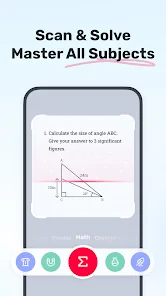
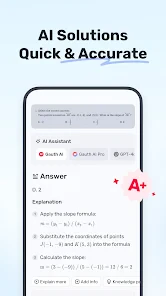
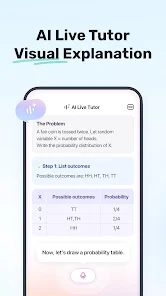
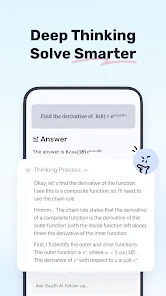
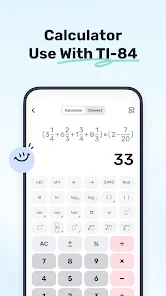

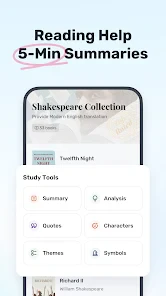
Analysis by Reviewed
Before deciding whether an AI study app belongs in your routine, I’d ask a practical question: what kind of help do you actually want? Gauth is an education app from GauthTech Pte. Ltd. built around asking study questions and getting assistance. I see it as a convenient starting point for working through schoolwork, not a substitute for paying attention in class or learning how to solve problems yourself.
What the free and paid options mean
Gauth is free to download, with in-app purchases priced from $0.49 to $369.99 per item. That range is worth noticing: the app can be tried without an upfront purchase, but “free” should not be read as a promise that every option or level of use costs nothing. I’d explore the free experience first and only consider a purchase if I had a specific need and understood what that item provides. The price range alone doesn’t tell me which purchase is worthwhile.
That distinction matters if you’re choosing between Gauth and a textbook, a tutor, or a general-purpose AI assistant. A textbook gives you a consistent course structure, while a tutor can respond to your reasoning in conversation. Gauth’s appeal is having study help in an app, but I wouldn’t assume it replaces either of those. If your main goal is a reliable lesson sequence, a course or teacher’s materials may be a better anchor; if you need a quick prompt to get unstuck, an app like this may fit more naturally.
Getting more from a study question
One useful habit is to treat an answer as the beginning of a study session rather than its end. After getting help, try closing the app and explaining the reasoning in your own words, then attempt a similar problem without assistance. That small check helps reveal whether you understood the method or merely recognized the answer. It also makes AI support less tempting as a shortcut when you’re tired or under deadline pressure.
A realistic use case is an evening review before a quiz: I might use Gauth to clarify a confusing point, write down the key step in my notes, and then test myself later without looking. For a longer assignment, I’d first use my class materials to identify the exact concept I’m stuck on, then ask a focused question instead of handing over the whole task. Narrow questions are easier to evaluate and more likely to keep the work genuinely mine.
Where I’d be cautious
AI help needs a quick reality check. If an explanation feels unclear, skips a step, or conflicts with what your teacher has taught, I’d compare it with class notes or ask a person who knows the subject. A confident-sounding answer is not automatically a correct one, and accepting one without checking can leave a gap that only shows up later in an exam. For high-stakes work, I’d use the app as a study aid, not as the final authority.
I’d also think about the kind of learner who benefits most. Someone who can name a specific sticking point and wants an extra route into it may get more value than someone hoping an app will plan every part of a course. If you prefer paper notes, worked examples from a textbook, or direct guidance from a teacher, those may be more comfortable and dependable choices. The best role for Gauth is the one that supports your learning rather than replacing the habits that make it stick.
More From Our News Desk

Weather by Xiaomi Review: Clear at a Glance, Less Clear Up Close

X Under Pressure: Can It Recover When Posting Goes Wrong?

Clash of Clans Is Won Between the Battles

Android Auto Makes the Case for Quieter Car Software

MobiOffice: Transforming Mobile Productivity with Seamless Integration

EA SPORTS FC™ Mobile Soccer: Redefining Mobile Sports Gaming
Make it a useful part of a study routine
There’s a difference between using a study assistant to solve a momentary problem and making it the centre of every study session. I’d keep my notes, syllabus, and assigned examples open as the reference points, then use Gauth only when I can identify a specific obstacle. This order helps me avoid spending time asking broad questions that produce more material than I can use.
When a response gives several steps, I’d pause after each one and ask myself what changed and why. That is more useful than copying the whole explanation into notes. If I cannot explain a step in my own words, I can ask a narrower follow-up or mark it for a teacher. The goal is not to collect answers; it is to leave the session with one idea I can apply independently.
For a student juggling different classes, a simple boundary can also prevent overreliance: use assistance while revising, but attempt graded work on your own unless the teacher explicitly allows AI support. School rules differ, and an answer that helps with practice may not be appropriate to submit. I’d treat that distinction as part of responsible use rather than assuming that availability means permission.
Getting Acquainted with Gauth
When you first open the app, you're greeted with a clean and intuitive interface. It’s designed to be user-friendly, which is a big plus if you’re not exactly a tech wizard. What really grabbed my attention was how smoothly the AI features integrated into the overall user experience. It’s like the app anticipates what you need before you even realize it yourself.
Features that Shine
The standout feature of Gauth: AI Study Companion is definitely its AI-driven study assistant. This isn’t just some basic flashcard app. The AI is capable of understanding your study patterns and suggesting personalized learning paths. It’s almost like having a study buddy who never tires. I particularly appreciated the real-time feedback on quizzes. It’s incredibly helpful for keeping track of your progress and areas where you might need to put in a little extra work.
Another cool feature is the app’s ability to break down complex topics into digestible chunks. We all have that one subject that feels like it’s written in an alien language, right? Well, Gauth simplifies these topics, making it easier to understand and retain the information. Plus, the app supports a wide range of subjects, so no matter what you’re studying, it’s got you covered.
The Learning Experience
I found the learning experience with Gauth to be quite engaging. The app’s interactive elements, like quizzes and study challenges, make learning feel less of a chore and more of an adventure. The AI constantly adapts to your learning style, which means the more you use it, the better it gets at helping you learn. It’s like the app evolves with you, adjusting to your pace and preferences.
There’s also a community feature where you can connect with other learners. Sharing tips and resources adds a social element to studying that I didn’t know I was missing until I tried it. It’s encouraging to know there are others out there on the same journey as you.
Choosing it over familiar study tools
Compared with a textbook, Gauth offers a more immediate way to ask about a point that has stopped making sense, while a textbook is usually better for following a carefully ordered explanation from beginning to end. Compared with a human tutor, the app is convenient for solo revision, but a tutor can notice hesitation, ask you to show your working, and adjust to what you say in real time. I’d think of these as different roles rather than competing replacements.
A general-purpose AI assistant can also be useful for broad questions, but an education-focused tool may feel more naturally suited to study tasks. The trade-off is that any AI answer still needs your judgement. If your course depends on a particular method or notation, compare the response with your teacher’s materials. When accuracy and alignment with a specific syllabus matter more than speed, those materials should lead.
Final Thoughts
In a nutshell, Gauth: AI Study Companion is a fantastic tool for anyone looking to boost their study efficiency. Whether you’re a student tackling difficult subjects or just someone looking to learn something new, this app has something to offer. It’s smart, intuitive, and incredibly helpful. If you’re tired of traditional study methods and want something that adapts to your style, give Gauth a try. It just might be the study companion you’ve been waiting for.
That recommendation comes with a practical caveat: I’d use the app to support active study, not to produce work I can’t explain afterward. For a learner who benefits from quick clarification and practice, that can be a helpful distinction; for someone who needs a structured course or sustained one-to-one teaching, a teacher, tutor, or textbook remains the better core resource.
Who is likely to find it useful?
Gauth may suit students who want help at the moment a topic becomes confusing, especially when they’re reviewing alone and don’t have someone nearby to ask. Its education focus and broad reach suggest that many learners are giving it a try: it has a 4.8 average from around 1.6 million ratings, with over 50 million installs. Those figures indicate popularity, not a guarantee that every answer will suit every subject or learner.
Parents and younger learners should keep the app’s Everyone content rating in perspective. It describes the app’s content classification, not whether every response is appropriate for a particular lesson or age. I’d still encourage a younger student to use it alongside assigned materials and adult guidance, especially when an answer affects homework or exam preparation.
Small habits that make the help more useful
To get a more dependable result, I’d include the exact part of a question that is confusing and say what I have already tried. Then I’d check whether the explanation addresses that step, rather than accepting a result that merely looks plausible. A second useful habit is to keep a short “still unclear” note: if the same point remains confusing after another explanation, take that note to a teacher instead of cycling through answers without progress.
It’s also worth separating practice from submission. Use assistance to understand a method, then put the app away and complete the actual work independently. That gives you a clearer sense of what you can do unaided and helps avoid relying on a tool when the task is meant to assess your own understanding. For collaborative study, compare ideas with classmates, but verify important explanations against course materials rather than treating a community discussion as authoritative.
Checking fit before making it a habit
The app is free, rated for Everyone, and its current version is 1.86.1; it requires Android 8.0 or later. It was released on March 31, 2021, and has 31K reviews alongside its large rating count. I’d check that my device meets the requirement before planning to use it, and I’d remember that optional purchases can change the cost if I choose to make them. There’s no reason to spend simply because a purchase is available: first see whether the free access supports the way you study.
How I’d decide whether it earns a place
The easiest way to judge the app is to try it against a real sticking point, not an imaginary ideal study plan. Pick a question you have already attempted, use the response to identify the step you missed, and then solve it again without looking. If that process leaves you more capable of doing the next problem, the app is serving a clear purpose. If it leaves you with an answer but no better grasp of the method, I would switch back to a worked example, class notes, or direct help.
For younger learners, I’d make that trial a shared one: ask the student to explain what they learned afterward, rather than judging success by whether the homework is finished. For independent students, a short note about what was confusing and what eventually made sense can reveal whether the assistant is helping over time. Neither approach requires buying anything before you know whether the free access fits your habits.
The decision is less about whether AI can be useful in general and more about whether this particular kind of help matches your needs. If you want a quick study companion for questions you can evaluate, Gauth is worth trying. If you need a complete course, an answer you can trust without checking, or a human who can follow your reasoning closely, I’d choose a textbook, teacher, or tutor as the main resource instead. That makes my verdict straightforward: start free, use it actively, and pay only if a specific purchase makes sense to you.
Gauth: AI Study Companion Frequently Asked Questions
What is Gauth: AI Study Companion, and what is it designed to do?
Gauth: AI Study Companion is an education app for learners who want help with study questions. Its short description is “Gauth,” and its summary invites users to ask anything and get an answer. It can be approached as a study aid: use it to work through topics and questions, while continuing to rely on your own understanding and course materials.
Who develops Gauth: AI Study Companion?
Gauth: AI Study Companion is developed by GauthTech Pte. Ltd. The app is intended to support studying, so it is best considered a learning aid rather than a substitute for working through material yourself. If you are choosing an app for regular study, its education focus is a useful starting point for deciding whether it suits your needs.
What devices can run Gauth: AI Study Companion?
Gauth: AI Study Companion is an education app for mobile devices. Before downloading, check that your device runs Android 8.0 or later, which is the stated minimum Android requirement. The app is free to download, so you can install it and explore its study tools without paying upfront. As with any app, available features may depend on your device and how you use it.
Who develops Gauth: AI Study Companion, and is it a popular app?
Gauth: AI Study Companion is developed by GauthTech Pte. Ltd. It has attracted a large audience, with more than 50 million installs and an average rating of 4.8 from around 1.6 million ratings. Those figures suggest that many learners have tried it, although individual experiences can vary. The app is intended to support studying, so it is best considered a learning aid rather than a substitute for working through material yourself.
What features does Gauth: AI Study Companion offer to enhance my learning experience?
Gauth: AI Study Companion is designed to revolutionize the way you study by offering a variety of features such as personalized study plans, interactive quizzes, and AI-powered insights. The app adapts to your learning style, providing tailored content that helps reinforce your understanding of complex topics. Additionally, it offers progress tracking, so you can monitor your improvement over time.
Pros
- Provides personalized learning paths.
- Includes a wide range of topics.
- User-friendly interface.
- Offers real-time progress tracking.
- Supports multiple languages.
Cons
- Requires a stable internet connection.
- Limited free version features.
- Occasional ads in free version.
- Can drain battery quickly.
- May have occasional bugs.
- Category
- Education
- Version
- 1.86.1











