Scientific calculator plus 991
- 4.34K
- 4.8
- Installs
- 50.00M
- Price
- Free

Screenshots
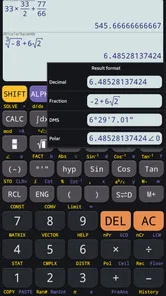
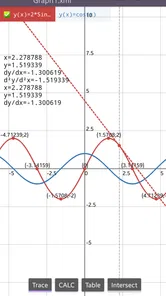
Analysis by Reviewed
On a shared household phone or tablet, a calculator can be useful to everyone without turning into a shared account or a family-management project. I see Scientific Calculator Plus 991 as a practical option for the moments when the basic calculator feels too limited: checking a measurement, working through homework, or comparing figures at the kitchen table. Its appeal is the range of calculator modes in one app, though that same breadth means it takes a little attention to choose the right tool for the task.
One calculator, several kinds of household problem
A realistic use might be a student checking a trigonometry exercise while someone else uses the device to convert a fraction or inspect a scientific expression. The app is aimed at education, and its 991-style scientific calculator is the main draw; the listing also describes simulator options associated with 115 and 300 Plus calculators. That makes it more relevant to classwork than a plain four-function tool, but it is not a substitute for understanding the method behind an answer.
For shared use, I would treat it like any other utility on a common device: let each person enter their own work, and avoid assuming that one person’s calculation history is private from the next user. A history log can help someone retrace their own calculations, but on a shared screen it is also a reason to clear or review the app before handing the device over if the previous work is personal. That simple habit matters more than any imagined family setting.
Choosing the right tool for the job
The developer, Tools for student, has made an app that sits between the built-in phone calculator and a dedicated physical scientific calculator. The default calculator is quicker for splitting a bill or adding shopping costs; a physical model may be preferable in a classroom or exam setting where phones are not allowed, or when tactile keys are important. This app is most useful when you want scientific functions available on the device you already carry.
It is free to install, rated for Everyone, and has an average rating of 4.8 from around 524,000 ratings, with over 10 million installs. Optional in-app purchases range from 99 cents to $4.99 per item. It was released on May 1, 2020, and version 7.4.1.484 requires Android 7.0 or later. Those details make it easy to judge whether it suits a household device, but the best test is still whether its button layout feels comfortable on your own screen.
Features that Make You Go "Wow!"
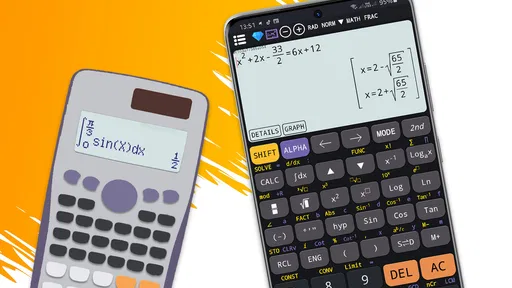
First off, the interface of the Scientific Calculator Plus 991 is as smooth as butter. It’s designed to be intuitive, which means even if you’re not a math whiz, you’ll find your way around pretty easily. The layout mimics a real-life scientific calculator, so all those familiar buttons are right where you expect them to be. No more squinting at your phone trying to find the cosine button—hallelujah!
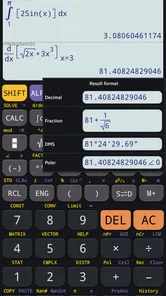
What really grabbed my attention was the vast array of functions this app supports. I’m talking about all the usual suspects like trigonometric, exponential, and logarithmic functions, but it doesn’t stop there. It also dives into more complex territories with statistical calculations, fractions, and even hexadecimal operations. Whether you’re a student, engineer, or just someone who loves dabbling in numbers, this app has something in its toolkit for you.
More From Our News Desk

Weather by Xiaomi Review: Clear at a Glance, Less Clear Up Close

X Under Pressure: Can It Recover When Posting Goes Wrong?

Clash of Clans Is Won Between the Battles

Android Auto Makes the Case for Quieter Car Software

MobiOffice: Transforming Mobile Productivity with Seamless Integration

EA SPORTS FC™ Mobile Soccer: Redefining Mobile Sports Gaming
Real-Life Applications
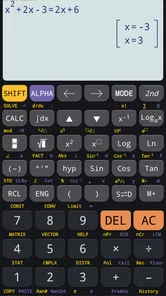
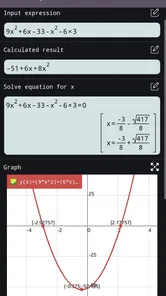
Imagine you’re working through a late-night study session, and you need to solve some gnarly equations. This app’s got your back with its equation solver feature. It’s like having a nerdy friend who always has the right answers. And if you’re into graphing, the app lets you plot functions with ease. I had a blast playing around with different equations and watching them come to life on my screen.
Another nifty feature is the history log. It keeps track of your calculations, so if you ever need to backtrack and see what you’ve done, it’s all right there. No more scratching your head trying to remember the steps you took five minutes ago.
How I would use it for a real task
Say I am checking a ramp angle for a small home project, then helping with a student’s math practice before dinner. I would use the scientific functions to check the angle calculation, then switch to the relevant school exercise rather than trying to make one long sequence of entries serve both tasks. The practical benefit is keeping unlike calculations mentally separate; the trade-off is that an app with several modes asks me to pause and confirm which mode I am in before trusting a result.
For homework, I find it more useful as a second pass than as the first step. I would write down the formula and substitute the values on paper, then use the calculator to check arithmetic or test whether a graph behaves as expected. When a result looks surprising, I would inspect the input for a misplaced bracket, sign, or exponent before assuming the tool is wrong. That workflow makes the app useful without letting a correct-looking decimal replace the explanation a class assignment may require.
Lightweight Yet Powerful
Despite its power-packed features, the app is surprisingly lightweight. It doesn’t hog your device’s resources, which means it runs smoothly without any hiccups. I’ve tried it on both Android and iOS, and the performance was top-notch across the board. It’s refreshing to use an app that doesn’t slow down your phone to a crawl.
And let’s talk about the design. It’s not just functional but also aesthetically pleasing. The developers have done a stellar job making sure the app is not only useful but also nice to look at. It’s like they’ve wrapped up all those features in a sleek, modern package.
Small-screen trade-offs and everyday alternatives
The best comparison is not simply “app versus calculator.” A phone app is convenient when I am already carrying the device and need functions beyond addition, while a physical scientific calculator gives me dedicated keys and avoids the temptation to switch to messages or other distractions. The built-in calculator remains the easiest choice for quick totals. Each option solves a different inconvenience, so I would choose based on the setting rather than assume one is best for every calculation.
On a compact screen, a scientific keypad can feel crowded, and selecting a secondary function may take more care than pressing a large physical key. A useful habit is to slow down for expressions with nested brackets or several operations, then check the displayed expression before accepting the answer. If I expect to work through a long set of problems, I would also compare the app’s layout with the physical calculator used in class, since switching key conventions mid-study can add needless friction.
When I would reach for another option
For everyday arithmetic, I would stick with the phone’s built-in calculator: opening a dedicated scientific app is unnecessary if all I need is a quick total. For coursework, though, a more revealing workflow is to enter a known example first, check that the result matches the expected form, and then use the solver or graphing tools on the unfamiliar problem. That small verification step helps catch input mistakes and keeps the app from becoming an answer button that hides the reasoning.
On a small phone screen, a dense calculator layout can also be less comfortable than a physical keypad, especially during a long session. I would rotate or reposition the device only if the app’s own layout makes that useful, rather than assume every control will be equally easy to reach on every screen. If accessibility, large tactile buttons, or classroom compliance is the priority, a physical calculator or a school-approved tool is the safer choice.
Household boundaries and age context
Because the app is a utility rather than a shared workspace, I would not expect it to separate one person’s activity from another’s. On a family tablet, a parent and student can take turns using it, but they should treat visible entries as potentially available to the next person. If a calculation contains private figures, the sensible response is to avoid leaving it open on a shared screen and to check the app before handing the device over, rather than relying on account boundaries that are not part of the way I would use this calculator.
The Everyone age classification is reassuring as a content label, but it does not make advanced mathematics child-friendly by itself. A younger learner may still need help understanding what a trigonometric or statistical function is doing, and an older student may need instruction in the specific notation expected by a teacher. I would let a child use it for guided practice, while keeping the lesson focused on the method and checking any paid-item prompts together on a shared device.
Good habits for study and shared devices
One useful way to work with the history log is to use it as a temporary audit trail: after solving a multi-step exercise, revisit the entries and compare them with the written working in a notebook. It can help spot where a sign, exponent, or bracket went wrong, but a list of calculations is not the same thing as a complete explanation. I would keep the written method alongside it when studying, particularly if the goal is to show work to a teacher.
For a household, agree on a simple handoff routine rather than expecting the app to manage separate people. The next user can begin a fresh calculation and check the visible history before relying on it; nobody should treat a shared device as a private workspace. There is no need to create a complicated system for occasional use, but students who regularly share one device may prefer separate devices or a calculator they can keep with their school materials.
Who is likely to appreciate it
I would recommend it to students who need more than basic arithmetic, adults revisiting scientific calculations, and anyone who wants a broad set of number tools in one place. The combination of equation solving, graphing, fractions, statistics, and hexadecimal work gives it uses beyond routine homework, while the familiar calculator-style layout makes it less intimidating than starting with a specialist math package.
I would not choose it as the only tool for high-stakes calculations without checking results independently, nor would I recommend it to someone who only wants a simple calculator with no extra controls. The app is free, but optional purchases are available, so families should make sure the person using a shared device understands that the app can offer paid items. The age rating is Everyone; that describes its content classification, not whether every child will find the advanced functions easy to use.
My household verdict
For a household that needs scientific functions occasionally, I think this is a sensible app to keep within reach: a student can use it for practice, an adult can check a measurement, and nobody needs to buy a dedicated device just for every short calculation. Its strongest case is convenience combined with a broad toolkit, not a promise to replace teaching, careful checking, or a classroom-approved calculator.
I would skip it if all anyone needs is a plain four-function calculator, if a tactile keypad is essential, or if the phone itself is not permitted during lessons or assessments. Before installing it on a shared device, I would also decide how family members will handle visible calculation history and optional purchases. Those small expectations make its household role clear without turning a simple utility into a project.
In conclusion, if you’re on the hunt for a reliable, feature-rich calculator app, look no further. The Scientific Calculator Plus 991 is a stellar choice that combines functionality with style. Whether you’re a student gearing up for exams or a professional needing quick calculations, this app is sure to meet and exceed your expectations. It’s like having a little piece of mathematics magic right in your pocket.
Scientific calculator plus 991 Frequently Asked Questions
Who develops Scientific Calculator Plus 991, and what kind of app is it?
Scientific Calculator Plus 991 is an education app developed by Tools for student. It is intended for people who want scientific calculator functions on a mobile device, including learners working through school or college subjects. The app’s name and store description emphasize an advanced scientific calculator, with simulator 115 and 300 plus also mentioned.
Is Scientific Calculator Plus 991 free to download, and are there in-app purchases?
Scientific Calculator Plus 991 is free to download, with optional in-app purchases priced from around one dollar to five dollars per item. You can start using the app without paying, then decide whether any paid options are useful for you. It is an education app from Tools for student, intended for learners and people who need a scientific calculator on their device.
What devices and software versions can run Scientific Calculator Plus 991?
The app supports devices running Android 7.0 or later. Before downloading, check your device’s operating system version so you can confirm it meets that requirement. Scientific Calculator Plus 991 is available for Android, and its current version is 7.4.1.484. Checking compatibility first can help avoid download or installation problems on an older device.
What features does Scientific Calculator Plus 991 offer?
Scientific Calculator Plus 991 is a comprehensive tool designed for students and professionals alike, offering a range of advanced mathematical functions. It includes standard arithmetic operations, trigonometric functions, logarithmic functions, and support for complex numbers. Additionally, it features a user-friendly interface, making it easy to switch between different modes and functions efficiently. Its store summary also describes simulator 115 and 300 plus, alongside the advanced scientific calculator.
Is Scientific Calculator Plus 991 suitable for professional use?
Yes, Scientific Calculator Plus 991 is suitable for both educational and professional environments. Its extensive range of functions covers everything from basic algebra to advanced calculus and statistics, making it a reliable tool for engineers, scientists, and mathematicians who require precise calculations and robust functionality. The app has a 4.8 average from around 524,000 ratings, which gives prospective users a broad sense of its reception.
Pros
- User-friendly interface
- easy to navigate.
- Supports complex scientific calculations.
- Includes unit conversion feature.
- Offers graphing capabilities.
- No ads to interrupt usage.
Cons
- Limited to landscape mode only.
- No cloud save for calculations.
- Requires internet for full features.
- High battery consumption.
- No dark mode available.