Photomath
- 74.66K
- 4.3
- Installs
- 100.00M
- Price
- Free

Screenshots
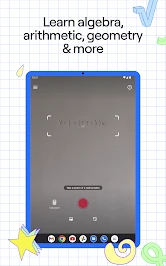
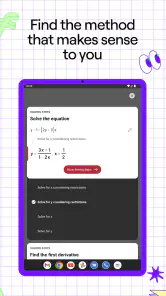
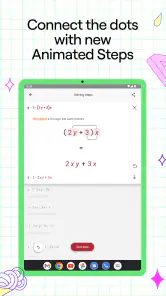
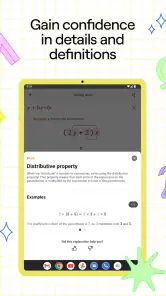
Analysis by Reviewed
I judge a math helper less by how quickly it produces an answer than by what I can do with that answer afterward. With Photomath, the camera-based solution is most useful when it helps me find a specific gap in my own working: a sign change I missed, a transformation I cannot justify, or a step that needs another look. Used that way, it is closer to a checking tool than a substitute for learning, and that distinction matters if you want to improve rather than just finish a page.
Why the worked solution matters more than the scan
The appealing part is the link between an exercise on paper and a sequence of steps I can inspect. I do not have to retype a long expression before checking it, and I can focus on the point that confused me instead of searching for a vaguely similar example online. That convenience is real, but it does not make the explanation self-teaching: I still have to stop and ask why each move is valid.
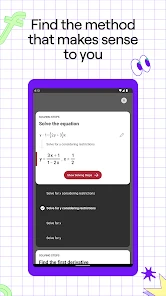
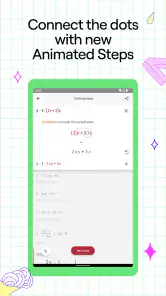
A useful way to use the solution is to cover the later steps and reveal them one at a time. Before moving on, I try to predict what operation comes next and compare that with the app’s explanation. This turns a passive read-through into a small test of understanding. If I can explain the step without looking, I am more likely to remember the method when the next problem changes a detail.
The Latest on Photomath
A practical routine for checking homework
My preferred routine is simple: attempt the exercise on paper, scan it only after reaching an answer or getting stuck, then compare the reasoning rather than just the final result. If the methods differ, I look for the first point where they stop agreeing. That is often more informative than deciding that one whole solution is “right” and the other is “wrong.” A different-looking route can still be valid, while one small algebra slip can make later steps look completely unrelated.
For a clearer scan, I isolate one expression, keep the writing legible, and check that the recognized problem matches what I intended. This is especially worthwhile when a minus sign, exponent, or fraction bar could be read in more than one way. If the result seems surprising, I do not immediately assume the math is wrong or that I made a mistake; I first verify that the app is solving the same expression I wrote.
How It Works
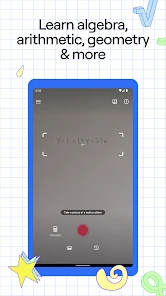
In ordinary use, I point the phone camera at a math problem and let the app read it before showing a solution. The key benefit is the worked path, not merely the final number. Photomath covers school and higher-level math topics, so it can be useful across different stages of study, although the amount of help I get depends on whether I can follow the particular explanation in front of me.
Reading the result rather than copying it
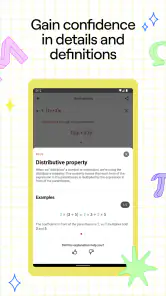
When a step is unfamiliar, I treat it as a question to investigate. I might pause at a rearrangement and write that same operation in my own notation, or check the result by substituting it back into the original problem when that makes sense. Those small checks keep me from mistaking a sequence of displayed steps for proof that I understand the underlying idea.
More From Our News Desk

X Under Pressure: Can It Recover When Posting Goes Wrong?

Clash of Clans Is Won Between the Battles

Android Auto Makes the Case for Quieter Car Software

MobiOffice: Transforming Mobile Productivity with Seamless Integration

EA SPORTS FC™ Mobile Soccer: Redefining Mobile Sports Gaming

How Microsoft OneDrive Became a Mobile Productivity Giant
There is also a difference between checking a worked example and learning a topic. A solution can show what happened in one exercise without explaining when that method is the best choice, what assumptions it relies on, or how to recognize a similar problem next week. For a new concept, I would pair the app with class notes, a textbook, or help from a teacher, then use the scan to inspect individual exercises.
Handwriting, graphs, and the small points of friction
Being able to scan handwritten problems saves the tedious step of entering notation by hand. In my experience, though, handwriting is not a guarantee of effortless recognition. Crowded lines and ambiguous marks can make a scan less dependable, so I leave space around the expression and check the interpreted problem before following its solution. If repeated scans are still unclear, rewriting the expression neatly is often quicker than trying to force a difficult photo to work.
The graphing view can help when a problem is easier to understand visually than symbolically. I see it as a companion to the algebra, not a replacement for it: a graph may help me notice a shape or relationship, while the written steps are what I need to examine for the calculation. If I need a deep explanation of why a graph behaves as it does, a lesson or textbook is the better place to build that understanding.
What it is like beside other ways of learning
Against a search engine, the camera workflow is convenient because it starts from the exact exercise in front of me rather than a set of search terms. Search results can be useful when I want a broader lesson or several examples, but matching a particular expression can take time. Against a calculator, Photomath offers more of a route through the work; a calculator remains simpler when I only need a numerical check and already know the method.
Paper practice has the opposite strength: it makes me do the thinking without placing a solved route in view. That is better when I am building speed or preparing to work unaided. I would not use an answer-scanning app as my only study method, especially before a test. A balanced approach is to use it after attempting a problem, then put the phone away and solve another one without assistance.
Who should use it—and when to choose something else
I would recommend it to students who get stuck on a particular step, people reviewing math after time away, and parents who want to check a homework method without pretending to remember every detail. It is also handy for an independent learner who is prepared to test each step and look up the concepts that remain unclear. The most important requirement is willingness to do some work before and after the scan.
I would steer away from relying on it for a course-wide explanation, exam practice that must be unaided, or problems whose notation the camera cannot read cleanly. In those cases, a teacher, a structured lesson, or plain paper practice may be a better fit. If I am short on time, I still resist scanning every question: checking only the problems I genuinely struggled with keeps the tool from taking over the practice it is meant to support.
For a realistic example, imagine finishing a set of algebra exercises at the kitchen table and finding that one answer does not match the back of the book. I would scan that problem, compare the first few transformations, and mark the line where my work diverges. Then I would close the solution and try a fresh exercise of the same kind. That last step is what tells me whether I learned from the check or merely saw how someone else reached an answer.
Availability and a sensible starting point
Photomath is an education app made by Google LLC. It is free to download, rated for Everyone, and has a 4.3 average based on around 3.1 million ratings, with more than 100 million installs. The current version is 8.46.0, and Android support begins with version 5.0. It has in-app purchases, with items priced from $0.99 to $79.99, so I would start with the free experience and consider paying only if I know which extra option I need.
The large audience makes it an easy tool to consider, but popularity is not a reason to trust every scan blindly. My practical test is whether it reads the expression correctly and whether I can explain the steps afterward. If either part fails, I switch to rewriting the problem, checking my notes, or asking for an explanation that gives more context.
When the explanation earns its place
When I use Photomath, the most useful part is not the quick answer but the worked path to it. That changes the camera from a shortcut into a chance to check where my reasoning went off track. If you already know how to solve an equation, you can compare your steps; if you do not, the explanation gives you something concrete to study instead of leaving you with a number and no method.
A camera scan is most valuable as a check
In practice, I get the best results when I try the problem first and scan it afterward. I can then compare the app’s sequence with my own and find the step where we diverge. That is more useful than scanning immediately and copying the result, especially when a teacher expects me to show my work. A clear, neatly written expression is easier to inspect than a crowded page, so framing just one problem at a time can save a frustrating second scan.
This workflow also helps with homework at the kitchen table: I can work through a question, use the explanation to check a confusing transformation, and then attempt a similar question without looking at the solution. For a parent who is rusty on a topic, the displayed steps can be a more practical prompt than trying to reconstruct a method from memory. I would still ask the student to explain the step in their own words; seeing a solution is not the same as being able to reproduce it.
Features That Stand Out
One of the standout features is its ability to handle handwritten problems. Yep, you heard that right. No need to type out equations painstakingly; just snap a picture. Plus, the app is incredibly user-friendly with its intuitive interface. You don’t need to be tech-savvy to navigate through it.
Another cool feature is the interactive graphs. For those who struggle with visualizing math problems, this feature is a game-changer. It helps you see the problem from a different perspective, making it easier to grasp.
Where the step-by-step approach helps—and where it doesn’t
The explanation is particularly handy when an answer looks plausible but I want to know why it follows. I use it as a second set of eyes, not as proof that my own work is correct: a scan can only help if the expression has been read as intended. Handwriting, cramped notation, or a fraction that is hard to distinguish can lead to a mismatch, so I check the equation the app interpreted before trusting the result.
Compared with searching the web for a worked example, scanning a specific exercise is more direct because I do not have to guess which search result matches my exact numbers. Compared with doing every step on paper, it is faster for checking a calculation, but paper remains better practice when I need to build fluency without help. If I am learning a new method for the first time, a teacher or textbook can provide context and intuition that a solved example alone may not.
Why You’ll Love It
Let’s face it, math can be intimidating, but Photomath takes that fear away. It’s like having a patient teacher by your side, explaining each step in a simple and easy-to-understand way. Whether you’re a student trying to ace your exams or a parent helping with homework, this app is a lifesaver.
And here’s something I personally love: the app doesn’t require an internet connection. So, whether you’re on a bus or stuck in a no-signal zone, you can still get your math problems sorted out. Talk about convenience!
Who gets the most from it
I’d recommend it most to students who want to identify a particular stumbling block, and to adults helping with homework who need a quick way to check a calculation. It can also suit an independent learner who is willing to pause at each step and work out why it makes sense. It is less suitable for someone who wants an app to teach an entire course from scratch, or for anyone tempted to scan every exercise instead of practicing. The useful habit is to hide or set aside the answer and try the next problem unaided.
Photomath is an education app from Google LLC. It is free to download, rated for Everyone, and has a 4.3 average from around 3.1 million ratings, with over 100 million installs. The current version is 8.46.0, and the app is available for Android devices running version 5.0 or later. Some in-app purchases range from $0.99 to $79.99 per item, so I would check what is included before paying for anything; the free option is the sensible place to start.
Final Thoughts
In the world of educational apps, Photomath stands out as a must-have tool. It’s not just about solving problems; it’s about enhancing your understanding of math. And with its sleek design and powerful features, it’s no wonder this app is a favorite among students and educators alike.
If you haven’t tried it yet, I’d say give it a shot. You might just find yourself enjoying math a little more—or at least dreading it a little less!
Photomath Frequently Asked Questions
Can I use Photomath to check homework before handing it in?
Yes. Photomath can be useful for checking your work: scan a problem and compare the solution steps with the method you used. Rather than copying the final answer, look for the point where your working differs and see whether you can explain the correction. That approach makes the app a practical study companion while keeping the focus on understanding the math.
Does Photomath show how to solve a problem, or only give the answer?
Photomath is intended to show step-by-step solutions, not just a final result. After scanning a problem, you can follow the displayed working to see how the answer is reached. The amount of explanation available can depend on the feature you use, and some additional learning options are associated with in-app purchases. It is most helpful when you pause at each step and connect it to what you have learned.
Is Photomath available for both Android and iOS, and what does a device need to run it?
Photomath is an education app for mobile devices, with an Android version that requires Android 5.0 or later. The app is designed around using a phone camera to capture math problems, so a device with a working camera is important for its main scanning feature. If you are considering downloading it, check that your operating system meets the requirement before installing.
What is Photomath and how does it work?
Photomath is a mobile app designed to help users solve math problems by simply taking a picture of the problem with their smartphone camera. The app uses advanced OCR (optical character recognition) technology to read printed or handwritten mathematical expressions and provides step-by-step solutions, making it an ideal tool for students and anyone looking to improve their math skills.
Is Photomath free to use, or does it require a subscription?
Photomath offers a free version that includes basic features such as scanning and solving simple math problems. However, for more advanced features like detailed explanations and learning resources, users can opt for the Photomath Plus subscription. This premium version provides a more comprehensive learning experience and is available as a monthly or yearly subscription. The app is free to download, while optional in-app purchases range from $0.99 to $79.99 per item, so review purchase details before confirming anything.
Pros
- Accurate math problem solving.
- User-friendly interface.
- Instant step-by-step solutions.
- Supports various math topics.
- Offline mode available.
Cons
- Limited advanced math topics.
- No handwriting recognition.
- Ads in free version.
- Requires camera access.
- Occasional solution errors.
- Category
- Education
- Version
- 8.46.0