Phases of the Moon
- 5.22K
- 4.1
- Installs
- 10.00M
- Price
- Free
Screenshots
Analysis by Reviewed
When I’m deciding whether an evening might suit a walk, a backyard gathering, or a little sky watching, I usually want one simple answer first: what will the Moon look like, and when might I see it? Phases of the Moon is a focused weather-category app from M2Catalyst, LLC., built around lunar timing rather than general forecasts. Its average rating is 4.1 from around 99,000 ratings, and it has more than 10 million installs. That reach makes sense for a simple, recurring question: what phase is the Moon in, and when might I see it?
Start with the question you actually have
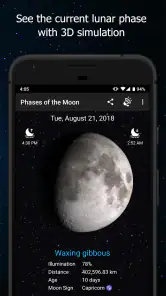
For a casual observer, the useful starting point is the current lunar view, not a complicated astronomy dashboard. I can check the Moon’s changing appearance, then use the calendar to look ahead or back. That makes the app handy when I’m choosing a night for a backyard gathering or trying to understand why the Moon looks different from one week to the next. It is free, rated for Everyone, and version 7.8.7 runs on Android 7.0 or later.
That first check is also a good way to set expectations. The phase tells me about the illuminated shape I can anticipate, while the calendar helps place that shape in time. I wouldn’t treat either as a promise that the Moon will be visible from my street: the buildings around me, the direction I’m facing, and the weather all affect what I can actually see. I use the app to answer the lunar part of the question, then decide whether the outing still makes sense.
Turn a quick check into a plan
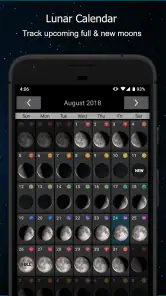
The calendar is more useful when I treat it as a planning tool rather than something to browse at random. I can scan a future month for a phase I want to see, then set an alert so the date doesn’t disappear from memory. Moonrise and moonset times add a practical second step: I can check whether the Moon’s timing fits the evening I have available. For photography or a late walk, I’d still use local conditions and my own schedule to choose the final moment; a phase calendar is a guide, not a guarantee of clear skies or an unobstructed view.
There is a small but worthwhile workflow here: check the phase, look at the relevant times, set a reminder, and then make the real-world plan. If I’m sharing that plan with someone, I’d send the date and meeting details separately rather than assume an alert will reach them too. The app helps me keep lunar timing in view, but it doesn’t replace coordination or a weather forecast.
A practical example is a weekday walk I’m considering with a friend. I can look ahead before we settle on a day, choose an evening whose lunar timing appeals to us, and set an alert to revisit the idea. When it arrives, I still check the forecast and agree on a meeting point. That separation is useful: the app keeps the Moon-related part from slipping my mind, while ordinary planning handles the route, clothing, and whether either of us is free.
For someone photographing the Moon, I’d use the calendar earlier than I might think necessary. A phase can help narrow the kind of image I’m after, but it is only one ingredient. The place I plan to shoot from, the view of the horizon, and the night’s conditions matter too. I’d treat a reminder as a prompt to prepare and check again, not as a signal to leave home automatically.
More From Our News Desk

Weather by Xiaomi Review: Clear at a Glance, Less Clear Up Close

X Under Pressure: Can It Recover When Posting Goes Wrong?

Clash of Clans Is Won Between the Battles

Android Auto Makes the Case for Quieter Car Software

MobiOffice: Transforming Mobile Productivity with Seamless Integration

EA SPORTS FC™ Mobile Soccer: Redefining Mobile Sports Gaming
Learning without turning it into homework
What I love about this app is how it combines education with exploration. It offers descriptions of each phase, explaining the science behind the moon's cycle. For those interested in astrology, there's also a section about the moon's connection with zodiac signs. It's like having a small astronomy lesson in my hand, with room for a different kind of lunar curiosity as well.
If you're someone who loves to learn and explore, this app is a treasure trove of information. It not only educates but also inspires curiosity about our natural satellite.
I find that the best way to use this material is to attach it to something I’ve already noticed. If the Moon looks like a thin curve one evening, I can check the phase and read about where it sits in the cycle instead of trying to memorize a list of terms in advance. That makes the educational side feel approachable for a child or a beginner. It also leaves room to enjoy the visual without turning every glance at the sky into a lesson.
The astrology content serves a different interest from the phase explanations. I see it as an optional avenue for people who enjoy that perspective, rather than a substitute for the astronomy information. If my aim is to learn how the lunar cycle works, I focus on the phase descriptions; if I’m browsing for cultural or personal associations, the zodiac material offers another reason to explore. Keeping those interests distinct helps me know what kind of information I’m looking at.
Discovering the Night Sky
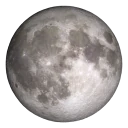
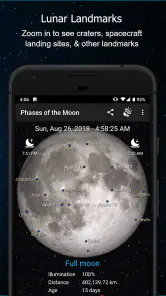
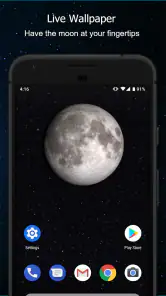
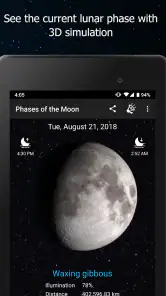
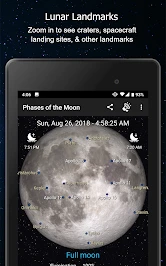
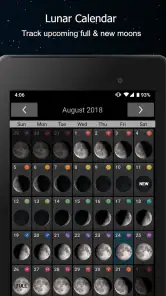
The first thing that struck me about this app was its visual representation of the Moon. You can see its changing appearance, which makes the cycle easier to follow than a list of dates alone. It is satisfying to check back and notice the shift in the illuminated portion. The detailed phase views work for casual stargazers, while people with deeper astronomy interests may still want a broader observing tool.
Interactive Features
One of the most useful features is the interactive moon calendar. You can scroll through months to see past and future phases. It is a convenient way to keep lunar dates close at hand. The app also provides moonrise and moonset times, which can help when I’m deciding whether a particular evening suits an outdoor plan.
Another feature that stands out is the notification system. You can set alerts for specific lunar phases, so a full moon or new moon is less likely to pass without notice. I like that this turns a calendar entry into a prompt I can act on, instead of requiring me to remember to open the app every day.
A useful habit is to check the calendar well before an event instead of waiting until the night itself. For example, if I’m hoping to take a moonlit walk with a friend, I can compare upcoming phases and use an alert as a prompt to revisit the plan. The alert is a nudge, not a complete itinerary: I still need to choose a location and consider whether clouds, buildings, or trees will block the view. That division of labor keeps expectations sensible and makes the calendar more valuable.
One small workflow improvement is to use the app for the date first, then move immediately to the practical details elsewhere. I can note the evening that appeals to me, check a local forecast nearer the time, and message anyone joining. This avoids the common trap of treating a lunar reminder like a complete event plan. It also makes the app useful even if I only open it occasionally: a quick check can be enough to set a date in motion.
The calendar’s past dates can be useful for looking back, too. If I’m trying to explain why the Moon looked different during a recent evening, I can revisit that period instead of relying on memory. That is a modest but handy learning loop: observe, check the phase, and connect the two. It will not recreate the conditions of the night, but it can help me put what I saw into the broader cycle.
How it fits beside other choices
Compared with the general weather app I might already open each morning, this one gives lunar dates and phase information a more central place. A standard forecast is the better choice when the main question is rain, temperature, or wind; this app is more appropriate when I’m tracking the Moon itself. Dedicated astronomy tools can suit people who want a wider observing toolkit, while this is easier to recommend to someone who mostly wants a clear lunar calendar, visual phase changes, and reminders. The trade-off is focus: it is not a replacement for a full sky-planning setup.
I’d particularly recommend it to people who enjoy casual stargazing, keep nature-based routines, or want a simple way to teach a child how the Moon changes over the month. It can also help photographers choose a broad lunar phase in advance, though it cannot decide the best composition or guarantee a visible Moon. If you only need tomorrow’s weather, or want detailed guidance for locating stars and planets, another app will probably serve you better.
It also suits people who like having a specific reason to step outdoors. A family might use a future phase as a loose prompt for an evening outside, while a keen walker may simply enjoy checking whether the Moon will be part of the view. In both cases, I’d keep the plan flexible. The lunar date is something to build around, not the only factor that should determine whether an outing goes ahead.
On the other hand, someone who wants one app to coordinate forecasts, cloud cover, star maps, and detailed observing sessions may prefer a broader astronomy or weather tool. I wouldn’t choose this as my only source for deciding whether conditions are suitable for a particular activity. Its advantage is that it makes the lunar cycle easy to follow; its limitation is that the rest of the sky and the conditions on the ground remain separate questions.
For a beginner, that narrow scope can be an advantage rather than a drawback. There is less to sort through when the immediate goal is simply to understand the Moon’s appearance or remember a phase date. For a more experienced observer, the app can still serve as a quick lunar reference, but I would pair it with whichever tools handle the rest of an observing session. The right choice depends less on how much someone likes astronomy and more on how much information they want in one place.
Where the routine can fall short
Moonrise and moonset times are useful, but they don’t tell me whether I’ll have a clear horizon or good visibility from my chosen spot. I also wouldn’t treat phase alerts as reminders for every detail of an outing: they help me remember the lunar event, while travel, equipment, and meeting arrangements still need separate attention. That is a modest limitation rather than a flaw, provided I use the app for what it is designed to do.
The experience is most rewarding when I have a specific question or plan. Browsing phase after phase without a reason can feel less useful, and anyone seeking a complete weather forecast or advanced observing support may find the narrow focus limiting. For my own use, that focus is also the appeal: I can move from a quick visual check to a date and a reminder without sorting through unrelated information.
There is also a difference between knowing a lunar event is coming and being ready to make use of it. An alert can bring the date back to mind, but I still need to decide whether I’m free, where I’ll go, and whether I want to bring anything. That may feel like an extra handoff if I hoped for an all-in-one planner. I prefer to see it as a clear boundary: the app tracks lunar timing, and my calendar, forecast, and messages cover the rest.
If I’m only curious about the Moon once in a while, I may not need alerts at all. The calendar and current view can answer an occasional question without turning a casual interest into another stream of notifications. People who enjoy reminders will get more from setting one for a phase they care about; people who prefer a quieter phone can simply check when curiosity strikes. That choice makes the feature feel optional rather than central to every use.
One other practical point is that phase information and viewing conditions are not interchangeable. A phase may be appealing, but it does not tell me whether the timing fits my evening or whether the Moon will be visible from the spot I have in mind. I would check the app for lunar context, then use local knowledge and a forecast to make the final call. That extra step is worth it when visibility matters, and easy to skip when I’m only browsing or learning.
Final Thoughts
In a world where we're often glued to screens, the Phases of the Moon app offers a refreshing way to reconnect with nature. It's visually appealing, easy to use, and gives me useful information to explore. Whether you're a seasoned astronomer or just someone who appreciates the night sky, this app is worth considering if lunar timing is what you want to follow. So, next time you find yourself wondering about the Moon, open the app and let it help you make sense of the lunar cycle.
Phases of the Moon Frequently Asked Questions
Can I add a Moon phase widget to my home screen?
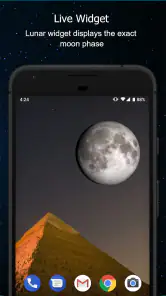
Yes. A widget is one of the advertised features of Phases of the Moon, making it possible to keep lunar information close at hand from your home screen. It can be useful if you like checking the Moon’s phase at a glance rather than opening the app each time. The app also includes a lunar calendar and Moon event alerts.
Can Phases of the Moon send alerts for lunar events?
Yes. Moon event alerts are among the app’s advertised features, so it can help you keep track of notable points in the lunar cycle. This may suit people who want reminders as well as those who simply enjoy checking the Moon. You can also use its lunar calendar and widget to follow lunar information in different ways.
Is Phases of the Moon suitable for children and families?
Phases of the Moon is rated Everyone, making it a broadly accessible choice for families and people of different ages. Its focus is on lunar phases and related information, so it can be used for casual curiosity as well as learning. Parents can explore the app alongside children who are interested in the night sky and the Moon.
Which devices can run Phases of the Moon?
The app requires Android 7.0 or later, so it is worth checking your device’s operating system before downloading. Phases of the Moon is a weather app developed by M2Catalyst, LLC. It has been available since November 13, 2012, and its current version is 7.8.7. The app is free to download.
What features does the Phases of the Moon app offer?
The Phases of the Moon app provides users with detailed lunar data, including current moon phase, rise and set times, and lunar calendar. It also offers high-resolution moon imagery, notifications for specific lunar events, and educational content about the moon. These features make it a comprehensive tool for astronomy enthusiasts and casual observers alike.
Pros
- Intuitive user interface design.
- Accurate lunar phase data.
- Customizable notifications.
- Educational content included.
- Offline access available.
Cons
- Limited free features.
- Ads in the free version.
- No widget support.
- Requires frequent updates.
- Limited customization options.
- Category
- Weather
- Version
- 7.8.7












