

Phases of the Moon Pro
- 1.01K
- 3.5
- Installs
- 50.00K
- Price
- $1.99
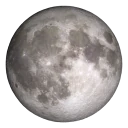
Screenshots
Analysis by Reviewed
I find a lunar app most useful when it answers a small, specific question: what phase will the Moon be on the night I’m planning to go out, and what does that phase look like? Phases of the Moon Pro is built around that kind of curiosity. Its calendar, visual model, wallpaper, and widget give the subject more room than a quick search result, though they won’t replace a forecast or a specialist astronomy tool.
Getting a useful answer before you head out
Connectivity matters most when I’m checking something time-sensitive or trying to make plans on the move. I’d look up a date and any relevant lunar timing while I have a dependable connection, especially before leaving home. That’s a sensible precaution, not a claim that every part of the app needs internet access; I wouldn’t assume a feature will refresh in a place where reception is poor.
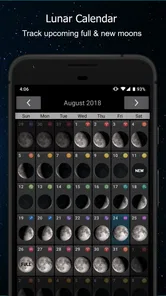
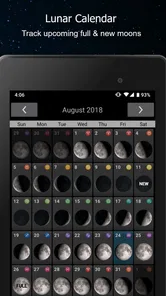
A practical example: if I’m considering an evening walk, I can check the lunar calendar earlier in the day and decide whether the Moon is part of the plan or just a pleasant possibility. Once I’m outside, buildings, trees, clouds, and the direction I’m facing can matter more than another screen check. The app can help me plan around lunar timing, but it can’t tell me whether the sky will be clear at my exact spot.
Keeping the Moon in view on a phone
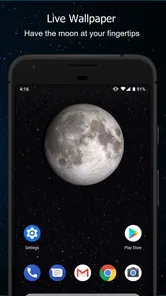
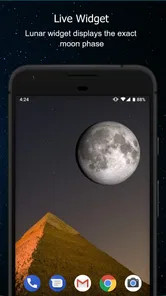
The wallpaper and widget make the app more present than a calendar I open once and forget. That can suit someone who enjoys a small daily reminder of the lunar cycle, or a parent who wants an easy prompt for a conversation with a curious child. It may be less appealing if you prefer a quiet home screen or avoid persistent visual extras. I’d treat these as optional ways to keep the subject handy, not reasons everyone needs to change how their phone looks.
On a short break, I’d use the calendar for a quick date check; when I have more time, I’d explore the model to understand what the phase names mean. That split is useful because a visual explanation and a fast lookup solve different problems. If a screen doesn’t update as expected, I’d check my connection and reopen the app, then try again later before relying on a detail for a specific outing. I’d also keep notifications limited to moments I actually care about, rather than adding alerts that I’ll ignore.
A Stroll Through the Features
So, let's dive right in. Phases of the Moon Pro is packed with features that cater to both moon enthusiasts and casual observers. First off, you get a real-time view of the current moon phase, which is pretty neat. No more guessing games about whether it’s waxing or waning. And guess what? You can also scroll through the lunar calendar to see what phase the moon will be in on any given day. Planning a romantic full moon dinner or a spooky new moon night? This app has got your back.
Interactive 3D Simulation
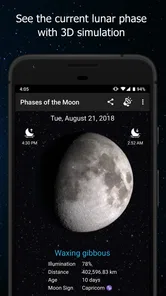
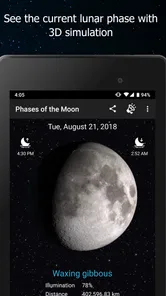
One of the standout features for me is the interactive 3D simulation. Imagine holding the moon in your hands and being able to rotate and zoom in on it. It’s like having a little piece of the universe right in your pocket. And it’s not just a pretty visual; you can tap on different moon phases to get detailed information about each one. It's both educational and mesmerizing.
More From Our News Desk

 Gmail
GmailGmail in a Busy Inbox: Who Benefits Most?
From first account to crowded workday, Gmail earns its place through dependable search and flexible sorting—but its best fit depends on how much inbox maintenance you can tolerate.

 Prime Video
Switching to Prime Video: What Changes in Your Viewing Routine
Prime Video can make a compelling second home for streaming, but switching means learning a different catalog, rental layer, and route from browsing to playback.

 Universal TV Remote Control
Universal TV Remote Control Works Best as a Reliable Backup
A phone remote earns its place through quick setup and reliable habits. Here is how to get more from Universal TV Remote Control—and where its limits show.

 Weather - By Xiaomi
Weather by Xiaomi Review: Clear at a Glance, Less Clear Up Close
Xiaomi’s weather app makes everyday forecasts quick to scan, but its calm surface can leave useful details and recovery paths harder to find than they should be.

 X
XX Under Pressure: Can It Recover When Posting Goes Wrong?
A resilience-focused review of X, examining setup, mistaken posts, interruptions, weak connections, and the gaps that matter when recovery needs to be dependable.

 Clash of Clans
Clash of Clans Is Won Between the Battles
Its raids are quick; its community is a long-term project of coordination, teaching, rivalry, and shared responsibility—with all the friction that entails.
Latest News



For a better look, I’d use the 3D view as a learning tool rather than just a screen to admire. Compare a few dates in the calendar, then rotate the model and pay attention to how the lit side changes. That makes the difference between waxing and waning easier to picture than a phase name alone. It is especially useful when explaining the cycle to a curious child or planning a simple skywatching activity, though anyone seeking professional observing data will likely want a dedicated astronomy tool as well.
Additional Perks
But wait, there’s more! The app also includes a lunar eclipse tracker, letting you know when the next one is coming up so you won’t miss it. Plus, it offers notifications for moonrise and moonset times, ensuring you never miss a magical moonlit moment. The developers really thought of everything.
Notifications are most helpful when they support a plan you have already made. I’d turn them on for the occasions when a moonrise or moonset matters to me, rather than treating every alert as essential. A notification can be a useful nudge, but it does not replace checking the sky: clouds, buildings, and the direction of the horizon can all affect what you actually see. For an eclipse, I’d use the tracker to know when to pay attention, then check local conditions before setting out.
Now, I know some of you might be thinking: "Do I really need an app for this?" Well, let me tell you, after using this app, you’ll wonder how you ever kept up with the lunar cycles without it. The convenience of having all this information at your fingertips is a game-changer.
Choosing it for the way you use your phone
The app is a better fit for people who enjoy checking the moon as a small, repeatable ritual: a casual observer, a family learning the phases, or someone who likes to plan an outdoor evening around the lunar calendar. Its live wallpaper and lunar widget also make the subject easier to keep in view during ordinary phone use, rather than requiring a dedicated visit every time. That convenience is a matter of taste, though; people who keep their home screen spare may prefer to open a calendar only when they need one.
Compared with a standard weather app, this is a focused companion for lunar phases rather than a broad forecast tool. A general weather app is the better choice when rain, temperature, or wind will decide whether your plans work. Compared with a basic phase calendar, the 3D simulation offers a more visual way to understand the cycle, while the calendar is quicker for checking a date. I’d choose according to the question I’m trying to answer, not expect one app to cover both weather planning and astronomy in depth.
What to expect from everyday use
On a busy day, I’d check a future date before making plans, then leave the app alone until a relevant reminder or a clear evening brings me back. If something fails to load or a detail looks stale, I’d first check my connection and reopen the app; if the issue persists, I’d revisit it later rather than assume the calendar or a notification is current. This is a sensible recovery routine for any app that may present time-sensitive information, not a guarantee about how every feature behaves offline.
It is also worth thinking about the phone itself. A live wallpaper and widget can make lunar information convenient, but they are optional ways to keep it visible; if you would rather conserve attention or keep your screen uncluttered, the calendar can still be the main reason to use the app. I would avoid enabling reminders I do not need, and I would not keep checking for updates when a single planned check answers the question. That makes the experience feel purposeful instead of turning a simple interest into another stream of alerts.
Who gets the most from it
I’d recommend this to someone who actually enjoys noticing the Moon: casual skywatchers, families learning the phases together, or people who like planning a night walk or outdoor meal around the lunar calendar. The strongest case is not simply that it displays a phase, but that it gives you several ways to engage with the same subject. A date check can lead into a visual comparison, and the widget or wallpaper can keep that interest close at hand.
There are trade-offs. If all you need is the phase for tonight, a quick web search or a simple calendar may be faster and cost nothing. If your priority is whether it will rain, what the temperature will be, or whether wind makes an outing uncomfortable, use a weather app first. And if you need detailed observing information, this isn’t the tool I’d rely on by itself. Its value depends on whether the calendar and visual learning features will become part of your routine.
Making a plan without overchecking
One small workflow I like is to choose the date first, use the calendar to see the lunar phase, then open the 3D view only if I want to understand what I’m looking at. That keeps a quick question quick while leaving room to explore. For a family activity, I might ask a child to predict whether the Moon will look more or less illuminated on a later date, then use the model to compare. It turns the app into a prompt for observation rather than a substitute for looking up at the sky.
For an outing, I’d pair that lunar check with a separate local forecast and a realistic view of the surroundings. A bright phase may be part of the appeal, but it doesn’t guarantee a visible Moon at the time or from the place you choose. Similarly, an eclipse reminder can help me remember to look, but I’d still confirm the timing and local conditions before building an evening around it. This is where a focused lunar app works best alongside, rather than instead of, ordinary planning tools.
Is It Worth the Hype?
Okay, let me level with you. I've tried my fair share of moon-related apps, and many of them fall short, either bogged down by ads or lacking in features. But this one delivers a seamless experience without any annoying interruptions. It’s refreshing to find an app that focuses on delivering quality content and user experience.
The app is made by M2Catalyst, LLC., and its 3.6 average from around 4.7 thousand ratings suggests a mixed reception rather than universal approval. It has passed 50 thousand installs and has about a thousand written reviews, so I’d read recent feedback before deciding whether its style suits me. It costs $1.99, is rated for Everyone, and version 7.7.0 supports devices running OS 7.0 or later. Those details make the choice fairly concrete: I’d pay for a specialized lunar companion if I expected to use its calendar, simulation, and home-screen options, but skip it if I only wanted an occasional phase lookup or a full weather forecast.
The price question comes down to frequency of use. If I’m likely to return for the calendar, explore the model, and make use of the widget or wallpaper, a dedicated paid app can feel worthwhile. If I only wonder about the phase a few times a year, the convenience may not justify buying a separate tool. I’d also consider how much I value a visual explanation: someone who learns by comparing dates and rotating a model may get more from it than someone who wants only a compact answer.
For connectivity, my verdict is straightforward: check important timing before you leave, use the app for the lunar questions it is designed to answer, and don’t treat it as a live substitute for local weather or what you can see overhead. I’d keep alerts selective, make a second attempt if something appears stale, and avoid making a trip depend on a last-minute refresh in a weak-signal spot. That keeps the experience useful without asking the app to do more than its focused role.
In conclusion, if you’re a moon lover, this app is a no-brainer. It’s intuitive, packed with features, and beautifully designed. Whether you're looking to educate yourself or just want to admire the moon in all its phases, this app is a solid investment. Go ahead, give it a try, and let the moonlight guide your way. 🌕
Phases of the Moon Pro Frequently Asked Questions
What devices and operating systems can run Phases of the Moon Pro?
Phases of the Moon Pro is available for Android and iOS, and its minimum operating system requirement is version 7.0. Before downloading, check that your device meets the requirement and has enough room for an app. The interface is designed to work across different screen sizes, so the lunar calendar and moon display can be viewed on a range of compatible devices.
What features does Phases of the Moon Pro offer?
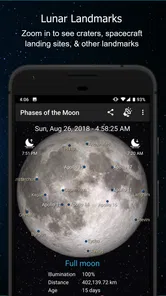
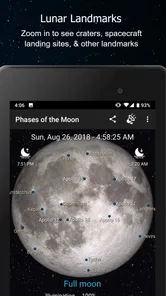
Phases of the Moon Pro offers a range of features designed to provide users with detailed information about the lunar cycle. It includes a real-time moon phase calendar, lunar eclipse tracking, and moonrise and moonset times. Additionally, the app provides a photo-realistic depiction of the moon, complete with lunar phases, and an interactive moon map with zoom capabilities. Its store summary also highlights a live wallpaper, a lunar widget, and a 3D simulation.
Is Phases of the Moon Pro available for both Android and iOS?
Yes, Phases of the Moon Pro is available for both Android and iOS platforms. Users can download the app from the Google Play Store for Android devices and the Apple App Store for iOS devices. The app is optimized for various screen sizes and provides a seamless experience across both operating systems.
Does Phases of the Moon Pro require an internet connection to function?
Phases of the Moon Pro does not require a constant internet connection to function. Once downloaded, the app can display moon phases and provide other features offline. However, an internet connection might be necessary for initial data synchronization and to access certain features like updates or additional content.
How much does Phases of the Moon Pro cost, and is it suitable for all ages?
Phases of the Moon Pro is a paid app priced at $1.99, so you can consider the one-time purchase before downloading. It has an Everyone content rating, making it suitable for a general audience. The app focuses on lunar information and viewing tools, which may appeal to anyone curious about the moon, whether for casual interest or planning a night outdoors.
Pros
- Accurate lunar data for planning activities.
- Offline access to moon phases information.
- Intuitive interface with easy navigation.
- Customizable notifications for moon events.
- Includes lunar calendar with important dates.
Cons
- No free version available for testing.
- Limited features compared to competitors.
- Occasional bugs in notification settings.
- Requires updates for latest device compatibility.
- Lacks interactive features for engagement.












