Life360: Stay Connected & Safe
- 296.07K
- 4.4
- Installs
- 100.00M
- Price
- Free

Screenshots
Analysis by Reviewed
I’ve found that family safety apps are most useful when they reduce the need for repeated check-in texts, not when they turn a household into a surveillance operation. Life360: Stay Connected & Safe is built around that balance: it can help people coordinate everyday travel and feel reassured when plans change, but it works best when everyone agrees on what sharing means. I’d consider it for a family or group that wants a shared view of arrivals and journeys, rather than for someone looking for a private navigation app.
Start with a purpose, not a map
Before inviting people, I’d settle one practical question: what decision should the shared location help the group make? It might be whether to leave for a pickup, when to start dinner, or whether a carpool is still on schedule. Having a specific purpose makes it easier to decide who belongs in a circle and which alerts are worth enabling. It also gives everyone a fair way to judge whether sharing is helping or simply adding another screen to check.
I would explain the arrangement plainly, especially with children or relatives who may feel that location sharing is being imposed on them. Agree on when it is useful, what an unexpected location should mean, and how someone can ask to change the setup. A map can show where a phone appears to be; it cannot establish why a person went somewhere or whether they want to talk. Keeping that distinction clear helps prevent a routine tool from becoming a source of suspicion.
How it fits into daily routines
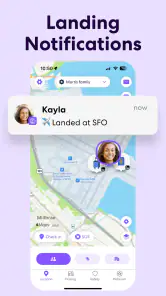
A practical setup is to create separate circles for groups with different needs, such as family members and a regular carpool. That keeps location sharing relevant instead of asking every contact to follow every movement. Before relying on arrival alerts, I’d agree on which places matter and who should receive notifications; a short list of useful locations is easier to act on than a stream of alerts for every trip.
Imagine a parent finishing work while a teenager takes the usual route home. Instead of sending several messages, the parent can check the shared map and use an arrival notification as a cue to start dinner. If the teenager’s plans change, the map may help explain why they are not home yet, but it should not replace a direct conversation when something genuinely needs attention. That distinction keeps a helpful tool from becoming a source of unnecessary worry.
Where it differs from simpler options
Phone operating systems and map apps can already make one-to-one location sharing straightforward. I’d choose those simpler tools when the need is occasional—meeting a friend, sharing a trip for a short time, or finding one person’s location with minimal setup. Life360 makes more sense when a group wants an ongoing family-oriented routine that brings shared locations and driving-related information together. The trade-off is that every member needs to be comfortable participating, and the app asks for more attention than a one-off location share.
It is also worth deciding how you will use driving reports before treating them as a scorecard. They can give a family a starting point for discussing habits, especially with a newer driver, but a report cannot tell the whole story of a journey. I’d look for patterns and discuss them calmly rather than confronting someone over a single alert. That approach makes the feature more useful and less likely to undermine trust.
More From Our News Desk

Weather by Xiaomi Review: Clear at a Glance, Less Clear Up Close

X Under Pressure: Can It Recover When Posting Goes Wrong?

Clash of Clans Is Won Between the Battles

Android Auto Makes the Case for Quieter Car Software

MobiOffice: Transforming Mobile Productivity with Seamless Integration

EA SPORTS FC™ Mobile Soccer: Redefining Mobile Sports Gaming
Who should choose it—and who should not
I think this app suits households with shared routines: parents coordinating school pickups, relatives checking that an older family member has reached a destination, or friends managing repeated rides together. It is less suitable for someone who wants to share a location only once in a while, dislikes continuous location sharing, or expects an app to provide reassurance without needing honest conversations. If only one person in a circle wants tracking, the mismatch is a reason to choose a less intrusive option instead.
There is a practical question behind the free price: whether the features you need are available without paying. Life360 is free to download, with in-app purchases ranging from about a dollar and a half to around two hundred and fifty dollars per item. I’d start by identifying the specific feature that would change your routine, then check the current in-app options before building a family process around it. A paid tier is not automatically worthwhile if all you need is occasional location sharing.
Using Life360 with clear expectations
Ever found yourself constantly checking in on family members just to make sure they're safe or on time? We've all been there, and that's where Life360: Live Location Sharing swoops in to save the day. This app promises to bring peace of mind by keeping you connected with your loved ones, no matter where they are. But does it really deliver on that promise? I took it for a spin, and here's what I found out.
As a lifestyle app from Life360, it has been around since April 7, 2010, and its current version is 25.45.0. That long-running presence is useful context for existing users: this is an established service rather than a new experiment, while the version number identifies the build available now. Those facts alone do not tell me exactly how any individual feature has changed over time, so I would check the app’s current settings and release notes before relying on a particular workflow. I’d also expect an update to be a reason to review settings, not a reason to assume that the way my circle uses the app has changed.
The app has a 4.4 average from around 2.1 million ratings, and more than 100 million installs. Those figures suggest broad adoption, but popularity is not a substitute for fit: the useful test is whether everyone in your circle understands the arrangement and finds the notifications worthwhile. It is rated for Everyone, though family members should still discuss location sharing in age-appropriate terms. The app can be downloaded for free, and optional purchases are available, so I would make the decision about upgrading separately from the decision to try basic sharing.
Keeping Tabs Made Easy
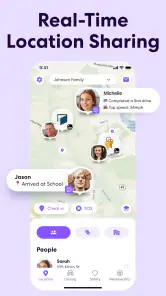
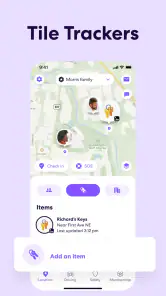
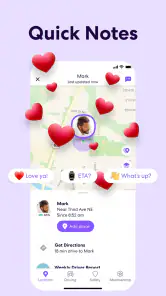
At its core, Life360 is all about live location sharing. Once everyone in your circle has the app installed, you can see their real-time location on a map. No more "Where are you?" texts! It's like having a digital leash, but in a good way. The app allows you to create various circles, making it easy to keep track of family, friends, or even your carpool group.
Features That Stand Out
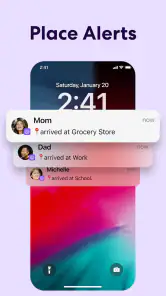
One of the coolest features of Life360 is the geofencing capability. You can set up alerts for when someone enters or leaves a designated area. Whether it's knowing when your kids get home from school or when a friend arrives at the coffee shop, these notifications are a game-changer. Plus, there's a built-in chat function, so you can coordinate plans or just check in without switching apps.
A useful way to keep those alerts from becoming noise is to reserve them for places that trigger an actual decision: home, school pickup, or a meeting point. If a location changes temporarily, agree on whether to adjust the alert or simply message the group. For a carpool, for example, an arrival notification can tell the next driver when to head out, while the shared chat handles delays or a change of pickup spot. That division—alerts for routine milestones, messages for exceptions—makes the tools easier to live with.
Another handy feature is the app’s ability to track your driving habits. It provides insights on speed, phone usage while driving, and even hard braking. It's like having a personal driving coach riding shotgun, which is pretty neat for new drivers or those of us who need a reminder to ease off the gas pedal.
There is a trade-off here: driving feedback is most constructive when the driver knows it is being used and can talk through what happened. A hard-braking event may have a reasonable explanation, and phone-use information is better treated as a prompt for safer habits than as proof of intent. If your household cannot discuss reports without blame, I would leave this part out of the routine and focus on location coordination instead.
Security and Privacy
Now, I know what you're thinking: "What about privacy?" It's a valid concern, especially in today's digital age. Life360 takes this seriously with end-to-end encryption and customizable privacy settings. You can choose who sees your location and when, giving you control over your own digital footprint.
In practice, I would make privacy a setup conversation, not something to revisit only after tension appears. Decide who belongs in each circle, what the map is meant to help with, and how someone can ask for a change. A child’s needs, an adult relative’s preferences, and a carpool’s logistics are not identical, so a single rule for everyone may be unfair or impractical. Clear boundaries are as important as the settings themselves.
That said, it's important to have open conversations with your circle about how and when you'll use the app. Mutual agreement and trust are key to making the most of Life360 without stepping on anyone's toes.
Final Thoughts
In a world where staying connected is more important than ever, Life360: Live Location Sharing offers a solid solution. It’s user-friendly, packed with features, and provides the peace of mind that comes with knowing where your loved ones are. Whether you’re a parent wanting to keep track of your kids or just someone who enjoys staying in the loop, Life360 is worth a try.
However, like any app that shares personal information, it’s crucial to use it responsibly and with respect for everyone’s privacy. So, if you’re ready to take the plunge into the world of live location sharing, Life360 might just be the app you’ve been looking for.
Before you rely on it
For a new circle, I’d begin with one everyday purpose and test the routine for a few days before adding more alerts or members. Ask whether the map actually saves messages, whether arrival notices arrive at useful moments, and whether everyone still feels comfortable sharing. If the answer is no, scale the setup back; more tracking is not automatically more safety. This small trial also gives the group a chance to agree on what to do when a location looks unexpected, rather than reacting in a rush.
Life360 is not a substitute for calling someone in an urgent situation, and a location display should not be treated as a guarantee that a person is safe. It is most helpful for ordinary coordination and awareness, where a shared map can answer a simple question or make a pickup easier. I’d keep an alternative contact plan for important journeys and use direct communication when a person needs help.
What I would watch over time
For existing users, the main thing I’d watch is whether updates keep the features their circle depends on easy to find and configure. The current version is 25.45.0; the number is a useful identifier when checking that everyone has the same build, but it is not a changelog by itself. After an update, I’d quickly revisit notification choices and privacy settings, then ask the group whether the app still fits its original purpose. That is a sensible habit for any location-sharing tool, especially one woven into family routines.
My recommendation is conditional but straightforward: try it if your group wants ongoing coordination and is willing to talk openly about boundaries. Skip it if you only need an occasional temporary share or if constant visibility would cause more stress than reassurance. Used with modest expectations, a few purposeful alerts, and consent from the people involved, Life360 can make everyday logistics easier without asking the app to do more than it can.
Life360: Stay Connected & Safe Frequently Asked Questions
Does everyone in my family need the same type of phone to use Life360?
No. Life360 is available for Android and iOS, so family members can use different kinds of smartphones and still connect through the app. Before downloading, each person should check that their device meets the minimum operating-system requirement: version 10. Keeping both the app and phone software up to date can also help everyone get the intended experience.
Who develops Life360, and is it a well-established app?
Life360 is developed by Life360 and has been available since April 7, 2010. It is a Lifestyle app with an average rating of 4.4 from around 2.1 million ratings, and it has been installed over 100 million times. Those details give prospective users a sense of its broad reach, though whether its features suit your household depends on how you want to stay connected.
What phones can I use Life360 on?
Life360 is available for Android and iOS, making it possible for family members using different kinds of smartphones to stay connected in the same app. Before downloading, check that your device meets the minimum operating-system requirement: version 10. Keeping the app and your phone’s software up to date can also help you get the intended experience.
What is Life360 and how does it work?
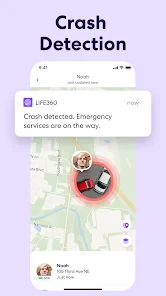
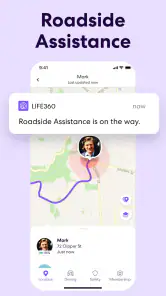
Life360 is a family networking app designed to keep families connected and safe. It works by enabling real-time location sharing among family members, allowing users to see each other's whereabouts on a private map. The app also provides driving reports, emergency assistance, and alerts for when family members arrive or leave designated places, enhancing family safety.
Is Life360 free to use, or are there any subscription fees?
Life360 is free to download, and it also offers in-app purchases. The available purchase prices range from $1.49 to $249.99 per item, so check the options shown in the app before buying and choose only what suits your household. You can start by exploring the app’s basic purpose—location sharing and family safety—before deciding whether a purchase is worthwhile for your needs.
Pros
- Real-time location sharing
- Family safety alerts
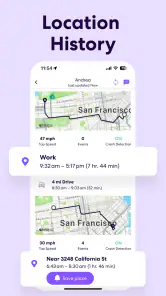
- Location history tracking
- Battery efficient
- Cross-platform support
Cons
- Privacy concerns
- Subscription required for premium features
- Can drain battery
- Location accuracy issues
- Complex setup
- Category
- Lifestyle
- Version
- 25.45.0