Samsung Wallet/Pay (Watch)
- 1.85K
- 3.3
- Installs
- 50.00M
- Price
- Free

Screenshots
Analysis by Reviewed
When I judge a payment app, I care less about how futuristic it looks and more about what happens at the moment I hand over money: does it fit my routine, do I understand the choices on screen, and do I feel in control? Samsung Wallet/Pay is a free lifestyle app from Samsung Electronics Co., Ltd., built around making payments from a compatible Samsung device. Its 3.3 average from around 38,000 ratings suggests experiences vary, so I’d treat it as a useful option to test against your own everyday needs rather than an automatic replacement for a physical wallet.
Trust begins with the choices you can see
For me, confidence starts with setup. Before relying on a digital wallet, I’d check which cards I’m adding, read each on-screen prompt, and make sure I’m comfortable with the account and device controls presented during setup. That is a more practical habit than assuming any payment app is secure simply because it is on a watch. Keep your usual payment method available until you have completed a small, low-pressure test and know what to expect at checkout.
The app is rated for Everyone and has been available since June 2020. Its current version is 8.0.02.20806, and it has passed 50 million installs. Those figures show that it is widely used, but popularity alone doesn’t tell me whether it suits a particular bank, device, or shopping routine. I’d make compatibility and the options shown on my own device part of the decision.
Where watch payments earn their place
So, I’ve been fiddling around with the Samsung Wallet/Pay app on my watch, and let me tell you, it’s quite the nifty tool for anyone looking to streamline their payment process. If you’re tired of rummaging through your bag or pockets for your wallet, this app might just be your new best friend.
One practical question is whether this should replace the wallet you already carry. I wouldn’t make that leap at the start. I’d treat the watch as an extra way to pay, then see whether it reliably fits the places I actually shop. That approach makes it easy to notice whether the convenience is meaningful or merely appealing in theory.
Seamless Integration with Your Samsung Gear
First off, let’s talk about how well this app integrates with your Samsung Gear. It’s designed to work flawlessly with your Samsung smartwatch, making it super convenient to pay for things on the go. Just a few taps on your wrist, and you’re good to go. I mean, how cool is that?
The strongest case for paying from a watch is a small, predictable purchase: grabbing a coffee while carrying a bag, or buying something when your phone is tucked away. I’d still keep a physical card handy for a first visit to a shop or any situation where I can’t afford to hold up a queue while checking the terminal. A watch payment saves a reach into a pocket, but it doesn’t remove the need to be ready with a backup.
More From Our News Desk

Weather by Xiaomi Review: Clear at a Glance, Less Clear Up Close

X Under Pressure: Can It Recover When Posting Goes Wrong?

Clash of Clans Is Won Between the Battles

Android Auto Makes the Case for Quieter Car Software

MobiOffice: Transforming Mobile Productivity with Seamless Integration

EA SPORTS FC™ Mobile Soccer: Redefining Mobile Sports Gaming
Compared with carrying a bank card, the watch puts payment within reach without taking out a phone. Compared with paying by phone, it can be quicker when the phone is buried or your hands are occupied. The trade-off is that a watch is a smaller, more limited interface: I wouldn’t choose it for reviewing account details or sorting out a problem at the till. If you don’t use a compatible Samsung watch, the watch-focused convenience described here may not justify changing your payment habits.
Getting Started
Setting up the Samsung Wallet/Pay is a breeze. You just need to download the app, link your credit or debit card, and voila! You’re set. The user interface is pretty intuitive, so you won’t find yourself scratching your head trying to figure things out. Plus, there’s a handy tutorial that guides you through the initial setup.
I’d approach setup as a check, not a race: add the card you actually intend to use, follow the prompts, and confirm that the payment option is ready before leaving home. If a card isn’t accepted or the setup flow doesn’t match what you expect, pause and use your regular method rather than repeatedly trying changes in a hurry. Your bank and the device you own can affect whether this workflow is convenient, so it’s sensible to verify your own setup before depending on it for a commute or trip.
Security Features
Now, I know what you’re thinking. Is it safe to pay with my watch? The app uses multiple layers of security to protect your information, including tokenization and biometric authentication. So, you can rest easy knowing your financial details are safe and sound. It’s like having a mini safe on your wrist!
I wouldn’t take that reassuring description as a reason to skip reading the actual choices the app presents. Payment setup involves sensitive information, so I’d pay attention to account access, device prompts, and any controls offered for managing the wallet. If the watch is shared, misplaced, or no longer in your possession, I’d use the account and device-management options available to me promptly and review what access remains. That cautious routine matters more than treating a security label as a guarantee.
A useful habit is to make the first test payment somewhere familiar, then notice how the watch indicates that it is ready and how the terminal responds. That gives you a chance to learn the gestures and timing without pressure. I’d also avoid trying to troubleshoot by repeatedly presenting the watch if the terminal doesn’t respond; switch to another payment method and check the setup later. It keeps a minor snag from turning into a stressful checkout.
Convenience at Its Best
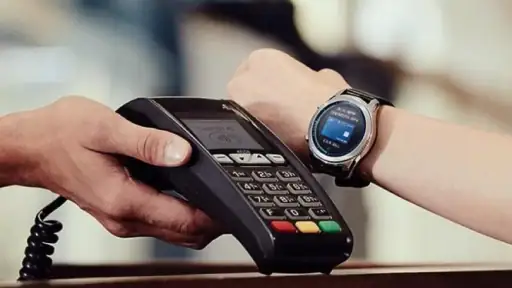
One of the standout features has to be the sheer convenience this app offers. Imagine being at a coffee shop, and instead of fumbling for your wallet, you just swipe your watch and boom, payment done. It’s especially handy when you’re in a rush or have your hands full. Plus, it works with a wide range of merchants, so you’re not limited in where you can use it.
For a realistic routine, I’d use the watch for a quick café stop on the way to work, then keep my phone or card available for a larger purchase or a checkout where I need to inspect details. That division of labor is the sweet spot: the watch handles speed, while a larger screen and a conventional card remain useful fallbacks. I’d also check that I have the right card selected before reaching the counter, rather than discovering a mismatch when people are waiting behind me.
There’s also a small but useful workflow advantage in deciding beforehand what belongs on your wrist. If you use several cards, loyalty options, and travel items, a quick glance at the wallet before leaving home can prevent the watch from becoming a crowded catch-all. I’d keep the items I genuinely expect to need within easy reach and leave rarely used ones out. That is especially helpful when you’re moving quickly: fewer choices on a tiny screen mean less searching at the counter.
Another cool feature is the ability to store not just your payment cards but also your loyalty cards and even boarding passes. It’s like having a digital filing cabinet on your wrist, making it super easy to fetch whatever you need, whenever you need it. Talk about a game-changer!
For travel, I’d think of that wrist-based access as a convenience, not as the only place to keep essential travel information. A boarding pass is most useful when it is easy to retrieve at the right moment, so I’d check it before heading to the airport and keep another practical way to access travel details. The same goes for loyalty cards: they can reduce clutter if you use them often, but storing every card you’re handed can make the wallet harder to navigate. I’d keep the items I reach for regularly and leave the rest out.
Who is likely to get the most from it? Someone who already wears a compatible Samsung watch, often makes quick in-person purchases, and likes having a payment option available without handling a phone. It can also suit people who use a few loyalty cards or want selected travel items close at hand. It is less compelling if your watch mostly stays at home, you prefer a single setup across different device brands, or you’re uncomfortable relying on a small screen when a payment needs attention.
People who already use Samsung devices and want a quick way to pay without taking out a phone are the natural audience. I’d be more cautious if you prefer one wallet that works identically across different brands, rarely use a smartwatch, or want to manage every payment detail from a larger screen. In those cases, a physical card or the payment option already built into your main phone may be a simpler fit. The app is free, but convenience only counts if the device and card you rely on work with your own routine.
A common concern is what to do when a terminal does not respond or a card is not accepted during setup. My practical answer is to avoid turning the checkout into a troubleshooting session: use the card or phone you brought as backup, then revisit the wallet when you have time to check the prompts and your setup. Another reasonable question is whether the watch can handle every payment situation. I wouldn’t assume so; for unusual purchases, account questions, or anything that requires careful review, a larger screen or a physical card is the calmer choice.
All in all, the Samsung Wallet/Pay app is a fantastic addition to any Samsung smartwatch user’s arsenal. It’s all about making life easier, and who doesn’t want that? If you’re all about convenience, security, and a sprinkle of tech-savvy flair, give this app a whirl. You might just find it’s exactly what you’ve been looking for.
My cautious take
I’d recommend trying it if you already have a compatible Samsung watch and want a faster option for familiar, everyday purchases. Give yourself time to learn the setup, check the controls that matter to you, and carry a backup while you build confidence. With 1.8 thousand reviews alongside its broad install base, opinions clearly aren’t one-size-fits-all; my advice is to judge it by your own device compatibility and checkout experience. If those fit, paying from your wrist can be genuinely handy. If they don’t, sticking with a card or phone payment is a perfectly sensible choice.
My final test would be simple: set it up calmly, try it with a low-stakes purchase, and ask whether it made that moment easier without adding uncertainty. If the answer is yes, keep it as a convenient part of your routine rather than expecting it to replace every other payment method. If the setup, available controls, or day-to-day fit leave you uneasy, there is no benefit in forcing the change. A wallet should make paying feel more manageable, and the right choice is the one you can use with confidence.
Samsung Wallet/Pay (Watch) Frequently Asked Questions
What should I check before downloading Samsung Wallet/Pay for my watch?
Start by checking that you have a compatible Samsung phone and smartwatch, since both are part of setting up Samsung Wallet/Pay on Watch. You will also need a payment card that can be added to the service. Compatibility can depend on the specific phone, watch, and card, so it is sensible to confirm those fit your needs before downloading and beginning setup.
Who makes Samsung Wallet/Pay, and what is the app’s main purpose?
Samsung Wallet/Pay is a Lifestyle app developed by Samsung Electronics Co., Ltd. Its focus is making payments from a compatible Samsung smartwatch, with the store summary describing it as a simpler, safer, smarter way to pay. The experience is designed around linking a card to the watch and using it at a contactless payment terminal, rather than replacing your bank or card issuer.
Does Samsung Wallet/Pay on Watch work without an internet connection?
Samsung Wallet/Pay on Watch is designed for making contactless payments from a compatible smartwatch after setup, but its use still depends on the watch, phone, card, and payment service being properly configured. Before relying on it for a purchase, make sure the card has been added and the watch is ready to pay. Keep another payment option available in case the service or terminal cannot complete a transaction.
How do I get started with Samsung Wallet/Pay on Watch?
Begin by checking phone and watch compatibility, then install the app and follow its setup prompts to link an eligible credit or debit card. You may need to verify the card with its issuer before it is ready to use. Once setup is complete, open the payment feature on your watch and hold it near a contactless terminal. The exact steps can vary with your devices and card.
Is Samsung Wallet/Pay suitable for children or families?
The app has an Everyone content rating, but using its payment features still requires a compatible Samsung phone and smartwatch, along with a card that can be added to the service. Families should consider who controls the payment card and watch before enabling payments. The age rating describes the app’s content; it does not mean every child can independently use every payment feature.
Pros
- Seamless integration with Samsung devices.
- Offers a wide range of supported cards.
- Easy-to-use interface with intuitive design.
- Strong security features for safe transactions.
- Quick and convenient payment process.
Cons
- Limited to Samsung device users only.
- Occasional compatibility issues with some banks.
- Requires a stable internet connection to work.
- May drain battery faster on certain devices.
- Limited acceptance compared to other payment apps.
- Category
- Lifestyle
- Version
- 8.0.02.20806