Amazon Alexa
- 144.20K
- 4.1
- Installs
- 100.00M
- Price
- Free

Screenshots
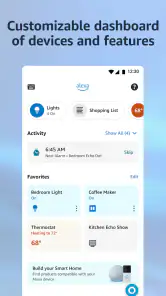
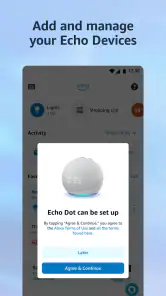


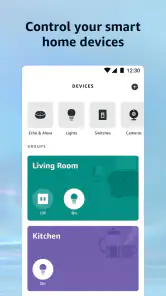
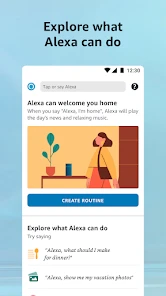
Analysis by Reviewed
I see Amazon Alexa as most worthwhile when it ties together a few small jobs you already do every day. The phone app gives you a place to manage Alexa, while compatible Echo and smart-home devices make speaking commands around the house more natural. That distinction matters: the app can help you organize settings and requests, but its strongest hands-free appeal usually comes when there is a device nearby to respond. If you already use Amazon services or want a shared home hub, it can be genuinely handy. If you only need a basic assistant on your phone, you may not get enough from it to justify changing your habits.
Where the convenience comes from
The best reason to try Alexa is not one flashy command; it is the way small tasks can fit together. A shopping list, a reminder, music, and a compatible light control can all sit within the same voice-led routine. That can reduce the little interruptions that make cooking, tidying, or getting ready feel more cumbersome. I would think of it as a home helper, not a replacement for every app on your phone.
There is a useful distinction between setting something up and using it day to day. The phone app is where you can manage Alexa and compatible devices, while voice control is most convenient when you can speak to an Echo or another compatible setup. If you are away from home, or need to make a careful choice from a long menu, tapping through a dedicated app is often clearer. Knowing which side of that divide you need prevents disappointment: Alexa is not automatically the quickest way to do every task just because it supports voice requests.
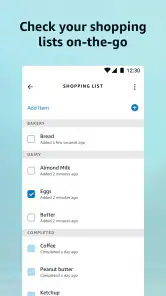
One practical tip is to begin with a single repeatable job and see whether it actually saves effort. A shared grocery list is a better test than connecting every device you own at once: add items as they run out, then check the list before shopping. If other people in your home will use it, agree on one list and simple wording. That avoids ending up with duplicate lists or items recorded in a way that is hard to recognize later.
Setting Up and Getting Started
First things first, let’s talk about setting up Amazon Alexa. Honestly, it’s as easy as pie. You just plug in your Echo device, download the Alexa app on your phone, and follow the prompts to connect to your Wi-Fi network. Boom, you’re in! The app itself is pretty intuitive, so even if you’re not super tech-savvy, you shouldn’t have any problems getting Alexa up and running.
That setup is easiest if you have an Echo already, but the app is also useful for managing Alexa settings and compatible devices from your phone. It is a free lifestyle app from Amazon Mobile LLC, with optional in-app purchases ranging from $0.99 to $99.99 per item. The current version is 2.2.656185.0, and it requires Android 10 or later. Its Teen age rating is worth noting if you are choosing apps for a younger user.
The app has a 4.1 average from around 5.3 million ratings, and it has been installed over 100 million times. Those figures suggest it is widely used, but they do not guarantee that every device or voice request will work smoothly in your home. I would treat Alexa as a practical hub whose value grows with the products and services you already use, rather than as a must-have on its own.
More From Our News Desk

Weather by Xiaomi Review: Clear at a Glance, Less Clear Up Close

X Under Pressure: Can It Recover When Posting Goes Wrong?

Clash of Clans Is Won Between the Battles

Android Auto Makes the Case for Quieter Car Software

MobiOffice: Transforming Mobile Productivity with Seamless Integration

EA SPORTS FC™ Mobile Soccer: Redefining Mobile Sports Gaming
Making smart-home control less fiddly
Once you’ve got Alexa all set up, the real fun begins. One of the coolest features is the smart home integration. Imagine just telling Alexa to turn off the lights without leaving your cozy couch. With compatible smart devices, you can control lights, thermostats, and even your coffee maker. It’s like living in the future!
A useful way to get more from that control is to group related devices and give them names you can say naturally. For example, a group for the main room is simpler to manage than remembering the exact name of every bulb. That small bit of setup can make voice commands feel dependable, especially when your hands are busy. The trade-off is that smart-home control only helps when you have compatible equipment and a working connection; if you do not plan to add devices, this part may not justify installing the app.
Before buying or connecting devices for voice control, I would check that they are compatible with the Alexa setup you plan to use. It is easy to imagine a single command controlling everything, but mixing products can mean learning their individual names and deciding how you want them grouped. Start with the one device that would remove a real annoyance, such as a light you often reach for while carrying something. If that works reliably, expand gradually instead of building a complicated setup you then have to troubleshoot.
Lists and reminders that fit real routines
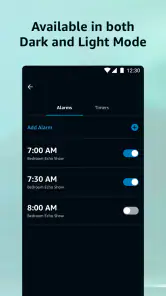
Another handy feature is the ability to set reminders and alarms. Whether it’s waking up in the morning or reminding you to take the chicken out of the freezer, Alexa’s got your back. Plus, with the shopping list feature, you can keep track of all those groceries you keep forgetting to buy. Just say, “Alexa, add milk to my shopping list,” and voila, it’s done!
I find lists and reminders particularly useful when they fit into an existing routine. If you are cooking, you can add ingredients as you notice they are running low instead of stopping to open a notes app. For a household, it can also help to keep one shared list rather than several scattered messages. Before relying on it for an important appointment or deadline, though, check that the reminder is set the way you intended; a spoken request can be misheard, and a digital assistant should not be your only backup for something critical.
A small but useful workflow is to treat voice entry as a quick capture method, then review the list on your phone before you leave. Speaking is good for catching an idea while your hands are occupied; looking over the list is better for correcting an item that was recognized incorrectly or adding detail. That division of labor is more dependable than expecting a spoken command to produce a perfectly organized plan. For medication, travel, or other high-stakes reminders, I would also use a second method I already trust.
Entertainment is convenient, not a full media library
If you’re a music lover, you’re in for a treat. Alexa can stream your favorite tunes from services like Spotify, Amazon Music, and more. Just ask her to play a song, and you’re having your very own mini-concert. And when you’re in the mood for something different, Alexa’s got skills for playing games, telling jokes, or even reading audiobooks. It’s like having a pocket-sized entertainer!
Voice playback is at its best when you want background music without reaching for your phone. It is less convenient when you need to browse carefully, compare versions, or choose a specific track from a long list; in those moments, a music service’s own app gives you more direct control. The same distinction applies to Alexa’s extra entertainment options: they are handy for casual use, but people who want a dedicated game, audiobook, or media library may prefer the app built specifically for that activity.
For a realistic evening, I might ask for music while making dinner, add an ingredient to the list when I notice it is nearly gone, and set a reminder to check something later. None of those actions is remarkable on its own, but avoiding repeated trips to a phone can make the sequence feel smoother. The phone remains the better tool when I want to choose an exact album, inspect a playlist, or browse audiobook details. Using voice for quick starts and the dedicated service for deliberate browsing is a sensible compromise.
Privacy choices are part of the setup
Now, I know some of you might be thinking about privacy concerns. Alexa understands that too. Amazon makes it easy to manage your voice recordings and delete them if you want. Plus, you can mute the microphone whenever you’re feeling a bit more private. It’s all about giving you peace of mind while enjoying the convenience of a smart assistant.
My practical advice is to review the privacy controls during setup instead of putting that off until you have a concern. Decide what feels comfortable, and remember that muting a device’s microphone is a physical habit you need to maintain when you want a quieter space. If you are uncomfortable having a voice assistant in the room at all, the app’s convenience may not outweigh that concern; using phone-based reminders or manual smart-home controls is a reasonable alternative.
Privacy preferences also affect how suitable Alexa feels in a shared space. In a family room, everyone should know when the assistant is available and how to mute the device if they want a break from voice interaction. If you are setting it up in a bedroom or a room used by guests, think through whether hands-free convenience is worth having the device there. Someone who wants every interaction to remain manual may be happier with ordinary switches and phone controls, even if that means giving up a few quick commands.
Who is likely to enjoy it—and who may not
A realistic use case is a busy evening at home: you add a missing ingredient to the shopping list while preparing dinner, set a reminder to check the oven, then ask for music while tidying up. If compatible lights are connected, you can also adjust them without interrupting what you are doing. The value comes from joining these small tasks in one place, not from any single feature being indispensable.
Compared with the usual alternatives, Alexa is strongest as a voice-led companion to Echo and compatible smart-home devices. A phone’s built-in assistant is often the simpler choice if you mainly want quick help while away from home, while individual smart-device apps can offer more detailed controls for a particular product. I would choose Alexa when I want a shared home hub and hands-free requests; I would skip it if I prefer doing everything through one phone screen or do not use Amazon-compatible services and devices.
It is also a better fit for people who enjoy setting up a system than for someone who expects a completely finished solution on the first day. Naming devices, choosing a shared list, and finding phrasing that works can take a little trial and error. That effort is worthwhile when the same requests recur and several people can benefit. If you live alone, rarely use voice commands, or already have a routine that works well through your phone, the extra hub may add steps rather than remove them.
Alexa’s occasional misunderstanding is more than a minor annoyance if you depend on precise commands, so I would keep important tasks easy to verify. It also takes some experimentation to discover which wording works best for a device or request. A little patience can improve the experience, but people who want every action to be predictable without setup may find a standard app menu less frustrating.
That is why I would not make Alexa the sole control path for anything you need to operate reliably. Keep a wall switch or the device’s own controls available, and use voice for convenience rather than as a point of failure. If a request does not work, checking the device name and trying a simpler phrase is a reasonable first step; if you need a precise adjustment, opening the product’s own app is often less ambiguous. This is a practical limitation, not a reason to dismiss the whole setup.
My recommendation
In a nutshell, Amazon Alexa is like that reliable friend who’s always there to help, whether you’re managing your smart home, staying organized, or just looking for a little entertainment. Sure, it’s not perfect—sometimes Alexa might mishear you or not understand a request—but for the most part, it’s a pretty nifty gadget to have around. If you’re looking to simplify your life a bit, Alexa might just be the way to go!
My recommendation is to start with one or two tasks you genuinely repeat, such as keeping a shopping list or controlling a compatible light, rather than trying to turn every part of your home into a voice-controlled setup. If those small conveniences become part of your routine, the app can earn its place. If they do not, there is no need to force it: a notes app, your existing music player, or direct device controls may serve you better.
For me, the deciding question is simple: do you want a voice-enabled home routine, or just occasional help on your phone? If it is the first, the app has a clear purpose and can make several everyday actions feel less interruptive. If it is the second, your phone’s built-in assistant or the app for a specific service may be easier to live with. Alexa is at its best when it supports habits you already have, rather than asking you to reorganize your day around it.
Amazon Alexa Frequently Asked Questions
Can I use Amazon Alexa if I do not have an Amazon account?
The Alexa app is designed to be used with an Amazon account, which lets you sign in and manage the assistant and compatible devices. If you are deciding whether to download it, consider whether you are comfortable using an account as part of setup. Once signed in, the app can guide you through available features and connected-device options.
Can I use Amazon Alexa in a browser instead of installing the app?
Amazon Alexa is a mobile app for compatible Android and iOS devices. Installing it gives you a place to sign in, adjust settings, and manage compatible Alexa devices and services from your phone or tablet. If you want to use Alexa on a mobile device, check that its operating system meets the app’s minimum requirement before downloading.
Is the Alexa app useful if I only want to manage smart home devices?
The app can be useful for setting up and managing compatible connected devices, even if voice commands are not your main reason for using Alexa. You can review device options and manage parts of your setup through the app. The controls available depend on the equipment and services connected to your Alexa account, so the experience can vary from one household to another.
Can I use Alexa while traveling or away from my usual Wi-Fi network?
You can use the Alexa app on a compatible phone when you are away from home, provided the phone has internet access for features that require online services. Managing a device remotely also depends on that device being connected and available through your setup. It is sensible to test the controls you plan to use before relying on them during a trip.
Does the Alexa app replace the Alexa voice assistant on an Echo device?
The app and an Echo or other Alexa-enabled device can work together, but they are not exactly the same experience. The app lets you manage settings, compatible equipment, and supported features from a phone or tablet, while dedicated hardware may offer its own voice and device functions. What you can do depends on the particular devices and services in your setup.
Pros
- Wide range of smart device integrations
- User-friendly interface
- Customizable routines
- Regular software updates
- Supports multi-language interaction
Cons
- Requires stable internet connection
- Limited offline functionality
- Can misinterpret commands
- Privacy concerns with voice data
- Device compatibility issues
- Category
- Lifestyle
- Version
- 2.2.656185.0