SmartThings
- 65.10K
- 4.6
- Installs
- 1.00B
- Price
- Free

Screenshots
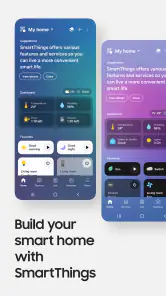
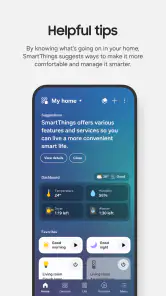
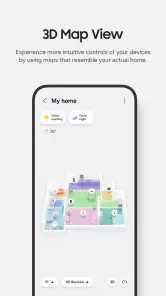
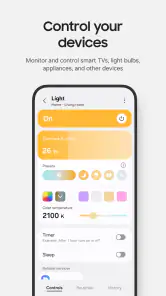
Analysis by Reviewed
My first expectation with SmartThings would be simple: one place to manage compatible home devices, rather than a separate app for every gadget. It is a free lifestyle app from Samsung Electronics Co., Ltd., and its reach is reflected in a 4.6 average from around four million ratings and over a billion installs. That popularity is useful context, but the app makes the most sense when you already own a Samsung TV, appliance, or other compatible device—or have a clear plan to add one.
What to expect from a shared home app
SmartThings is not a replacement for every device’s own controls in every situation. Think of it as a central dashboard for bringing supported products together. In practice, that can mean checking or controlling a television and appliances alongside compatible smart-home devices, instead of switching between several manufacturer apps. The benefit grows as your setup grows; if you only have one device and its original remote or app already works well, the extra layer may not be worthwhile.
Compared with using each brand’s app separately, a shared control point can make everyday routines easier to manage. The trade-off is that compatibility matters: a device needs to work with SmartThings before it can join your setup, and the experience can differ across products. I’d start by checking the exact model of the device you want to connect rather than assuming that every smart appliance or accessory will appear automatically.
The Latest on SmartThings
Who should begin—and who may not need it
I see the strongest case for this app in a home that already has Samsung products or several confirmed compatible devices. You can bring familiar equipment into one place without buying a whole new collection just to justify the dashboard. It can also suit someone who wants to check a device while moving between rooms, or who likes the idea of grouping a few ordinary actions instead of opening several apps.
On the other hand, if you only want to operate one TV, the supplied remote may remain quicker. If your main device is not supported, installing a hub app will not solve that mismatch; the manufacturer’s own app or physical controls are the sensible fallback. I would not choose SmartThings simply because a device is described as “smart.” Confirm the exact model’s compatibility first, especially when you are buying equipment specifically to use with it.
Getting Started with SmartThings
First things first, downloading SmartThings and getting it set up was a breeze. I just hopped onto the app store, hit download, and in no time, I was ready to dive into the world of smart living. The app does a stellar job of guiding you through the setup process, making sure even the least tech-savvy among us can get it all running without a hitch.
Make your first setup manageable
For a calmer first session, have the device nearby and powered on, and follow the prompts for adding it instead of trying to connect the whole home at once. Begin with the product you are most likely to control every day. A Samsung TV is a practical starting point if you want convenient access to its controls; a compatible appliance makes more sense if your main goal is checking or managing it from the same place as your other devices.
More From Our News Desk

Weather by Xiaomi Review: Clear at a Glance, Less Clear Up Close

X Under Pressure: Can It Recover When Posting Goes Wrong?

Clash of Clans Is Won Between the Battles

Android Auto Makes the Case for Quieter Car Software

MobiOffice: Transforming Mobile Productivity with Seamless Integration

EA SPORTS FC™ Mobile Soccer: Redefining Mobile Sports Gaming
If a product does not show up, I would first confirm that it is a compatible model and that it is ready to be paired, then retry the guided process. That is a more useful first check than repeatedly tapping around the app. The app is free and rated for Everyone, but the overall setup still depends on the devices you own and their compatibility. It requires Android 11 or later on Android, so an older phone may need a different way to manage the home.
Get one useful result before adding more
A good first win is a direct action you can repeat: open the app, find a connected device, and use its available control. That confirms the connection is useful before you spend time building a larger setup. For example, when you are settling in for the evening, being able to manage a compatible TV or appliance from the same app can save a few steps. Once that feels dependable, add another device and see whether having both together improves your routine.
For a first-time user, I would count a small, repeatable success as more valuable than a complicated automation. Try the same action on another day and notice whether it is genuinely easier than reaching for the remote or opening the original app. That simple comparison helps you decide whether SmartThings is earning a place in your routine, rather than turning setup into a hobby in itself.
Build routines around real habits
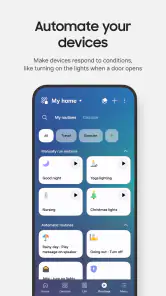
Once you’ve got the app up and running, the real fun begins. SmartThings integrates seamlessly with a multitude of devices. I connected my smart lights, thermostat, and even my coffee maker, all in one go. It’s like having a universal remote for your entire house! The app allows you to create “Scenes” which are basically custom settings for different times of the day. Imagine waking up to your lights gradually brightening, the thermostat adjusting to the perfect morning temp, and the smell of fresh coffee brewing. Absolute bliss, right?
For a first routine, keep the idea modest: choose a combination of compatible devices you already use and a moment when you would normally control them together. A leaving-home routine, for instance, is only helpful if every included product can perform the action you expect. It is worth testing a scene while you are present before relying on it as part of a daily habit. This catches mismatched device behavior early and keeps automation convenient rather than surprising.
A useful way to judge a scene is to ask what it replaces. If it combines actions you already perform in sequence, it may save a little time. If you have to remember exceptions or correct it afterward, it may be more trouble than it is worth. I would also keep a routine easy to understand for other people in the home: a few predictable actions are easier to trust than a long chain whose effects are unclear.
Common points of confusion
The word “universal” can set expectations too high. SmartThings brings supported devices into one place; it does not make an unsupported product compatible or guarantee identical controls across brands. If a device appears with fewer options than in its own app, that does not necessarily mean the connection failed. For detailed settings, the manufacturer’s app or the device’s physical controls may still be the better choice.
It also helps to separate a scene from a device connection in your mind. First make sure each device can be controlled on its own. Then combine the actions you actually want. If one part of a scene does not behave as expected, test that device separately before rebuilding the whole routine. That small troubleshooting habit makes it easier to pinpoint whether the issue is the individual product, its connection, or the way the routine is arranged.
Another practical distinction is between seeing a device in a shared app and having every setting available there. A central control can be enough for common actions, while a product’s original app may still be where you go for a less frequent adjustment. I would keep both options accessible rather than treating this as an all-or-nothing switch. That approach is especially helpful when you are still learning what each connected product exposes.
How it feels in everyday use
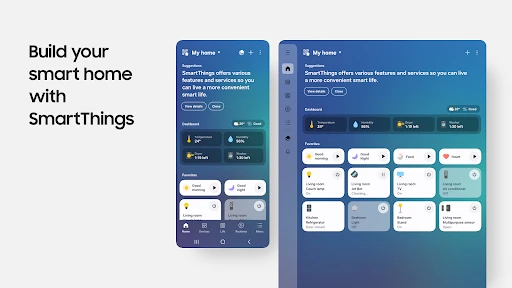
The user interface of SmartThings is clean and intuitive. Everything is laid out in a manner that’s easy to navigate, and I never felt overwhelmed by too many options or settings. Plus, the app is pretty quick, so you don’t have to deal with annoying lags when you’re trying to adjust your devices on the fly.
For people who share a home, the practical question is whether everyone needs the same controls and is comfortable using an app for them. I would introduce the setup with one or two clear actions first, rather than expecting someone else to learn a complicated arrangement of scenes immediately. And if you prefer a dedicated remote for a TV or straightforward buttons on an appliance, keep using those; the app works best as an added control option, not as a reason to give up a method that already suits you.
Picture a weekday evening: you come home, put down your bags, and want to check or adjust a compatible appliance before settling in to watch something on a Samsung TV. Having both devices available from one place can make that sequence feel less scattered. But the benefit is convenience, not magic; you still need the right device support, and a remote may be faster when you are already sitting in front of the television. I’d use the app where it removes a genuine extra step and leave familiar controls in place where they do the job better.
Reliability and sensible fallbacks
Now, I know reliability is a big deal when it comes to smart home devices. You don’t want your lights flickering on and off like a disco when you’re trying to relax. Thankfully, I found SmartThings to be rock solid. I’ve been using it for a few months, and it’s been smooth sailing. On the rare occasion that I had a question or needed help, the support team was just a message away, ready to assist.
My practical advice is not to make an app the only way to operate something important. Keep the usual control method available for a TV or appliance, especially while you are still learning how a new connection behaves. SmartThings is most useful when it adds convenience without making a simple task depend on a routine you have not yet tested. Samsung’s app has a broad audience, but an individual home’s experience still comes down to the particular compatible products and how you use them.
If a control does not respond as you expect, avoid changing several things at once. Check whether the device itself still works through its usual method, then try the app again and narrow down the issue. This keeps troubleshooting manageable and helps you avoid accidentally making a working setup harder to use. For a task that needs to work every time, having a familiar backup is not a failure of the app; it is sensible home practice.
Choosing between SmartThings and separate apps
The usual alternative is to keep each product in its manufacturer’s app and use the TV remote or appliance controls as before. That can be the better choice when your setup is small, when a specific product offers more detailed options in its own app, or when you do not want to learn another interface. SmartThings earns its place when a shared view or a small routine makes several compatible products easier to manage together.
I would treat the two approaches as complementary rather than competitors. Use the shared app for the actions you repeat and the original controls for specialized adjustments. That division avoids a common disappointment: expecting one dashboard to reproduce every device-specific menu. It also gives you an easy test before investing more time—if you rarely open SmartThings after connecting a device, the separate control may already be enough for your needs.
Who will get the most from it?
I’d recommend trying it if you have Samsung home products or several compatible devices and want a shared place to manage them. It is also a sensible starting point if you enjoy building small routines around existing equipment rather than buying devices just to make an app feel worthwhile. Samsung Electronics Co., Ltd. is the developer, and the app has been available since April 17, 2017; its long presence and broad adoption make it a familiar choice, though neither removes the need to check compatibility for your own gear.
If you want a control app for a device that is not supported, or you only want the simplest possible way to operate one appliance, the device maker’s own app, remote, or built-in controls may be a better fit. SmartThings is not something I would install expecting every product in the house to connect automatically. I would begin with one confirmed compatible device, judge whether the shared controls help, and expand only when there is a real routine to improve.
One question first-time users often have is whether they need to connect everything immediately. I would say no: start with one device, learn what its controls look like, and add others only when you can name a useful reason to bring them together. Another is whether the app replaces a product’s own controls. In my view, it is safer and more practical to keep those controls available, because the shared app may not expose every setting and a physical method can remain more convenient.
It is also worth thinking about the phone you plan to use. On Android, the minimum operating system is Android 11, so check that before making this your main control method. The app is free, but the real cost of using it is the time spent choosing compatible products and setting up a home in a way that makes sense. If you are already invested in Samsung or compatible devices, that effort may pay off; if not, begin by verifying the exact products you care about rather than planning around assumptions.
Its broad adoption—over a billion installs and around sixty-five thousand written reviews—suggests that many people find a reason to keep it, while the Everyone age rating makes it approachable for general household use. Those figures are background, not a promise that every device combination will feel equally smooth. My recommendation is to judge it by one practical test: can you complete a common task with fewer steps, without losing a control method you trust?
In conclusion, if you’re looking to dip your toes into the world of smart home tech, SmartThings is a fantastic place to start. It’s user-friendly, reliable, and packed with features that genuinely make life easier. Whether you’re a tech enthusiast or just someone looking to simplify your daily routine, this app is definitely worth checking out. Happy automating!
SmartThings Frequently Asked Questions
Can SmartThings control Samsung TVs and appliances?
Yes. SmartThings is designed to control compatible Samsung Smart TVs, appliances, and other SmartThings-compatible devices from the app. It can be useful if you want to bring supported products together instead of relying on a separate control method for each one. Before downloading, consider whether the devices you already own—or plan to add—are compatible with SmartThings.
Can I use SmartThings on my phone or tablet?
SmartThings is an app for managing compatible smart home products from a mobile device. Before downloading, check that your device runs a supported operating system; the app requires Android 11 or later. Once installed, you can use it to manage supported Samsung TVs, appliances, and other compatible devices through the app. SmartThings is free to download and is rated for Everyone.
Who makes SmartThings, and what kind of app is it?
SmartThings is a lifestyle app developed by Samsung Electronics Co., Ltd. It is designed to bring compatible home devices together in one place, so you can manage them through your phone rather than using a separate control method for each product. Its focus is connected-home control and automation, making it most useful to people who already own, or plan to use, Samsung and SmartThings-compatible devices.
What is SmartThings and how does it work?
SmartThings is a versatile smart home platform developed by Samsung that allows users to connect, automate, and manage a wide range of smart devices and appliances within their home. Through the SmartThings app, users can control lights, cameras, thermostats, and more, all from their smartphone. It supports various third-party devices, making it a convenient hub for integrating different smart home technologies. The app provides options for creating routines and automations, enhancing the smart home experience.
Is SmartThings compatible with all smart devices?
While SmartThings is compatible with a wide array of smart devices, not all devices are supported. It works well with many major brands like Philips Hue, Ring, and Ecobee. However, it’s essential to check compatibility before purchasing new devices. Users can usually find compatibility information on the SmartThings website or within the app itself. Device integration might require the use of third-party services like IFTTT for some products.
Pros
- User-friendly interface.
- Wide device compatibility.
- Automated routines available.
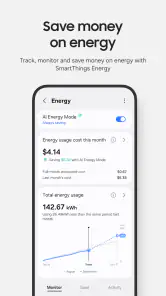
- Energy-saving features.
- Remote access control.
Cons
- Requires stable internet.
- Limited offline functionality.
- Some devices not supported.
- Occasional app crashes.
- Privacy concerns.
- Category
- Lifestyle
- Version
- Varies with device