LG ThinQ
- 18.05K
- 4.3
- Installs
- 100.00M
- Price
- Free

Screenshots
Analysis by Reviewed
I’d decide on LG ThinQ by starting with the appliances you already own, not the promise of a fully connected home. This free lifestyle app from LG Electronics, Inc. is most useful when you have compatible LG smart appliances and want one place to check or manage them. If your household uses a mix of brands, or your appliances are not connected models, the benefit can be limited. The key question is whether it solves a real routine for you, rather than whether a smart-home app sounds appealing.
What it changes in an ordinary routine
For me, remote control is most valuable when it removes a small interruption, not when it turns every chore into a phone task. A realistic example: I can check a connected appliance’s status while getting ready to leave, then use a notification to know when a cycle is done instead of repeatedly going back to the laundry area. Before relying on that workflow, I’d connect the appliance and confirm that its controls and alerts work as expected; what the app can do depends on the appliance.
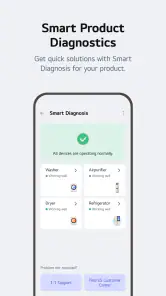
Smart Diagnosis is another practical reason to keep the app available. If an appliance behaves oddly, a diagnostic prompt can be a useful first step before I decide whether to consult support. I would treat it as a way to narrow down a problem, not a guarantee that every fault can be solved from the phone. Keeping the appliance and app connected also matters: a remote feature is only convenient when setup has already been completed and the device can communicate.
Choosing it over a general smart-home app
Compared with a general-purpose home-control app, ThinQ makes most sense as an LG-focused companion. It can be a simpler place to find appliance-specific controls and diagnosis than trying to coordinate everyday appliance tasks through a broader system. On the other hand, if your main goal is to bring products from several manufacturers together, a platform built around a wider mix of devices may suit you better. I would not choose ThinQ on the assumption that every appliance in a home can be added to it.
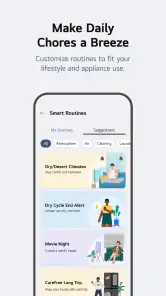
There is also a useful distinction between occasional remote access and building an elaborate routine. If you only want to check a cycle or get an alert, you may not need to spend much time customizing anything. If you want routines, think through what should happen when plans change: an automated action is helpful only when it matches your actual schedule and the appliance supports that task. Starting with one reliable routine is less frustrating than trying to automate the whole home at once.
Setup, fit, and the trade-off
The main cost is attention rather than money: you need to connect each compatible appliance and learn which controls are genuinely useful. I would begin with the device I use most, check its status and notifications, then add other appliances only when I have a clear reason. That approach makes it easier to spot whether the app is saving time or simply adding another place to check. If your devices are older or not smart models, this is not a shortcut that can make them connected.
It is a particularly good fit for someone who already owns LG smart appliances, values phone-based status checks, or wants appliance-focused troubleshooting close at hand. It is less compelling for someone who prefers physical controls, rarely uses remote access, or needs one app to manage a mixed-brand collection. Those readers may be better served by the manufacturers’ individual apps or a broader smart-home option, depending on their devices and priorities.
More From Our News Desk

Weather by Xiaomi Review: Clear at a Glance, Less Clear Up Close

X Under Pressure: Can It Recover When Posting Goes Wrong?

Clash of Clans Is Won Between the Battles

Android Auto Makes the Case for Quieter Car Software

MobiOffice: Transforming Mobile Productivity with Seamless Integration

EA SPORTS FC™ Mobile Soccer: Redefining Mobile Sports Gaming
The app has a 4.3 average from around 1.1 million ratings, and it has been installed over 100 million times. It is rated for Everyone, so it is suitable for a general household audience. Its version is 5.1.20330, and it runs on Android 9 or later. Those details make it easy to assess basic compatibility, but the appliance itself remains the deciding factor for what you can actually control.
A practical way to test whether it earns a place on your phone
I’d give the app a short, focused trial rather than immediately moving every household task into it. Start by pairing the LG appliance that causes the most interruptions, then use only the status view, one useful notification, and any relevant controls. After a few days, ask whether you checked the app less often than you would have checked the appliance itself. If the answer is no, adding more devices may increase clutter without improving the routine.
It also helps to distinguish between convenience and necessity. A completion alert can be genuinely helpful when the appliance is in another part of the home or when you are occupied, but it does not remove the need to load, unload, or maintain the machine. I would avoid building a habit around constant checking. The best result is usually a quiet notification that lets you get on with something else, not another screen demanding attention.
Small setup choices that prevent frustration
When connecting a device, I’d keep its name clear and recognizable rather than relying on a vague label. That matters once more than one appliance appears in the app: choosing the right device quickly is easier when its name reflects where it is or what it does. I’d also test notifications while I’m at home and paying attention, before depending on them when I’m out. This simple check can reveal whether the alert is useful for my routine and whether I need to adjust how I use the app.
For shared homes, I’d agree on who is responsible for setup and which controls everyone should use. A phone-based control can be convenient, but it can also create confusion if one person assumes an appliance is running while another has changed its state. Keeping the app’s role simple—status checks, a few practical controls, and diagnosis when needed—makes it easier for the household to understand what to expect.
Another trade-off is that an app can make a supported task easier without making every appliance task safer or more appropriate to do remotely. I would use remote controls only for actions that make sense for the specific appliance and situation, and rely on the appliance’s normal instructions for anything involving operation or care. ThinQ is best treated as a companion to the appliance, not a replacement for knowing how it works.
Have you ever wished for a smarter way to manage your home appliances? Well, let me introduce you to the LG ThinQ app, a nifty tool designed to make your life a tad bit easier. I’ve spent some time fiddling with this app, and let me tell you, it’s like having a little helper right in your pocket.
Getting Acquainted with Your Smart Home Companion
First off, setting up the LG ThinQ app is a breeze. As soon as you download it, you’re greeted with a sleek interface that’s both intuitive and user-friendly. Whether you’re a tech wizard or just someone who occasionally struggles with tech, you’ll feel right at home. The app guides you through connecting your LG smart appliances without breaking a sweat.
Features That Make You Go ‘Wow’
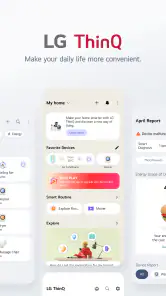
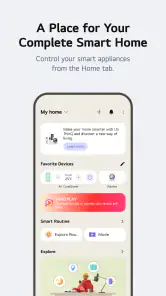
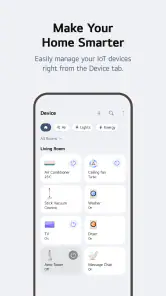
One of the standout features of this app is its ability to remotely control your appliances. Imagine being able to start your washing machine while lounging on the couch or preheat your oven on your way home from work. With just a few taps, you’re in control. The app also offers real-time notifications, so you’re always in the loop with what’s happening in your home.
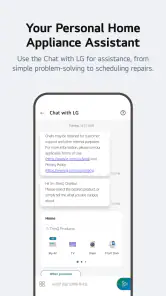
Another feature worth mentioning is the Smart Diagnosis. Ever had an appliance act up and had no clue what’s wrong? This feature lets your appliance communicate directly with the app to troubleshoot issues. It’s like having a tech support team on standby, ready to diagnose problems without the hassle.
Living the Future Today
What really sets the app apart is its focus on creating a cohesive smart home environment. You can even set routines for your devices. For instance, you can program your coffee machine to start brewing as soon as your morning alarm goes off. How cool is that?
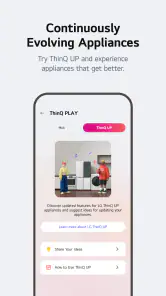
Moreover, the app is constantly updated, bringing new features and improving existing ones. It’s evident that the developers are committed to enhancing user experience, which is always a huge plus in my book.
How it compares with the usual alternatives
The closest alternative is often not another all-in-one app but the controls built into each appliance maker’s own app. Those can be the better choice if you own just one connected device and already know where its settings live. ThinQ has more appeal when several compatible LG appliances make a single place for checking them worthwhile. In a mixed-brand home, separate manufacturer apps may still be necessary, while a broader home-control platform can be a better starting point if bringing different products together matters more than LG-specific controls.
I would also separate appliance management from general smart-home automation. A broad platform may be useful for coordinating devices across a home, but it does not automatically make appliance-specific diagnosis or controls easier to find. ThinQ’s advantage is its focus; its limitation is the same focus. Before choosing, list the exact tasks you want to do from your phone and check whether your particular appliances support them. That is more useful than deciding based on a long feature menu or the idea of a fully automated home.
Questions worth settling before you commit
Do you need an LG appliance to use it meaningfully? In practice, yes: its strongest purpose is managing compatible LG smart appliances, so someone without one is unlikely to get much value from installing it. Can it control every LG appliance? No assumption is safe; support and available actions depend on the model. I’d check the appliance’s own compatibility information before planning a routine around a feature.
Is it free, and is it suitable for a family phone? The app is free and rated Everyone, which makes it broadly suitable for household use. Is it available on an older Android phone? It requires Android 9 or later, so I’d check the phone’s system version before starting setup. And does Smart Diagnosis replace service? I would not count on that: it can help narrow down an issue, but a more serious or unresolved problem may still need support.
Final Thoughts: Is It Worth It?
So, what’s the verdict? If you own LG smart appliances, the app is a must-have. It’s not just about convenience; it’s about revolutionizing the way you interact with your home. It takes the mundane out of household chores and adds a layer of excitement to managing your home.
In a nutshell, this app is like having a magic wand that brings your appliances to life. It’s a game-changer for anyone looking to embrace the future of home management. So go ahead, give it a whirl, and watch as your home transforms into a smart haven.
Who I’d recommend it to
I’d recommend ThinQ to people who already have compatible LG appliances and can name at least one recurring task they want to make easier. That might be checking a cycle from another room, getting a completion alert, or using diagnosis as an initial troubleshooting step. It is also a sensible choice for someone who prefers one manufacturer-focused place for these tasks instead of opening an individual control for each LG appliance.
I’d skip it if you do not own supported LG smart appliances, if you rarely use a phone during household chores, or if your priority is bringing many brands into one consistent system. In those cases, the app may add another account and screen without changing your day. The 18,000 written reviews and the 4.3 average suggest a substantial audience has found value in it, but that broad response cannot tell you whether your particular appliance and routine are a match.
My recommendation is to treat it as a practical appliance companion, not as a reason to buy into connected-home features for their own sake. It costs nothing to try, but your time and attention still matter. Pair one device, test the controls and alerts you care about, and keep it only if it makes a real task simpler. That is the clearest way to decide whether this LG-focused lifestyle app belongs in your household.
LG ThinQ Frequently Asked Questions
Can I use LG ThinQ to receive alerts about my appliances?
LG ThinQ is designed to help users monitor and manage compatible connected appliances, and notifications can be part of that experience. What alerts are available depends on the appliance and its supported features. If you want updates about an appliance’s operation, add the compatible product in the app and review the options shown for that model.
Can more than one person in my household use LG ThinQ?
LG ThinQ is intended to make connected appliance management convenient at home, but the setup and access options can depend on the appliance and the account arrangements shown in the app. If several household members need access, check the app’s account and sharing prompts during setup. Keep sign-in details secure and follow any instructions presented for the specific product.
Does LG ThinQ work without an internet connection?
LG ThinQ’s connected features rely on communication between the app, the appliance, and the network. Without an internet connection, remote monitoring and control may not work as expected. The exact experience can depend on the appliance and the feature you are trying to use, so connect the phone and compatible appliance as prompted when setting them up.
Is LG ThinQ free to download, and which devices can install it?
LG ThinQ is a free lifestyle app from LG Electronics, Inc. It is rated for Everyone and supports devices running Android 9 or later. Before downloading, check that your phone meets that minimum requirement and that you have access to the app store for your device. The app is designed to connect you with compatible LG smart appliances.
What is LG ThinQ and what does it do?
LG ThinQ is a smart home application developed by LG Electronics that allows users to control and manage LG smart appliances remotely. By connecting your devices to the app, you can monitor operations, set schedules, receive notifications, and even diagnose issues without needing to call for service. It offers a seamless experience to enhance home automation and efficiency.
Pros
- User-friendly interface with intuitive controls.
- Seamless integration with LG smart devices.
- Remote control of home appliances via app.
- Customizable settings for personalized use.
- Regular updates with new features.
Cons
- Limited compatibility with non-LG devices.
- Requires stable internet for optimal performance.
- Can be complex for non-tech-savvy users.
- Occasional connectivity issues reported.
- Battery drain on prolonged use.
- Category
- Lifestyle
- Version
- 5.1.20330